
EUCHNER EKS-A-IIX-G01-ST02/03 Guida utente

EN
Application
Integration of EKS with PROFINET interface in BECKHOFF TwinCAT 3

Application EKS
Integration of EKS with PROFINET interface in BECKHOFF TwinCAT 3
2(Application) AP000240-01-01/19
Contents
1. About this document............................................................................................. 3
1.1. Version ..........................................................................................................................................3
1.2. Scope............................................................................................................................................3
1.3. Target group ..................................................................................................................................3
1.4. Supplementary documents ..............................................................................................................3
1.5. Notice............................................................................................................................................3
2. Components/modules used .................................................................................. 4
2.1. EUCHNER ......................................................................................................................................4
2.2. Others ...........................................................................................................................................4
2.3. Software ........................................................................................................................................4
3. Functional description........................................................................................... 4
4. Overview of the communication data..................................................................... 5
4.1. Input..............................................................................................................................................5
4.2. Output ...........................................................................................................................................5
5. Installing the GSD le............................................................................................ 6
6. Setting the control system parameters .................................................................. 7
7. Conguring and setting the parameters of the EKS with PROFINET interface .......... 8
7.1. Conguring the PROFINET network...................................................................................................8
7.2. Conguring the EKS with PROFINET interface....................................................................................9
7.3. Setting the EKS parameters ..........................................................................................................11
7.4. Assigning PROFINET device names to the EKS................................................................................12
8. Using the BECKHOFF library ............................................................................... 14
8.1. Installation of the library ................................................................................................................14
8.2. Calling the library and description of the block interface ..................................................................16
8.2.1. Calling the library ..........................................................................................................16
8.2.2. Description of the block interfaces .................................................................................18
8.2.3. Complete EKS data type call..........................................................................................18
9. Linking the input and output areas in EKS............................................................ 19
10. Reading and writing Electronic-Key data ............................................................. 21
10.1. Transferring program to the PLC....................................................................................................21
10.2. Reading content of the memory in the Electronic-Key using the block interface..................................21
10.3. Writing content of the memory in the Electronic-Key using the block interface....................................21
11. Important note – please observe carefully! ......................................................... 22

3
AP000240-01-01/19 (Application)
Application EKS
Integration of EKS with PROFINET interface in BECKHOFF TwinCAT 3
EN
1. About this document
1.1. Version
Version Date Change/addition Chapter
01-01/19 10.01.2019 Prepared All
1.2. Scope
The purpose of this document is the integration and conguration of the EKS with PROFINET interface (from device version
as per table) in BECKHOFF TwinCAT 3.
Order no. Designation Device version
106305 EKS-A-IIX-G01-ST02/03 V3.0.0
106306 EKS-A-IIXA-G01-ST02/03/04 V3.0.0
122352 EKS-A-AIX-G18 V1.X.X
122353 EKS-A-AIXA-G18 V1.X.X
1.3. Target group
Design engineers and installation planners for safety systems on machines, as well as setup and servicing staff possessing
special expertise in handling safety components as well as expertise in the installation, setup, programming and diagnostics
of programmable logic controllers (PLC) and bus systems.
1.4. Supplementary documents
The overall documentation for this application consists of the following documents:
Document title
(document number) Contents
Manual
(2516210)
Electronic-Key-System
Manual EKS and EKS FSA with PROFINET IO interface
Internet
www
Possibly enclosed data
sheets Item-specic information about deviations or additions
1.5. Notice
This application is based on the manual for the EKS with PROFINET interface. Please refer to the manual for the technical
details and other information. In the rest of this document the EKS with PROFINET interface is referred to as the "EKS" for short.

Application EKS
Integration of EKS with PROFINET interface in BECKHOFF TwinCAT 3
4(Application) AP000240-01-01/19
2. Components/modules used
2.1. EUCHNER
Description Order number / item
EKS with PROFINET interface 106305 / EKS-A-IIX-G01-ST02/03
TIP!
More information and downloads about the aforemen-
tioned EUCHNER products can be found at www.euchner.com.
Simply enter the order number in the search box.
2.2. Others
Description Order number / item
CX9020-0110-M930 CX9020-0110-M930
2.3. Software
Description Version
Microsoft Visual Studio 2013 Shell (Integrated) Version 12.0.21005.1 REL
Microsoft .NET Framework Version 4.7.03056
TcMeasurement 1.0
TcProjectCompare 1.0.0.9
TcTargetBrowserPackage Extension 1.0
TcXaeDebuggerLiveWatch 1.0
TcXaeHelper 1.0
TcXaeModules 1.0
TwinCAT XAE Base 3.1.0.0
TwinCAT XAE EventLogger 1.0
TwinCAT XAE PLC 3.1.0.0
3. Functional description
EKS PROFINET devices are read/write systems with electronics for the inductive bidirectional interface to the transponder
and the interface electronics.
The system is connected via the integrated PROFINET interface, which is designed as an RJ45 socket. A separate switch
may be required for the PROFINET connection. The EKS does not have an integrated switch.
The current state of the Electronic-Key adapter is displayed using a 3-color LED.
The Electronic-Key is placed on the Electronic-Key adapter for operation. The power supply for the transponder and the data
are transferred between the Electronic-Key adapter and the Electronic-Key without using any contacts.

5
AP000240-01-01/19 (Application)
Application EKS
Integration of EKS with PROFINET interface in BECKHOFF TwinCAT 3
EN
4. Overview of the communication data
4.1. Input
PROFINET Bit 7 Bit 6 Bit 5 Bit 4 Bit 3 Bit 2 Bit 1 Bit 0
Byte 0
(Status byte)
Job in progress Job nished - - - - Electronic-Key
detected
Device ready for
operation
PROFINET Description Function
Byte 1
Receive data Max. 124 bytes user data from the Electronic-Key plus 3 bytes reserve. If fewer bytes of data were
selected during conguration, these are lled with 0hex.
.
.
.
Byte 127
4.2. Output
PROFINET Bit 7 Bit 6 Bit 5 Bit 4 Bit 3 Bit 2 Bit 1 Bit 0
Byte 0
(command byte)
- - - - - - - Write Electron-
ic-Key
PROFINET Description Function
Byte 1 Start address Denes rst byte in the memory in the Electronic-Key that is written on setting bit no. 0 in the
command byte. Start address of user data: byte no. 0, 4, 8 … 112.
Byte 2 Number of bytes Denes the number of bytes in the memory in the Electronic-Key that are written on setting bit no.
0 in the command byte. Number of bytes of user data: 4, 8, 12 … 116 bytes.
Byte 3 Not used
Byte 4
Transmit data If bit no. 0 in the command byte is set to 1, the content of these bytes is written to the Electronic-Key
starting from the start address dened.
.
.
.
Byte 119
Byte 120
.
.
Byte 127
Not used
TIP!
You will nd further information in the manual.
NOTE!
On the Electronic-Key read/write with 116 bytes freely programmable, the memory is organized in
4-byte blocks. This means the start address for writing must be given in the range byte number 0 to
byte number 112, always in 4-byte steps (byte number 0, 4, 8 ... 112). Also a multiple of 4-byte sized
blocks must always be written (4, 8, 12 ... 116 bytes).
During reading it is possible to access the memory byte-by-byte without the above-mentioned restric-
tion for writing.

Application EKS
Integration of EKS with PROFINET interface in BECKHOFF TwinCAT 3
6(Application) AP000240-01-01/19
5. Installing the GSD le
You will require the corresponding GSD le in the GSDML format to integrate the EKS into TwinCAT 3, depending on the
design of the EKS:
Design Related GSD le
compact
(Order No. 106305/106306) GSDML-V2.31-Euchner-EKS_3.x.x_109539-YYYYMMDD.xml
modular
(Order No. 122352/122353) GSDML-V2.31-EUCHNER-EKS_PN_modular_126145-YYYYMMDD.xml
You will nd the GSD les in the download area at www.euchner.com. Always use the latest GSD le.
Please proceed as follows to integrate the GSD le in TwinCAT 3:
Open the path as shown in Figure 1 and then add the unpacked GSDML and bitmap le.
Figure 1: Adding GSD le

7
AP000240-01-01/19 (Application)
Application EKS
Integration of EKS with PROFINET interface in BECKHOFF TwinCAT 3
EN
6. Setting the control system parameters
Specify the cycle time for the PlcTask. Use the value 2 for this purpose.
Figure 2: Setting the control system parameters

Application EKS
Integration of EKS with PROFINET interface in BECKHOFF TwinCAT 3
8(Application) AP000240-01-01/19
7. Conguring and setting the parameters of the EKS with PROFINET interface
7.1. Conguring the PROFINET network
Add the PROFINET network as follows:
1. In Solution Explorer click I/O, right-click Devices and choose Scan.
Figure 3: Adding PROFINET network
NOTE!
To undertake scans the TwinCAT must be in the Cong Mode.
2. Select the PROFINET controller and accept using OK.
Figure 4: Selection of PROFINET controller

9
AP000240-01-01/19 (Application)
Application EKS
Integration of EKS with PROFINET interface in BECKHOFF TwinCAT 3
EN
3. You are then prompted as to whether a search is to be made for additional boxes (devices). Please answer this prompt
with No because it cannot be ensured the correct EKS will be congured.
Figure 5: Rejecting search for devices
7.2. Conguring the EKS with PROFINET interface
4. Right-click the PROFINET controller and then choose Add New Item...
Figure 6: Adding a device
Application EKS
Integration of EKS with PROFINET interface in BECKHOFF TwinCAT 3
10 (Application) AP000240-01-01/19
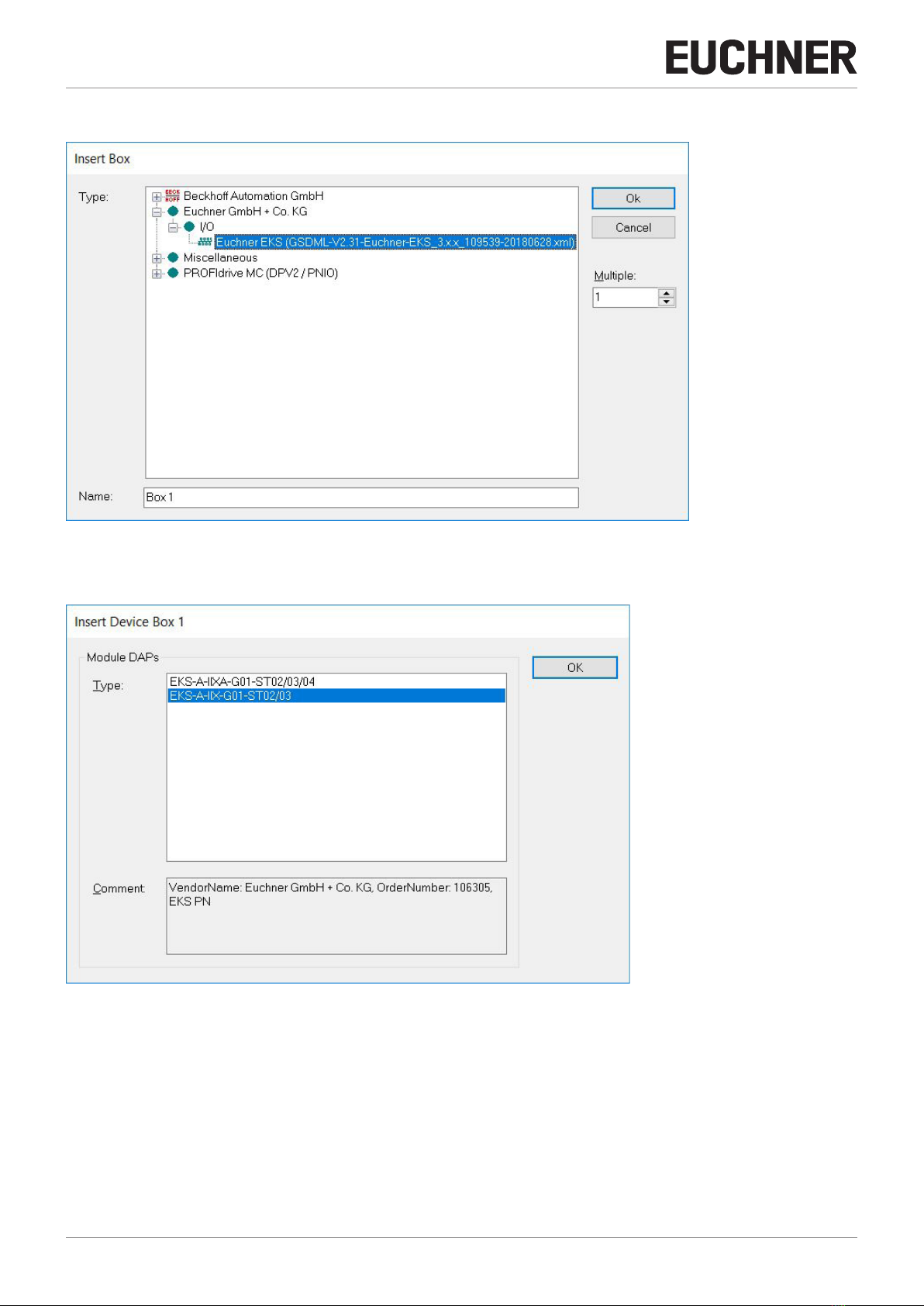
5. Select the corresponding GSDML le.
Figure 7: Selection of the GSDML le
6. Select the corresponding EKS.
Figure 8: Selection of the EKS
Questo manuale è adatto per i seguenti modelli
3
Indice
Manuali Apparecchiature di registrazione popolari di altre marche


Strymon
Strymon NIGHTSKY Manuale utente

Mitsubishi Electric
Mitsubishi Electric 16CH DIGITAL RECORDER DX-TL5000U Manuale utente

Tews Technologies
Tews Technologies TPMC465 Manuale utente

Honeywell
Honeywell Excel 50 Manuale utente

SeaLevel
SeaLevel COMM+8.LPCI Manuale utente

Arturia
Arturia AUDIOFUSE STUDIO Manuale utente


