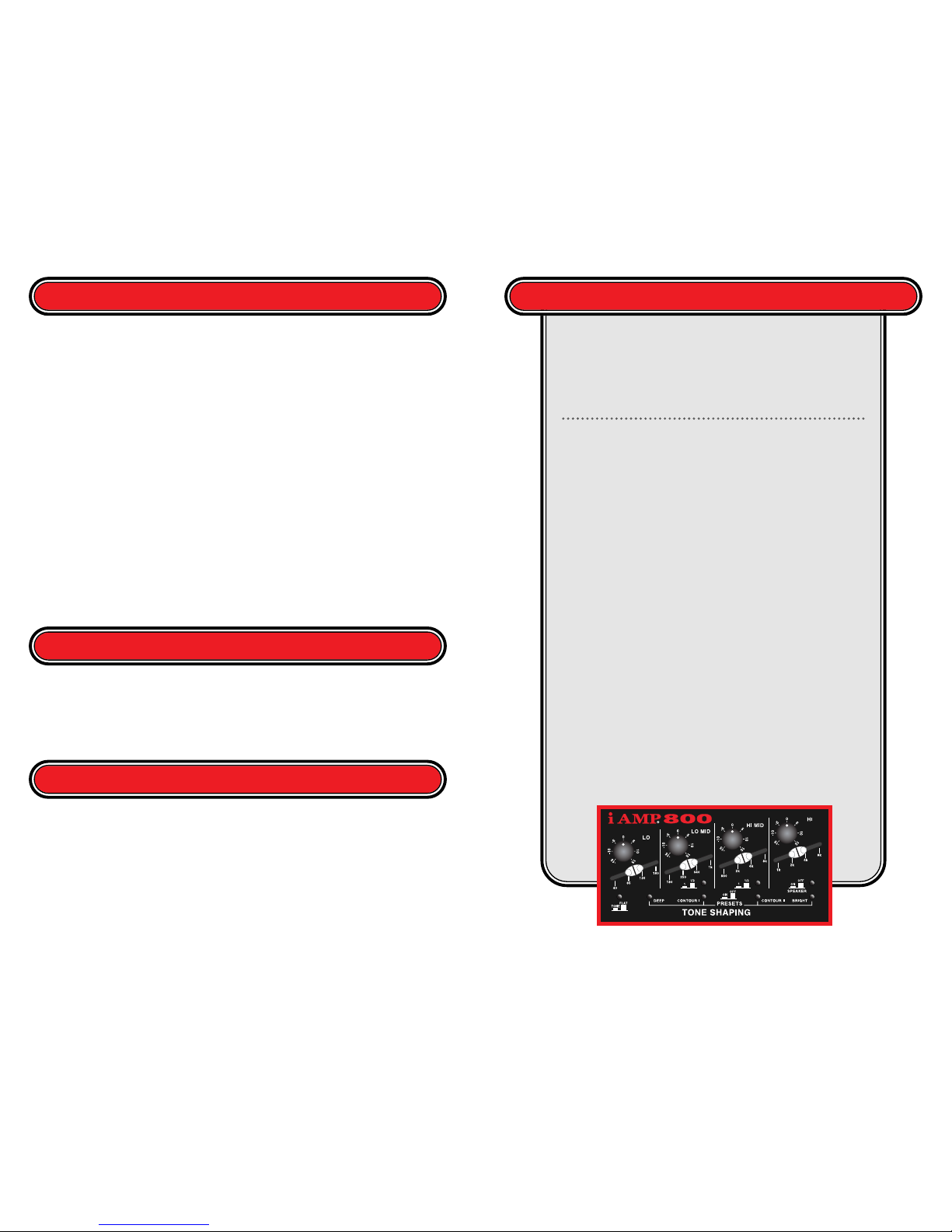
The iAMP is designed so that either the presets or
the more detailed tone shaping option of the
iAMP can be used individually or together. We
suggest that if both are to be used in conjunction
that first you should dial in your desired tone with the sliders and THEN enhance the sound by
kicking on the presets.
Each slider, from left to right, affects a higher frequency range; stepping up like a ladder. Here is
a step-by-step introduction to the infinite possibilities presented by the iAMP Tone Shaping
Section. First, engage each preset button, one at a time to see if you get the tone you are looking
for. If you still want something different DISENGAGE all Presets. Find the frequency you want
to enhance (or diminish). To do this, estimate the frequency range that you want to adjust (Lo,
Lo-Mid, Hi-Mid or Hi). Boost the Rotary control for that slider by 5–10dB. Play a note and
slowly move the slider until the desired characteristic "blooms". Now that you have isolated the
frequency you can use the rotary control to enhance or diminish it. You might want to add some
bottom to fill out the sound on a low volume gig. Adding midrange will help you cut through
the mix. You might also want to remove some fret noise or string squeak.
Now that you've added or removed certain specific frequency ranges, you can engage different
presets to affect the overall sound. Be cautious as each of these are additive. If you've boosted the
bass by 15dB and then turn on the Deep button, you have boosted the bass by 21dB. This can
cause serious damage to many speaker systems as well as your hearing!
This is only a guide. Determine your personal settings based on your instrument and your
playing style.
Finally, one more quote from Bass Player Magazine: “The deep button's moderate bass boost,
combined with contour 2's upper midrange dip, produced a full
and clear sound that worked especially well with 4–string basses.
These two presets are so well voiced I never needed to use the
iAMP's powerful parametric EQ during my gig tests. To enhance
the EQ section's intuitive feel, EA angles the frequency-selecting
sliders to give a better graphic representation of their function.
It's easy to find EQ sweet spots by slowly adjusting the sliders.”
■DEEP: +6dB@50Hz, 1/2-octave bandwidth. Use this control to fill out the bottom end that
is easily lost at lower volume settings. The frequency range that this preset affects is the area
perceived as the "solidity of an instrument,"" or how much strength your sound has. Caution:
when engaged at loud volume settings, this preset could cause permanent loudspeaker and
hearing damage.
■CONTOUR I: –6dB@500Hz, 1/2-octave bandwidth. This preset was conceived to optimize
fingerstyle playing. This EQ is based upon players' request for a "sculpted" pleasing tone—
specially tailored toward an ultimate finger picking sound. It will also take the "honk" out of
almost any speaker system. CONTOUR I will eliminate a portion of the lower midrange
frequencies, providing wide, deep shaping. At low volume levels, you can use this preset similarly
to a loudness control (which typically boost the extreme low and high frequencies).
■CONTOUR II: –8dB@750Hz, 1/2-octave bandwidth. This preset was designed to give a
great slap/pop sound. This wide filter removes the upper midrange frequencies thereby
eliminating the harshness that is often present when slapping the bass. CONTOUR II makes this
playing popular style of more sonically pleasing.
response of a vintage Fender® Jazz Bass pickup. It gives you a top end "snap" that dull-sounding
pickup systems cannot. The tremendous amount of boost also compensates for speaker systems
that do not deliver a good upper end response. It can also add sparkle to a lackluster or old set
of strings.
For more detailed Tone Shaping options the player can boost or cut specific frequencies as
desired. The unique design of the iAMP Tone Shaping section presents a visual representation of
the effect on your sound. There are four adjustable frequency ranges:
■LO CONTROL: +/–18dB shelving gain control, cut or boost, 40–180 Hz
■LO-MID CONTROL: +/–18dB gain control, 180–1kHz; 1 or 1/2-octave
bandwidth or “Q” switch
■HI-MID CONTROL: +/–18dB gain control, 800-8kHz; 1 or 1/2-octave
bandwidth or “Q” switch
■HI CONTROL: +/–18dB shelving gain control, cut or boost, 1–8kHz
Each frequency range has a diagonal slider that centers the frequency to be adjusted and a rotary
boost/cut control knob. Additionally, the Lo-Mid and Hi-Mid have a switch to set the bandwidth
or “Q” to either 1 or 1/2-octave. PLEASE NOTE THAT THE TONE/FLAT SWITCH HAS NO EFFECT
ON THE PRESETS.
O
VERVIEW
The iAMP’s
tone shaping section is divided
into two sections that can be
used independently or
together. The iAMP has
Presets that allow the player to
quickly dial in a great sound.
There is also a section that
allows more detailed tone
shaping options. There are 4 presets, Deep, Contour I, Contour II and Bright. Each Preset
has it's own on/off switch.
6 7
U
SING
T
HE
iAMP’
S
T
ONE
S
HAPING
S
ECTION
C
ONCLUSION
The EA Tone
Shaping Section is extremely
powerful and versatile. Use the
Tone Shaping section judiciously.
Add a little bit at a time.