
Ezviz T31 Manuale utente


COPYRIGHT © Hangzhou EZVIZ Software Co., Ltd.. ALL RIGHTS RESERVED.
Any and all information, including, among others, wordings, pictures, graphs are the properties of Hangzhou EZVIZ
Software Co., Ltd. (hereinafter referred to as “EZVIZ”). This user manual (hereinafter referred to as “the Manual”)
cannot be reproduced, changed, translated, or distributed, partially or wholly, by any means, without the prior written
permission of EZVIZ. Unless otherwise stipulated, EZVIZ does not make any warranties, guarantees or representations,
express or implied, regarding to the Manual.
About this Manual
The Manual includes instructions for using and managing the product. Pictures, charts, images and all other
information hereinafter are for description and explanation only. The information contained in the Manual is subject to
change, without notice, due to firmware updates or other reasons. Please find the latest version in the ™
website (http://www.ezvizlife.com).
Revision Record
New release – January, 2019
Trademarks Acknowledgement
™, ™, and other EZVIZ’s trademarks and logos are the properties of EZVIZ in various jurisdictions.
Other trademarks and logos mentioned below are the properties of their respective owners.
Legal Disclaimer
TO THE MAXIMUM EXTENT PERMITTED BY APPLICABLE LAW, THE PRODUCT DESCRIBED, WITH ITS HARDWARE,
SOFTWARE AND FIRMWARE, IS PROVIDED “AS IS”, WITH ALL FAULTS AND ERRORS, AND EZVIZ MAKES NO WARRANTIES,
EXPRESS OR IMPLIED, INCLUDING WITHOUT LIMITATION, MERCHANTABILITY, SATISFACTORY QUALITY, FITNESS FOR A
PARTICULAR PURPOSE, AND NON-INFRINGEMENT OF THIRD PARTY. IN NO EVENT WILL EZVIZ, ITS DIRECTORS, OFFICERS,
EMPLOYEES, OR AGENTS BE LIABLE TO YOU FOR ANY SPECIAL, CONSEQUENTIAL, INCIDENTAL, OR INDIRECT DAMAGES,
INCLUDING, AMONG OTHERS, DAMAGES FOR LOSS OF BUSINESS PROFITS, BUSINESS INTERRUPTION, OR LOSS OF DATA
OR DOCUMENTATION, IN CONNECTION WITH THE USE OF THIS PRODUCT, EVEN IF EZVIZ HAS BEEN ADVISED OF THE
POSSIBILITY OF SUCH DAMAGES.
TO THE MAXIMUM EXTENT PERMITTED BY APPLICABLE LAW, IN NO EVENT SHALL EZVIZ’S TOTAL LIABILITY FOR ALL
DAMAGES EXCEED THE ORIGINAL PURCHASE PRICE OF THE PRODUCT.
EZVIZ DOES NOT UNDERTAKE ANY LIABILITY FOR PERSONAL INJURY OR PROPERTY DAMAGE AS THE RESULT OF
PRODUCT INTERRUPTION OR SERVICE TERMINATION CAUSED BY: A) IMPROPER INSTALLATION OR USAGE OTHER THAN
AS REQUESTED; B) THE PROTECTION OF NATIONAL OR PUBLIC INTERESTS; C) FORCE MAJEURE; D) YOURSELF OR THE
THIRD PARTY, INCLUDING WITHOUT LIMITATION, USING ANY THIRD PARTY’S PRODUCTS, SOFTWARE, APPLICATIONS, AND
AMONG OTHERS.
REGARDING TO THE PRODUCT WITH INTERNET ACCESS, THE USE OF PRODUCT SHALL BE WHOLLY AT YOUR OWN RISKS.
EZVIZ SHALL NOT TAKE ANY RESPONSIBILITES FOR ABNORMAL OPERATION, PRIVACY LEAKAGE OR OTHER DAMAGES
RESULTING FROM CYBER ATTACK, HACKER ATTACK, VIRUS INSPECTION, OR OTHER INTERNET SECURITY RISKS;
HOWEVER, EZVIZ WILL PROVIDE TIMELY TECHNICAL SUPPORT IF REQUIRED.
SURVEILLANCE LAWS AND DATA PROTECTION LAWS VARY BY JURISDICTION. PLEASE CHECK ALL RELEVANT LAWS
IN YOUR JURISDICTION BEFORE USING THIS PRODUCT IN ORDER TO ENSURE THAT YOUR USE CONFORMS TO THE
APPLICABLE LAW. EZVIZ SHALL NOT BE LIABLE IN THE EVENT THAT THIS PRODUCT IS USED WITH ILLEGITIMATE
PURPOSES.
IN THE EVENT OF ANY CONFLICTS BETWEEN THE ABOVE AND THE APPLICABLE LAW, THE LATTER PREVAILS.
Regulatory Information
FCC Information
This device complies with Part 15 of the FCC Rules. Operation is subject to the following two conditions:
(1) This device may not cause harmful interference, and
(2) This device must accept any interference received, including interference that may cause undesired operation.
Note: This product has been tested and found to comply with the limits for a Class B digital device, pursuant to Part
15 of the FCC Rules. These limits are designed to provide reasonable protection against harmful interference in a
residential installation. This product generates, uses, and can radiate radio frequency energy and, if not installed and
used in accordance with the instructions, may cause harmful interference to radio communications. However, there is
no guarantee that interference will not occur in a particular installation. If this product does cause harmful interference
to radio or television reception, which can be determined by turning the equipment off and on, the user is encouraged
to try to correct the interference by one or more of the following measures:
—Reorient or relocate the receiving antenna.
—Increase the separation between the equipment and receiver.
—Connect the equipment into an outlet on a circuit different from that to which the receiver is connected.
—Consult the dealer or an experienced radio/TV technician for help.
Please take attention that changes or modification not expressly approved by the party responsible for compliance
could void the user’s authority to operate the equipment.
This equipment should be installed and operated with a minimum distance 20cm between the radiator and your body.
This device complies with Industry Canada licence-exempt RSS standard(s). Operation is subject to the following two
conditions:
(1) this device may not cause interference, and
(2) this device must accept any interference, including interference that may cause undesired operation of the device.
Under Industry Canada regulations, this radio transmitter may only operate using an antenna of a type and maximum
(or lesser) gain approved for the transmitter by Industry Canada. To reduce potential radio interference to other users,
the antenna type and its gain should be so chosen that the equivalent isotropically radiated power (e.i.r.p.) is not more
than that necessary for successful communication.
EU Conformity Statement
This product and - if applicable - the supplied accessories too are marked with "CE" and comply
therefore with the applicable harmonized European standards listed under the Radio Equipment
Directive 2014/53/EU, the EMC Directive 2014/30/EU, the RoHS Directive 2011/65/EU
.
2012/19/EU (WEEE directive): Products marked with this symbol cannot be disposed of as
unsorted municipal waste in the European Union. For proper recycling, return this product to your
local supplier upon the purchase of equivalent new equipment, or dispose of it at designated
collection points. For more information see: www.recyclethis.info.
2006/66/EC and its amendment 2013/56/EU (battery directive): This product contains a battery
that cannot be disposed of as unsorted municipal waste in the European Union. See the product
documentation for specific battery information. The battery is marked with this symbol, which
may include lettering to indicate cadmium (Cd), lead (Pb), or mercury (Hg). For proper recycling,
return the battery to your supplier or to a designated collection point. For more information see:
www.recyclethis.info.
SAVE THIS MANUAL FOR FUTURE REFERENCE
Гарантийный срок-1 год
Срок службы-3 года
Производитель:Ханджоу Хиквижн Диджитал Технолоджи(Китай)
Импортер-поставщик в России: ЗАО ''Хиквижн''
Импортер-поставщик в Республике Беларусь:ООО ''Торговый Дом ''АВАНТ-
ТЕХНО''
Сайт:www.ezviz.ru
Industry Canada ICES-003 Compliance
This device meets the CAN ICES-3 (B)/NMB-3(B) standards requirements.
EC DECLARATION OF CONFORMITY
Hereby, Hangzhou EZVIZ Software Co.,Ltd. declares that the radio equipment type [CS-T31-A, CS-T31-B] is in
compliance with Directive 2014/53/EU.
The full text of the EC DECLARATION OF CONFORMITY is available at the following web link:
http://www.ezvizlife.com/declaration-of-conformity.
Safety Instruction
• Keep the device away from water, fire, humidity or hot environments.
• Do not attempt to disassemble, repair, or modify the device.
• Do not use the device where wireless devices are not allowed.
• The socket-outlet shall be installed near the equipment and shall be easily accessible.
• For passthrough devices, plug the power strips into the integrated electrical sockets of the devices, but devices of
the same or another type not be stacked in normal use.
• The devices are not intended for use in locations where the temperature may be less than actual room conditions,
such as unheated warehouses or garages.
Please read and follow the above safety information when operating the device. We cannot guarantee that no accidents
or damage will occur due to improper use of the device. Please use this product with care and operate at your own risk.
Due to the product shape and dimension, the name and address of the importer/manufacturer are
printed on the package.
Customer Service
For more information, please visit www.ezvizlife.com.
Need help? Please visit “www.ezvizlife.com/inter/page/contact-us” for our local contact details.
1
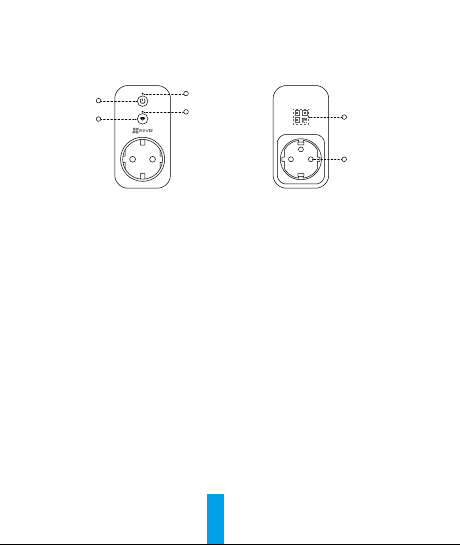
Basics
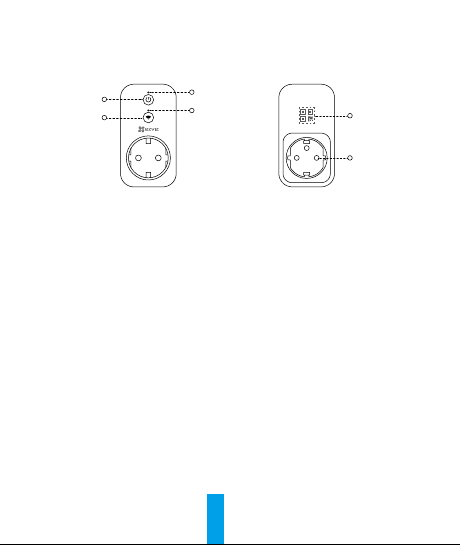
Power Button
Wi-Fi Button
Power Indicator
QR Code
Power Input
Wi-Fi Indicator
Name Description
Power Button Press to connect or cut off power.
Wi-Fi Button Press this button for 2 seconds to initiate Wi-Fi
configuration.
Power Indicator •On: The device is switched on.
•off: The device is switched off.
Wi-Fi Indicator •Solid: The network is connected.
•Slowly Flashing: The network is disconnected.
•Fastly Flashing: The device is ready for Wi-Fi configuration.
QR Code Labeled on the cover of this manual or on the back of the
device.

2
Setup
Step 1 Power-on
Plug the device into a power outlet. When the Wi-Fi indicator is
fastly flashing, it is ready for the Wi-Fi connection.
Power Outlet
Wi-Fi Indicator
Step 2 Device Setup
1. Create a user account
- Connect your mobile phone to Wi-Fi.
- Download and install the EZVIZ app by searching “EZVIZ” in App
Store or Google PlayTM.
2. Add a device to EZVIZ
- Log in the EZVIZ app.
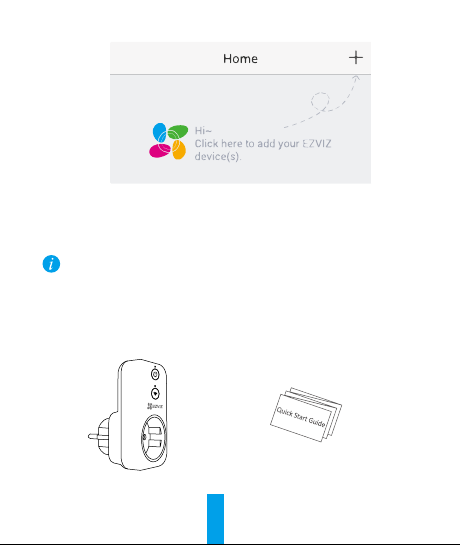
- From the EZVIZ app Home screen, tap “+” on the upper-right hand
corner to go to the scan QR code interface.
Power Outlet
3
- Scan the QR Code on the cover of this manual or on the back of
the device.
- Follow the EZVIZ app wizard to finish Wi-Fi configuration.
Please make sure your phone is connected to the 2.4GHz Wi-Fi from the router
for Wi-Fi configuration.
Box Content
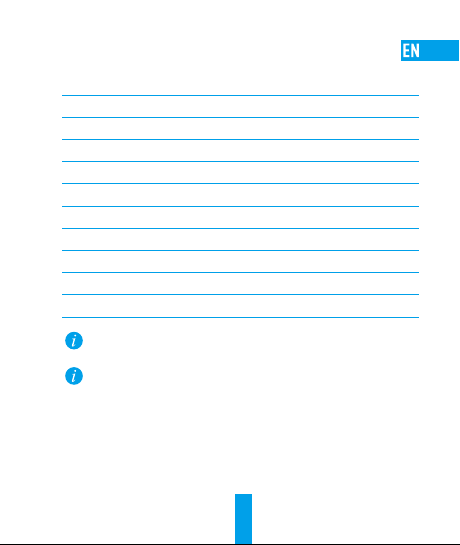
Smart Plug (x1) Quick Start Guide (x1)
4
Parameters
Maximum Start-up Time ≤30s
Wi-Fi 2.4G, 802.11 b/g/n
Max Load 16A
Max Power 3840W
Enclosure Material High-temperature and flame-retardant material
Power Supply 100 to 240 VAC
Working Temperature 0 to 40°C (32 to 104°F)
Working Humidity 0 to 80%
Size 100 x 54 x 38 mm (4 x 2 x 1.5 inch)
Weight 210g
Do not insert into each other.
For detailed information, please visit www.ezvizlife.com.
5
기본 사항
전원 버튼
Wi-Fi 버튼
전원 LED
QR 코드
전원
입력
Wi-Fi 표시기
이름 설명
전원 버튼 전원을 켜거나 끄려면 이버튼을
누르십시오.
Wi-Fi 버튼 Wi-Fi 구성 초기화는 2초동안 버튼을
누르십시오.
전원
표시기
•켜짐: 장비에 전원이 켜진 상태입니다.
•꺼짐: 장비에 전원이 꺼진 상태입니다.
Wi-Fi 표시기 •점등: 네트워크에 연결되었습니다.
•천천히 깜박임: 네트워크 연결이
해제되었습니다.
•빠르게 깜빡임: Wi-Fi 구성을 위한 준비
상태입니다.
QR 코드 이 설명서의 표지 또는 장비의 뒷면에
라벨로 붙어 있습니다.
Altri manuali per T31
2
Indice
Altri manuali Ezviz Accessori

Ezviz
Ezviz T1C Manuale utente

Ezviz
Ezviz T1 Manuale utente

Ezviz
Ezviz DP2C Manuale utente

Ezviz
Ezviz T2C Manuale utente

Ezviz
Ezviz T51C Manuale utente

Ezviz
Ezviz DB1 Pro Manuale utente

Ezviz
Ezviz DB2C Manuale utente

Ezviz
Ezviz CS-DP2C Manuale utente

Ezviz
Ezviz CSW2DAPC Manuale utente

Ezviz
Ezviz DP2 Manuale utente

Ezviz
Ezviz T1 Manuale utente

Ezviz
Ezviz T31 Manuale utente

Ezviz
Ezviz T1C Manuale utente

Ezviz
Ezviz DB2 Pro Manuale utente

Ezviz
Ezviz T30-10B Manuale utente

Ezviz
Ezviz T6 Manuale utente

Ezviz
Ezviz DP1 Manuale utente

Ezviz
Ezviz CS-DB2C Manuale utente

Ezviz
Ezviz T30-10A-US Manuale utente

Ezviz
Ezviz Smart Chime Manuale utente


