
Ezviz CS-RT1 Manuale utente

COPYRIGHT © Hangzhou EZVIZ Software Co., Ltd. ALL RIGHTS RESERVED.
Any and all information, including, among others, wordings, pictures, graphs are the properties of
Hangzhou EZVIZ Software Co., Ltd. (hereinafter referred to as “EZVIZ”). This user manual (hereinafter
referred to as “the Manual”) cannot be reproduced, changed, translated, or distributed, partially or
wholly, by any means, without the prior written permission of EZVIZ. Unless otherwise stipulated,
EZVIZ does not make any warranties, guarantees or representations, express or implied, regarding to
the Manual.
About this Manual
The Manual includes instructions for using and managing the product. Pictures, charts, images and
all other information hereinafter are for description and explanation only. The information contained
in the Manual is subject to change, without notice, due to rmware updates or other reasons. Please
nd the latest version in the ™ website (http://www.ezviz.com).
Revision Record
New release – January, 2023
Trademarks Acknowledgement
™, ™, and other EZVIZ’s trademarks and logos are the properties of EZVIZ in various
jurisdictions. Other trademarks and logos mentioned below are the properties of their respective
owners.
Legal Disclaimer
TO THE MAXIMUM EXTENT PERMITTED BY APPLICABLE LAW, THE PRODUCT DESCRIBED, WITH
ITS HARDWARE, SOFTWARE AND FIRMWARE, IS PROVIDED “AS IS”, WITH ALL FAULTS AND ERRORS,
AND EZVIZ MAKES NO WARRANTIES, EXPRESS OR IMPLIED, INCLUDING WITHOUT LIMITATION,
MERCHANTABILITY, SATISFACTORY QUALITY, FITNESS FOR A PARTICULAR PURPOSE, AND
NON-INFRINGEMENT OF THIRD PARTY. IN NO EVENT WILL EZVIZ, ITS DIRECTORS, OFFICERS,
EMPLOYEES, OR AGENTS BE LIABLE TO YOU FOR ANY SPECIAL, CONSEQUENTIAL, INCIDENTAL, OR
INDIRECT DAMAGES, INCLUDING, AMONG OTHERS, DAMAGES FOR LOSS OF BUSINESS PROFITS,
BUSINESS INTERRUPTION, OR LOSS OF DATA OR DOCUMENTATION, IN CONNECTION WITH
THE USE OF THIS PRODUCT, EVEN IF EZVIZ HAS BEEN ADVISED OF THE POSSIBILITY OF SUCH
DAMAGES.
TO THE MAXIMUM EXTENT PERMITTED BY APPLICABLE LAW, IN NO EVENT SHALL EZVIZ’S TOTAL
LIABILITY FOR ALL DAMAGES EXCEED THE ORIGINAL PURCHASE PRICE OF THE PRODUCT.
EZVIZ DOES NOT UNDERTAKE ANY LIABILITY FOR PERSONAL INJURY OR PROPERTY DAMAGE AS
THE RESULT OF PRODUCT INTERRUPTION OR SERVICE TERMINATION CAUSED BY: A) IMPROPER
INSTALLATION OR USAGE OTHER THAN AS REQUESTED; B) THE PROTECTION OF NATIONAL OR
PUBLIC INTERESTS; C) FORCE MAJEURE; D) YOURSELF OR THE THIRD PARTY, INCLUDING WITHOUT
LIMITATION, USING ANY THIRD PARTY’S PRODUCTS, SOFTWARE, APPLICATIONS, AND AMONG
OTHERS.
REGARDING TO THE PRODUCT WITH INTERNET ACCESS, THE USE OF PRODUCT SHALL BE WHOLLY
AT YOUR OWN RISKS. EZVIZ SHALL NOT TAKE ANY RESPONSIBILITES FOR ABNORMAL OPERATION,
PRIVACY LEAKAGE OR OTHER DAMAGES RESULTING FROM CYBER ATTACK, HACKER ATTACK,
VIRUS INSPECTION, OR OTHER INTERNET SECURITY RISKS; HOWEVER, EZVIZ WILL PROVIDE
TIMELY TECHNICAL SUPPORT IF REQUIRED. SURVEILLANCE LAWS AND DATA PROTECTION
LAWS VARY BY JURISDICTION. PLEASE CHECK ALL RELEVANT LAWS IN YOUR JURISDICTION
BEFORE USING THIS PRODUCT IN ORDER TO ENSURE THAT YOUR USE CONFORMS TO THE
APPLICABLE LAW. EZVIZ SHALL NOT BE LIABLE IN THE EVENT THAT THIS PRODUCT IS USED WITH
ILLEGITIMATE PURPOSES.
IN THE EVENT OF ANY CONFLICTS BETWEEN THE ABOVE AND THE APPLICABLE LAW, THE LATTER
PREVAILS.

2
Table of Contents
Overview ��������������������������������������������������������������������������������������������������1
1� Package Contents ���������������������������������������������������������������������������������������������������������������������������������������� 1
2� Basics ���������������������������������������������������������������������������������������������������������������������������������������������������������� 1
Add to EZVIZ App��������������������������������������������������������������������������������������4
Network Conguration �����������������������������������������������������������������������������4
Congure Network via App��������������������������������������������������������������������������������������������������������������������������������� 4
Congure Network via Website �������������������������������������������������������������������������������������������������������������������������� 4
One-Key Access ���������������������������������������������������������������������������������������5
Hardware method ���������������������������������������������������������������������������������������������������������������������������������������������� 5
Software method ����������������������������������������������������������������������������������������������������������������������������������������������� 5
Mesh Networking �������������������������������������������������������������������������������������6
Hardware method ���������������������������������������������������������������������������������������������������������������������������������������������� 6
Software method ����������������������������������������������������������������������������������������������������������������������������������������������� 6
Operations on the EZVIZ App ��������������������������������������������������������������������7
1� Control Panel������������������������������������������������������������������������������������������������������������������������������������������������ 7
2� Terminal Management���������������������������������������������������������������������������������������������������������������������������������� 9
3� Toolbox ������������������������������������������������������������������������������������������������������������������������������������������������������ 10
4� Settings������������������������������������������������������������������������������������������������������������������������������������������������������ 11
SPECIFICATION ��������������������������������������������������������������������������������������12
INFORMATION FOR PRIVATE HOUSEHOLDS �������������������������������������������12
1
Overview
1� Package Contents
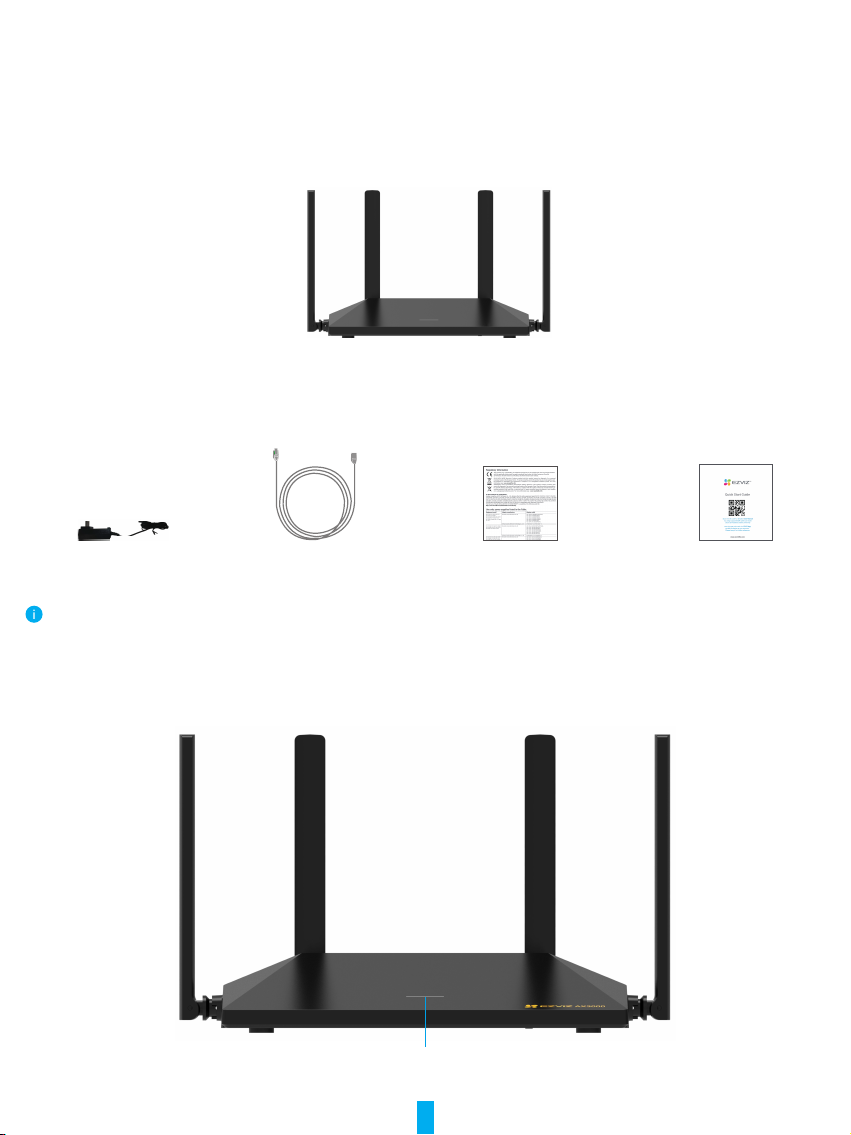
Router(x1)
(hereinafter referred to as “device“)
Power Adapter(x1) Network Cable(x1) Regulatory Information(x2) Quick Start Guide(x1)
The device's appearance is subject to the one you have bought, it can not be used outdoors.
2� Basics
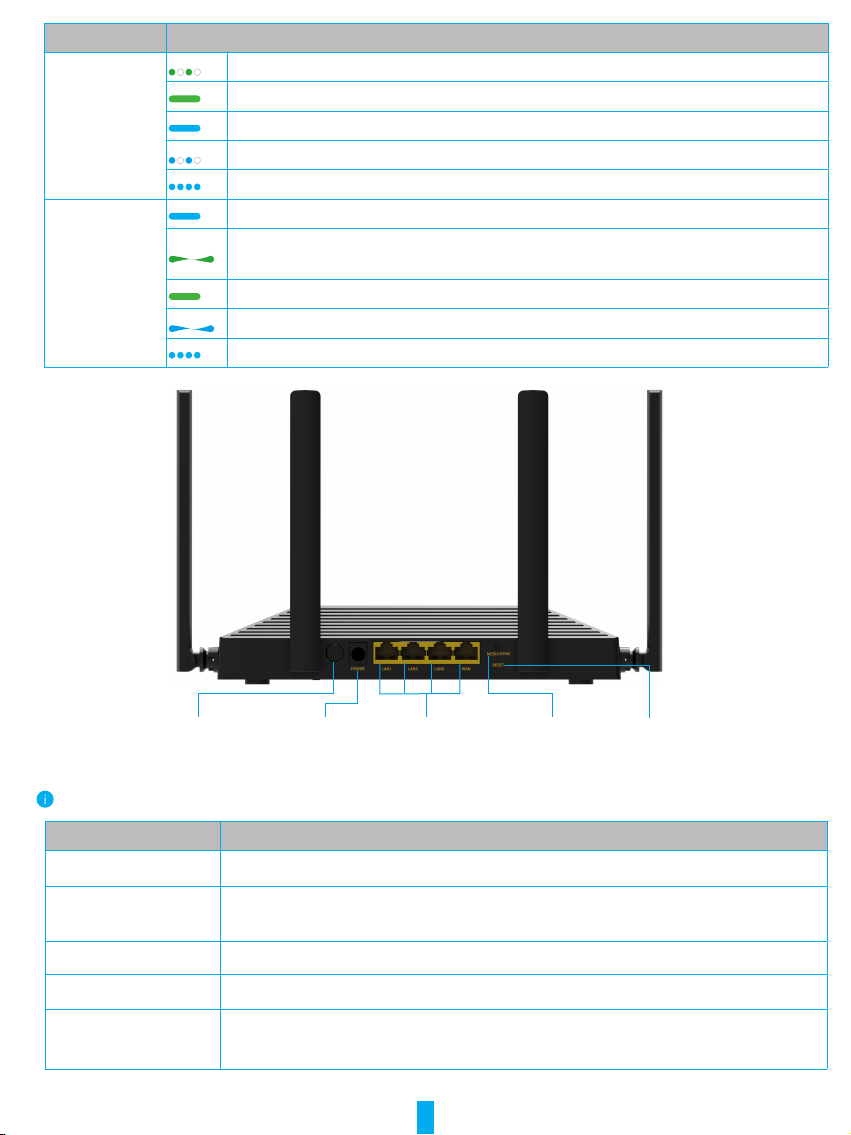
The following description will take AX3000 as an example.
LED Indicator
Front View
2
Name Description
AX1800
LED Indicator
Slow-flashing green: System started up but the network disconnected.
Solid green: System started up and the network connected.
Solid blue: System starting up.
Slow-flashing green: One-Key Access is enabled.
Fast-flashing blue: Restore to Factory Settings.
AX3000
LED Indicator
Solid blue: System starting up.
Breathing light flashing green: System started up but the network
disconnected.
Solid green: System started up and the network connected.
Breathing light flashing blue: One-Key Access is enabled.
Fast-flashing blue: Restore to Factory Settings.
POWER Button POWER Port WAN/LAN Port RESET HoleMESH/SYNC
Back View
Different from AX3000, WAN/LAN port of the AX1800 is separately used.
Name Description
RESET Hole Poke over 7s to restart and set all parameters to default.
MESH/SYNC Button Press once to enable Mesh Networking, or enble One-Key Access, please
refer to "One-Key Access" section for details.
POWER Port Use the power adapter included (DC 12V 1.5A).
POWER Button Press once to turn on/off the device.
WAN/LAN Port Support Ethernet Cable Blind Plug-in, any port of the four can be used as
WAN Port or Lan Port.
3
Get the EZVIZ App
1. Connect your mobile phone to Wi-Fi (suggested).
2. Download and install the EZVIZ app by searching for “EZVIZ” in the App Store or Google PlayTM.
3. Launch the app and register an EZVIZ user account.
EZVIZ App
If you have already used the app, please make sure that it is the latest version. To nd out if an update is
available, go to the app store and search for "EZVIZ".
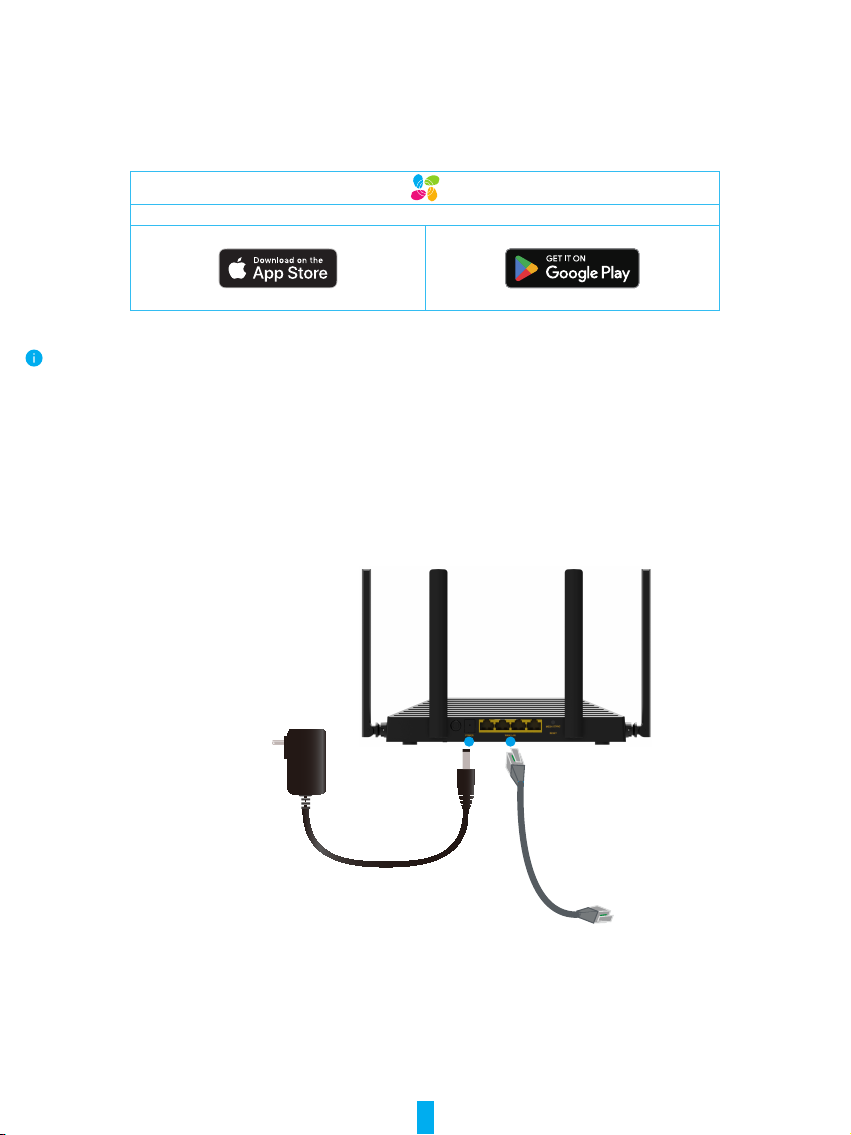
Setup
1. Connect the device to power outlet via power adapter.
2. Connect any of WAN/LAN port of the device to the Internet via network cable.
(For AX1800) Connect the WAN port of the device to the Internet via network cable.
12V 1.5A

4
Add to EZVIZ App
-Log in to your EZVIZ account.
-On the Home screen, tap “+” on the upper-right corner to go to the Scan QR Code interface.
-Scan the QR code on the Quick Start Guide cover or on the body of the device.
-Follow wizard to add your device to the EZVIZ app.
Network Conguration
When using the device for the rst time, please congure the parameters through the following
two methods.
Congure Network via App
Please operate according to the description of the "Setup" and "Add to EZVIZ App" sections to
complete the network conguration.
Congure Network via Website
Conrm that the device has been connected correctly according to Setup section, and then press
the Power button once and the LED indicator is solid green.
-Connect your mobile phone to the Wi-Fi of the device (Network Name: ezviz_ XXXXXX, no
password by default).
-Open the browser of your mobile phone, input "wi.ezvizlife.com", and go to the conguring
page.
-Set the parameters such as the device management password, Wi-Fi name and password, etc.

5
One-Key Access
After the network configuration completed, the EZVIZ smart home camera(s) can connect to the
router's Wi-Fi by the function of One-Key Access.
Hardware method
- Restore EZVIZ camera(s) to its factory settings or restart it in its factory default state;
- When the camera(s) is in the state of waiting to congure the Wi-Fi, press MESH/SYNC Button of
the device once to delete your camera(s), and then the camera(s) will connect to the device’s Wi-
Fi.
The device will automatically exit One-Key Access after 120s.
Software method
-Log in to the conguring page of the browser of your computer or mobile phone, or log in to
your EZVIZ App that added the main router.
-Go to Control panel -> EZVIZ cameras -> Quick network conguration, access your camera(s)
by following the wizard on App.

6
Mesh Networking
Number of devices in the network: no more than 8 is recommended.
The mesh networking is supported by the following methods.
Hardware method
-When the sub routers are in the reset state, you only need to press the MESH/SYNC Button on
the main router to build automatically the mesh network.
-For a device that has not joined the mesh network, you only need to press the MESH/SYNC
Button of the device (the main router or the sub routers) that has joined the mesh network,
and the device that has not joined the Mesh network will automatically join the existing mesh
network.
Main Router Sub Router
Software method
-Log in to the conguring page of the browser of your computer or mobile phone, or log in to
your EZVIZ app that added the main router.
-Go to Control panel > Router management > Add routers, the detected router will join the mesh
network.

7
Operations on the EZVIZ App
The app interface may be different due to version update, and the interface of the app you installed on your
phone shall prevail.
1� Control Panel
When you launch the EZVIZ app, the device’s control panel page displays as shown below.
You can choose to go to the Control panel, Terminal management or Toolbox as needed.
Icon Description
Router management. For more details, please refer to Router
Management page.
Internet speed optimization. Tap to improve your Wi-Fi environment
and Internet speed automatically.
Trafc map. Tap to view the detailed trafc using information.
Work plan. Tap to set a work plan for your device.
Wi-Fi settings. Tap to set Wi-Fi parameters of your device.

8
Router Management
No.Description
1View online router number.
2See using status of the ports and current negotiated rate.
3Tap to add sub routers to your device.
4View device status.
5See more device information, like CPU utilization, memory
utilization, device name, MAC address, serial number and etc.
Altri manuali per CS-RT1
1
Indice
Altri manuali Ezviz Router di rete


Manuali Router di rete popolari di altre marche


NETGEAR
NETGEAR FS526T - Switch Manuale utente

Korenix
Korenix JetNet 5710G Series Manuale utente

Automated Logic
Automated Logic ZN551 Manuale del proprietario

Cisco
Cisco ASR 1000 Series Manuale dell'operatore

EnGenius
EnGenius ESR-9710 Manuale utente

Cisco
Cisco 805 Series Istruzioni operative e di sicurezza