FARSEEING FS-LED60W Manuale utente


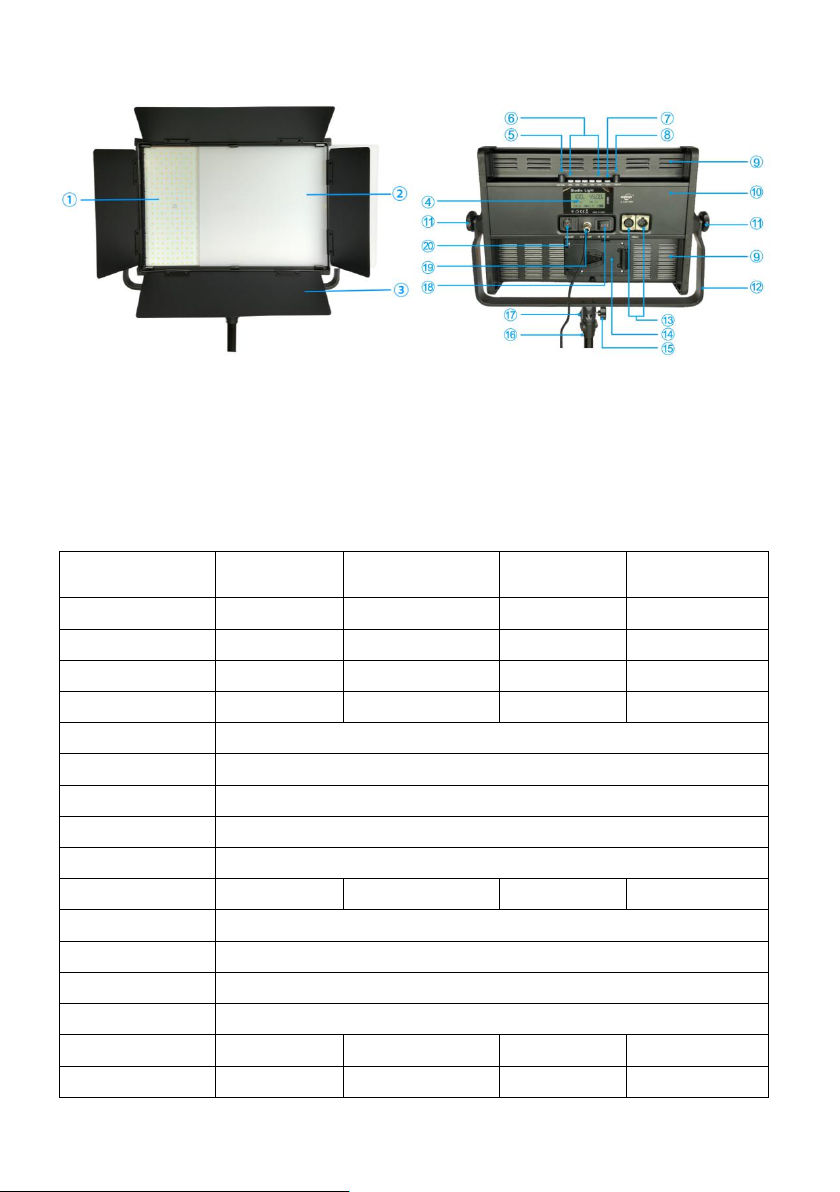
Product Structure Description:
FRONT BACK
○
1Luminous Surfaced ○
2Light Diffuser(removable) ○
3Dimmer (removable) ○
4LCD
○
5CCT Knob ○
6CCT Fast Key ○
7Option Key ○
8Brightness Knob ○
9Cooling Hole
○
10 Aluminium Alloy House ○
11 Bracket Lock Knob ○
12 U-shaped Bracket ○
13 DMX Socket
○
14 V-mount Battery Plate ○
15 Light Stand Lock Knob ○
16 Light Stand(partial)
○
17 Light Stand Interface ○
18 Power Switch ○
19 DC Socket ○
20 AC Socket
1. Technical data
Model No.
FS-LED60W
FS-LED90W
FS-LED120W
FS-LED150W
Power
60W
90W
120W
150W
0.5W SMD LED
576PCS
864PCS
1152PCS
1440PCS
Luminous Flux
7200LM
10800LM
14400LM
18000LM
Brightness
2300Lux/1M
3700Lux/1M
4800Lux/1M
5700Lux/1M
CCT
Bi-Color 2800K~6500K
CRI
Ra≥96
TLCI
Qa≥96
Beam Angle
Approx1200
LED Lifetime
50000hrs
Power Adapter
DC15-18V,>5A
DC15-18V,>7.5A
DC15-18V,>10
DC28-32V,>7A
AC Direct Supply
AC100-240V(some models do not)
Battery
V-mount lithium battery
Control Mode
Host control + Mobile APP + DMX
Dimmer
0-100%
Dimensions
35.5×39×8CM
49×39×8CM
62×39×8CM
75×39×8CM
Host Weight
2.9KG
3.7KG
4.7KG
5.6KG
2. Operation Instruction:

3.1 Taking the panel light form the packing box, plug the output of the power adapter into the
○
19 “DC Socket”and connect the AC.
3.2 Turn on ○
18 “Power Switch”, ○
4“LCD”is lit up, it enter the default Bi-Color mode.
3.2.1 Rotate ○
8“Brightness Knob”can be adjustable brightness, on the ○
4“LCD” brightness
display “000%”~“100%”.
3.2.2 Rotate ○
5“CCT Knob”can be adjustable color temperature, on the ○
4“LCD” color
temperature display “2800K”~“6500K”.
3.2.3 Press○
6“CCT Fast Key” to quickly set the corresponding color temperature, ○
6“CCT
Fast Key” the color temperature is set to 2800K, 3500K、4500K、5500K 和6500K.
3.3 Press ○
7“Option Key” once, the “CH” flashes on the ○
4“LCD”, enter the mobile APP
channel value setting mode.
3.3.1 Rotate ○
8“Brightness knob”can be modified channel value of the mobile APP, the
mobile APP channel value is set to “CH.01”~“CH.99”.
3.3.2 When the mobile APP channel value is set to “CH.FF”, it means that the bluetooth
function of the panel light is turned off.
3.3.3 Related mobile APP download and instructions, please refer to Mobile APP Operation
Instruction.
3.4 Press ○
7“Option Key” again, the “DMX” flashes on the ○
4“LCD”, enter the DMX address
code setting mode.
3.4.1 Rotate ○
8“Brightness Knob” can be modified DMX address code, the DMX address
code is set to “DMX.001”~“DMX.512”.
3.4.2 Connect DMX control device.
3.4.2.1Plug one end of the data cable into the ○
13 “DMX Socket” and the other end into the
DMX control device (or other lamp’s DMX socket controlled by DMX).
3.4.2.2After connecting the DMX control device, if you need to modify DMX address code,
please press ○
7“Option Key” once, the “DMX” flashes on the ○
4“LCD”, follow “3.4.1”
to modify DMX address code, then press ○
7“Option Key” again, exit to modify DMX
address code mode.
3.4.2.3The DMX address code on this series of panel light, the corresponding channel on
the DMX control device, can be used to adjust the brightness.
3.4.2.4The DMX address code +1 on this series of panel light, the corresponding channel
on the DMX control device, can be used to adjust the color temperature.
3.5 Press ○
7“Option Key” again, exit the settings mode and enter the default Bi-Color mode.
3.6 This series of panel light is equipped with a buzzer. When the light receives the signal
during adjustment, it will emit a "drop" sound. Long press ○
7“Option Key” for 3 seconds
to turn on or off the buzzer.
3.7 This series of panel light is preset with v-mount battery holder, inserted V-mount lithium
battery, it can be used for power supply by lithium battery.
3.8 Some models have built-in power supply, which can be used for AC direct power supply.
When using DMX control mode, it is recommended to use power adapter (or battery) for
power supply. AC direct power supply is prone to high-frequency interference.
3.9 All models are equipped with universal ○
12 “U-shaped Bracket” and ○
17 “Light Stand

Interface”, which can be fixed on the light stand for use, and other interfaces can be
customized.
3.10 When using battery power, please pay attention to the display of battery power. When
the battery power is insufficient, the light will automatically turn off and wait for the
battery or power supply to be replaced.
3.11 When used continuously for a long time ,and the light peripheral heat dissipation
condition is bad, please note that the light body surface temperature, generally allow the
light body surface temperature of 65℃, if more than need to shut off the power, or to
improve the cooling condition, some models built-in overheating protection device and
automatic power-off protection when temperature is too high.
3. Attention
Please do not put the light into over-heat and over-moisture place!
Please do not immerse the product in water or expose it to rain!
Never put the battery into fire or heat up!
When the battery runs out, the battery is easy to liquid leakage, so remove the battery
when not in use for a long time to avoid damage to the product.
If the liquid in the battery touch your skin or clothing, please wash immediately with
plenty of water.
4. Packing List For The Whole Set
No.
Name
QTY
Remarks
1
Panel Light
1pc
2
Light Diffuser
1pc
Removable
3
Dimmer
1pc
Removable
4
Soft Cloth
1pc
Removable
5
Adapter
1pc
Some models don't have
6
AC Card
1pc
7
DMX Cable
1pc
8
Portable Bag
1pc
9
Instruction
2pcs
10
V-mount Battery
—
Optional accessory
11
Battery Charger
—
Optional accessory
12
Light Stand
—
Optional accessory
In case of failure, please turn off the power, unplug the power cord, and contact the local
dealer promptly. Non-professionals should not disassemble or repair the product, if you
disassemble no warranty. This series of panel light is guaranteed for 2 years form the date
of sale(excluding lamp beads, shell and exterior parts).
Questo manuale è adatto per i seguenti modelli
3
Indice