
Fatar CMS-61 Manuale utente



Congratulations
on
purchasingtheComputerMusicStation
CMS-61
andwelcome
to
the
world
ofFATAR Keyboard Controllers.
The CMS-61 isthe perfect choice ofthe musician looking for a simple yetversatilekeyboard
controller to produce qualityresults in the multi-media environment.
The CMS-61isthe only keyboard controller on the market today to accomodate a computer
keyboard and mouse pad within the same product.
TECHNICAL
CHARACTERISTICS
•61unweighted keys
•One zone
•Velocity Sensitive
•Pitch Bend Wheel and Programmable Wheel
•Two ParallelMIDI Outputs
•Sustain InputJack
•Volume InputJack
•Program change, MIDI Channel, Transpose,Programmable wheel(Volume,Pan, Aftertouch,
Pitch, Modulation) etc.
•External Adapter 9VDC 500ma included
•Dimensions: 513/4"X 133/4"X 4 1/2"48Ibs.
CONNECTIONS
1.Connect the AC/DC adapter cableto the power input jack, in the back ofthe controller, located
next to the power switch.
2.Make sure that the AC/DC adapter corresponds to the correct voltage output. The CMS- 6l will
accept an adapter that has a rating of9VDC with a positivepolarity tip and has a minimum
current of200mA.
3.Connect MIDI cable from the CMS - 6l MIDI outputs, (each output can handle up to four
synthesizers, modules, or effect devices) to the MIDI inputon your sound sources. Setyour
sound sources to the desired MIDI channelsby the CMS- 6l.Each channel would normally be
assigned to a different sound oreffect. Sincethe CMS- 6l has onlyone zone,youcan only
program one ofthe l6 channels at a time. Make sure that your sound source isproperly assigned
to the channel you are sending on.
4.Toselecta base channel hold the [CHANNEL[ switchand enter the channel number (1through
l6) by depressing the appropriateblack numbered key (0-9).The function switch must be
released afterthe black number keys. At this point the CMS- 6l issending on that channel.
PROGRAM
CHANGEAprogram change command allows you to change the sound on your sound source from the
CMS- 6l.The program change will be sent on whichever MIDI channel the CMS- 6l is
currently set. Program changes are numbered 1 through 128.You may notice, depending onthe
sound source, that a program change of1 will show upon your sound source as0. This isnot a
problem, since MIDI isnot completely standard between manufacturers.Thank the heavens that
there are only a few anomalies like this between the manufacturers.

Toissue a program change, hold the [PROGRAM] switch and enter the desirednumber on the
numbered black keys with the appropriateprogram number or use the [INC]/ [DEC] (increment/
decrement) keys.Ifa number greater than 128isentered, itwillwrap around tothe beginning.
BANK
CHANGESomesound sources today, especially found oncomputer sound cards,have a feature called
bank select. The MIDI specification calls for banknumbers 1 through 16384.Once you have
selected your bank you are able to select a program change (1through 128).
Toselecta bank of programs, hold the [PROGRAM ]switch, press [BANK] key, and enter the
appropriate banknumberusing the 0 through 9 keys.The bank command willbetransmitted
whenthe[PROGRAM]switchis
released. The [INC]/ [DEC] keys may beusedinstead ofentering the bank number.
CONTROL#
COMMANDS
There are 127controller functions that are made upofcontinuous and switchcontrolcommands.
SeeFigure # 3.The mostcommonly used controllers are aftertouch, pitch, modulation, volume
and pan.Many expensive keyboard controllers offeraftertouch,which allows expressive control
ofsoundsources. The CMS - 61allowsthesame expressionvia [WHEELA]. Aftertouch, pitch,
(1through l6). Refer to the sound source s owners manual for this procedure.
Connect a momentary footswitch, which circuit isnormally open, to the sustain input jack clearly
marked SUSTAIN located next to the MIDI jacks. We recommend a VFP-1/10 (piano-like sustain
pedal) available from Music Industries Corp.
Connect a control voltage pedal for volume in the jack clearly marked VOLUME located next to
the sustain jack.We recommend a VP-26 (expression pedal) available from Music Industries
Corp.
Onceallconnections are inplace, pressthe powerswitchto the ON position.
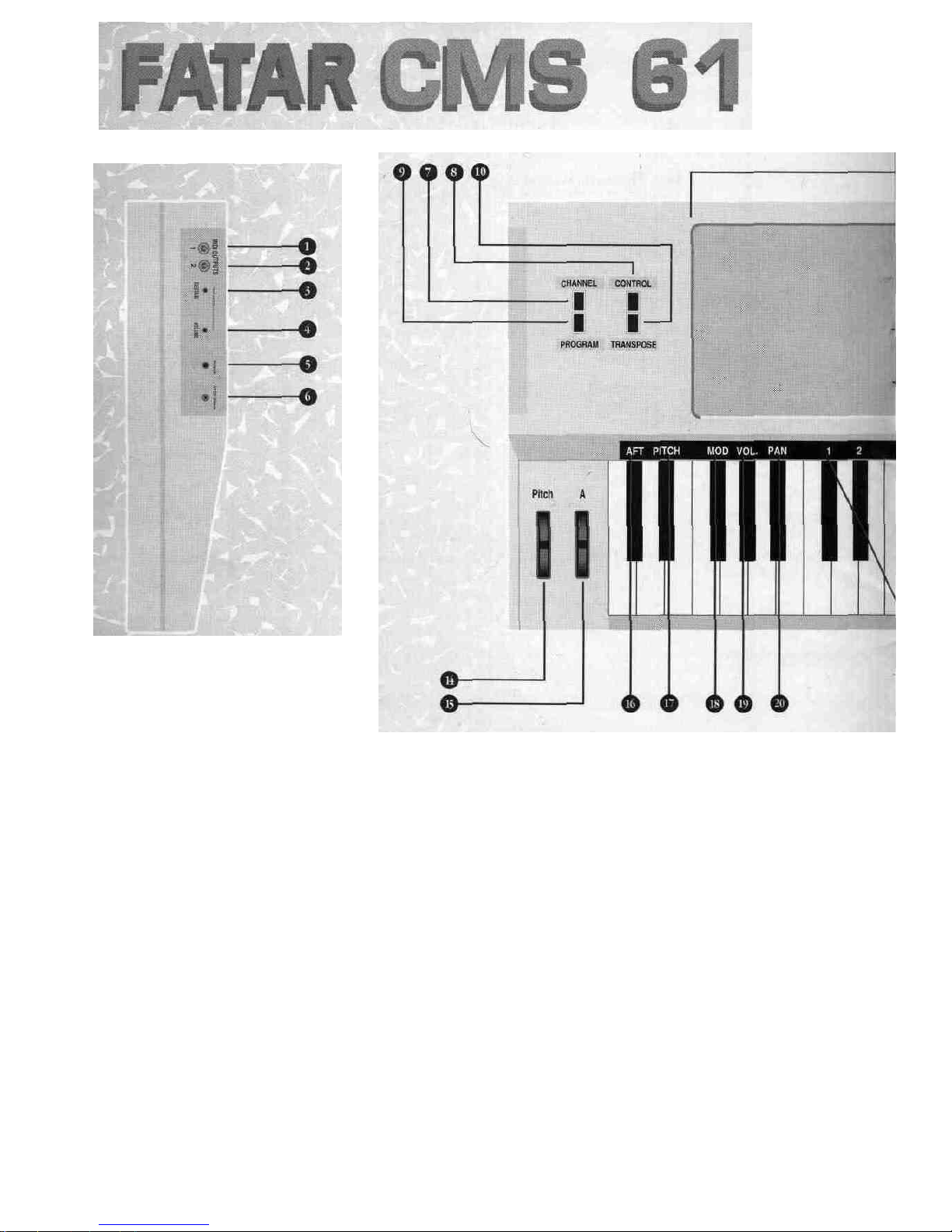
TOPPANELSeeFigure #2. You will notice on the left a dedicated pitch and a programmable second wheel,
marked[WHEELA]. With [WHEELA]you mayassignaftertouch, pitch,modulation, volume and
pan aswell asany controller (0-127).
Tothe right ofthe wheels there are four switches.Theseswitchesare used for program change,
channel assignment, transposition and programmable wheel assignment. Eighteen black keys on
the keyboard are used for special MIDI functions. The firstfive are used for[WHEEL A]. Notice,
[AFT],[PITCH], [MOD], [VOL] and [PAN]. These keys represent aftertouch,pitch, modulation,
volume and panning. The next 10black keys represent a numeric key pad for program changes
and channel assignments. The following two black keys are usedfor increment and decrement
ofa program change. [INC]/[DEC] will also change the controller number. The last key isusedfor
selecting a bank. More onthis in the next section.
Operation:
Getting around the CMS- 61isvery simple. However, you must know certain basic MIDI theory
before itcan make sense.
BASECHANNELThere are 16differentchannels in the MIDI specification thatcan be accessed modulation,
volume and pan can be accessed by the corresponding black keys, ,while all the remaining
control functions can beaccessedby the number or [INC]/[DEC] keys.

Toassign the programmable wheel press and hold the Control # switch. Enter the desired
controller number on the numbered black keys, or use the [INC] / [DEC] keys, then release the
control# switch. Look at the list in try them out. Ifyou are having problems, chances are the
sound source does not have that feature. Sometimes you might get undesirable results. At this
point itmight be bestto reset your sound source (seesound sources owners manual)and shut
off the CMS- 6l,then turnitback onagain. This will reset the CMS- 6l to base channel #1,the
controlwheel to modulation and no transposition.
CONTROLLER
NUMBER
CONTROLLER
NUMBER
0
1
2
3
4
5
6
7
8
9
10
11
12-15
16
17
18
19
20-31
32
33-63
64
65
66
CONTROLLER
FUNCTION
Bank
Modulation
Breath controller
Undefined
Foot controller
Portamento rate
DataEntryMSB
Volume
Balance
Undefined
Pan
Expression
Undefined
Gen'l Purpose #\
Gen'l Purpose #2
Genii Purpose #3
Gen'l Purpose #4
Undefined
Bank
Leastsignificantbyte for
Sustain (damper)
Portamento On/ Off
Sostenuto
CONTROLLER
NUMBER
67
68
69
70-7
80
81
82
83
84-91
92
93
94
95
96
97
98
•
121
122
123
124
values O to31125
126
127
CONTROLLER
FUNCTION
Soft Pedal
Undefined
Hold2
Undefined
Gen'l Purpose #1
Gen'l Purpose #2
Gen'l Purpose #3
Gen'l Purpose #4
Undefined
Tremolo Depth
Chorus Depth
Detune
Phaser Depth
Data increment
Data decrement
Undefined
Local control On/Off
AllNotesOff
OmniOff
Omni On
Mono On-PolyOff
Poly On - Mono Off
Refer toa MIDI technicalhandbook for further information onthesecontrollerfunctions.
TRANSPOSITION
Sometimesa player may not beable to play in a certain key. At these times the [TRANSPOSE]
switch will be invaluable. For example, if you need to change from the key ofC major to the key
ofEb major, you can stillplay the C major keys, but what you hear would be Eb major.
Totranspose the keyboard, hold the [TRANSPOSE]switchand press the desired key onthe
keyboard above or below middle C. The result will be a new key change when the C major keys
are played. Your range islimited to24 half steps up and 24 half stepsdown.
If there are any technical problems thatrelate to the CMS- 6l only,pleasecontactMusic
Industries Corp. 800-431-6699.Best ofluck!!!
Indice
Altri manuali Fatar Tastiera elettronica


