
FatShark PREDATOR V2 CE Manuale utente

Fat Shark RC Vision Systems
1
For more product information, please visit:
www.fatshark.com
All Rights Reserved
Weitere Informationen erhalten Sie auf der Webseite:
www.fatshark.com
Alle Rechte vorbehalten
PREDATOR V2 CE
RTF FPV KIT
USER MANUAL
PREDATOR V2 CE
RTF FPV KIT
BEDIENUNGSANLEITUNG

Fat Shark RC Vision Systems
2
Contents
Product contents....................................................................................................... 4
Controls Diagram...................................................................................................... 5
Controls .................................................................................................................... 6
Downlink Overview (Camera, TX, Power) ............................................................... 6
Transmitter ......................................................................................................... 7
Camera .............................................................................................................. 7
Power (via discharge lter supply) ..................................................................... 7
AV in/out Port............................................................................................................ 8
Recording Video................................................................................................. 8
Using an external receiver: ................................................................................ 8
Battery Charging....................................................................................................... 8
Accessories .............................................................................................................. 9
Diopter lens........................................................................................................ 9
Tiny Telemetry from ImmersionRC................................................................... 10
Specications ......................................................................................................... 10
Headset Specications..................................................................................... 10
Camera Specications ..................................................................................... 11
Transmitter Specications................................................................................ 12
Downlink Kit ..................................................................................................... 12
Operational advice.................................................................................................. 12
Trouble shooting..................................................................................................... 13
Warranty ................................................................................................................. 14

Fat Shark RC Vision Systems
3
Introduction
Congratulations on purchasing the Fat Shark Predator RTF FPV video piloting
system with goggles, transmitter and camera. To ensure your continued enjoyment,
please take the time to thoroughly read through this operating manual before using.
Product Compatibility
The Predator has been designed to adhere to established video standards and is
compatible with any product also adhering to accepted video standards. Due to
the high number of different manufacturers and variation in quality, it’s impossible
to for us to have tested with every product combination and some troubleshooting
may be required if mix/matching components. The Predator has been thoroughly
tested with ImmersionRC gear. For best results and no compatibility issues, Fat
Shark recommends ImmersionRC gear for your accessory products.
IMPORTANT!!!! Product Warning!!!!!
DO NOT LEAVE HEADSET EXPOSED TO DIRECT
SUNLIGHT. SUNLIGHT WILL MAGNIFY THROUGH THE
OPTICS AND BURN HOLES IN THE LCD COLOR FILTER
THIS WILL NOT BE COVERED BY WARRANTY. KEEP
GOGGLES IN PROTECTIVE CASE WHEN NOT IN USE.

Fat Shark RC Vision Systems
4
Product contents
Carry case
Predator Headset
FPV Downlink
(camera, TX, lter)
AV cable
5G8 Antenna (2p)
(headset and transmitter)
Battery
(with discharge adapter)
Manual

Fat Shark RC Vision Systems
5
Controls Diagram

Fat Shark RC Vision Systems
6
Controls
Brightness/contrast control: pressing left and right increases/decreases display
contrast. Press forward/back increases/decreases brightness.
RX power switch: The receiver module power is controlled by this switch. If
viewing video source via the AV cable; the RX module needs to be turned off to
avoid image conict.
Channel select: Pressing channel up/down buttons will cause the channel to
incrementally increase/decrease. Audio beep sounds on channel change. A long
beep sounds on channel top and bottom limits.
Note: Fat Shark only guarantees compatibility with Fat Shark or ImmersionRC
transmitters.
CH1: 5740 MHz CH2: 5760 MHz CH3: 5780 MHz CH4: 5800 MHz
CH5: 5820 MHz CH6: 5840 MHz CH7: 5860 MHz
Low battery warning: Audio warning if input voltage drops below 6.8 V
Volume control: each press of button increments volume up or down. Standard
earphones can be used with the Predator (not included).
Downlink Overview (Camera, TX, Power)
Downlink system comes preassembled and tested for plug/play with your aircraft.
Simply connect the balance lead of your 2S to 4S (7 V - 25 V) RC battery to
provide power to your Fat Shark Downlink and you are ready to y.
The handy balance lead lters RC servo and motor noise from your RC pack for a
crisp, clear image.

Fat Shark RC Vision Systems
7
Transmitter
Channel select chart:
1 2 3 4
Ch1 5740 MHz On On On N/A
Ch2 5760 MHz Off On On N/A
Ch3 5780 MHz On Off On N/A
Ch4 5800 MHz Off Off On N/A
Ch5 5820 MHz On On Off N/A
Ch6 5840 MHz Off On Off N/A
Ch7 5860 MHz On Off Off N/A
Small white connector on back of transmitter is for ImmersionRC Tiny Telemetry.
See accessories.
Camera
2.8 mm lens for wide angle 100 degree FOV; ideal for xed camera piloting.
Camera is NTSC/PAL selectable (NTSC default, remove jumper on back for PAL).
Plugs camera directly into TX via included cable (pre assembled).
Power (via discharge lter supply)
The discharge lter supply allows you to power your downlink equipment from your
onboard RC pack. Connect as shown below:

Fat Shark RC Vision Systems
8
AV in/out Port
RCA Connector:
Yellow: Video, White: Audio Left,
Red: Audio Right
Recording Video
Connect AV cable to AV out port on right side of headset. Connect recording
device to cables and set up as per manufacturer directions.
Note: Cables pins are not all the same (see above chart), be sure to connect to
headset using the included cable.
Using an external receiver:
Use the AV cable to connect headset to
the RCA AV port of external devices.
To share the base station power supply
with your goggles, pick up a 3m Dominator
AV cable accessory from your retailer.
Note; internal receiver must be shut off to
properly display external AV.
Battery Charging
The 1000 mAh 7.4 V lithium polymer
batery pack is equipped with a 3 pole
balance charger lead that allows the
battery to be charged off standard RC battery pack chargers (not included). Follow
your charger instructions for setting up for 760 mA, 7.4 V Li-Po. Some chargers
require the discharge cable to be connected. Use the enclosed discharge lead
adapter for these types of chargers.

Fat Shark RC Vision Systems
9
Note (1): If the charger fails to announce charge complete, but is showing battery
voltage at 8.4 V, the charge can be considered nished.
DO NOT LEAVE BATTERY ATTACHED TO CHARGER WHEN CHARGER IS
NOT PLUGGED IN.
Note (2): If battery becomes fully discharged or shorted an internal safety circuit
will trip. To reset the battery, tap 9 V direct to the barrel connector via the discharge
adapter cable’s banana connector. This will instantly reset the battery and it can
be recharged as normal.
Accessories
Diopter lens
For near sighted users, diopter lens insert sets are available that include -2, -4 and
-6 dpt. See below insert instructions. Lens orientation is not critical.
Fat Shark RC Vision Systems
10
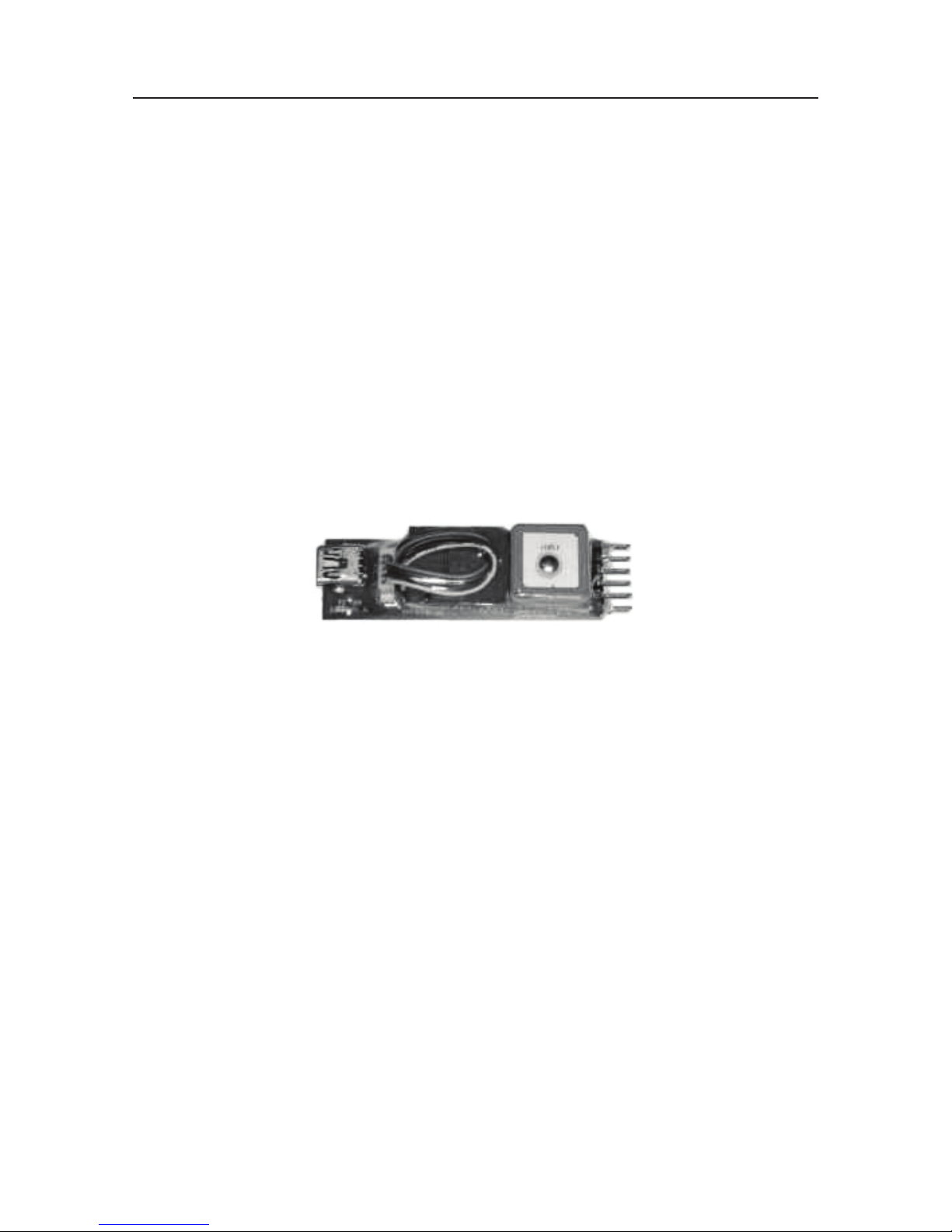
Tiny Telemetry from ImmersionRC
Conventional OSDs offer a host of features, some of which you don’t need if you’re
just ying FPV around your local eld or have a small and light FPV plane that
can’t really carry a full OSD. All you really want in those cases is for your tracking
antenna to point at the plane accurately and have GPS positional data along with
vital statistics such as battery voltage and current consumption.
TinyTelemetry is a minimal GPS locator that sends EzTelemetry data for the
EzAntennaTracker down one of the audio channels on the audio/video transmitter.
The EzAntennaTracker will then track the plane and offer battery statistics on its
LCD display as well as other telemetry data such as positional info etc.
The new v2.0 EzAntennaTracker will also offer audible warnings for battery
voltage and total current consumption.
The Tiny Telemetry plugs into the transmitter’s dongle power supply located on the
back of the transmitter.
Specications
Headset Specications
Optics:
• FOV 25 degrees diagonal
• Interpupillary (IPD) distance: 63.5 mm (xed)
• Optional diopter lens inserts available in -2, -4, -6 dpt
Audio:
• Stereo
User Controls:
• Channel selection
• Contrast/ brightness
• Volume adjustment
Electrical:
• Power supply, 7-13 V (2S/3S supply)
• Power consumption: 200/350 mA (direct/wireless)
Battery:
• 7.4 V, 1000 mAh lithium polymer with safety circuit.
Altri manuali per PREDATOR V2 CE
1
Indice
Lingue:
Altri manuali FatShark Cuffia


