Ferguson AV290DVD Manuale utente

ENGLISH
1. What’s in the box?
AV290DVD with speakers
EN User manual
PL Instrukcja obsługi
User manual Remote Control
Unit
2x AAA baterries A/V cable FM antenna wire
2. Connect - basic connection
Connect at least speakers and FM antenna
CAUTION!
DO NOT OPEN
RISK OF ELECTRIC SHOCK
ACHTUNG!
NICHT ÖFFNEN
LEBENSGEFAHR
UWAGA!
1,(27:,(5$û
R<=<.2325$ĩ(1,$
Right speaker
Left speaker
FM antenna
Qucik Start Guide

ENGLISH
3. Setup
APress to turn on.
BPress SETUP to enter Setup menu.
CSelect Language Setup tab then “OSD Language” option and press OK.
DUse keys to select a language option in the menu and press OK to conrm.
EAdjust other settings if needed
FPress SETUP to exit.
4. Use
ACopy multimedia les to USB memory.
BConnect USB memory to USB port in AV290DVD
CUse keys to navigate in the menu. Choose in“Files Manager” le that you
want to play
DPress OK to start playback.
ETo stop playback, press STOP.
CAUTION!
Refer to the user manual for more information.

ENGLISH
Introduction
1 Product Overview
1 Safety Information
2 User manual
3 Software upgrade
3 Symbols used on the device
4 Setup
Connections
5 Connecting speakers and antenna
6 Connecting the power cord
7 Optional: Connecting TV
8 Optional: Connecting a supported USB
devices and memory cards
Functional Overview
9 Front and Rear panel
10 Remote Control Unit RCU290
Getting Started
11 Step 1: Inserting batteries into the
Remote Control
11 Step 2: Setting up the TV
12 Step 3: Setting language preference
Major functions
13 Playable Discs
13 Playable Content
15 Basic radio playback controls
16 Playing discs
16 Basic playback controls
17 Operations for video playback (DVD/
VCD/SVCD)
18 Playing multimedia les from the USB
device or memory card
Setup Menu Options
19 Language Setup menu
19 Video setup menu
20 Audio setup menu
21 General Setup menu
Troubleshooting
Specication
Glossary
Contents


1
ENGLISH
Introduction
Product Overview
Thank you for purchasing the AV290DVD.
This user manual provides step-by-step
instructions for installing and using your
new system.
With this unit, you can:
watch video from DVD/VCD/SVCD or USB
devices
enjoy audio from discs or USB devices
view pictures from discs or USB devices
listen to FM radio
Other features:
USB 2.0 HOST port (for USB storage
devices)
Card reader SD/MMC
Safety Information
Please observe all warnings and
instructions on the equipment and
contained in these operating instructions.
Please carefully read this user’s manual
before using the device.
To avoid electric-shock hazards, do not
open the cabinet, refer servicing to
qualied personnel only. If cabinet is
opened warranty will be invalid.
Please switch o completely the device
during thunder, during abnormal
phenomenon, before cleaning it and in
case it remains out of service for a long
period.
Do not expose the device under the
sunlight. And keep it away from the heat
source or humid environments. Do not
block ventilation holes of the device so
that air can circulate freely.
Please place the device in horizontal and
stable conditions, keeping it away from
vibrating.
If device is moved from warmer place to
a colder one some problem might occur.
Please switch o the device and turn it on
after 1 or 2 hours.
Keep the device away from ower
vases, tubs, sinks, etc., in order to avoid
damaging the equipment. Do not touch
power supply with wet hands.
Don’t put any objects on the device.
Be sure to turn the device o and
disconnect the AC power cord before
cleaning the receiver surface. If the
surface is dirty, wipe clean with a cloth
which has been dipped in a weak soap/
and/water solution and wrung out
thoroughly, and then wipe again with a
dry cloth.
Do not connect cables while power is
plugged.

2
ENGLISH
Do not use damaged cables for
connections: you could cause res.
Please switch o completely the device
while making all connections.
The product purchased is a sophisticated
electronic device which is not suitable for
children under 18 years.
We do not assume responsibility for
damages caused to people or object,
deriving from use of the device made by
people under 18 years.
User manual
Ferguson has used all the available
means to ensure the latest information
regarding its products. Ferguson does not
give a warranty regarding the contents
of this User Manual and waives any
implied warranties regarding market
value or tness for specic purposes. The
information contained herein provide
guidelines allowing the operation and
maintenance of the receiver.
Ferguson reserves the right to make
changes, corrections or to translate
the User Manual without giving prior
notice of such changes. Therefore, it is
recommended that users visit our website
regularly to receive the latest information.
IMPORTANT!
All the information contained in this
manual was correct at the time of
publication. However, as our engineers
are always updating and improving the
product, your device’s software may
have a slightly dierent appearance or
modied functionality than presented in
this manual.
To obtain the most current user manual
Visit the Ferguson website
www.ferguson-digital.eu to check the
availability of the latest version of user
manual. Please visit the FAQ section too.
Introduction

3
ENGLISH
Symbols used on the device
CAUTION!
DO NOT OPEN
RISK OF ELECTRIC SHOCK
ACHTUNG!
NICHT ÖFFNEN
LEBENSGEFAHR
UWAGA!
NIE OTWIERAĆ
RYZYKO PORAŻENIA
The caution risk of electrical shock - do
not open symbol
This symbol tells you that you are
not allowed to open the device. Only
authorized (service) technicians are
allowed to open the box.
The CE mark
This mark tells you that the device is
following the provisions of Council
Directive 2004/108/EC on the
approximation of the laws of the Member
States relating to the electromagnetic
compatibility and the provisions of
Council Directive 2006/95/EC on the
approximation of the laws of the Member
States relating to low voltage and
electrical safety.
The double insulation symbol
This symbol tells you that the device is
electrically safe within the normal use of
the device as stated in the safety chapter.
The RoHS mark
This mark tells you that the device is
following The Directive on the Restriction
of the Use of Certain Hazardous
Substances in Electrical and Electronic
Equipment 2002/95/EC (commonly
referred to as the Restriction of Hazardous
Substances Directive or RoHS)
Software upgrade
Periodically Ferguson may issue software
upgrade to enhance your user experience.
To download and install the latest
software to Ferguson
Visit the Ferguson website
www.ferguson-digital.eu to check the
availability of the latest software upgrade.
Introduction

4
ENGLISH
Setup
Finding a suitable location
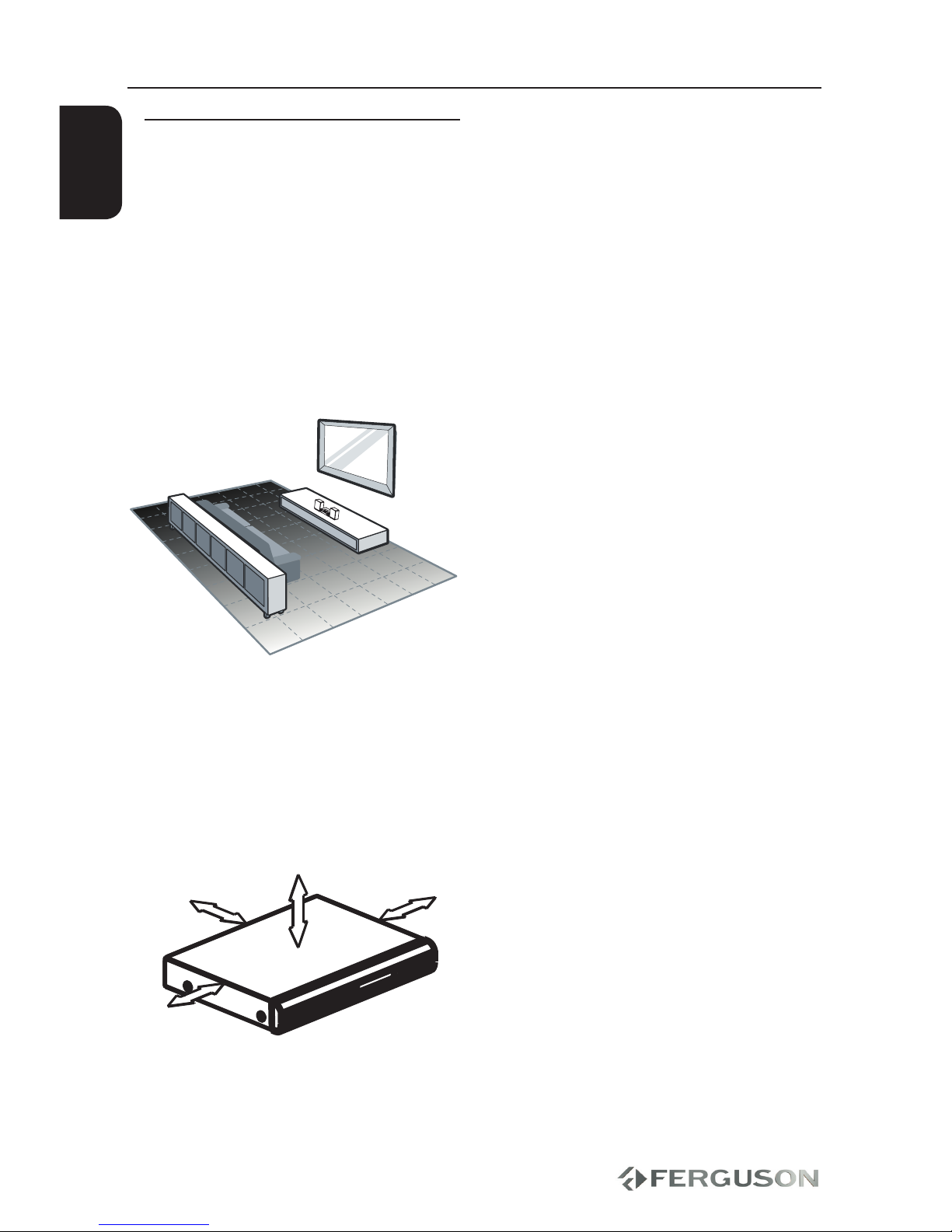
– Place the set on a at, hard and stable
surface.Do not place the set on a carpet.
– Do not position the set on top of other
equipment that might heat it up (e.g.
reciever or amplier).
– Do not put anything under the set (e.g.
CDs, magazines).
– Install this system near the AC outlet
and where the AC power plug can be
reached easily.
Space for ventilation
– Place the apparatus in a location
with adequate ventilation to prevent
internal heat buid up.Allow at least 10 cm
clearance from the rear and the top of the
set and 5 cm from the left and right to
prevent overheating.
10cm 10cm
5cm
5cm
Avoid high temperatures, moisture,
water and dust
– Apparatus shall not be exposed to
dripping or splashing.
– Do not place any sources of danger on
the apparatus (e.g., liquid lled objects,
lighted candles).
Introduction

5
CAUTION!
DO NOT OPEN
RISK OF ELECTRIC SHOCK
ACHTUNG!
NICHT ÖFFNEN
LEBENSGEFAHR
UWAGA!
1,(27:,(5$û
R<=<.2325$ĩ(1,$
Right speaker
Left speaker
FM antenna
ENGLISH
IMPORTANT!
For optimal sound, use the supplied
speakers only.
Connect only speakers with imped-
ance that is the same or higher than
the supplied speakers. Refer to the
Specication section of this manual.
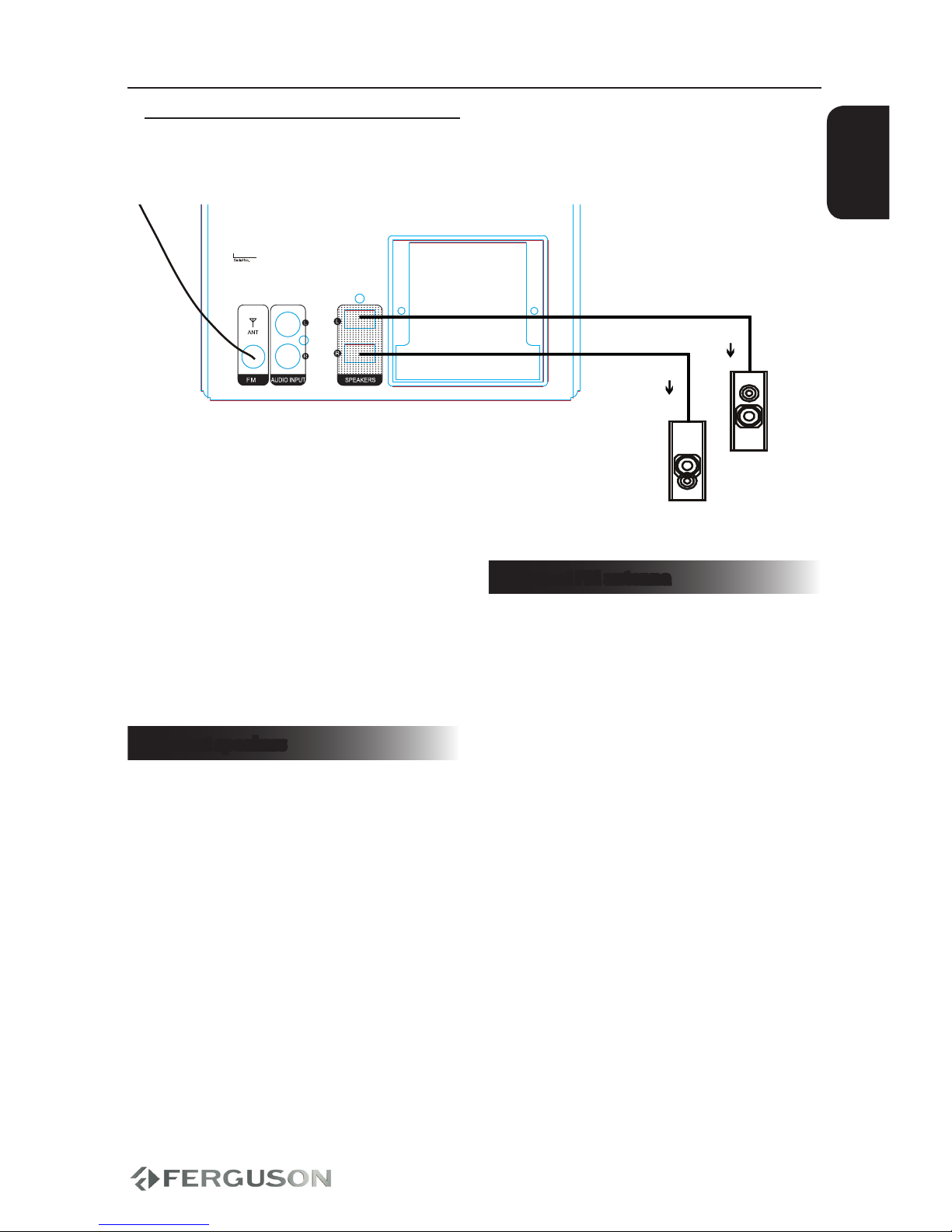
Connect speakers
AInsert the connector of the wire
completely into scoket. Insert the right
speaker wire to“R”, left speaker wire to “L”.
Connections
Connect FM antenna
For optimal reception, fully extend and
adjust the position of the antenna.
For better FM stereo reception, connect
an outdoor FM antenna to the ANT FM
jack.
The unit does not support MW radio
reception.
AConnect the supplied FM wire antenna to
the ANT FM socket on the unit.
Connecting speakers and antenna

6
CAUTION!
DO NOT OPEN
RISK OF ELECTRIC SHOCK
ACHTUNG!
NICHT ÖFFNEN
LEBENSGEFAHR
UWAGA!
NIE OTWIERAĆ
RYZYKO PORAŻENIA
TV
ENGLISH
Connections
After everything is connected properly,
connect the power cable into an AC
power outlet.
Never make or change any connections
with the power switched on.
Press POWER SWITCH on back panel.
Press POWER on the RCU. Display on
the front panel will turn on.
Connecting the power cord
Indice
Altri manuali Ferguson Lettore multimediale