
FiLIP Technologies Filip 2 Manuale utente
FiLIP2 USER GUIDE
2015 © Filip Technologies, Inc. All Rights Reserved.
APR 2015

WELCOME TO THE FiLIP FAMILY
FiLIP helps children stay in touch with their parents… and helps parents know where their children are.
The FiLIP is a phone, location tracking device, and watch worn by a child and syncs with the FiLIP
companion app on the parent’s smartphone. FiLIP allows the parent to see where their child is at any
point in time, call or text message their child, and receive notifications if their child has left a SafeZone
or is in an emergency. With FiLIP, a child can easily call their parent, or one of five trusted contacts, and
can alert those trusted contacts if they are in an emergency.
There are a couple of important things to do before you and your child start using your FiLIP.

TABLE OF CONTENTS
What’s In The Box
Get To Know Your FiLIP
• Turning Your FiLIP On and Off From the Device
• Charging Your FiLIP
• Latch & Size Spacers
• Interchangeable Wristband
Downloading The FiLIP App
Creating A FiLIP Account
Connecting FiLIP To The FiLIP App
Setting Up The FiLIP App
• The Map Screen
• The Menu Screen
• Location Settings
• Adding Contacts
• Adding A Guest User
• Creating SafeZones
• Notification Settings
Using The FiLIP & FiLIP App
• Making & Receiving Calls From the FiLIP
• Calling the FiLIP From the FiLIP App
• Muting the FiLIP Ringer
• Text Messaging
• Locating the FiLIP
• Emergency Mode: Triggering From the FiLIP
• Emergency Mode: Triggering From the FiLIP App
• Turning Your FiLIP Off From the App
----------------------------------------------------------------------------- 1
--------------------------------------------------------------------- 2
----------------------------------- 2
--------------------------------------------------------------------- 3
------------------------------------------------------------------- 4
------------------------------------------------------------ 5
---------------------------------------------------------------- 6
------------------------------------------------------------------- 7
------------------------------------------------------- 8
------------------------------------------------------------------- 9
-------------------------------------------------------------------------- 9
----------------------------------------------------------------------- 10
----------------------------------------------------------------------- 11
------------------------------------------------------------------------ 12
------------------------------------------------------------------- 13
-------------------------------------------------------------------- 14
------------------------------------------------------------------ 15
--------------------------------------------------------------- 16
------------------------------------------- 16
------------------------------------------------ 17
--------------------------------------------------------------- 18
------------------------------------------------------------------------- 19
--------------------------------------------------------------------- 20
-------------------------------------- 21
------------------------------- 22
----------------------------------------------- 23

1
WHAT’S IN THE BOX?
•FiLIP in Interchangeable Wristband •
• Wristband End Cap •
• Size Spacer Bundle: Latch Spacer, Medium & Large Spacer Extenders •
• FiLIP USB Cable •
• Power Adapter •
• Quick Start Guide •
You should have the following items:
End Cap Latch Spacer
(up to 4.8” wrist)
Medium Extender
(up to 5.2” wrist)
Large Extender
(up to 5.6” wrist)

2
GET TO KNOW YOUR FiLIP
Turning Your FiLIP On From the Device
Press the red button firmly for 1-2 seconds to turn the FiLIP on.
Press the red and black buttons simultaneously for approximately 30 seconds until the “Shutdown”
option appears on the screen. Select “Shutdown” and follow the prompts to shutdown the FiLIP.
Turning Your FiLIP Off From the Device
Press & hold
both buttons
for 30 seconds
Press the
black button
to select
“Shutdown”
3
GET TO KNOW YOUR FiLIP
Charging Your FiLIP
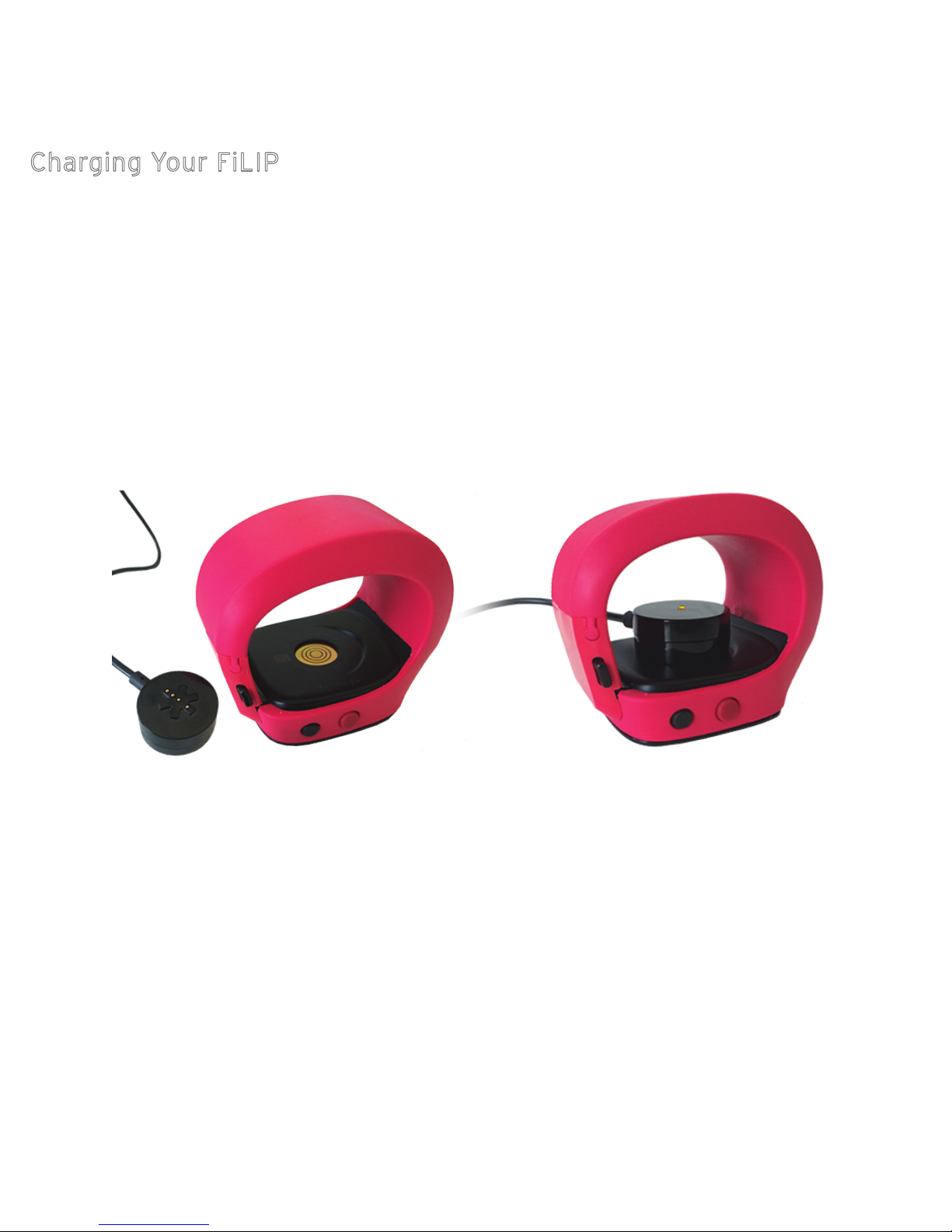
To charge your FiLIP, attach the star-shaped side of the charger to the underneath part of the FiLIP
screen, aligning the connection until you see the yellow light illuminate. If you do not see the yellow
light illuminate on the charger, then the charger is not properly attached to the FiLIP. There will be a
magnetic pull that keeps the charger attached once it’s in place. We recommend that you lay the FiLIP
on its screen while it is charging, and keep the charger attached for approximately 6-8 hours (at night
while your child is sleeping) to ensure an optimal charge.

4
GET TO KNOW YOUR FiLIP
Latch & Size Spacers
The FiLIP can be worn either open or closed. To wear the FiLIP open, slide the end cap onto the end of
your FiLIP to wear it open.
To wear the FiLIP closed, determine the size of your child’s wrist, and then select from one of the
options below. If your child’s wrist is small (4.8” or less), they will only need the latch. If your child’s
wrist is larger, then they will need either the latch + medium extender (up to 5.2” wrist) OR the latch +
large extender (up to 5.6” wrist).
All spacers, extenders and end caps are designed to slide on and off the end of the FiLIP wristband, as
shown. Do not try to push or snap them on or off, as that may cause them to break.
End Cap
End Cap Latch Spacer
(up to 4.8” wrist)
Latch Spacer
+ Medium Extender
(up to 5.2” wrist)
Latch Spacer
+ Large Extender
(up to 5.6” wrist)
5
GET TO KNOW YOUR FiLIP
Interchangeable Wristband
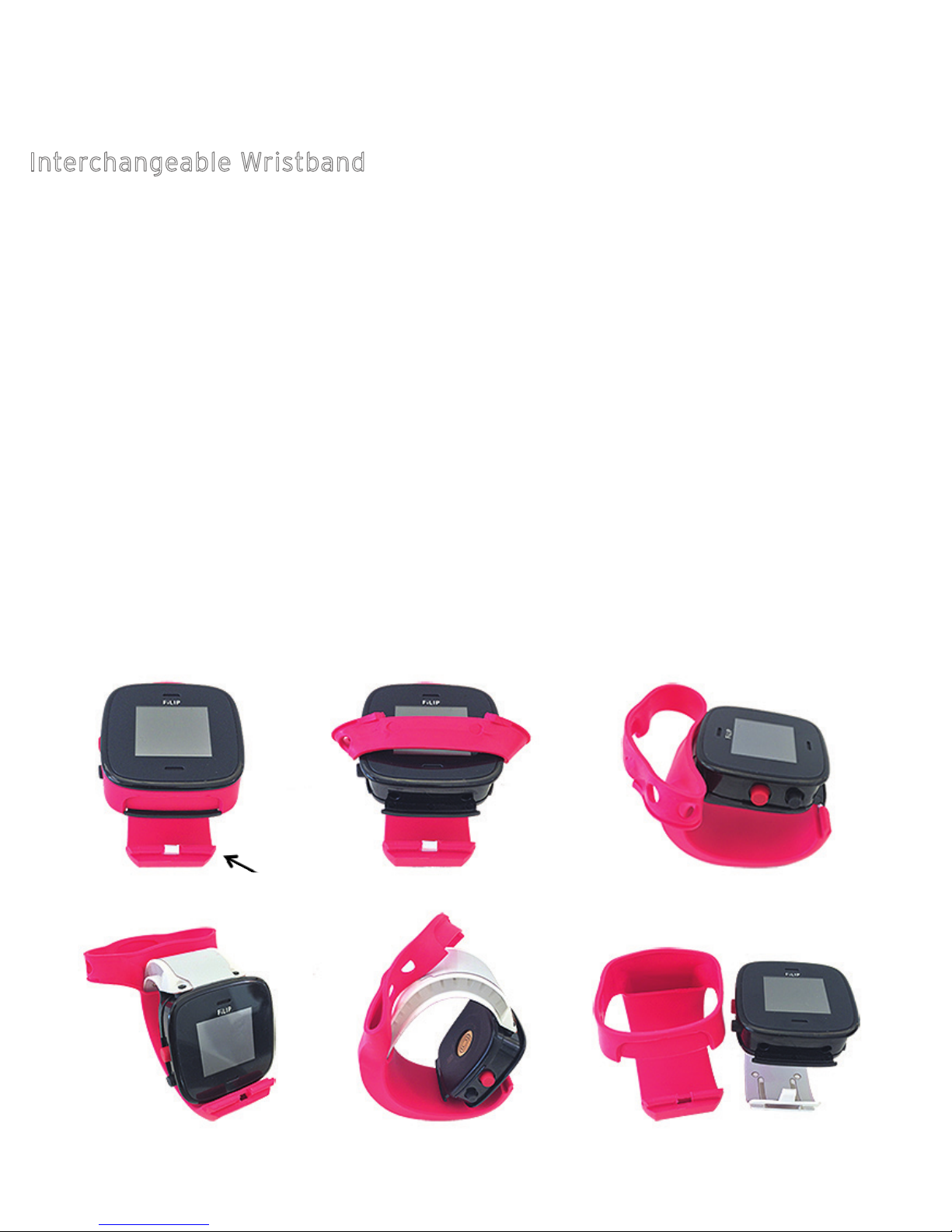
The FiLIP 2 is built with an interchangeable wristband that can be easily removed and replaced with a
different color. To change your FiLIP 2 wristband, follow these three simple steps:
STEP 1: PREP YOUR FiLIP
The first step is to remove the end-cap, latch and/or size spacer from the wristband before you pull it
off of your FiLIP.
STEP 2: REMOVE WRISTBAND
Gently peel the wristband sleeve away from your FiLIP, starting at the screen. Once you’ve peeled the
wristband sleeve away from the screen, then the rest should easily slide right off of your FiLIP.
STEP 3: SLIDE ON THE NEW WRISTBAND
Simply slide the new wristband sleeve onto your FiLIP, starting with the thin, flat side and ending with
the screen. Once you get to the screen, gently pull the wristband over the screen to secure it in place.
Slide your end cap, latch and/or size spacer back on and you’re ready to go.
Remove End Cap
6
DOWNLOADING THE FiLIP APP
In order to set up and use your FiLIP, you must first download the free FiLIP companion app
from the Apple App Store (if you have an Apple iPhone) or the Google Play shop (if you have
an Android smartphone).
Once the app is installed on your phone, tap the FiLIP icon to open the app.
If this is your first time creating a FiLIP account, select “Create Account” and then follow the
prompts to create your FiLIP account.
If you have already created a FiLIP account, select “Sign In” and follow the prompts to
connect your FiLIP to the app if you have not done so already.

7
CREATING A FiLIP ACCOUNT
Open the app and enter your
personal information in the
designated fields.
We’ll send you a verification
email. Please open the email
from your smartphone and
click on the link to confirm
your email address and move
forward in the process.
The final part of this step is to
create a profile for your child.
1 2 3
Follow these simple steps:
Indice


