FLEETBOARD DispoPilot.Guide Manuale del proprietario

DispoPilot.guide
Supplement

Symbols
GWARNING
Warning notes make you aware of dangers
which could pose a threat to your health or
life, or to the health and life of others.
HEnvironmental note
Environmental notes provide you with infor-
mation on environmentally aware actions or
disposal.
! Notes on material damage alert you to
dangers that could lead to damage to your
vehicle.
iThese symbols indicate useful instruc-
tions or further information that could be
helpful to you.
XThis symbol designates an instruc-
tion you must follow.
XSeveral consecutive symbols indi-
cate an instruction with several
steps.
(Y page) This symbol tells you where you
can find further information on a
topic.
Y YThis symbol indicates a warning or
an instruction that is continued on
the next page.
Display This text indicates a message on
the display.

Index ....................................................... 2
Introduction ........................................... 3
Overview and operation ....................... 5
FleetBoard® Navigation ...................... 17
Practical advice ................................... 25
0105844481 É0105844481oËÍ
Contents 1

B
Battery
Charging ............................................ 7
Inserting ............................................. 6
Replacing ......................................... 26
C
Care ...................................................... 26
D
Declaration of conformity ..................... 3
Destination
Deleting ........................................... 21
Displaying destination informa-
tion .................................................. 22
Ending route guidance ..................... 23
Entering ........................................... 18
Entering a stopover .......................... 20
Last destinations ............................. 19
Storing ............................................. 21
E
Electromagnetic compatibility ............. 3
Entering the home address ................ 22
Equipment .............................................. 3
F
First steps .............................................. 6
I
Information
Displaying ........................................ 15
M
Maintenance ........................................ 26
Map view .............................................. 18
........................................................ 18
Mercedes-Benz Service Centre
see Qualified specialist workshop
N
Navigation
Display ............................................. 23
Ending .............................................. 23
Route options .................................. 19
Starting ............................................ 18
O
Opening/closing a service menu ......... 9
Operating safety .................................... 3
Overview ................................................ 8
P
Point of interest (POI) ......................... 21
Portal ...................................................... 8
Q
Qualified specialist workshop .............. 4
R
Reset button ........................................ 26
Route selection .................................... 19
S
Scope of delivery ................................... 4
Settings
Brightness ........................................ 11
Date ................................................. 11
General ............................................ 10
Language ......................................... 10
Map orientation ............................... 12
Navigation ........................................ 11
Route options .................................. 13
Time zone ........................................ 11
Units ................................................ 11
Vehicle dimensions .......................... 13
Vehicle weight ................................. 14
Volume ............................................ 11
Specialist workshop .............................. 4
Status indicator ................................... 10
V
Vehicle profile ..................................... 13
2Index

Operating safety
Important safety notes
GWARNING
Operating the integrated information systems
and communications equipment in the vehicle
while driving will distract you from traffic con-
ditions. You could then lose control of the
vehicle. There is a risk of an accident.
Only operate these devices if road traffic con-
ditions permit. If you are unsure about the
surrounding conditions, pull over to a safe
location and make entries only while the vehi-
cle is stationary.
Observe the legal requirements for the coun-
try you are currently in.
Bear in mind that, at a speed of only 50 km/h,
your vehicle is covering a distance of nearly
14 m per second.
When using the device please follow:
Rthe safety notes in these operating instruc-
tions
Rtraffic laws and regulations
Rlaws pertaining to motor vehicles and
safety standards
iImproper work on electronic components
or other systems (such as the radio and
disc slot) and their software may result in
malfunction or failure. Even systems that
have not been modified could be affected
because the electronic systems are con-
nected. Malfunctioning electronics can
severely impair the operating safety of the
vehicle.
Therefore, have all work on and modifica-
tions to electronic components carried out
at a qualified specialist workshop.
Equipment
This Supplement describes DispoPilot.guide
with all standard and optional equipment
available at the time of going to print. Coun-
try-specific deviations are possible. Bear in
mind that your DispoPilot.guide may not be
equipped with all of the described features.
This also applies to safety-relevant systems
and functions. The equipment level of your
DispoPilot.guide may therefore differ from
that shown in some descriptions and illustra-
tions.
The scope of services of DispoPilot.guide
depends on the software status and the serv-
ices ordered. If you wish to update your Dis-
poPilot.guide and order additional Fleet-
Board® services, please contact the Fleet-
Board® Hotline or your FleetBoard® sales rep-
resentative.
This Supplement is an integral part of the
vehicle. Keep it in the vehicle along with the
Operating Instructions.
Declaration of conformity
Vehicle components that receive
and/or transmit radio waves
The following note refers to all components of
the vehicle which receive and/or transmit
radio waves and the integrated information
systems and communications equipment in
the vehicle:
iThe components of the vehicle that
receive and/or transmit radio waves are
compliant with the basic requirements and
all other relevant regulations stipulated by
Directive 1999/5/EC. You can obtain fur-
ther information from any Mercedes-Benz
Service Centre.
Electromagnetic compatibility
The electromagnetic compatibility of the vehi-
cle components has been checked and certi-
fied according to the currently valid version of
Directive ECE-R 10.
Introduction 3
Z

Qualified specialist workshop
Therefore, have all work on and modifications
to electronic components carried out at a
qualified workshop. It has the necessary spe-
cialist knowledge and tools for the work
required. In particular, work relevant to safety
or on safety-related systems must be carried
out at a qualified specialist workshop.
A Mercedes-Benz Service Centre is a qualified
specialist workshop.
Scope of delivery
The delivery includes:
RDispoPilot.guide
RCradle for attaching
RRechargeable battery
RCable set
ROperating Instructions
The DispoPilot software is constantly being
improved. All of the functions described in
these Operating Instructions are based on the
most recent edition of the software.
Availability
The device is offered for Mercedes-Benz vehi-
cles in the original equipment and across all
retrofitted models.
4Introduction

Important safety notes ......................... 6
Introduction ........................................... 6
First steps .............................................. 6
Overview ................................................ 8
Portal ...................................................... 8
DispoPilot status displays .................. 10
DispoPilot settings .............................. 10
Information .......................................... 15
5
Overview and operation

Important safety notes
GWARNING
Operating mobile information systems and
communications equipment while driving will
distract you from traffic conditions. You could
then lose control of the vehicle. There is a risk
of an accident.
Only operate these devices when the vehicle
is stationary.
When using DispoPilot, observe the legal
requirements of the country in which you are
currently driving.
Introduction
FleetBoard®
FleetBoard® is an innovative Internet-based
telematics service. It provides constant com-
munication between vehicle and headquar-
ters. It can be used at almost any location and
at any time.
All transport and vehicle management data
can be called up by the user at the push of a
button. This includes, for example, the loca-
tion of the vehicle and the status of an order.
A mobile connection is used to transmit data
between the logistics department and the
vehicle.
The FleetBoard® vehicle hardware consists
of:
RGPS receiver
RGSM modem
RVehicle electronics interface (can be
ordered via vehicle optional extras)
FleetBoard® vehicle management enables
unlimited access to the vehicle's consump-
tion figures and maintenance forecasts.
The FleetBoard® "Logistics Management"
service offers the following modules:
RLogistics, including trip and vehicle logis-
tics
RTrip monitoring
RRecording of the vehicle position on a dig-
ital map of the world
RNavigation
DispoPilot.guide
DispoPilot.guide facilitates communication
between the driver and logistics. Messages
and orders can be transmitted to the driver.
The driver can inform the logistics depart-
ment about the status of trips and orders.
DispoPilot.guide features an integrated navi-
gation system that guides the driver to the
addresses where goods are loaded and unloa-
ded.
The hardware components of DispoPi-
lot.guide are:
Rdevice
Rbracket for attaching
Rcable set for connecting DispoPilot.guide
to the FleetBoard® vehicle computer
FleetBoard® logistics service
The FleetBoard® logistics service can be con-
figured to meet a wide range of customer
needs. Therefore, the operation of this ser-
vice is not described in these Operating
Instructions. If you have any questions on the
operation of this service, please contact the
FleetBoard® hotline or your FleetBoard®
sales representative.
First steps
Inserting the rechargeable battery
DispoPilot.guide is only available with a pre-
installed battery. The battery cannot be
6First steps
Overview and operation

removed. If the battery needs to be replaced,
contact FleetBoard® Support.
Charging the battery
When the ignition is switched on, the Dispo-
Pilot.guide battery will be charged automati-
cally.
First steps 7
Overview and operation
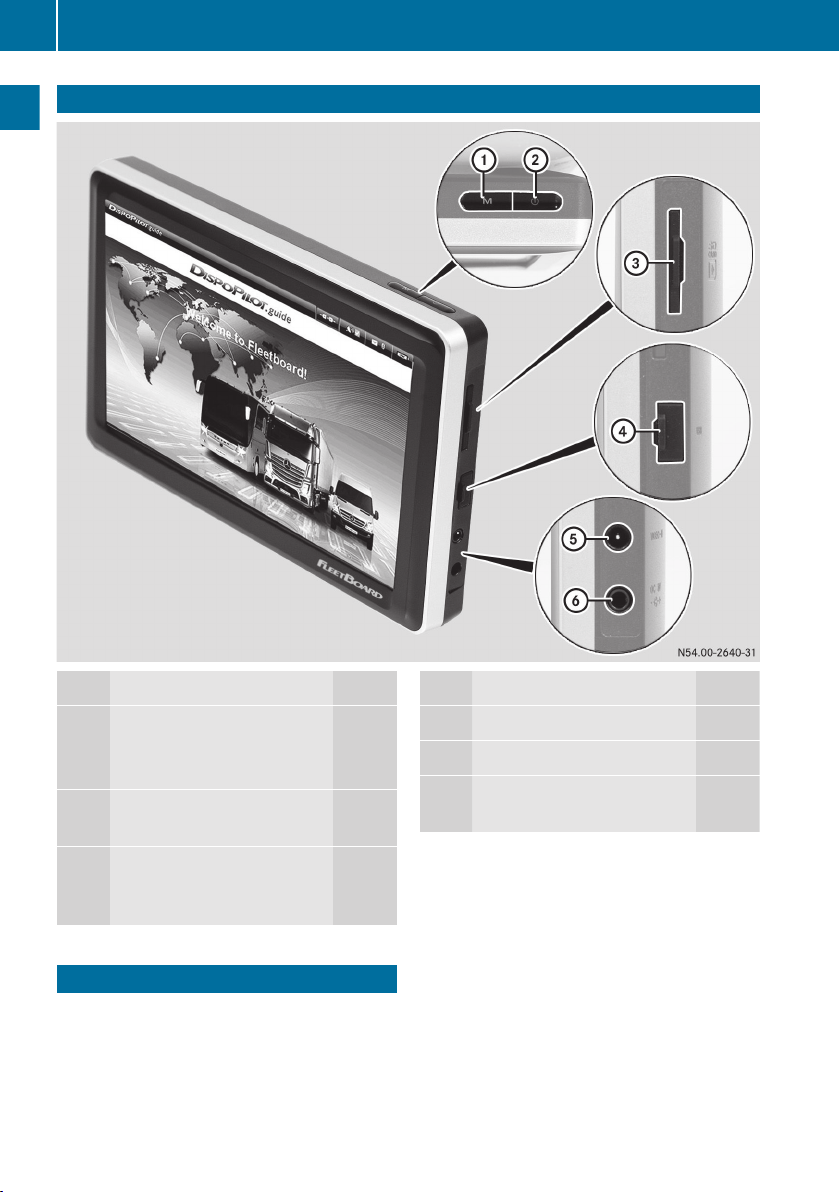
Z

Overview
Function Page
1M Calls up the portal page 8
Exits navigation full screen
mode 23
2Ü Switches DispoPilot
on/off 8
3Card slot for the SD card
(for navigation system
updates)
Function Page
4USB port
5Video input (no function)
6External power connection
(no function)
Portal
When DispoPilot is switched on, the portal is
displayed automatically after the device has
booted up.
8Portal
Overview and operation
Indice