FLIR K Series Manuale utente

Getting Started Guide
Flir K series


Důležitá poznámka
Před použitím zařízení si přečtěte veškeré pokyny, upozornění, varování a vyvázání se ze záruky, ujistěte se, že
jim rozumíte, a řiďte se jimi.
Vigtig meddelelse
Før du betjener enheden, skal du du læse, forstå og følge alle anvisninger, advarsler, sikkerhedsforanstaltninger
og ansvarsfraskrivelser.
Wichtiger Hinweis
Bevor Sie das Gerät in Betrieb nehmen, lesen, verstehen und befolgen Sie unbedingt alle Anweisungen,
Warnungen, Vorsichtshinweise und Haftungsausschlüsse.
Σημαντική σημείωση
Πριν από τη λειτουργία της συσκευής,πρέπει να διαβάσετε,να κατανοήσετε και να ακολουθήσετε όλες τις
οδηγίες,προειδοποιήσεις,προφυλάξεις και νομικές αποποιήσεις.
Important note
Before operating the device, you must read, understand, and follow all instructions, warnings, cautions, and legal
disclaimers.
Nota importante
Antes de usar el dispositivo, debe leer, comprender y seguir toda la información sobre instrucciones,
advertencias, precauciones y renuncias de responsabilidad.
Tärkeä huomautus
Ennen laitteen käyttämistä on luettava ja ymmärrettävä kaikki ohjeet, vakavat varoitukset, varoitukset ja
lakitiedotteet sekä noudatettava niitä.
Remarque importante
Avant d'utiliser l'appareil, vous devez lire, comprendre et suivre l'ensemble des instructions, avertissements, mises
en garde et clauses légales de non-responsabilité.
Fontos megjegyzés
Az eszköz használata előtt figyelmesen olvassa el és tartsa be az összes utasítást, figyelmeztetést, óvintézkedést
és jogi nyilatkozatot.
Nota importante
Prima di utilizzare il dispositivo, è importante leggere, capire e seguire tutte le istruzioni, avvertenze, precauzioni
ed esclusioni di responsabilità legali.
重重要要なな注注意意
デバイスをご使用になる前に、あらゆる指示、警告、注意事項、および免責条項をお読み頂き、その内容を理解
して従ってください。
중중요요한한 참참고고 사사항항
장치를 작동하기 전에 반드시 다음의 사용 설명서와 경고,주의사항,법적 책임제한을 읽고 이해하며 따라야 합니
다.
Viktig
Før du bruker enheten, må du lese, forstå og følge instruksjoner, advarsler og informasjon om ansvarsfraskrivelse.
Belangrijke opmerking
Zorg ervoor dat u, voordat u het apparaat gaat gebruiken, alle instructies, waarschuwingen en juridische informatie
hebt doorgelezen en begrepen, en dat u deze opvolgt en in acht neemt.
Ważna uwaga
Przed rozpoczęciem korzystania z urządzenia należy koniecznie zapoznaćsięz wszystkimi instrukcjami,
ostrzeżeniami, przestrogami i uwagami prawnymi. Należy zawsze postępowaćzgodnie z zaleceniami tam
zawartymi.
Nota importante
Antes de utilizar o dispositivo, deverá proceder à leitura e compreensão de todos os avisos, precauções,
instruções e isenções de responsabilidade legal e assegurar-se do seu cumprimento.
Важное примечание
До того,как пользоваться устройством,вам необходимо прочитать и понять все предупреждения,
предостережения и юридические ограничения ответственности и следовать им.
Viktig information
Innan du använder enheten måste du läsa, förstå och följa alla anvisningar, varningar, försiktighetsåtgärder och
ansvarsfriskrivningar.
Önemli not
Cihazıçalıştırmadan önce tüm talimatları, uyarıları, ikazlarıve yasal açıklamalarıokumalı, anlamalıve bunlara
uymalısınız.
重重要要注注意意事事项项
在操作设备之前,您必须阅读、理解并遵循所有说明、警告、注意事项和法律免责声明。
重重要要注注意意事事項項
操作裝置之前,您務必閱讀、了解並遵循所有說明、警告、注意事項與法律免責聲明。

Table of contents
Any late changes are first implemented in English.
The latest revision of this publication always applies, and can be downloaded from http://support.flir.com.
EN-US English .............................................................................................7
CS-CZ čeština............................................................................................10
DA-DK Dansk.............................................................................................13
DE-DE Deutsch..........................................................................................16
EL-GR Ελληνικά.........................................................................................19
ES-ES Español ..........................................................................................22
FI-FI Suomi ................................................................................................25
FR-FR Français..........................................................................................28
HU-HU Magyar...........................................................................................31
IT-IT Italiano............................................................................................... 34
JA-JP 日本語..............................................................................................37
KO-KR 한국어............................................................................................ 40
NB-NO Norsk .............................................................................................43
NL-NL Nederlands .....................................................................................46
PL-PL Polski...............................................................................................49
PT-PT Português .......................................................................................52
RU-RU Русский .........................................................................................55
SV-SE Svenska..........................................................................................58
TR-TR Türkçe ............................................................................................61
ZH-CN 简体中文.........................................................................................64
ZH-TW 繁體中文 ........................................................................................67
© 2013, Flir Systems, Inc. All rights reserved worldwide.
Publ. no. T559819, rev. A


EN-US English
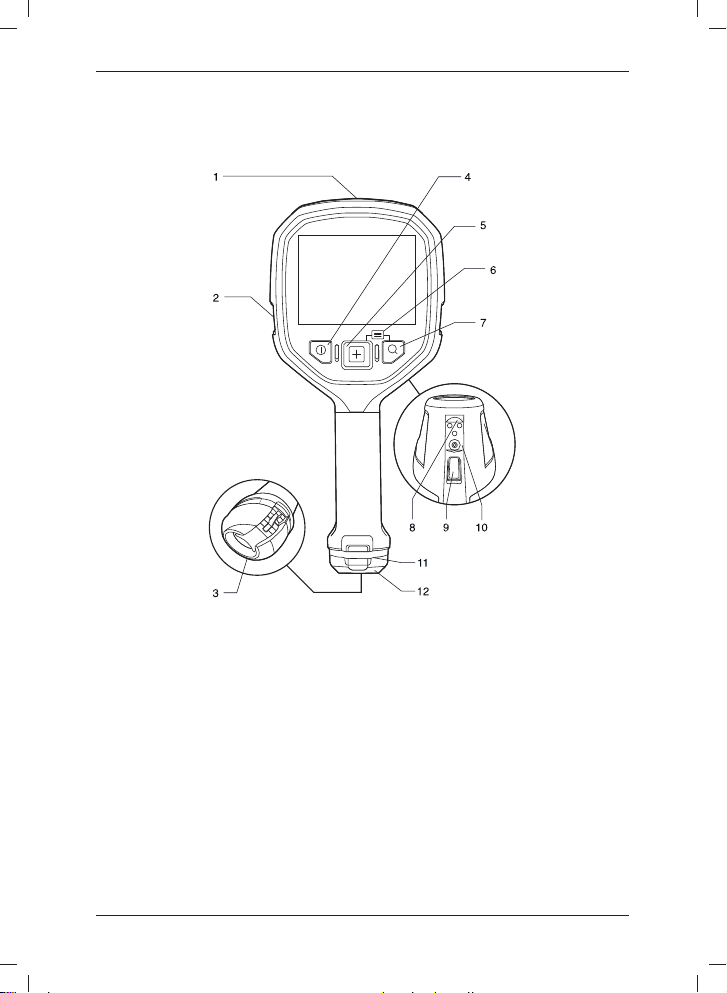
Camera parts
Figure
Explanation
1. USB Mini-B connector: Connect to a computer to download images using Flir
Tools.
2. Attachment point for lanyard strap/neck strap (left and right side).
3. Eccentric latch to secure the battery.
4. On/off button. This button has two functions:
• Push and holdto turn on/off.
• Push to go to default mode.
5. Mode button: Push repeatedly to select camera modes.
6. Access to setup menus and stored images: Push Mode + Zoom button.
7. Zoom button (zoom factor 2×).
8. Connectors for in-truck charger.
9. Save trigger. This trigger has two parallel functions:
• Pull the trigger: Save an image.
© 2013, Flir Systems, Inc. All rights reserved worldwide. 7
Publ. no. T559819, rev. A

1
2
3
4
5
6
7
9
8
EN-US English
• Pull the trigger: Freeze an image. The image is then frozen until the trigger is
released.
10. Mount for tripod adapter.
11. Attachment point for retractable lanyard.
12. Battery.
Screen elements
Figure
Explanation
1. NFPA firefighting mode. Multipurpose mode for the initial fire attack with life
rescuing operation and control of the fire.
2. Black and white firefighting mode. Multipurpose mode for the initial fire attack
with life rescuing operation and control of the fire.
3. Fire mode. Similar to the NFPA firefighting mode, but with a higher-temperature
starting point for the heat colorization.
4. Search and rescue mode. Optimized for maintaining high contrast in the infrared
image while searching for people.
5. Heat detection mode. Optimized for searching hotspots during overhaul after the
fire is out.
6. Temperature scale.
7. Spotmeter.
8. Battery condition indicator.
9. Spotmeter temperature.
NOTE
• The green icon color indicates that the camera automatically switches between the
high-sensitivity range and the low-sensitivity range, depending on the object.
• The blue icon color indicates that the temperature range is locked.
• NFPA = National Fire Protection Association, an international non-profit
organization (http://www.nfpa.org).
© 2013, Flir Systems, Inc. All rights reserved worldwide.
8Publ. no. T559819, rev. A

EN-US English
Quick start guide
Follow this procedure to get started right away:
1. Charge the battery for 4 hours before starting the camera for the first time, or until
the blue battery condition LED glows continuously.
2. Push the On/off button to turn on the camera.
3. Aim the camera toward the object of interest.
4. Select a suitable camera mode by pushing the Mode button.
5. Pull the Save trigger to save an image.
6. Connect the camera to a computer, using the USB cable.
7. Do one of the following:
• Move the image to the computer using a drag-and-drop operation.
NOTE
Moving an image using a drag-and-drop operation does not delete the image
in the camera.
• Move the image to the computer using Flir Tools. A download card for Flir
Tools is included in the transport case. In Flir Tools you can analyze the
images and create PDF reports.
© 2013, Flir Systems, Inc. All rights reserved worldwide. 9
Publ. no. T559819, rev. A

CS-CZ čeština
Části kamery
Obrázek
Vysvětlení
1. Konektor USB Mini-B: Připojte jej k počítači, chcete-li stáhnout snímky pomocí
Flir Tools.
2. Připojovací bod pro popruh nebo popruh pro zavěšení na krk (levá a pravá
strana).
3. Excentr pro zajištění baterie.
4. Tlačítko Zap/Vyp. Toto tlačítko má dvěfunkce:
• Chcete-li přístroj zapnout nebo vypnout, stiskněte jej a přidržte.
• Chcete-li přepnout do výchozího režimu, stiskněte jej.
5. Tlačítko Režim: Stiskněte jej, chcete-li volit režimy kamery.
6. Přístup do nabídek nastavení a k uloženým snímkům: stiskněte tlačítko Režim
+ Zoom.
7. Tlačítko Zoom (dvojnásobné zvětšení).
8. Konektory pro nabíječku do nákladního automobilu.
© 2013, Flir Systems, Inc. All rights reserved worldwide.
10 Publ. no. T559819, rev. A
Altri manuali per K Series
2
Indice
Lingue:
Altri manuali FLIR Telecamera termica

FLIR
FLIR G Series Manuale utente

FLIR
FLIR Duo Pro R Manuale utente

FLIR
FLIR M-Series Manuale utente

FLIR
FLIR E series Manuale utente

FLIR
FLIR TG130 Manuale utente

FLIR
FLIR Voyager II Manuale utente

FLIR
FLIR VS290-2x Manuale utente

FLIR
FLIR C Series Manuale utente

FLIR
FLIR E-EST Series Manuale utente

FLIR
FLIR CX series Manuale utente

FLIR
FLIR M100SERIES Manuale di istruzioni

FLIR
FLIR ZENMUSE XT2 Manuale utente

FLIR
FLIR FLIR AX8 Manuale utente

FLIR
FLIR ThermaCAM E320 Manuale utente

FLIR
FLIR T840 Manuale utente

FLIR
FLIR Ax5 series Manuale utente

FLIR
FLIR HM-Series Manuale utente

FLIR
FLIR T600 Manuale utente

FLIR
FLIR FC-Series S Manuale utente

FLIR
FLIR mariner Manuale utente