Forenex e.Frame C/E Series Manuale utente

e.FrameUser’sManualV1.1
e.FrameC/ESeries
DigitalSignagePanel
User's Manual
DSP133
DSP156
DSP220

e.FrameUser’sManualV1.1 -2-
Content
1IntroductionofIconsandFunctions...............................................................................................‐3‐
1‐1IconsforSystemFunctions............................................................................................................‐ 3‐
1‐2NewWindowCreationandOperationModeSetUp....................................................................‐ 5‐
1‐3PictureMode.................................................................................................................................‐ 6‐
1‐4VideoMode...................................................................................................................................‐ 7‐
1‐4‐1SetUpStreamingMedia(RTSP)inVideoWindows.................................................................‐ 7‐
1‐5ScrollingTextMode.......................................................................................................................‐ 8‐
1‐6Date&TimeMode........................................................................................................................‐ 8‐
1‐7EnableInteractiveFunctions(EseriesOnly).................................................................................‐ 9‐
1‐8BroadcastDeviceSynchronization..............................................................................................‐ 10‐
1‐9SetUpScheduledDisplay............................................................................................................‐ 11‐
2SampleAdvertisingProject...........................................................................................................‐12‐
3Appendix:.......................................................................................................................................‐15‐
3‐1EnteringEditMode......................................................................................................................‐ 15‐
3‐2FileManagement.........................................................................................................................‐ 15‐
3‐3UseMobileDevicetoEditBroadcastContent............................................................................‐ 17‐
3‐4UsePCtoEditBroadcastContent...............................................................................................‐ 18‐
3‐5DefineOwnWindowFrameStyle...............................................................................................‐ 20‐
3‐6LimitationsforCreatingVideoWindows....................................................................................‐ 20‐

e.FrameUser’sManualV1.1 -3-
(Figure1)
1IntroductionofIconsandFunctions
1‐1IconsforSystemFunctions
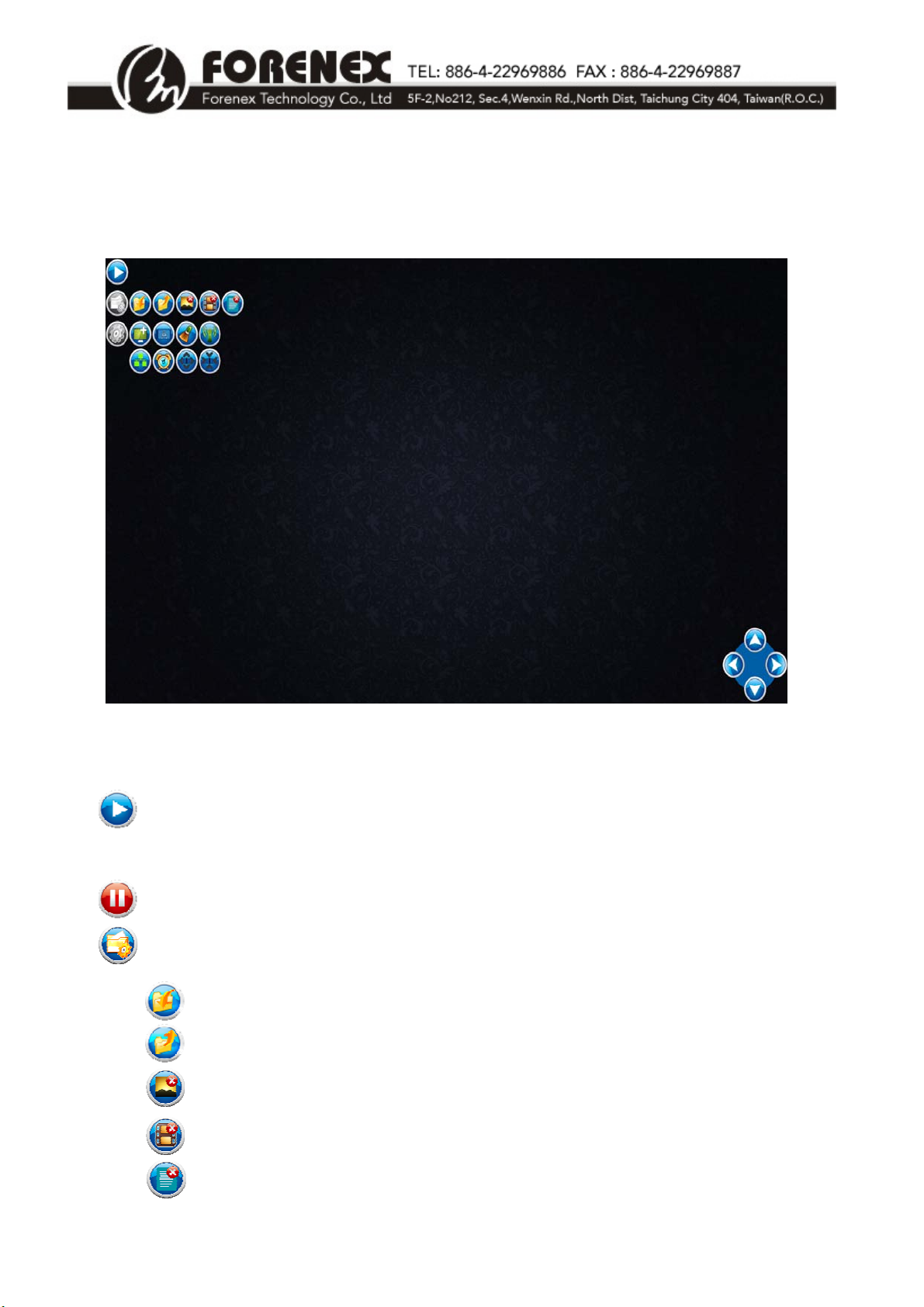
Whene.Frameisturnedon,theinitialscreenisshownbelow:
**Whene.Frameisplayingadvertisements,allofthefunctioniconswillbeautomaticallyhidden.
Play:Playnewlycreatedadvertisingprojectorpreviouslycompletedadvertising
project(.ad)ordisplayschedule(.lst)ine.Frame.
Pause:Pauseplayingadvertisementandentereditmode. Refertosection3‐1.
FileManagementToolbar:
Savethecompletedadvertisingproject.Thedefaultfilenameextensionis“.ad”.
Selectandopenasavedadvertisingproject(.ad)ordisplayschedule(.lst).
Deletepicturefilesinthepicturegallery.RefertoSection3‐2.
Deletevideofilesinthevideogallery.RefertoSection3‐2.
Deleteadvertisingproject(.ad)ordisplayschedule(.lst).RefertoSection3‐2.

e.FrameUser’sManualV1.1 -4-
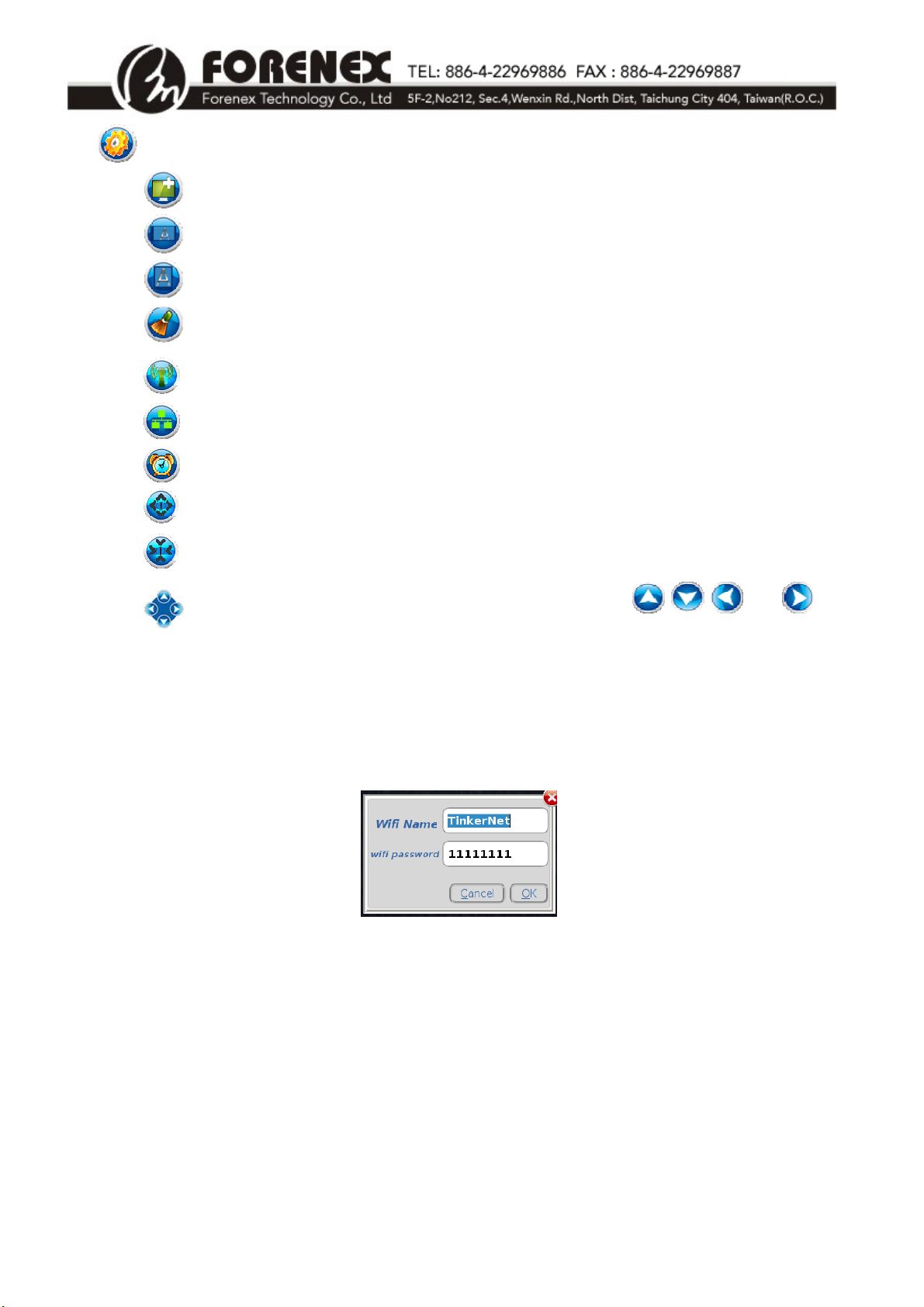
SystemToolbar:CollapseorexpandtheSystemToolsiconsasbelow.
Insertabackgroundofanewadvertisingproject.
Changescreentolandscapemode.
Changescreentoportraitmode.
Clearfullscreen.
SetupWi‐FiIDandpasswordondevice.RefertoFigure2.
. Setupsynchronizationofe.Framesonthesamenetwork.RefertoSection1‐8.
Setupscheduleddisplaysleepandwakeuptimesdaily.RefertoSection1‐9.
Increasetheiconsize.
Decreasetheiconsize.
Adjustmentbuttonstofine‐tunewindowposition: Usethe ,,,and
buttonstoadjustthewindowposition.Thepositionoftheadjustmentbuttonscluster
canbemovedanywherewithine.Frame.
(Figure2)

e.FrameUser’sManualV1.1 -5-
1‐2NewWindowCreationandOperationModeSetUp
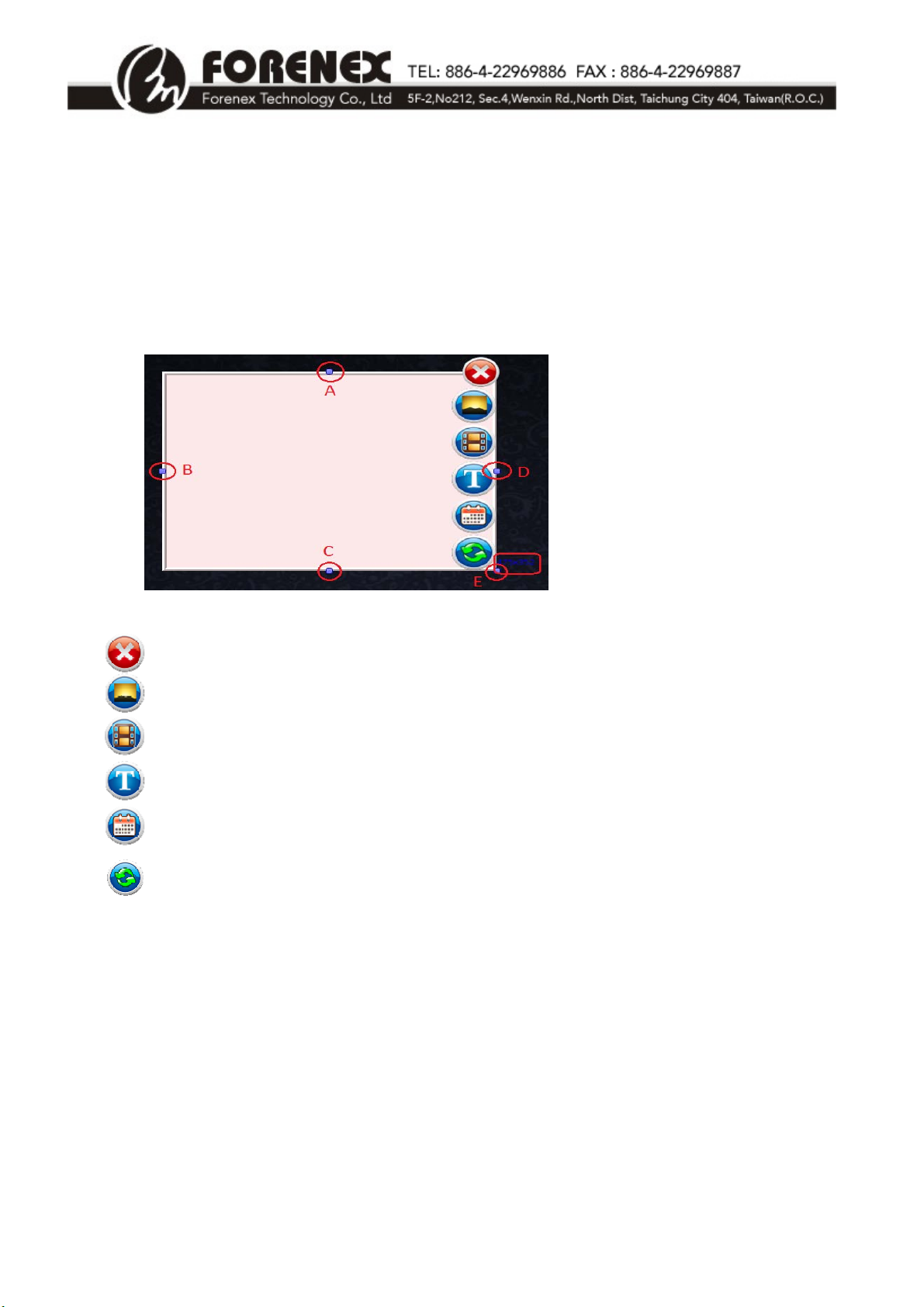
Click&Dragtheleftbuttonofthemouseanywhereine.Framefromtheupper‐leftto
lower‐righttoopenanewwindowandusethedraghandleslocatedatA,B,C,D,Eto
adjustwindowsize.RefertoFigure3.
Thewindowsize(ex.475x352)isshowninlower‐rightcorner.
Deletethewindow.
Picturebutton:Opennewpicturemodewindow.
Videobutton:Opennewvideomodewindow.
ScrollingTextbutton:Opennewscrollingtextmodewindow.
Date&Timebutton:Opennewdate&timemodewindow.
Enableinteractivefunctionforeachwindow:Setuptoconnecttoasinglepage.(.ad)or
multiplepages.(.lst)on‐click.RefertoSection1‐7EnableInteractiveFunctionsfordetail.
OnlyavailableonESeries.
(Figure3)

e.FrameUser’sManualV1.1 -6-
1‐3PictureMode
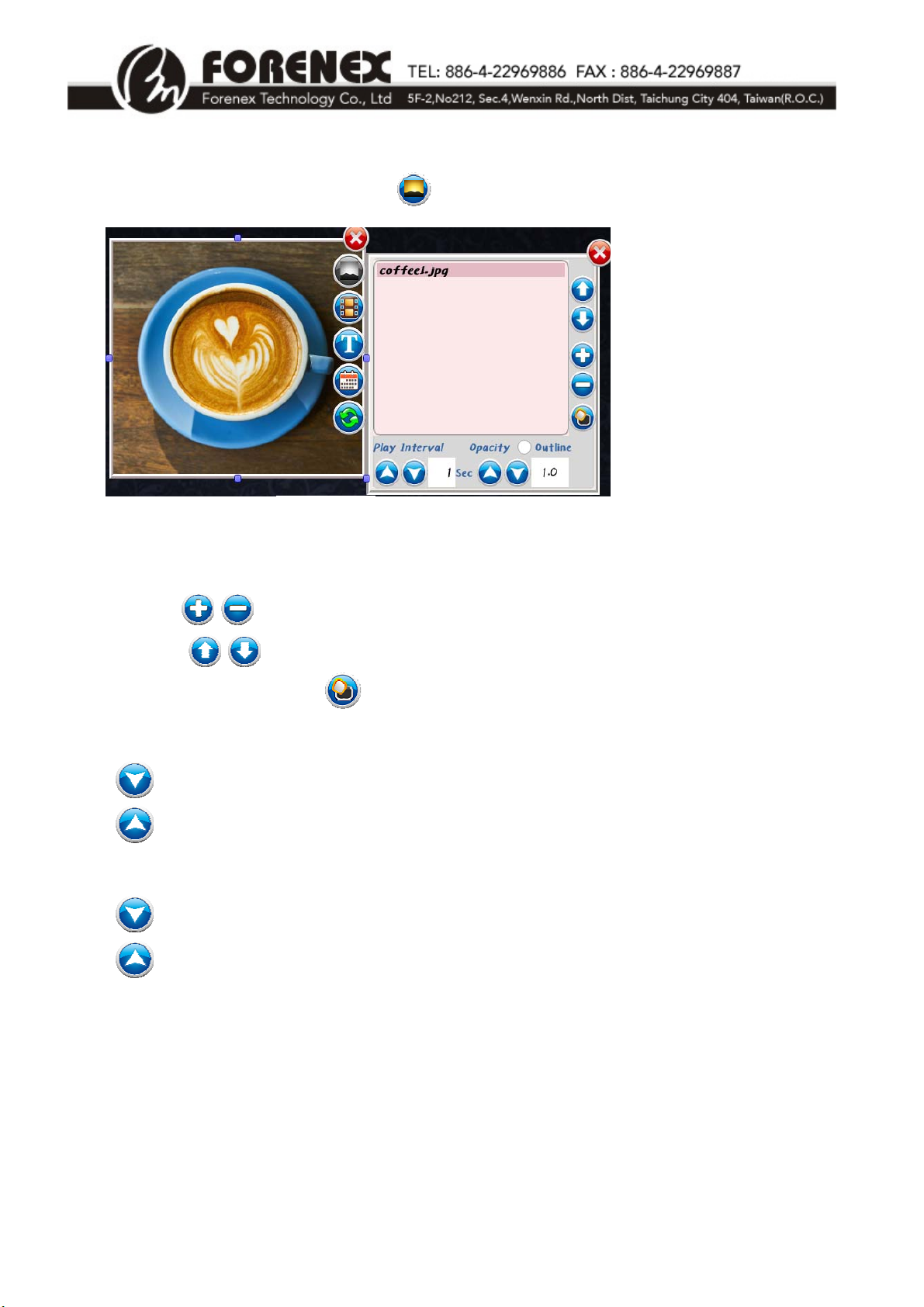
Inthewindow,clickthePicturebutton ,tosetthewindowaspicturemode.RefertoFigure4.
** Supportedpictureformats:JPG,BMP,PNG,GIF.
Usethe/buttonstoaddortoremovepictures.
Clickthe/buttonstoadjusttheplayorder.
ClickWindowShapebutton toselectwindowframestyle.
Opacity:Transparencyratiosettings.
Decreasepicturetransparency(backgroundbecomepale).
Increasepicturetransparency(enhancebackground).
PlayInterval:Settimeintervaltodisplayeachpicture.
Decreasepicturedisplaytimeinseconds.
Increasepicturedisplaytimeinseconds.
(Figure4)

e.FrameUser’sManualV1.1 -7-
1‐4VideoMode
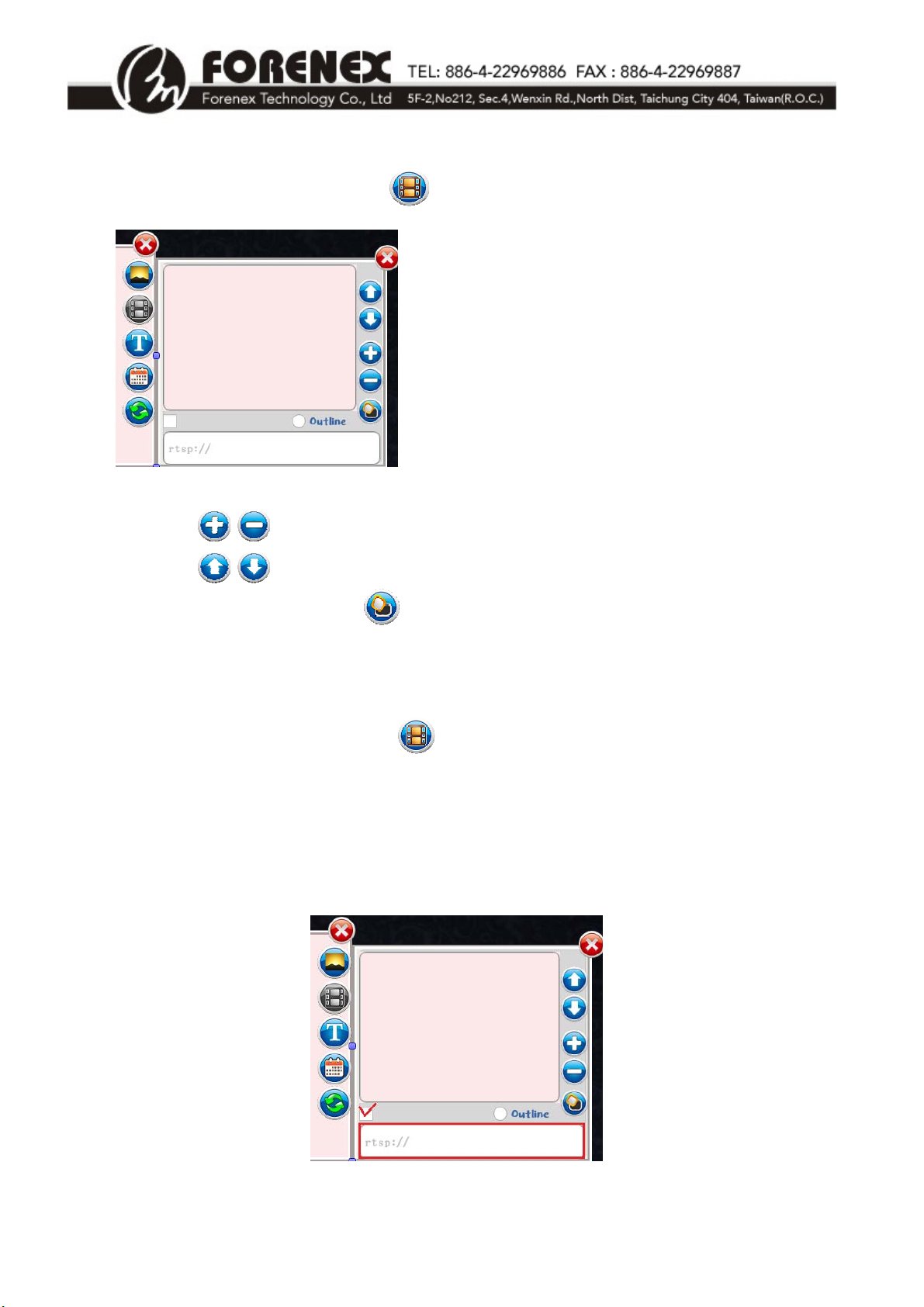
Inthewindow,clickthe Videobutton tosetthewindowasvideomode.RefertoFigure5.
Clickthe/buttonstoaddorremoveavideo.
Clickthe/buttonstoadjustvideoplayorder.
ClicktheWindowShapebutton toselectwindowframestyle.
1‐4‐1SetUpStreamingMedia(RTSP)inVideoWindows
Inthewindow,clicktheVideobutton tosetthewindowasvideomodefirstlyandthen
selectthe″rtsp://″optionbelowimageandtypetheRTSPIPaddressafter″rtsp://″.Referto
Figure6.
*RTSP(RealTimeStreamingProtocol)allowsinstantreal‐timestreamingofremotemedia.
** allowplayingoneormorevideosasoneplaylist.
** supportedfileformatsforvideo:MP4、AVI、MP
**supportedMax.Resolution:FHD‐1080p
(Figure5)
(Figure6)

e.FrameUser’sManualV1.1 -8-
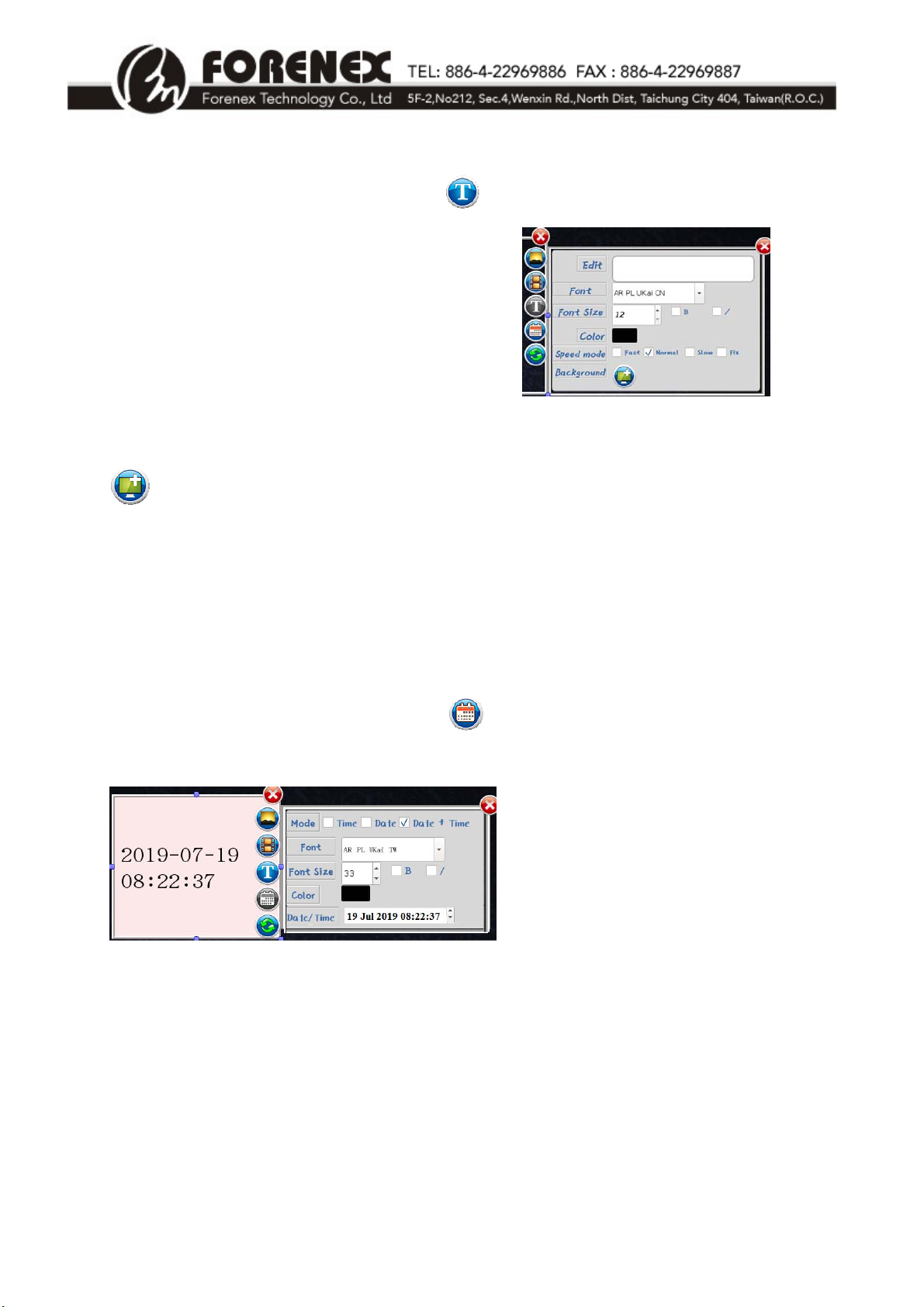
1‐5ScrollingTextMode
Inthewindow,clicktheScrollingTextbuttontosetthewindowtobescrollingtextmode.
RefertoFigure7.
Edit:Edittexthere.
Fontstyle:Selectthefontstyle.
Fontsize:Selectthefontsize(12–99).
Color:Selectthefontcolor.
Speedmode:Selectscrollingtextdisplayspeedmode(fast,normal,slow,fixed)
Selectbackgroundforscrollingtext(Defaultbackgroundistransparent)
**Foradditionalfonts,pleasecontactyourlocale.Frameagent.
**SettingthebackgroundforscrollingtextwillnotaffectthesetupinSection1‐1(forthewhole
advertismentbackground).
1‐6Date&TimeMode
Inthewindow,clicktheDate&Timebuttontosetthewindowasdate&timemode.
RefertoFigure8.
Mode:Selectdisplaydate/timemode(1.Time、2.Date、3.Date&Time).
Fontstyle:Selectfontstyle.
Fontsize:Selectfontsize(12–99).
Color:Selectfontcolor(defaultfontcolorisblack).
(Figure7)
(Figure8)

e.FrameUser’sManualV1.1 -9-
1‐7EnableInteractiveFunctions(Eseries Only)
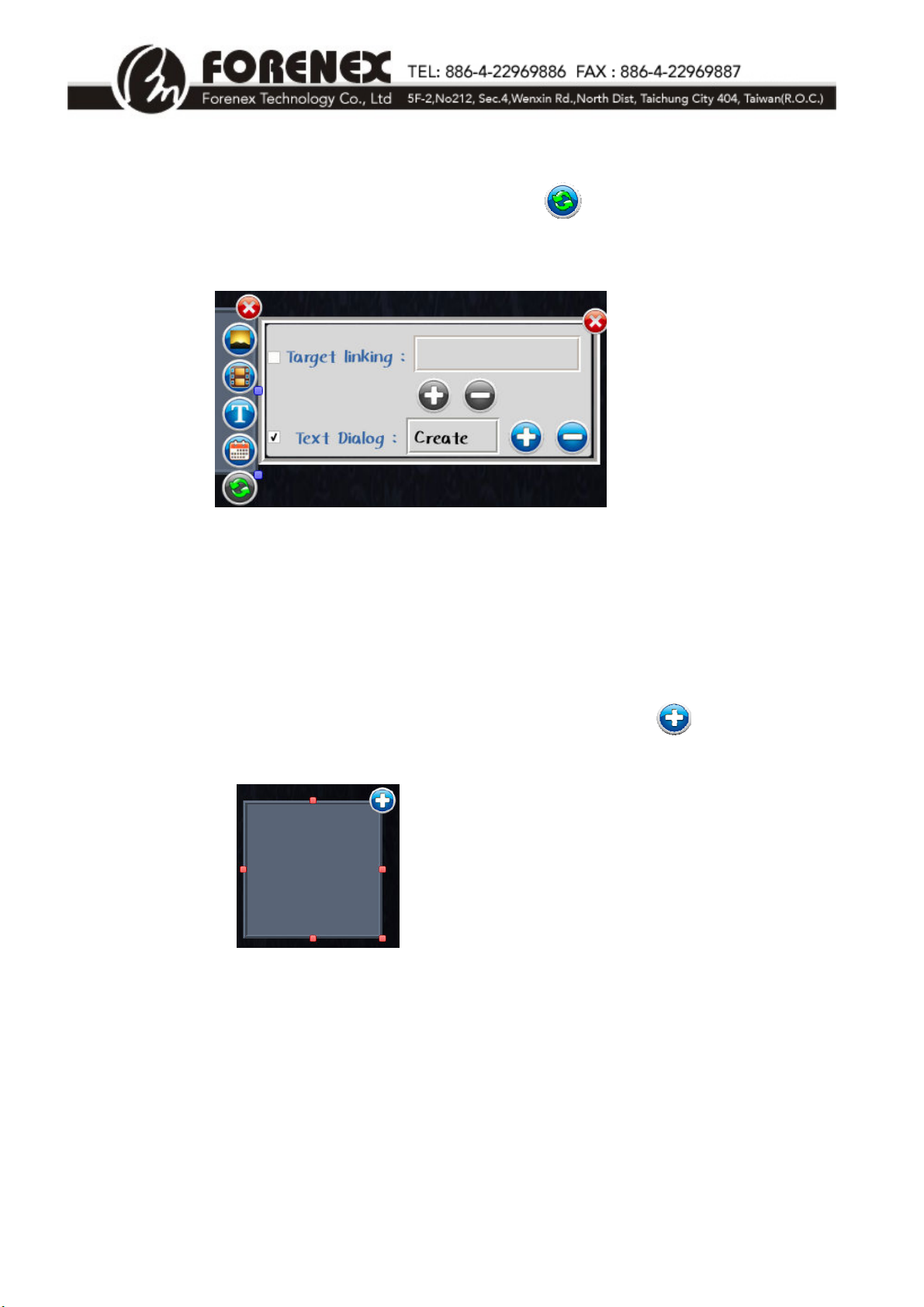
Inthenewlycreatedwindow,clicktheInteractivebuttontosetupinteractivefunctionof
thewindow.Clicktheinteractivecategory,usingthesettingdialogshowbelow.RefertoFigure9.
Oncetheinteractivefunctionhasbeensetup,thewholeareaofthewindowwillfunctionasa
button.Whenpressingtheareaofthewindow,itwillautomaticallyplaythecontentwhichwas
setupinthetargetlinkorinthetextdialog.
MarkedTargetlinking:Setupautomaticallytodisplayasinglepage(.ad)ormultiplepages(.lst)
aftertheareaofthewindowispressed.
MarkedTextDialog:Automaticallycreateanewwindow,thenclickthebuttontoadda
graphicstextfile.RefertoFigure10.
(Figure9)
(Figure10)

e.FrameUser’sManualV1.1 -10-
1‐8BroadcastDeviceSynchronization
Anye.Frameadvertisingcontentcanbesynchronouslydisplayedonmultiplee.Framedeviceson
thesamenetwork.
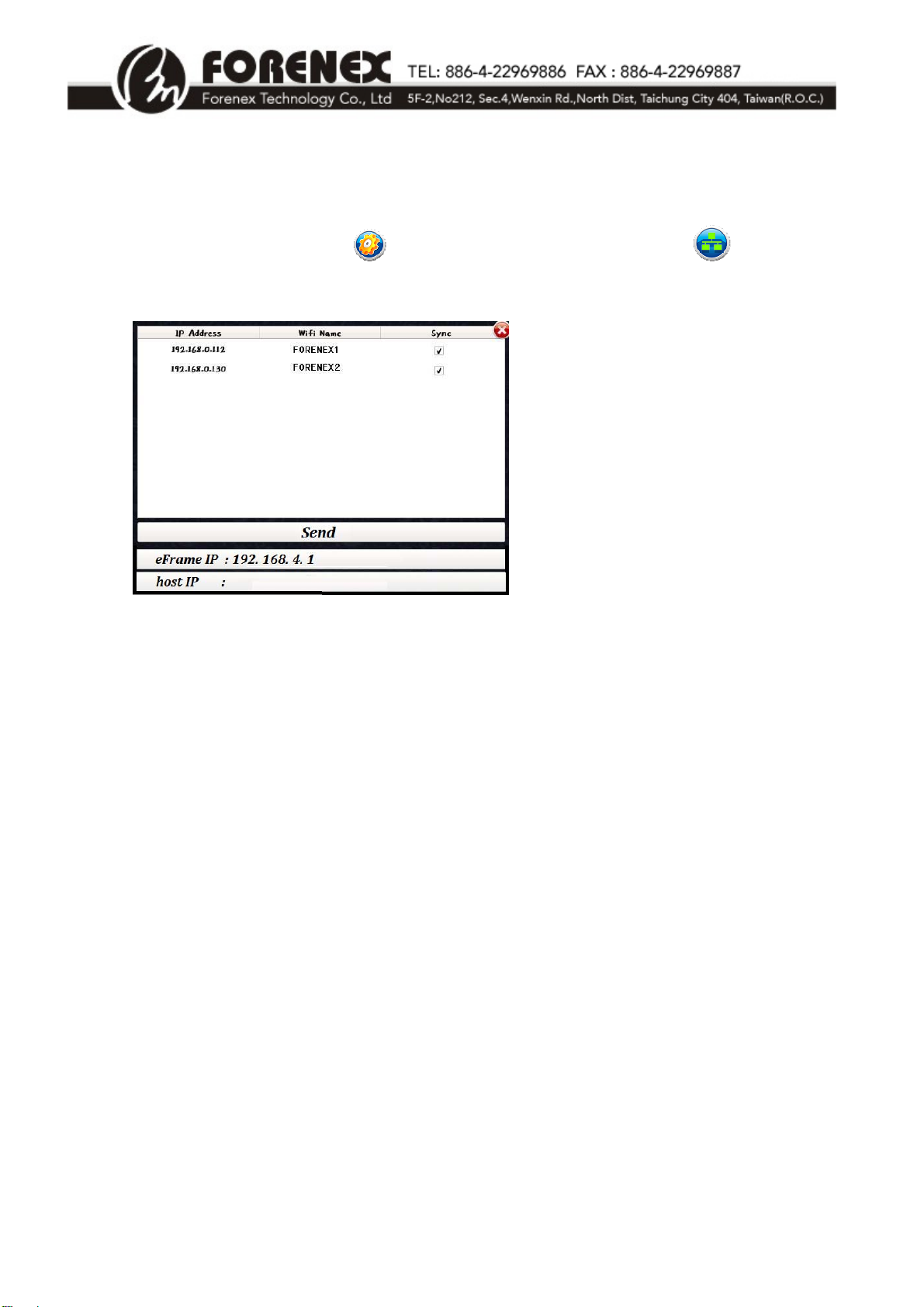
ClicktheSystemToolbarbutton,andthenclicktheSynchronizedbutton.
Anewdialogboxwillshowothere.Framedevicesonthesamenetwork.RefertoFigure11.
Theindividuale.FramedeviceIPaddressesandWi‐Finameswillbelistedinthedialogbox.
Selectthe“Sync”checkboxbesidethedevicestodisplaysynchronizedcontent.
Click“Send”tobeginbroadcastingSynchronizedcontenttotheselectede.Framedevices.
*“eFrameIP”:TheIPaddressisarandomaddressthatchangesinaccordancewithlocal
networks.WheneFrameconnectstoanetworkitshowsIPaddressautomatically.
*“hostIP”:ThehostIPenablesaPCtolinkeFramethroughaPCside,todesigncontentand
touploadanddownloadadvertisements.
(Figure11)
Questo manuale è adatto per i seguenti modelli
3
Indice