10 www.fosterrefrigerator.com
Defrost
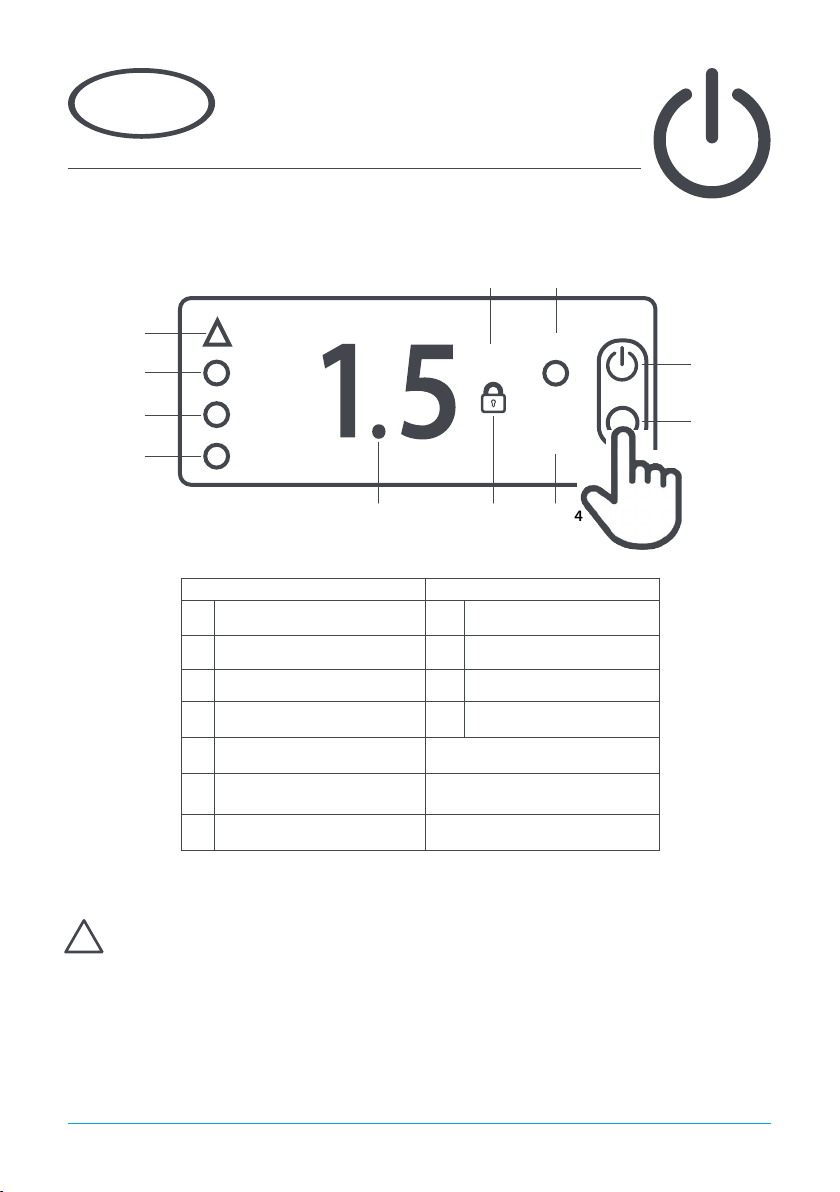
The appliance has an automatic defrost function and will defrost periodically each day
without any user intervention. This process is normal and does not aect product stored
in the appliance. During defrost the appliance can be used as normal.
To start a defrost manually press and hold button 1 for 5 seconds. This will turn o the
appliance. When this happens do not release the button and after 2 more seconds the
display will indicate a defrost has commenced (dEF is briey displayed) and the button
can be released. The appliance set point temperature will be displayed during defrost
and icon ‘g’ will ash to indicate a defrost is in progress.
The defrost will operate for it’s full duration, it is not possible to cancel a defrost when it
has started.
Keypad Sounds
If the user does not require the keypad to indicate with a sound when a button is pressed
this can be turned o. Press and hold button 2 for 3 seconds until the display shows ‘SP’.
Press button 2 until the display shows ‘biP’. Press button 1 to display the current value.
‘Yes’ indicates keypad sounds are active and ‘no’ indicates keypad sounds are not active.
Select the value required and press button 1 to save the new value. If button 1 is not
pressed the new value will not be stored. Exit with button 3.
Keypad Security Settings
The keypad can be locked to prevent unauthorised adjustment of the appliance and it’s operating tempera-
ture.
When the keypad is locked no adjustments can be made using the keypad and icon ‘f’will be displayed.
To lock or unlock the keypad press and release button 2 for 3 seconds and the display will show ‘SP’. Release
the button and then press button 2 once and the display will show ‘Loc’. Press button 1 to display the current
keypad lock status. Adjust using button 2 and button 4 to set the value to ‘Yes’to lock the keypad and ‘no’ to
unlock the keypad. Press button 1 to save the new value. If button 1 is not pressed the new value will not be
stored. The display will resume normal operation after 30 seconds or if button 3 is pressed.
Set Point
To display the appliance Set Point, with the display showing the temperature, press button 2 for 3 seconds and
the display will show ‘SP’. Then press button 1 once to display the current set point.
Adjust the set point using button 2 to increase and button 4 to decrease. Press button 1 to save the new value
and the display will show ‘Loc’. If button 1 is not pressed the new value will not be stored. Exit by pressing
button 3.
If the Set Point cannot be adjusted to the value required please contact your authorised Foster dealer for
advice.
The display will resume normal operation after 30 seconds or if button 3 is pressed.