
G.R.A.S. 41AC-3 Manuale utente

Instruction Manual
G.R.A.S 41AC-3 CCP Outdoor Microphone with
RemoteCheck for Community & Airport Noise
www.gras.dk
LI0152– 4 July 2017

2LI0152 – 4 July 2017
Revision History
Revision Date Description
1 26 August 2014 First edition
2 4 July 2017 42AG substituted for the obsolete 42AB
Copyright Notice
© 2014, 2017 G.R.A.S. Sound & Vibration A/S
http://www.gras.dk
Any technical documentation that is made available by G.R.A.S. is the copyrighted work of
G.R.A.S. and is owned by G.R.A.S.
The content in this document is subject to change without notice. G.R.A.S. Sound & Vibration A/S
is not liable or responsible for any errors or inaccuracies that may appear in this document.
Trademarks
Any product names mentioned in this document may be trademarks or registered trademarks of
their respective companies and are hereby acknowledged.

3
LI0152 – 4 July 2017
Contents
Introduction.................................................................................. 4
Delivered Items............................................................................. 4
Installation .................................................................................. 6
System Integration ...................................................................... 12
Accessories ................................................................................ 14
Specifications ............................................................................. 14
Calibration, Warranty and Service................................................... 18

4LI0152 – 4 July 2017
Introduction
The G.R.A.S. 41AC-3 CCP Outdoor Microphone for Community & Airport Noise is a precision
microphone set (IEC 61672-1) for monitoring community noise and the noise of overhead
aircraft.
It can be used for monitoring of noise with 90 degrees of incidence, typically community noise.
With the proper correction data, it can be used for 0 degrees of incidence, typically noise from
overhead aircraft. A USB flash drive with correction data is part of the delivery.
It is waterproof, rated at IP-55, and can operate unattended over a wide range of weather condi-
tions and temperatures for a very long period, i.e. a year or longer.
It uses a G.R.A.S. 40AE-S2 1/2” Prepolarized Free-field Microphone, High Sensitivity and a
G.R.A.S. 26CA 1/2’’ CCP Standard Preamplifier with BNC Connector.
It has TEDS according to IEEE1451.4 template UDID 127-0-0-0U.
Important. The 40AE-S2 microphone and its protective grid have been modified for the 41AC-3.
Therefore, microphone and grid cannot be replaced by standard items.
Delivered Items
1/2" Prepolarized Free-Field Microphone, High Sensitivity 40AE-S2
1/2’’ CCP Standard Preamplifier with BNC Connector 26CA
O-ring for preamplifier OR2038
USB flash drive with correction data for 0° (resolution: 1/12 octave)
Wind Screen AM0378
Top cone -
Upper housing -
Lower housing -
1” pole mount adapter RA0286
Tripod Adapter GR1096
Tripod thread adapter SK0017
5
LI0152 – 4 July 2017
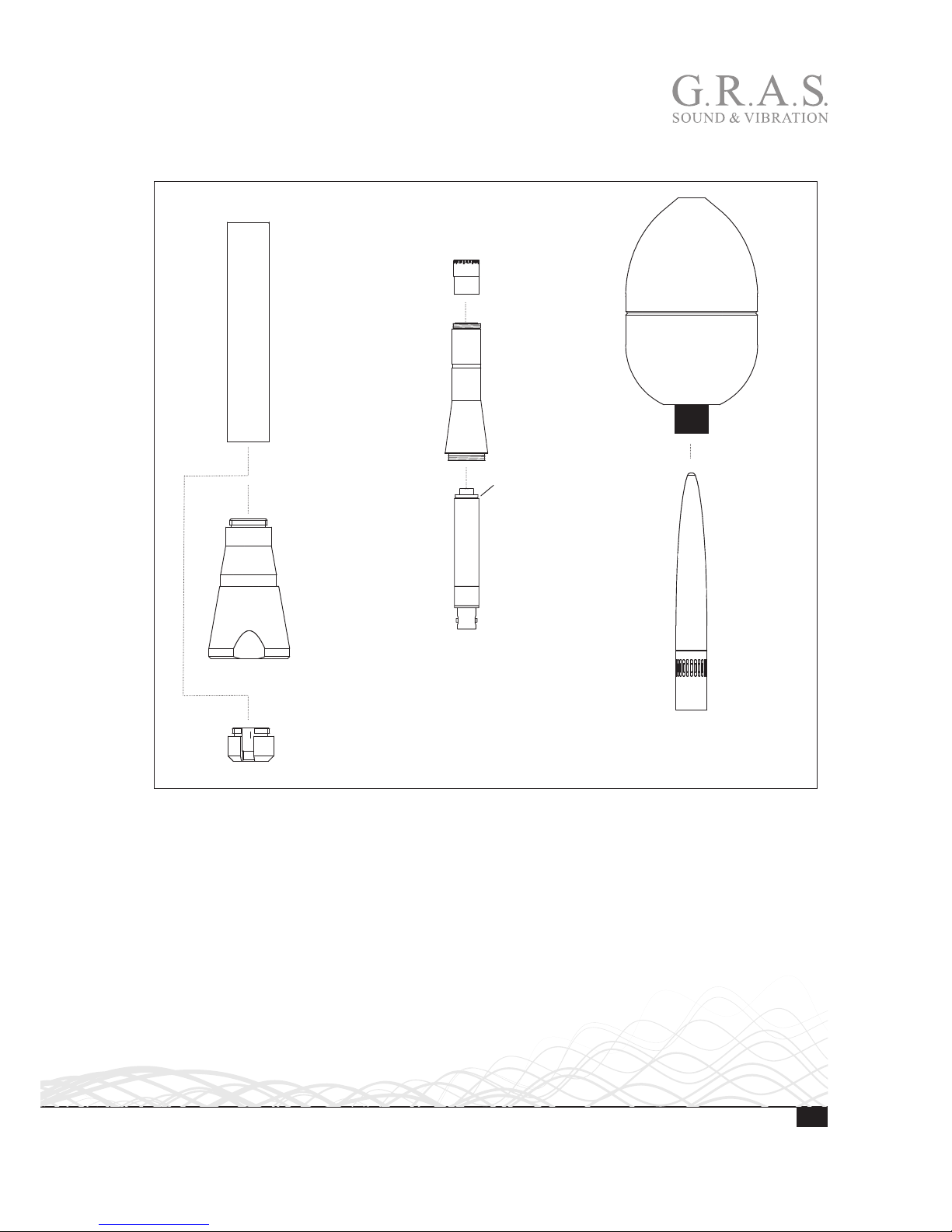
41AC-3 is delivered preassembled except for the windscreen and thread adapter.
2-piece
1” pole mount
adapter RA0286
Lower housing
Windscreen
AM0378
Top cone
Preamplfier 26CA
Upper housing
½" microphone
40AE-S2
Tripod and thread
adapter SK0017
O-ring OR2038
Fig. 1. The parts of 42AC-3.

6LI0152 – 4 July 2017
Installation
Mounting 41AC-3 on Tripod or Pole Mount Adapter
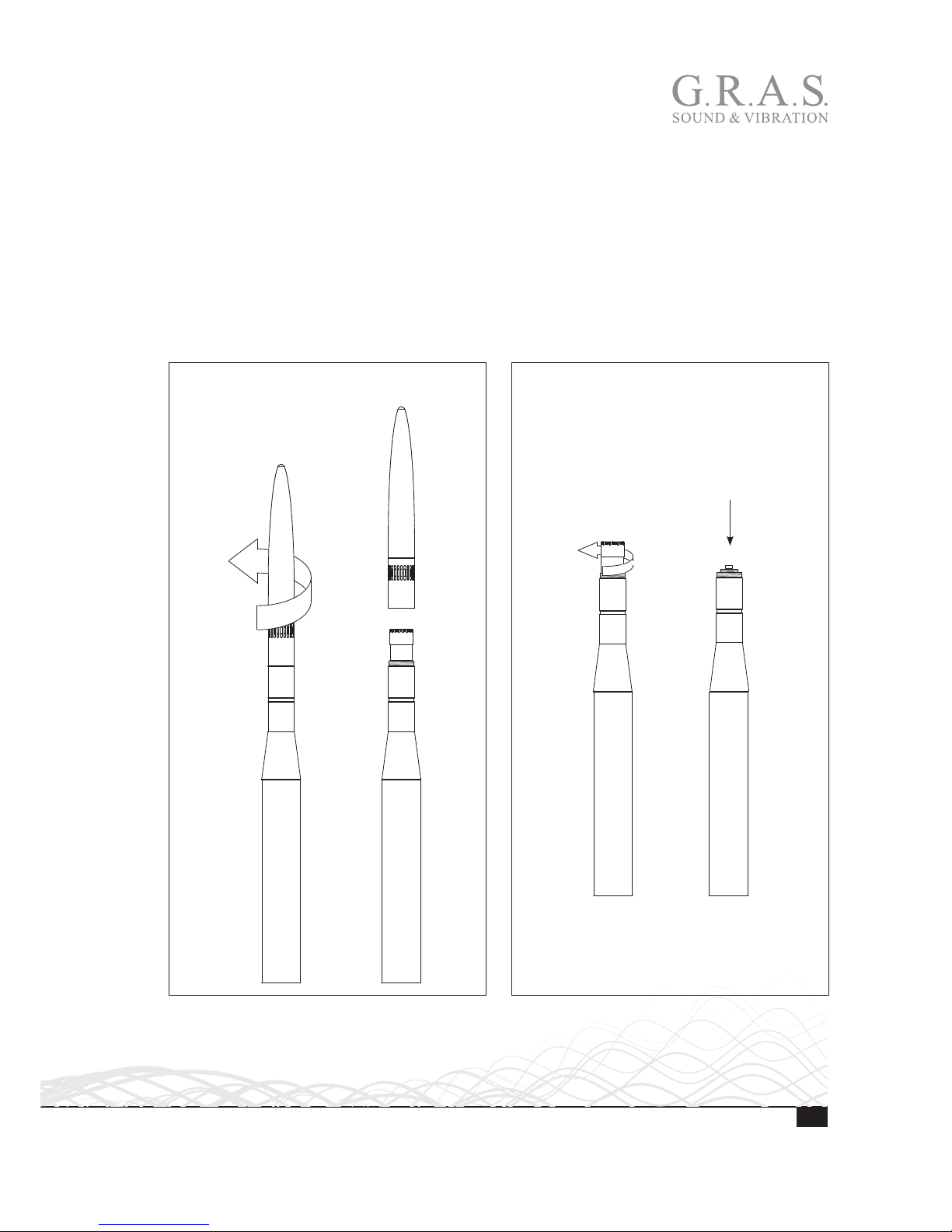
The 41AC-3 is designed for permanent installation and therefore comes with an adapter for
mounting on a 1” pole. See Fig. 2 and Fig. 3, 3. The 41AC-3 ’s housing is attached to the
mounting fittings with a M18 x 1.5 thread.
Two-piece pipe adapter with
1” pipe thread (ISO 228/1-G1)
M18 x 1.5
GR1096 Tripod
thread adapter
with SK0017 1/4”
threaded bushing
Tripod thread adapter
with 3/8” thread (without
1/4” bushing)
Fig. 2. The 41AC-3 lower housing’s thread and adaptor for tripod or pole mount.
7
LI0152 – 4 July 2017
Removing the Preamplifier
As delivered, the microphone set is mounted inside the housing. To attach the cable, you must
remove the top, remove the microphone and pull out the preamplifier.
1. Unscrew the top cone from the housing.
2. Set it aside and ensure that it is protected from dirt and moisture.
3. Remove the microphone from the preamplifier and set it aside. Ensure that it is protected from
dirt and moisture.
4. Push at the top of the preamplifier to make it slide down through the tube.
13
24
Fig. 3. Removing the top cone and releasing the preamplifier.

8LI0152 – 4 July 2017
Connecting the Cable to the Preamplifier and Remounting the Microphone Set
1. Connect the cable to the preamplifier.
2. Push the preamplifier up through the lower and upper housing.
3. To expose the thread for the microphone, ensure that the preamplifier is pushed up as far as it
will go.
4. Mount the microphone onto the preamplifier and tighten lightly.
1 32 4
Fig. 4. Connecting the cable and securing the microphone set.

9
LI0152 – 4 July 2017
Mounting the Top Cone
When the microphone has been mounted on the preamplifier, you can mount the top cone.
1. Screw on the top cone.
2. Ensure that the top cone is properly fastened.
1 2
6
5
Fig. 5. Mounting the upper housing and the top cone.
10 LI0152 – 4 July 2017
Mounting the Windscreen
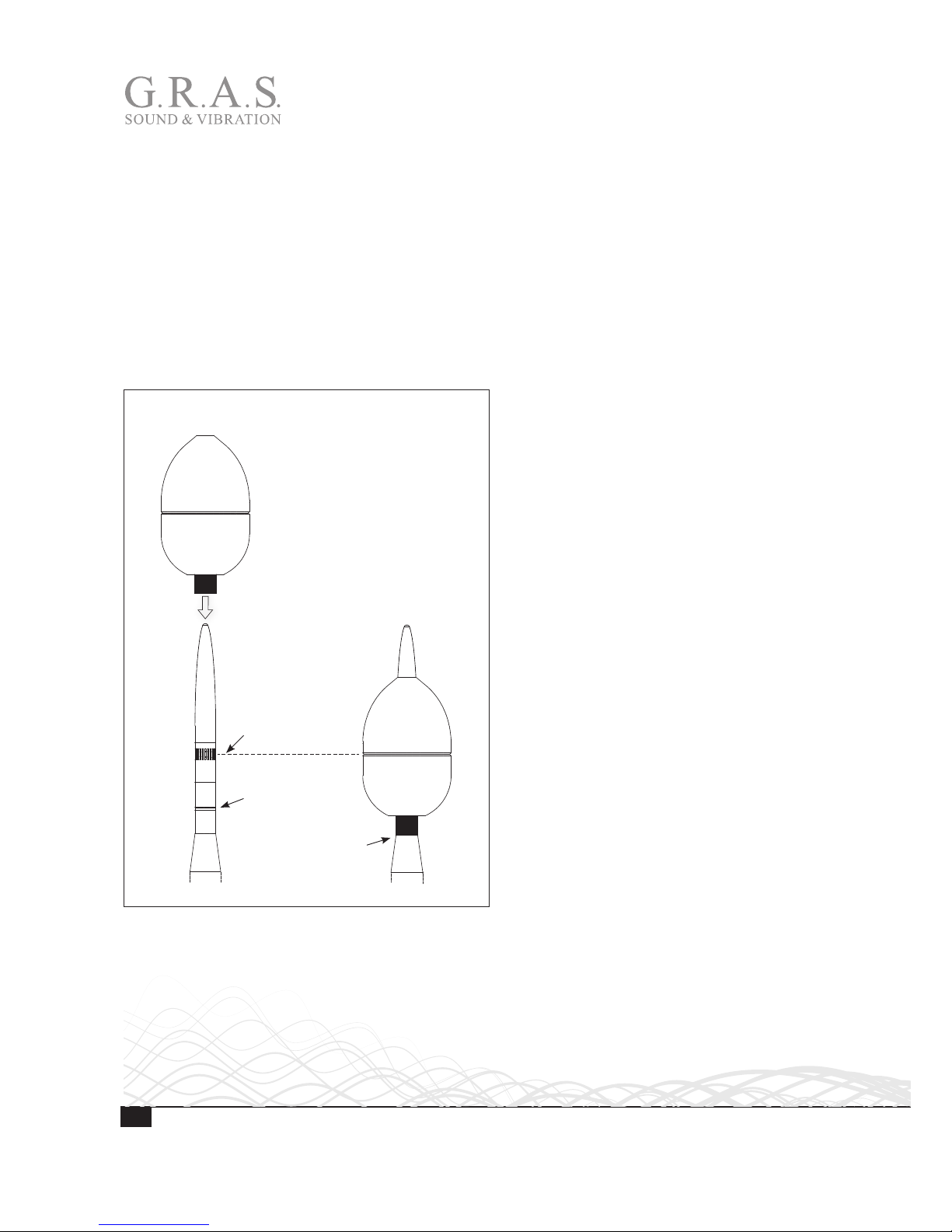
The windscreen is glued onto a plastic tube that ensures that it can be positioned correctly:
• When pushed down, the windscreen tube is prevented from going too far by the upper hous-
ing’s conical shape.
• When the windscreen is pushed as far down as it will go, it will be kept in place by a locking
groove. Because of this, it cannot be dislocated unintentionally, and incorrect measurements
due to an incorrectly positioned windscreen are avoided.
1. Slide the tube down over the top cone.
2. Ensure that the tube is pushed as far down as it will go.
1 2
End
stop
Locking
groove
Top of microphone
(diaphragm)
Fig. 6. Mounting the wind screen.
Indice
Altri manuali G.R.A.S. Microfono


