GAMDIAS HEBE M2 RGB Manuale utente

QUICK
INSTALLATION
GUIDE
<Français>
<Deutsch>
<English >
< E s p añ o l > <Português>
<Русский > < ภาษาไทย >
< 한국어 >
<日本語>
M2

《ENGLISH》
Thank you for choosing the HEBE M2 gaming headset by GAMDIAS™. GAMDIAS
multi-sensorial gaming headset delivers immersive sound for movie /game/music.
When detecting a blast, the ear cup vibrates to help pinpointing the source.
Ergonomic leather headband and soft leather ear pads, comfortable and breathable,
suit for a prolonged game play.
System Requirements
●Windows ® XP/ Vista / 7 / 8 / 10
●PC with standard USB port
Hardware and Software Installation
1. Plug the GAMDIAS™ HEBE M2 into your PCs via USB Port.
2. The “found new hardware” notice will appear, please following instruction to
complete hardware installation.
3. Log onto the GAMDIAS™ website (http://www.GAMDIAS.com) to download the
latest version of the HERA.
4. Start installing the GAMDIAS™ HERA, and following the onscreen instructions to
complete the installation.
HEBE M2 Specification
Sensitivity: 110dB + / - 3 dB
Impedance: 64±15% OHMS ( f=1KHz)
Driver diameter: 53mm
Driver magnets: NdFeB
Microphone size: φ6mm * 2.7mm(H)
Microphone Sensitivity: -42±3 dB (0dB=1V/Pa.1KHz)
Vibration unit driver unit size: 35mm
Cable Length: 2m
Plug type: Gold-plated USB plug
Dimension (L×W×H): 170 x 105 x 225 mm
Registering Your GAMDIAS™ HEBE M2 Gaming Headset
Please visit www.GAMDIAS.com for online product registration.
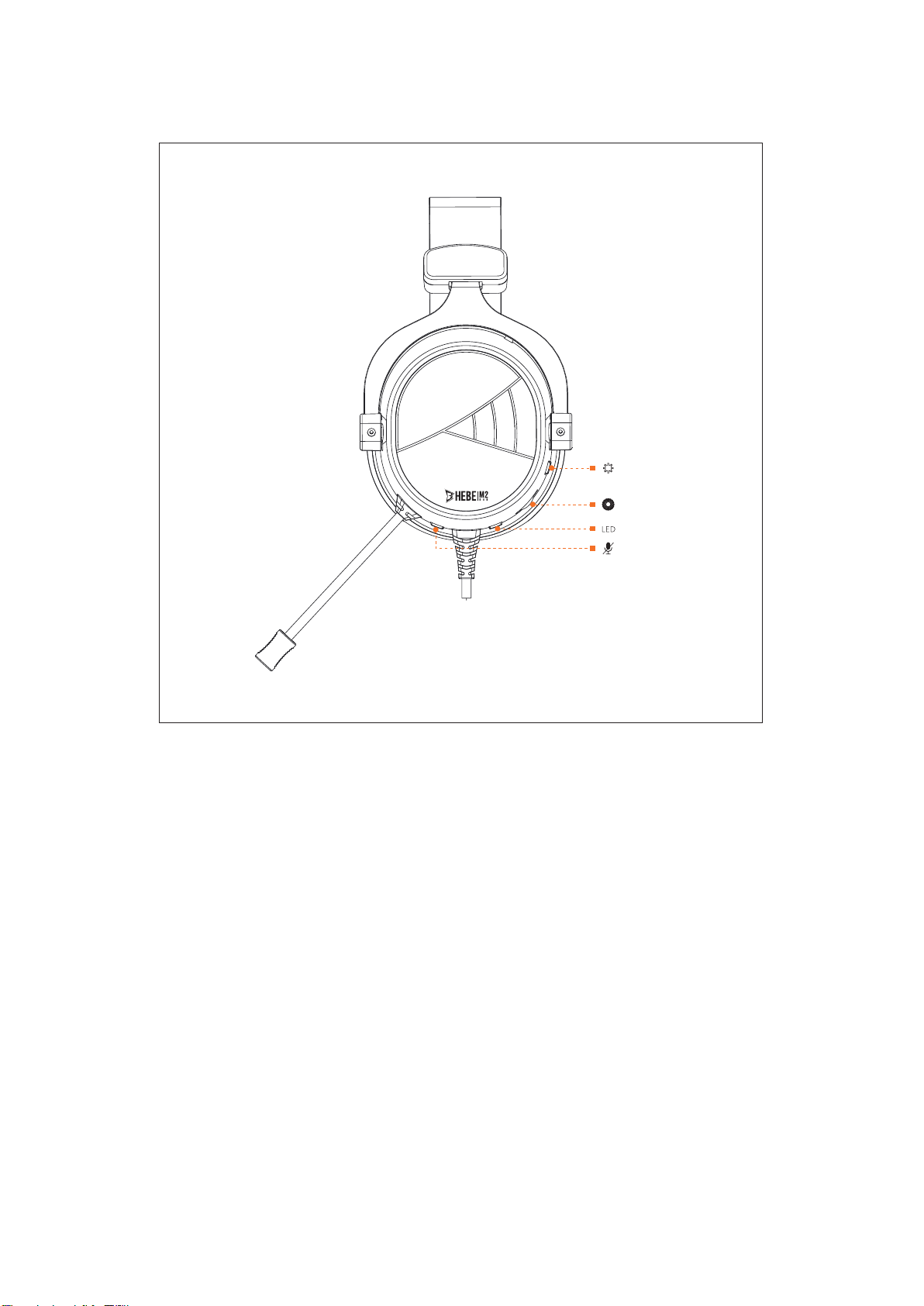
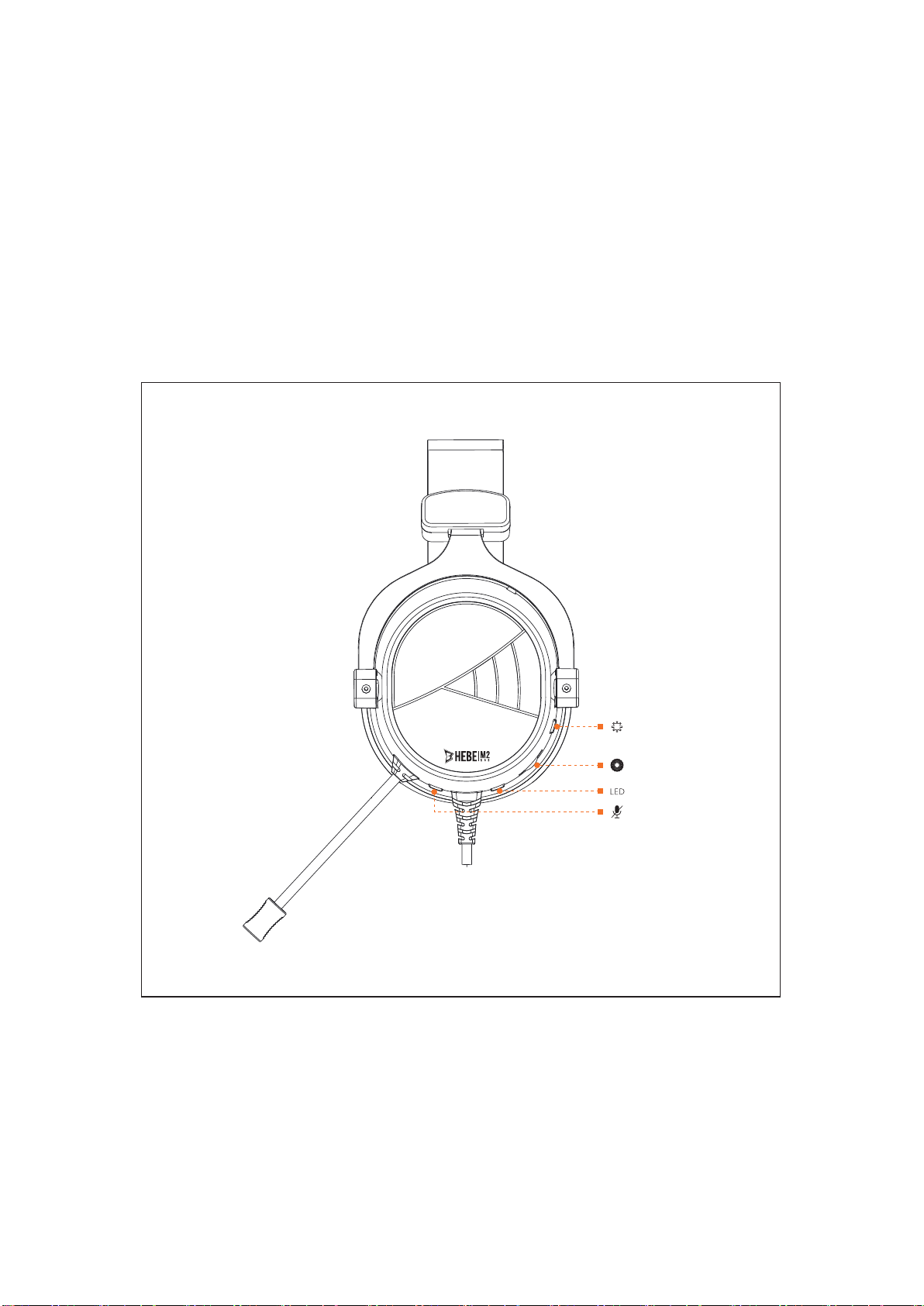
In-line control function:

Vibration On/Off
Light Mode
Mic On/Off
Vol Up/Down

《Español》
Gracias por elegir los auriculares para juegos HEBE M2 de GAMDIAS™. Los
auriculares de juegos multisensoriales GAMDIAS dotan de un sonido
envolvente a sus películas/juegos/música. Cuando detecta un sonido de gran
intensidad, el auricular vibra para ayudarle a localizar la fuente. Diadema y
almohadillas de auriculares de piel suaves y ergonómicos. Cómodos y
transpirables, ideales para prolongadas sesiones de juego.
Requisitos del sistema
●Windows ® XP/ Vista / 7 / 8 / 10
● PC con puerto USB estándar
Instalación de hardware y software
1. Conecte los auriculares GAMDIAS™ HEBE M2 al puerto USB de su PC.
2. Cuando aparezca el mensaje «Nuevo hardware encontrado», siga las
instrucciones para completar la instalación del hardware.
3. Inicie sesión en la página web de GAMDIAS™ (http://www.GAMDIAS.com)
para descargar la última versión de HERA.
4. Empiece a instalar GAMDIAS™ HERA y siga las instrucciones de la pantalla
para completar la instalación.
Especificaciones de HEBE M2
Sensibilidad: 110 dB + / - 3 dB
Impedancia: 64±15% OHMS ( f=1KHz)
Diámetro de altavoz: 53 mm
Imanes del altavoz: Neodimio
Tamaño de micrófono: φ6mm * 2.7mm(H)
Sensibilidad del micrófono: -42±3 dB (0dB=1V/Pa.1KHz)
Tamaño de altavoz de la unidad de vibración: 35 mm
Longitud de cable: 2 m
Tipo de enchufe: conector USB dorado
Dimensiones (pr. x an. x al.): 170 x 105 x 225mm
Registre sus auriculares de juegos GAMDIAS™ HEBE M2

Visite www.GAMDIAS.com para registrar su producto en línea.
Función de mando a distancia en línea:
Vibration On/Off
Light Mode
Mic On/Off
Vol Up/Down

《Deutsch》
Vielen Dank, dass Sie sich für das Gaming-Headset HEBE M2 von GAMDIAS™
entschieden haben. GAMDIAS‘ multisensorisches Gaming-Headset liefert einen
atmosphärischen Klang bei Filmen, Spielen und Musik. Bei Erkennung einer
Explosion vibriert das entsprechende Ohrpolster zur Unterstützung der Ortung.
Kopfbügel und Ohrpolster sind ergonomisch geformt und bestehen aus
weichem Leder. Komfortabel und atmungsaktiv, geeignet für ein langes
Spielerlebnis.
Systemanforderungen
●Windows ® XP/ Vista / 7 / 8 / 10
● PC mit Standard-USB-Port
Hardware- und Softwareinstallation
1. Schließen Sie das GAMDIAS™ HEBE M2 an einem USB-Port an Ihrem PC
an.
2. Der Hinweis über neu gefundene Hardware erscheint; bitte befolgen Sie die
Anweisungen zum Abschließen der Hardwareinstallation.
3. Besuchen Sie bitte die GAMDIAS™-Webseite (http://www.GAMDIAS.com)
und laden die neueste Version der HERA-Software herunter.
4. Starten Sie die Installation der GAMDIAS™ HERA-Software und befolgen
Sie bitte die Bildschirmanweisungen zum Abschließen der Installation.
HEBE M2 Spezifikationen
Empfindlichkeit: 110 dB +/- 3 dB
Impedanz: 64±15% OHMS ( f=1KHz)
Treiberdurchmesser: 53 mm
Treibermagneten: NdFeB
Mikrofongröße: φ6mm * 2.7mm(H)
Mikrofonempfindlichkeit: -42±3 dB (0dB=1V/Pa.1KHz)
Vibrationseinheit –Treibergröße: 35 mm
Kabellänge: 2 m

Steckertyp: Goldbeschichteter USB-Stecker
Abmessungen (L × B × H): 170 x 105 x 225 mm
Zum Registrieren des GAMDIAS™ HEBE M2
Gaming-Headsets besuchen Sie bitte www.GAMDIAS.com.
Im Kabel integrierte Fernbedienung:
Vibration On/Off
Light Mode
Mic On/Off
Vol Up/Down

《Français》
Merci d’avoir choisi le casque de jeu HEBE M2 de GAMDIAS™. Le casque de jeu
multi-sensoriel GAMDIAS propose un son immersif pour les
films/jeux/chansons. Lors de la détection d’une explosion, les coussinets
vibrent pour mieux identifier la source. Des coussinets et un serre-tête en cuir
souple ergonomiques. Confortable et respirant, adapté à de longues parties.
Configuration système requise
●Windows ® XP/ Vista / 7 / 8 / 10
● PC avec port USB standard
Installation matérielle et logicielle
1. Branchez le casque GAMDIAS™ HEBE M2 sur votre PC via un port USB.
2. La notification de « nouveau matériel prêt à être installé » s’affichera, suivez
les instructions pour finir d’installer le matériel.
3. Connectez-vous au site Web GAMDIAS™ (http://www.GAMDIAS.com) pour
télécharger la dernière version d’HERA.
4. Commencez à installer GAMDIAS™ HERA, et suivez les instructions à
l’écran pour terminer l’installation.
Spécifications de HEBE M2
Sensibilité : 110 dB + / - 3 dB
Impédance : 64±15% OHMS ( f=1KHz)
Diamètre des oreillettes : 53 mm
Aimants des oreillettes : NdFeB
Taille du microphone : φ6mm * 2.7mm(H)
Sensibilité du microphone : -42±3 dB (0dB=1V/Pa.1KHz)
Taille de l’unité de vibration : 35 mm
Longueur de câble : 2 m
Type de prise : Prise USB plaquée or
Dimensions (L x H x P): 170 x 105 x 225 mm
Enregistrez votre casque de jeu GAMDIAS™ HEBE M2
Visitez www.GAMDIAS.com pour enregistrer votre produit en ligne.

Télécommande intégrée :
Vibration On/Off
Light Mode
Mic On/Off
Vol Up/Down

《Português》
Obrigado por escolher os auscultadores HEBE M2 para jogos da GAMDIAS™. Os
auscultadores para jogos multissensoriais da GAMDIAS oferecem som
imersivo para filmes, jogos e música. Ao detetar uma explosão, o auscultador
vibra para ajudar a localizar a origem do som. Banda para cabeça e
auscultadores ergonómicos em pele macia. Material confortável e transpirável,
adequado para utilização prolongada.
Requisitos do sistema
●Windows ® XP/ Vista / 7 / 8 / 10
● PC com porta USB normal
Instalação de software e hardware
1. Ligue o GAMDIAS™ HEBE M2 ao seu PC através da porta USB.
2. Será exibido o aviso “novo hardware encontrado”. Siga as instruções para
concluir a instalação do hardware.
3. Aceda ao Web site da GAMDIAS™ (http://www.GAMDIAS.com) para
transferir a versão mais recente da HERA.
4. Comece a instalar a HERA da GAMDIAS™ e siga as instruções no ecrã
para concluir a instalação.
Especificações do HEBE M2
Sensibilidade: 110dB + / - 3 dB
Impedância: 64±15% OHMS ( f=1KHz)
Diâmetro da unidade de condução: 53 mm
Ímanes da unidade de condução: NdFeB
Tamanho do microfone: φ6mm * 2.7mm(H)
Sensibilidade do microfone: -42±3 dB (0dB=1V/Pa.1KHz)
Tamanho da unidade de condução da unidade de vibração: 35 mm
Comprimento do cabo: 2 m
Tipo de ficha: Ficha USB banhada a ouro
Dimensões (C×P×A): 170 x 105 x 225 mm
Registe os seus auscultadores para jogos GAMDIAS™ HEBE M2
Indice
Lingue:
Altri manuali GAMDIAS Cuffia