GDC CLA-2000 Manuale utente

USER MANUAL FOR
CLA-2000 CONTENT LIBRARY ADAPTER
May 3, 2016

TABLE OF CONTENTS
CLA-2000 User Manual 2 3 May 2016
TABLE OF CONTENTS
1. INTRODUCTION ................................................................................................................ 7
1.1 About This Manual....................................................................................................... 7
1.2 Safety Instructions ....................................................................................................... 7
2. INSTALLATION OF CLA-2000 .......................................................................................... 9
2.1 Packing List.................................................................................................................. 9
2.2 Product Specifications.................................................................................................10
2.3 Front Panel..................................................................................................................10
2.4 Back Panel..................................................................................................................10
2.5 Cable Connection to Different Devices ........................................................................11
2.5.1 Ethernet Connection between CLA-2000 and Network Switch................................11
2.5.2 eSATA/USB Connection between CLA-2000 and Storage Devices.........................12
2.5.2.1 Connection to CRU ..............................................................................................12
2.5.2.2 Connection to Portable Storage ...........................................................................13
2.5.2.3 Connection to Enterprise Storage.........................................................................14
2.6 First Time Setup of CLA-2000 .....................................................................................15
2.6.1 Physical Power Connection.......................................................................................15
2.6.2 Network Connection..................................................................................................15
2.6.3 Power Up CLA-2000.................................................................................................15
2.6.4 Configure CLA-2000 via CLA Manager on Windows PC...........................................15
2.6.5 Operate CLA-2000....................................................................................................16
3. OPERATION OF CLA-2000 ..............................................................................................17
3.1 About CLA Manager....................................................................................................17
3.2 Access CLA Manager..................................................................................................17
3.3 CLA-2000 Content Management.................................................................................22
3.3.1 Content Transfer between Two Storage Devices ....................................................22
3.3.2 Content Transfer from CRU to Storage Device........................................................24
3.3.3 Content Transfer through LAN to Multiple Screens Simultaneously.........................24
3.3.3.1 Operation on CLA Manager..................................................................................24
3.3.3.2 Operation on GDC Server....................................................................................26
3.4 Remote Access CLA-2000...........................................................................................27

TABLE OF CONTENTS
3 May 2016 3 CLA-2000 User Manual
3.4.1 Access CLA-2000 on the Linux or MAC Operating System.....................................27
3.4.2 Access CLA-2000 on the Windows Operating System............................................27
3.5 Eject External Devices from CLA Manager..................................................................27
3.6 Shut Down the CLA Manager......................................................................................28
3.7 RESET CLA-2000 .......................................................................................................29

CLA-2000 User Manual 4 3 May 2016
Thank you for purchasing a CLA-2000 Content Library Adapter from GDC
Technology Limited.
To ensure proper operation and to maximize value of CLA-2000, please review this User Manual. It will guide
you through all the features and benefits.
COPYRIGHT NOTICE
Copyright© 2016 by GDC Technology Limited
All rights reserved. No part of this manual may be copied or distributed, transmitted, transcribed, stored in a retrieval
system, or translated into any human or computer language, in a form or by any means, electronic, mechanical,
photocopying, recording, magnetic, optical, manual or otherwise, or disclosed to third parties without prior written
permission of GDC Technology Limited.
MANUAL DISCLAIMER
The manual is made with CLA-2000 Firmware (2.0-build 7) and CLA Manager (V2.0) and there might be slight
differences depending on the software version. The contents, features and specifications stated in this manual are
subject to change without notice due to continuous product development and improvements. In no other event shall
GDC Technology Limited be liable for any loss of profit or any other commercial damages, including but not limited to
special, consequential, or other damages.

CONTACTS AND OFFICES
3 May 2016 5 CLA-2000 User Manual
CONTACTS AND OFFICES
Website: www.gdc-tech.com Email: inf[email protected]m
24/7 Engineering
Support Hotline:
Hong Kong
(Headquarters)
China (Beijing)
China (Shenzhen)
Spain (Barcelona)
Unit 1-7, 20th Floor,
Kodak House II,
39 Healthy Street East,
North Point, Hong Kong
Tel: +852 2507 9555
Rm. 609-618, Office
Building,20# Xinde Street,
Xicheng District, Beijing,
P.R. China 100088
Tel: +86 10 6205 7040
Room A701, 7/F,
Languang Technology Building,
No.7 Xinxi Road, North Zone,
HighTech Park, Nanshan District,
Shenzhen, China
Tel: +86 755 8608 6000
Edificio Mercurio
Vía Augusta, 59, desp. 607
08006 Barcelona, Spain
Tel: +34 93 159 51 75
Peru (Lima)
USA (Los Angeles)
Brazil
(São Paulo)
Singapore
Calle Manuel Miota 170, Miraflores
Lima 18, Peru
Tel: +51 1 340 5146
1016 West Magnolia
Boulevard Burbank,
CA 91506, USA
Tel: +1 818 972 4370 /
+1 877 743 2872
(Toll Free)
Rua da Penha, 426,
4º andar, conjunto 43,
CEP 18010-001 -
Sorocaba/SP –Brasil
Tel: +55 15 33269301
10 Ubi Crescent,
Ubi Tech Park,
Lobby B, #06-25
Singapore 408564
Tel: +65 6222 1082
North America
+1 877 743 2872 (TollFree)
Latin America
+52 55 8851 1198
Europe
+34 928 912 295
China
+86 400 886 0996 (Toll Free)
North Asia
+852 3520 0920 (TollFree)
India
+91 022 4044 0500
South East Asia
+65 6100 4328
Australia/ New
Zealand
+61 407 040 744

CONTACTS AND OFFICES
CLA-2000 User Manual 6 3 May 2016
Indonesia (Jakarta)
Japan (Tokyo)
India (Mumbai)
Mexico
(Mexico City)
Total Building Lantai 4 Suite 0401,
Jl. Letjen S. Parman Kav. 106A,
Kel Tomang, Kec. Grogol
Petamburan,
Jakarta Barat 11440, Indonesia
Tel: +62 21 2920 4691
3F, Kyobashi-Chuo Bldg,
1-14-7 Kyobashi Chuo-ku,
Tokyo 104-0031, Japan
Tel: +81 3 5524 2607
Office No. B-207/208,
Everest Chamber,
Andheri Kurla Road,
Marol, Andheri (East),
Mumbai-400 059, India
Tel: +91 22 4044 0500
Ave. Santa Fe 94,
Torre A Piso 8,
Col. Zedec Santa Fe,
Alvaro Obregon,
Mexico, D.F.,
C.P. 01210 Mexico
Tel: +52 55 8851 1198/
+52 55 8851 1165
United Arab Emirates
(Dubai)
Business Centre,
Dubai World Central,
PO Box 390667,
Dubai UAE

1. INTRODUCTION
3 May 2016 7 CLA-2000 User Manual
1. INTRODUCTION
1.1 About This Manual
This manual provides instructions on how to use and manage CLA-2000 Content Library
Adapter for content transfer and storage backup with or without Theatre Management
System (TMS).
1.2 Safety Instructions
The CLA-2000 is intended for installation in a restricted access location.
The operating environment temperature range is 0°C - 70°C
CAUTION: RISK OF EXPLOSION IF BATTERY IS REPLACED BY AN INCORRECT
TYPE. DISPOSE OF USED BATTERIES ACCORDING TO THE INSTRUCTIONS.
NOTE: This equipment has been tested and found to comply with the limits for a Class A
digital device, pursuant to part 15 of the FCC Rules. These limits are designed to provide
reasonable protection against harmful interference when the equipment is operated in a
commercial environment. This equipment generates, uses, and can radiate radio
frequency energy and, if not installed and used in accordance with the instruction manual,
may cause harmful interference to radio communications. Operation of this equipment in
a residential area is likely to cause harmful interference in which case the user will be
required to correct the interference at his own expense.
WARNING: This is a Class A product. In a domestic environment this product may cause
radio interference in which case the user may be required to take adequate measures.
For PLUGGABLE EQUIPMENT, the socket-outlet shall be installed near the equipment
and shall be easily accessible.
Before operating your CLA-2000, please read this manual thoroughly, and retain it for
future reference.
Installation and preliminary adjustments should be performed by qualified GDC
Technology personnel. All warnings on the CLA-2000 and in this manual should be
adhered to.
All operation and maintenance instructions of CLA-2000 must be followed closely.
To prevent fire or electrical shock hazard, do not expose the CLA-2000 to rain or moisture.
Clean with a dry cloth only.
Do not block any ventilation openings.
Do not install near any heat sources (e.g. radiators, stove or other apparatus that produce
heat).
Consult GDC Technology Service team for servicing or maintaining CLA-2000.

1. INTRODUCTION
CLA-2000 User Manual 8 3 May 2016
You are cautioned that any changes or modifications not expressly approved in this
manual or approved in writing by an authorized representative of GDC Technology could
void your warranty and/or authority to operate CLA-2000.

2. INSTALLATION OF CLA-2000
3 May 2016 9 CLA-2000 User Manual
2. INSTALLATION OF CLA-2000
2.1 Packing List
This section provides a suggested installation configuration of GDC CLA-2000 for reference. Please
contact our sales representatives to specify the accessory needed for the installation.
Item
Qty
Photo
CLA-2000 Unit
1
Power Cord
1
3M Ethernet Cable
1
Manual CD
1
User Manual
1

2. INSTALLATION OF CLA-2000
CLA-2000 User Manual 10 3 May 2016
2.2 Product Specifications
Dimensions: 440(W) x 252.4(D) x 44.4(H) mm
Weight: 4kg
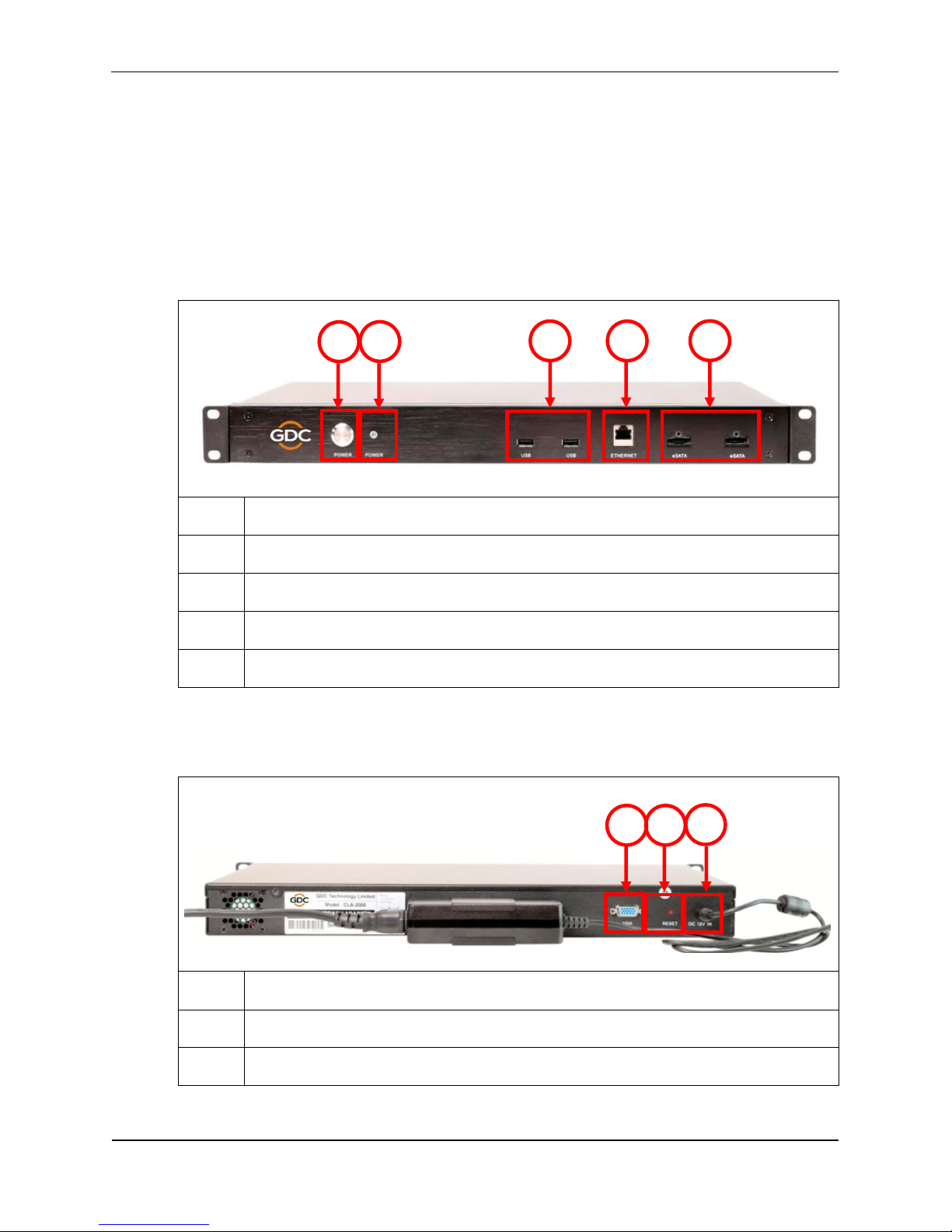
2.3 Front Panel
1
Power Button
2
Power LED
3
USB Connector
4
Ethernet Connector
5
eSATA Connector
2.4 Back Panel
1
VGA Port
2
Reset Button
3
DC Power Jack
2
3
4
5
1
1
2
3
Indice
Altri manuali GDC Adattatore