
Genki GK-2000 Manuale utente

GK-2000 | User Manual


DISCLAIMER
Read all safety tips, warning messages, terms of use, and disclaimers carefully. Users take full
responsibility for all usage and operations. Familiarize yourself with the related regulations in
your area. You are solely responsible for being aware of all relevant regulations and using
GENKIPWR products in a way that is compliant.
GENKIPWR GK-2000

1
4
5
6
6
7
7
8
9
10
10
3.1 Product Introduction
3.2 Product Details
3.3 LCD Screen
3.4 Display Attention
3.5 UPS Mode
3.6 Solar Panel Connection
3.7 Car Charging
1.
2. Safety Instructions
3. Getting Staed
4. FAQs
5. What’s in the Box
6. Storage & Maintenance
CONTENTS
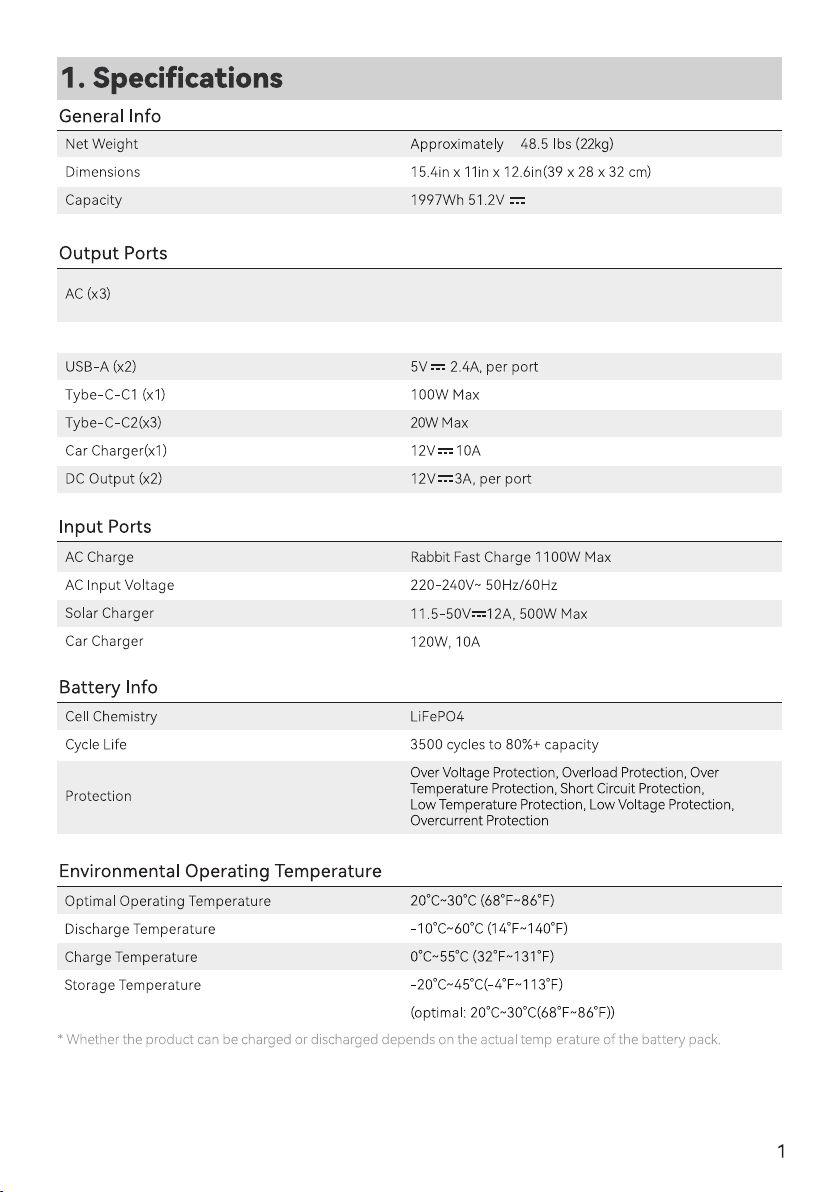
Specications
2
3
2.1 Usage
2.2 Disposal Guide
Pure Sine Wave, 2000W total (Surge 4000W),
100V-120V(US、JP)/220-240V (EU) / 50Hz/60Hz
Max Device(s) Power Suppoed by X-Boost 3000W (Constant power)

2. Safety Instructions
1. Do not use the product near a heat source, such as a re source or a heating furnace.
2. Avoid contact with any liquid. Do not immerse the product in water or get it wet. Do not use the product in
rain or humid environments.
3. Do not use the product in an environment with strong static electricity/magnetic elds.
4. Do not disassemble the product in any way or pierce the product with sharp objects.
5. Avoid using wires or other metal objects that may result in a sho circuit.
6. Do not use unocial components or accessories. If you need to replace any components or accessories,
please visit ocial GENKIPWR channels to check relevant information.
7. When using the product, please strictly follow the operating environment temperature specied in this user
manual. If the temperature is too high, it may result in a re or explosion; if the temperature is too low, the
product peormance may be severely reduced, or the product may cease to work.
8. Do not stack any heavy objects on the product.
9. Do not lock the fan forcibly during use or place the product in an unventilated or dusty area.
10. Please avoid impact, falls, or severe vibrations when using the product. In case of a severe external impact,
turn o the power supply immediately and stop using the product. Ensure the product is well fastened
during transpoation to avoid vibrations and impacts.
11. If you accidentally drop the product into water during use, please place it in a safe open area, and stay
away from it until it is completely d. The dried product should not be used again, and should be properly
disposed of according to Section 2.2 below. If the product catches re, we recommend that you use the re
extinguishers in the following order: water or water mist, sand, re blanket, d powder, and nally a carbon
dioxide re extinguisher.
12. Use a d cloth to clean o di on the product pos.
13. Rest the product on a at suace to avoid damages caused by the product falling over. If the product is
oveurned and severely damaged, turn it o immediately, place the batte in an open area, keep it away
from combustible matter and people, and dispose of it in accordance with local laws and regulations.
14. Ensure that the product is kept out of reach of children and pets.
15. Store the product in a d and ventilated place.
16. It is recommended to use moisture barrier bags in wet environments (for example, places by the sea or
waterways) to prevent the product from getting soaked. If water is found inside the product, it must not
be used or turned on again. Please take anti-eletric shock measures before touching the product. Following
this, place the product in a safe, waterproof and open area. Once complete contact GENKIPWR Customer
Seice immediately.
17. This product is not recommended for powering medical emergency equipment related to personal safety,
including but not limited to medical grade ventilators (hospital version CPAP: Continuous Positive Airway
Pressure ), aicial lungs ( ECMO, Extracorporeal Membrane ) Please follow your doctor's instructions and
consult with the manufacturer for restrictions on the use of the equipment. If used for general medical
2.1 Usage

2.2 Disposal Guide
1. If conditions permit, make sure that the batte is fully discharged before disposing it in a designated
batte recycling bin. The product contains batteries with potentially dangerous chemicals, so it is strictly
prohibited to dispose of it in ordina trash cans. For more details, please follow the local laws and
regulations on batte recycling and disposal.
2. If the batte cannot be fully discharged due to a product failure, please do not dispose of the batte
directly in the batte recycling box. In such case, you should contact a professional batte recycling
company for fuher processing.
3. Please dispose of over-discharged batteries that cannot be recharged.
equipment, please be sure to monitor the power status to ensure that the power does not run out.
18. When in use, power supply products will generate electromagnetic elds, which are likely to aect the
normal operation of medical implants or personal medical equipment such as pacemakers, cochlear
implants, hearing aids, debrillators etc. If these types of medical equipment are being used, please contact
the manufacturer to inquire about any restrictions on the use of such equipment. These measures are
fundamental to ensure a safe distance between the medical implants (for example, pacemakers, cochlear
implants, hearing aids, debrillators etc.) and this product while in use.

3.1 Product introduction
3. Getting Staed
This product is a 1997Wh large capacity 2000W high power, 2 hours of high-speed charging poable energy
storage power supply, using high safety peormance of LiFePO4 batte.
It can be used as a backup power supply in case of emergency powercut, disaster, camping and vehicles, and can
also provide power for various electric tools.
2000W high power, pure sine wave AC output, can be used for house-hold appliances such as ders, microwave
ovens, refrigerators,high-power induction cookers and it can also be used for other electronic devices such as
personal computers.
Through the 1100W ultra-fast charging,this model can be full charged within 2 hours, The AC input/output
voltage frequency can automatic or manually switched between 50Hz/60Hz.This product also suppos maximum
700W solar charging and allow you to charge even when the power cut or in outdoor situations.
① Main power control
② Light control
③ USB control
④ DC control
⑤ LCD display
⑥ Air intake/outlet
⑦ AC on/o control
(50Hz/60Hz switching)
⑧ XT90 input po
(for solar panel)
⑨ AC input po
⑩ Overload protection

① Main Power Control
Main Control for the whole system turn on/o.
Operate method: long press the button for 3s to turn on/o the system.
② LED light control
Operate method:sho press to turn on and change the light mode(SOS/Flash).
Notice: you can turn o the light by long press the button(1-2s) in any mode.
③ USB button
Operate method:sho press to turn on/o.
④ DC button
Operate method:sho press to turn on/o.
⑤ LCD display
Present the remaining power and using data.
⑥ Cooling system
When the fans are working, please don't block the channel.
⑦ AC button(AC output, total share 2000W)
Operate method:sho press to turn on/o.Notice:
1.Please conrm the output voltage or frequency before using
2.Long press the button for 3s to ent the frequency changing mode, 50Hz and 60Hz will blink in the display,
press again the button to choose the right frequency. Wait till the frequency is not blinking, then you will get the
frequency you want.
3.Quick sho press for 10 times to switch the voltage 220V or 230V.
⑧ Solar panel input
Use the included XT90-MC4 conversion cable to connect the solar panel.
1.Solar panels can have a maximum input of 500W and a maximum voltage of 50V.
2.If exceeding the maximum voltage leads to equipment damage, it is beyond the scope of warranty.
⑨ AC input po
Use wall socket to get 1100W fast charging, which can full charge from 0 to 100% in 2 hours.
*The product can be charged directly by the wall socket, please do not use extension cords and cable taps,
When the product is charging, do not plug other products in the same socket.
*Please do not plug several devices together in a extension socket at once, the current will be too high and
bring damage to the cable and re risk.
*Do not use the same socket to connect other devices when charging.

⑩ Overload protection
To protect this product, an overload protector is added. Prevent damage to the product due to
excessive AC input current caused by lightning and power grid uctuations. When such a
situation occurs, the overload protector will sta to cut o the AC input to protect the product
Restore the AC input function of the product in the following sequence.
1. Turn o the power button and unplug all pos.
2. After conrming that all pas are normal, turn on the power button.
3.3 LCD Screen
3.4 Display Attention
① Charging/using time
②Fan state
③ H/L temperature protection
④Power percentage
⑨ Type-C output
⑩USB output
⑪AC charging
⑫ Solar Charging Input
⑬ Type-C output
⑭Cigarlighter output
⑤ Total input power
⑥ Total output power
⑦LED light
⑧AC output
When this icon lights up. Please keep Air intake/outlet unobstructed.
When this icon lights up. Please note the device is now with high/low temperature and will
possibly stop working till the temperature back to normal standard.
When this icon is blinking, represent that the AC input is fault,please recheck
(Power/Hz/cable).
When the icon is blinking, represent the output is fault, please recheck.
Indice
Altri manuali Genki Alimentazione elettrica


