Gira HomeServer Manuale utente

Gira HomeServer
0529 00
Gira FacilityServer
2075 00
Gira HomeServer/FacilityServer
Information on start-up


3
11.2020/V 2.3
1. Introduction ........................................................................................... 4
1.1 Scope of delivery............................................................................................ 4
1.2 Interfaces and connection options ................................................................. 4
1.3 System requirements .................................................................................... 5
1.4 Area of application ......................................................................................... 5
1.5 Registration .................................................................................................... 5
1.6 Software updates .......................................................................................... 6
2. Start-up and installation......................................................................... 7
2.1 Device description.......................................................................................... 7
2.2 Setup and installation..................................................................................... 9
2.2.1 Connecting to the mains voltage ................................................................... 9
2.2.2 Connecting to a network ............................................................................... 10
2.2.3 Connecting to the KNX................................................................................... 10
2.3 Connection test .............................................................................................. 10
2.3.1 Connection test is not successful................................................................... 11
2.4 Installation of the “HS Expert” start-up program ........................................... 11
3. Operating the Gira HomeServer............................................................. 12
3.1 Programming a Gira HomeServer .................................................................. 12
3.2 Firmware update ............................................................................................ 12
3.2.1 Programming the Gira HomeServer............................................................... 12
3.2.2 Resetting to the factory settings .................................................................... 13
3.2.3 Resetting the firmware to version 4.8 ............................................................ 13
3.2.4 Gira HomeServer as a virtual machine ........................................................... 13
4. User interfaces....................................................................................... 14
4.1 Free visualisation............................................................................................ 14
4.1.1 HSClient.......................................................................................................... 14
4.2 QuadClient...................................................................................................... 14
4.3 Apps ............................................................................................................... 14
5. Remote access....................................................................................... 14
6. Software interfaces................................................................................ 14
7. Licences ................................................................................................. 14
8. Link list................................................................................................... 15

Introduction
411.2020/V 2.3
1. Introduction
The Gira HomeServer is a gateway for visualising and controlling the complete electrical
installation of buildings, provided they are equipped with the KNX system. These can be both
private and company buildings.
The KNX functions can be monitored and controlled at any time and from anywhere, exter-
nally and internally. Monitoring and control is done using smartphone, PC, iPad, iPhone or
devices with an Internet browser and app. Faults, measured values and actuator or sensor
states can be transmitted via PUSH notification, text message and e-mail.
As the software for the device purchased by you is constantly being further developed and
updated, information in this manual may no longer be up-to-date.
The latest product information is always available on the Gira website:
http://www.gira.de
Current software updates and documentation for your product are also available at https://
www.download.gira.de.
The information, data, values etc. included in these documents may be changed without
notice. The illustrations are likewise subject to change.
Technical modifications reserved!
For easier reading, only the term Gira HomeServer is used in this description. All information
relating to the Gira HomeServer applies both to the Gira HomeServer and to the Gira Facili-
tyServer. Properties and functions relating specifically to the Gira FacilityServer are marked
accordingly.
1.1 Scope of delivery
The following items are included in the scope of delivery:
– 1 x Gira HomeServer 4 / Gira FacilityServer 4
– 1 x mains cable
1.2 Interfaces and connection options
The Gira HomeServer has the following interfaces and connection options:
– Mains voltage connection 230 V
– RS232 interface for KNX and programming (up to version 4.10.x)
– Network connection for RJ45 Cat 5 Ethernet TCP/IP

Introduction
5
11.2020/V 2.3
1.3 System requirements
To operate the Gira HomeServer, a functional KNX system is required. Communication with
the KNX devices, as well as monitoring of all events, is done via the KNX.
The Gira HomeServer is programmed using the “HS Expert” software, which is available free
of charge in the download area of the Gira website. This software can be operated on a
standard PC with a Microsoft® Windows operating system.
1.4 Area of application
The Gira HomeServer is set up in buildings, in rooms with ‘normal’ humidity and room tem-
perature. Use in damp cellars, for example, may adversely affect the functionality of the
device. The device is used for monitoring, visualisation and controlling KNX systems. The
software made available in the download area of the Gira website may only be used together
with the Gira HomeServer.
Any other use of the device and software is not permitted. Gira shall assume neither legal
responsibility nor a warranty of any kind for errors and damage resulting from the improper
use of the device or the related software.
1.5 Registration
Please register your device at the site https://geraeteportal.gira.de
Only registered users can access the portal page or receive a new password for accessing
the portal page if they have forgotten their old password. You will also receive technical sup-
port and regular information about downloads, updates (further developments), additional
modules and training offers. The use of other services, e.g. Dynamic DNS or weather fore-
casts, is also possible via the portal.

Introduction
611.2020/V 2.3
1.6 Software updates
Updates eliminate technical problems (bug fixing), and also close possible security gaps.
Therefore check the Gira website at regular intervals and register your device (see above).
No automatic device updates are carried out.
Please note that Gira will assume neither legal responsibility nor a warranty of any kind for
problems or damage resulting from obsolete firmware or updated firmware.
.
Important: do not fail to install the updates!
Please install firmware updates at regular intervals, and observe the installation instructions.
Important: back up remanent data before updating the firmware!
Make sure to save the data to the remanent memory of the Gira HomeServer before updat-
ing / upgrading / downgrading the firmware.
The backup is carried out using the Expert software. Follow the instructions in the Expert
software’s help function.

Start-up and installation
7
11.2020/V 2.3
2. Start-up and installation
To start up the Gira HomeServer, a general distinction must be made between two subject
areas:
– Setup and connection of the Gira HomeServer
– Function test and start-up
2.1 Device description
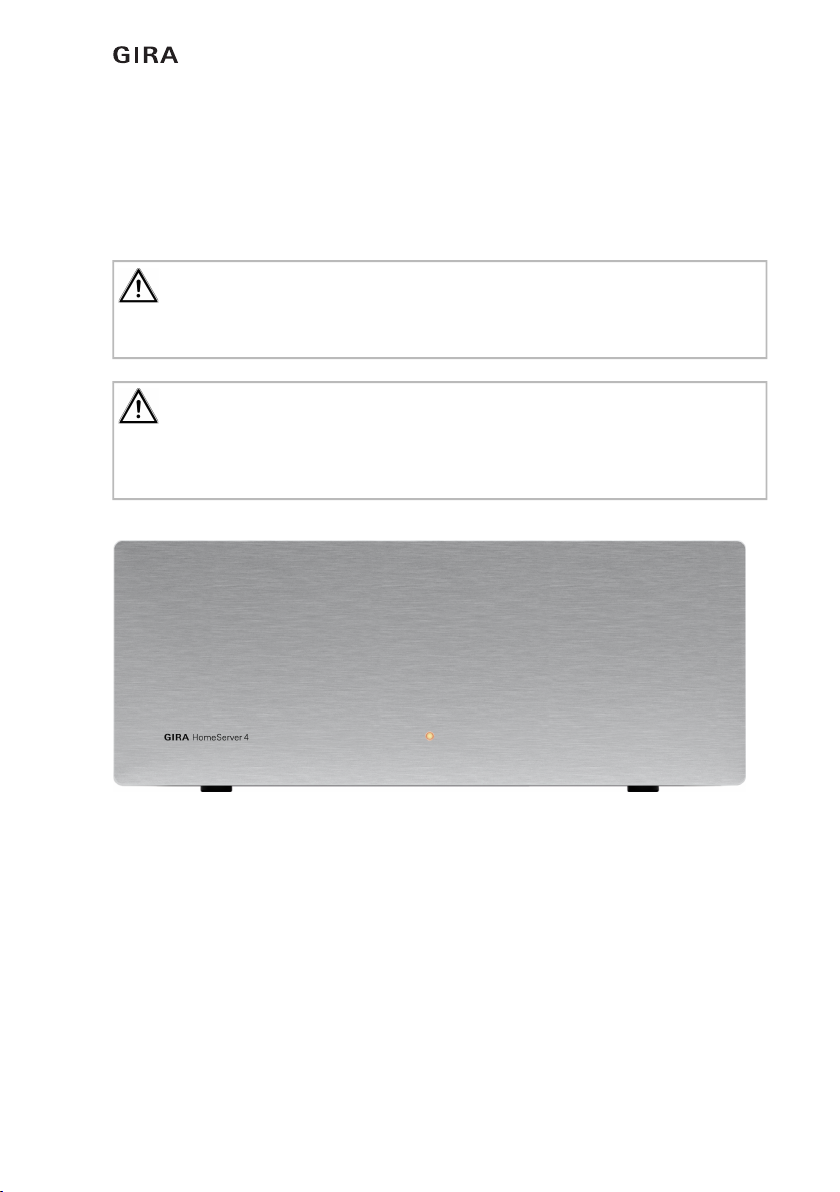
Fig. 1.1: Operating and control elements on the front of the Gira HomeServer
Control elements on the front of the Gira HomeServer and FacilityServer:
– Operating LED that lights up in red when the device is switched on.
Operating element on the front of the Gira FacilityServer:
– Reset button: the Gira FacilityServer is restarted without power interruption.
Important: start-up may only be carried out by a qualified electrician!
Connection and start-up of the device may only be carried out by trained and qualified elec-
tricians.
Important: check the current software version before installing!
Before installing the Expert setup, it is essential to download the current Expert setup from
https://download.gira.de. The software package contains the HS Expert setup software and
the firmware for the device.

Start-up and installation
811.2020/V 2.3
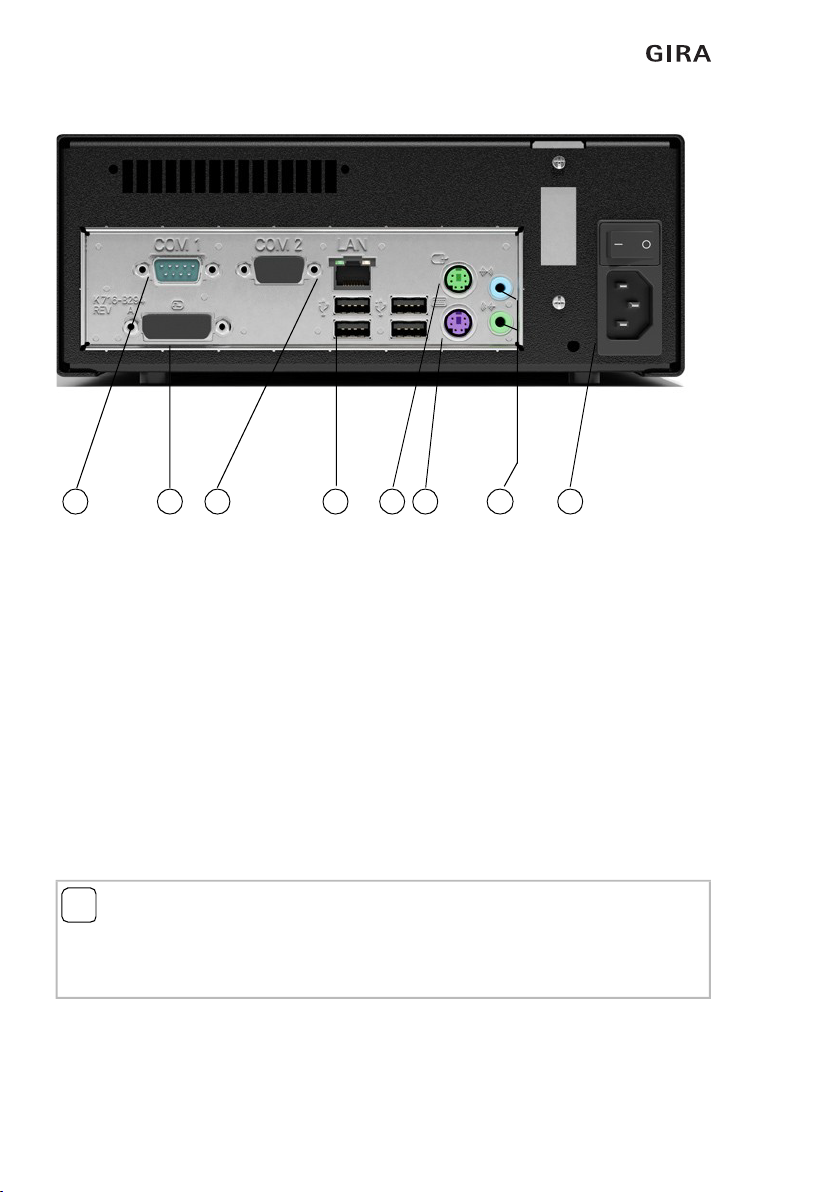
Fig. 1.2: Interfaces on the back of the Gira HomeServer
Interfaces on the back of the Gira HomeServer:
– 230 V mains connection (1) and ON/OFF switch
– PS2 connection for mouse (2), without function
– PS2 connection for PC keyboard (3), for service purposes
– DVI connection for PC monitor (4), for service purposes
– RJ45 network connection (5)
– USB interfaces (6), bus access via USB, USB-ISDN adapter,
– USB keyboard, for service purposes (e.g. firmware update via USB memory stick
with version 4.9 and higher)
– RS232 interface (7), no function
– Jack sockets (8), no function
iNote: LEDs at the network connection.
The network connection has a green and a yellow LED. Both LEDs light up or flash when
there is a network connection to the Gira HomeServer. The LEDs only flash when the Gira
HomeServer is switched on. A valid IP address is not required.
7456 2 3 8 1

Start-up and installation
9
11.2020/V 2.3
2.2 Setup and installation
The Gira HomeServer may only be set up inside buildings. It is not intended and not
approved for mobile operation.
Set up the Gira HomeServer at a central location so that connection to the mains voltage, to
the network and the KNX is trouble-free. The location should also be ‘out of the way’ so that
the device does not impede other work being carried out and so that one of its connections
cannot be accidentally interrupted.
2.2.1 Connecting to the mains voltage
The Gira HomeServer is connected via the mains cable to the mains voltage (230 V~).
iNote: selecting the setup location.
Select a setup location where you can be sure that other work will not cause the power sup-
ply, network connection or KNX connection to be accidentally interrupted.
iNote: sufficient air circulation.
In order to ensure perfect operation of the Gira HomeServer, a setup location should be cho-
sen that has sufficient air circulation around the device, enabling operation at room temper-
ature.
Important: the device starts up immediately when connected to the mains voltage!
The Gira HomeServer starts as soon as it is connected to the mains voltage and the On/Off
button on the rear is switched on.
The Gira HomeServer is ready for operation after the three double signal tones have
sounded.
Important: carry out lightning protection!
In order to avoid damage to the device, we highly recommend protecting the device from
overvoltage in the mains cable, at the network connection, at the ISDN adapter and in the
KNX voltage access using appropriate protective devices.

Start-up and installation
10 11.2020/V 2.3
2.2.2 Connecting to a network
You require a network distributor and network cable to integrate the Gira HomeServer into
an existing local network (LAN). Please observe that the network distributor and network
cable are not included in the scope of delivery.
A start-up PC can also be connected directly to a Gira HomeServer using a so-called cross-
over network cable. The cable is not included in the scope of delivery.
The Gira HomeServer supports 10/100/1000 MBit network connections.
2.2.3 Connecting to the KNX
The Gira HomeServer can be connected to the KNX system using the following KNX devices
(not included in the scope of delivery):
– via LAN with KNX IP router (order no. 2167 00)
– USB data interface (order no. 1080 00)
– USB data interface (order no. 1070 00)
The Gira HomeServer requires no start-up by the ETS. Any necessary physical address is set
using the Expert and must correspond to the physical address of the interface used.
2.3 Connection test
After you have connected the device to your LAN, you can switch on the device. In the state
of delivery, IP address issuance occurs via DHCP. Should the device not receive an address
using this method, the IP address 192.168.0.11 with the net mask 255.255.0.0 is used after
a certain waiting time.
To find the device in your LAN, open the “Network” section in the Windows Explorer of your
PC. To do this, first switch on the network detection in the Network and Sharing Centre in
the Windows system settings.
The Gira HomeServer should now be visible in the “Network” area of Windows Explorer.
A double-click now opens the index page of the Gira HomeServer.
The following login data is configured on delivery:
User: admin
Password: admin
iComment
The address assignment by a DHCP server only takes place on start-up. A change in the
DHCP server requires a restart of the device.
iAssigning a static IP address
A static IP address can also be assigned via the HS Expert start-up software. “IP address”,
“IP subnet mask” and “IP standard gateway” can be set here.
Questo manuale è adatto per i seguenti modelli
3
Indice
Altri manuali Gira Domotica