
Glab GSC-4 Manuale utente
instrukcja obsługi
bedienungsanleitung mode d’emploi
user manual
GUITAR SYSTEM CONTROLLER

Tables of Contents
1 OVERVIEW 5
1.1 Basic Elements 6
1.2 Keyboard description and layout. 7
2 BASIC OPERATION 9
2.1 Main screen 10
2.2 MENU screen 12
2.3 Message screen 12
2.4 Onscreen text keyboard 13
2.5 Onscreen numbers keyboard 14
3 WORKING MODE 15
3.1 Switching on the controller 16
3.2 Display 16
3.3 Recalling the preset 17
3.4 Recalling the bank 18
3.5 Controller’s hardware work 18
3.5.1 LOOPS 18
3.5.2 SWITCH outs 18
3.5.3 MIDI 18
4 PROGRAMMING MODE 19
4.1 Preset and MFS basic programming 20
4.1.2 Bank name 22
4.1.3 MFS name 22
4.1.4 LOOP section 22
4.1.5 SWITCH section 22
4.2 Settings programming 22
4.2.1 MIDI OUT functions 23
4.2.2 MIDI IN function 25
4.2.3 WAH PADS function 25
4.2.4 SWITCH OUT MODE of work 25
4.2.5 CLICK PROTECTION function 26
4.2.6 LOOPS SLIT function 26
4.2.7 FACTORY SETTINGS and memory clearing 26
4.2.8 USB function 26
4.2.9 ABOUT GSC function 26
5 CONNECTING GSC-4 ACCESSORY 27
5.1 Expression pedal wiring: 28
5.2 Amp channel / function switching: 28
5.3 WAH PADS 29
5.4 Phantom powering 29

Important safety instructions
– Read these instructions and follow them.
– Prevent this device against moisture or spilling liquid inside.
– Clean only with dry cloth.
– Do not install near any heat sources such as radiators, heat registers, stoves, or other apparatus
producing a lot of heat
– Protect the power supply cord from being walked on or pinched.
– Only use attachments/accessories specified by the manufacturer.
– Unplug this device during lighting storms or when unused for long periods of time.
– Do no open device or its power supply casing.
– The power supply adapter should be installed in the socket outlet and disconnection of the adapter should
be easily accessible.
– To completely disconnect from AC mains disconnect the power supply adapter from the AC receptacle.
FCC Compliance
This device complies with Part 15 of the FCC Rules. Operation is subject to the following two conditions: (1) this
device may not cause harmful interference, and (2) this device must accept any interference received, including
interference that may cause undesired operation.
NOTE: This equipment has been tested and found to comply with the limits for a Class B digital device, pursuant to
Part 15 of the FCC Rules. These limits are designed to provide reasonable protection against harmful interference in
a residential installation. This equipment generates, uses and can radiate radio frequency energy and, if not installed
and used in accordance with the instructions, may cause harmful interference to radio communications. However,
there is no guarantee that interference will not occur in a particular installation.
If this equipment does cause harmful interference to radio or television reception, which can be determined by
turning the equipment off and on, the user is encouraged to try to correct the interference by one or more of the
following measures:
– Reorient or relocate the receiving antenna.
– Increase the separation between the equipment and receiver.
– Connect the equipment into an outlet on a circuit different from that to which the receiver is connected.
– Consult the dealer for help.
Declaration of Conformity
Elzab Soft sp. z o.o., ul. Kruczkowskiego 39, 41-813 Zabrze, Poland,
declare under sole responsibility, that the following product:
G LAB/GSC 4 Guitar System Controller
conforms with requirements of the EC Council Directives:
• 2006/95/EECLowVoltageDirective,
• 2004/108/EECElectromagneticCompatibility,andholdsCEmark.Abovenamedproductconformswiththefollowing
standards:
• PN-EN60065:2004/EN60065:2002/Audio,videoandsimilarapparatus-Safetyrequirements.
• PN-EN55103-1:2000/EN55103-1:1996/Electromagneticcompatibility-Productfamilystandardforaudio,video,audio-
visual and entertainment lighting control apparatus for professional use - Part 1: Emission
• PN-EN55103-2:2001/EN55103-2:1996/Electromagneticcompatibility-Productfamilystandardforaudio,video,audio-
visual and entertainment lighting control apparatus for professional use - Part 2: Immunity
Arkadiusz Kocik
President of the Elzab Soft sp. z o.o. Board of Directors
Copy of original EC declaration of conformity is available for download on our website
http://www.glab.com.pl

Thank you for purchasing the Guitar System Controller 4 by G LAB.
GSC-4 is a programmable foot controller for fast and easy control of guitar equipment.
Basic features:
- Large 4.3’’graphic LCD TFT display with a sharp and high quality image that enables easy program-
ming and controlling of the entire system.
- Intuitive 7 key navigation keyboard for direct and quick setting.
- 12x foot switches. (10x multifunction + 2x bank preset UP/DOWN)
- 10 MFS (Multifunction switch) with a two color description of the foot switch state. Each MFS foot
switch can used to operate the following:
1. Recalling of PRESETS (setting the effect loops, switch outs and send MIDI commands.
2. Switching of effect loops (LOOP MODIFIER).
3. Setting of SWITCH OUTs (SWITCH MODIFIER).
4. Sending a MIDI PROGRAM CHANGE and/or CONTROL CHANGE (MIDI MODIFIER).
- 2x bank or preset UP/DOWN switches.
- 6x effect loops via electromechanical relays(passive switching).
- Switchable high impedance input buffer in any preset (identical to a tube amp input load impedance
characteristics).
- Dedicated TUNER output with silent tuning which receives the signal through a very high impedance
circuit (no tone coloration on guitar signal).
- LOOP SPLIT mode that enables the connection of two stomp boxes at the amp’s front input and three
in the amp’s FX- loop without a ground loop hum.
- 6x relays for amp switching (3 isolated stereo outs) with 3 programmable modes of operation
(Latching, impulse and momentary).
- WAH-PAD input for connecting a Wah-Pad and Whammy-Pad.
- Expression pedal input.
- MIDI OUT for controlling up to 10 midi devices.
- PROGRAM CHANGE and CTRL CHANGE commands.
- 20x programmable CTRL CHANGE commands for every MIDI device and capability of sending up to 20
CTRL commands with one press of the footswitch.
- MIDI IN input to control the GSC-4 by other MIDI device.
- USB connections for external keyboard, flash memory or computer.
- 6x9VDCoutputsforpoweringstompboxes(2xsectionsof500mApersection).
- Durable power socket for connecting a dedicated power supply via a long and flexible cable.
- PHANTOM POWER MODE for powering the GSC-4 thru the midi out connector.
- 1000 presets (100 banks with 10 presets each)
- TAP TEMPO function operated by CTRL CH and/or NOTE ON/OFF
- Durable powder-coated casing.
- Dimensions (width x depth x height): 50cm x 14cm x 6,5cm / 19.7” x 5.5” x 2.6”
- Weight: 1,9 kg / 4,2 lbs
- Powerconsumption:24VDC240mA(undernoloadconditionsatthe9VDCoutputs).


user manual GSC_4 5
1 OVERVIEW
6 user manual GSC_4
1 2 3 4 5 6 7 8 9 10 11
12
13
14
15
16 17 18
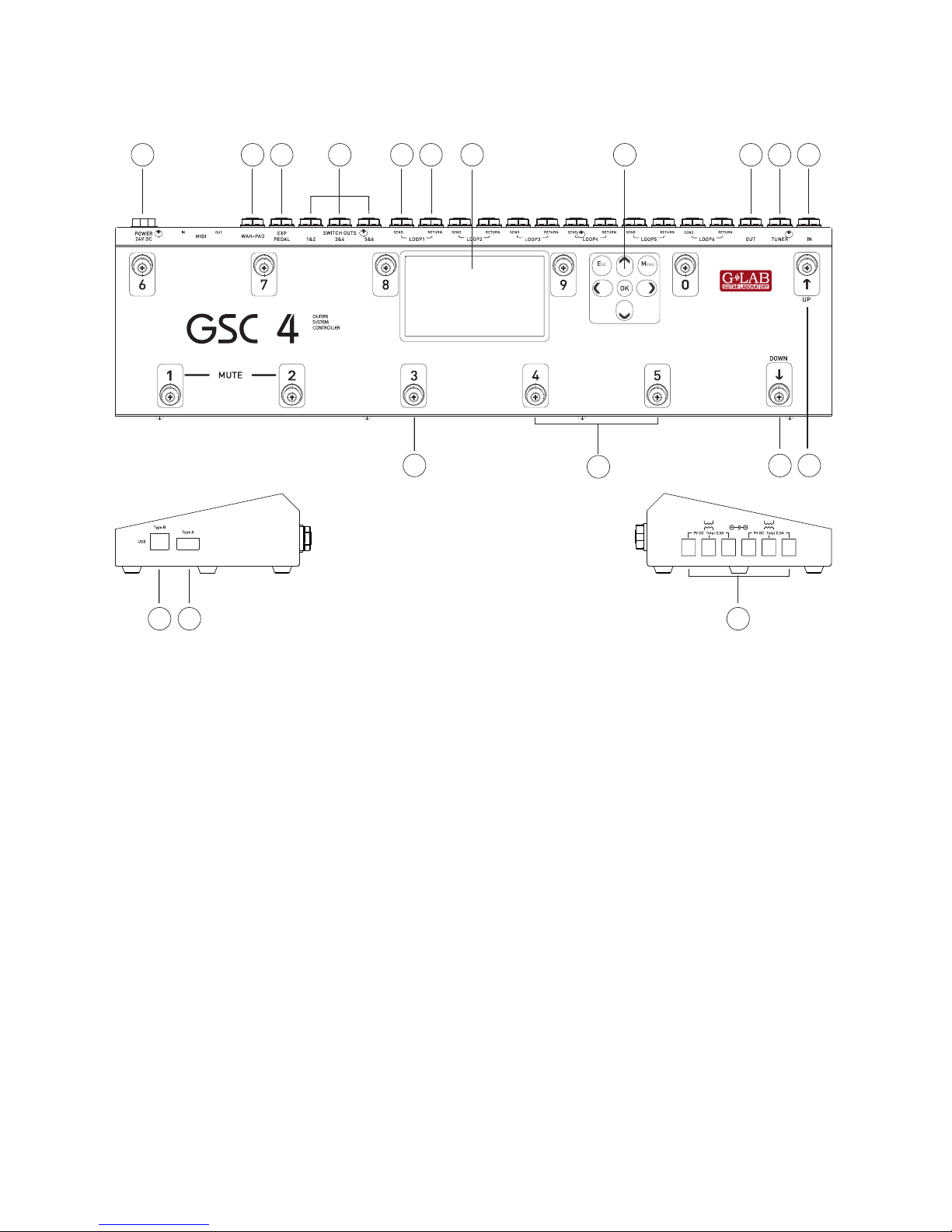
1-24VDCpowerconnection.
2 - WAH-PAD input.
3 – EXPRESSION PEDAL input.
4 - SW1&2, SW3&4, SW5&6 outs for amp
controlling.
5 – EFFECT LOOP SEND output (connect to
effect input).
6 – EFFECT LOOP RETURN input (connect
from effect output).
7 – TFT Display.
8 – GSC-4 programming keyboard.
9 – MAIN-OUT (signal output).
10 – TUNER output.
11 –MAIN IN (signal input).
12 – PRESET/BANK UP foot switch.
13 – PRESET/BANK DOWN foot switch.
14 – MFS foot switches.
15 – MFS state indicators.
16 - USB B type connection.
17 - USB A type connection.
18-9VDCoutputsforpoweringeffects.
1.1 Basic Elements
user manual GSC_4 7
1.2 Keyboard description and layout.
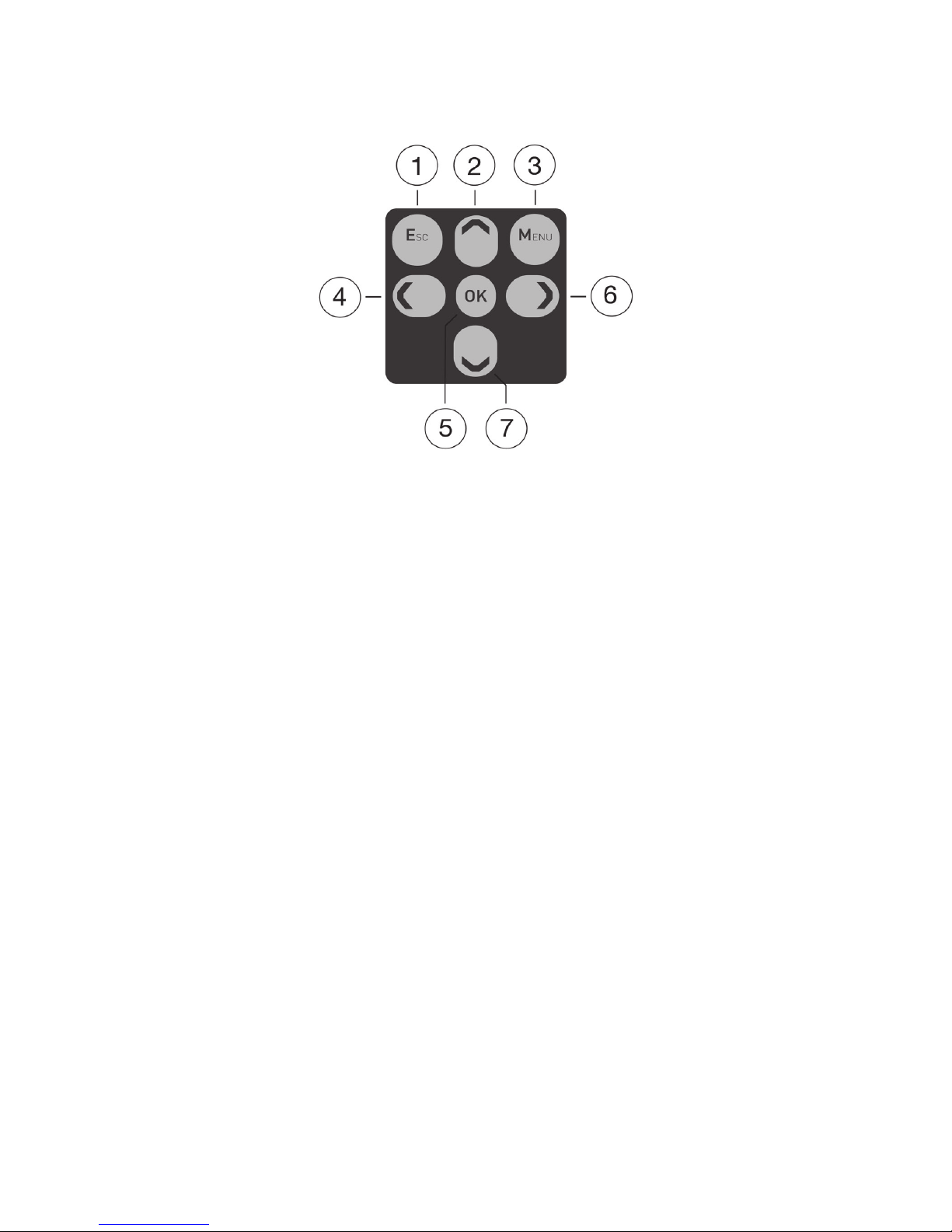
1_ “ESC” key.
2_ “ARROW/UP” key.
3_ “MENU” key.
4_ “ARROW/LEFT” key.
5_ “OK” key.
6_ “ARROW/RIGHT” key.
7_ “ARROW/DOWN” key.


user manual GSC_4 9
2 BASIC
OPERATION
Altri manuali per GSC-4
1
Indice


