Global Sat GH-615B Manuale utente

GH-615B / GH-615M
User Manual
Version 1.0

page 2 GH-615
Thank you for purchasing Gsat GH-615.
We sincerely hope you to enjoy using this high
technology GPS device. For fully understand the
functions and features of GH-615, please read the
user manual before you get started.

page 3
GH-615
Table of Contents
Introduction and Features ������������������������������������������������������������������� 6
Introduction������������������������������������������������������������������������������������� 6
Features������������������������������������������������������������������������������������������ 6
Specications������������������������������������������������������������������������������������������� 7
Hardware overview�������������������������������������������������������������������������������� 9
Package contents�������������������������������������������������������������������������� 9
Button introduction ����������������������������������������������������������������������10
Hardware Introduction���������������������������������������������������������������� 11
Charge the GH-615 �������������������������������������������������������������������� 11
Wear the Heart Rate Monitor ����������������������������������������������������13
Getting Started ��������������������������������������������������������������������������������������14
Starting up your GH-615������������������������������������������������������������14
Change the Mode������������������������������������������������������������������������ 15
Menu Structure - Main Menu������������������������������������������������������17
Activity ������������������������������������������������������������������������������������������������������19
Display/Delete the training data������������������������������������������������19
Memory capacity �������������������������������������������������������������������������20
Delete all training data ���������������������������������������������������������������20
Navigation �����������������������������������������������������������������������������������������������21
Record the route when you are jogging����������������������������������21
Save a Waypoint ������������������������������������������������������������������������� 22
Find and Go to a Waypoint��������������������������������������������������������23
Turn PC-GPS on/off��������������������������������������������������������������������25
Return to start ������������������������������������������������������������������������������25

page 4 GH-615
Create a route������������������������������������������������������������������������������26
Navigate or delete a route ��������������������������������������������������������� 26
Delete all routes���������������������������������������������������������������������������27
GPS Info ���������������������������������������������������������������������������������������27
Exercise Studio �������������������������������������������������������������������������������������28
Auto Hold��������������������������������������������������������������������������������������28
Alert — Time / Distance Alert��������������������������������������������������28
Alert — Speed Alert������������������������������������������������������������������29
Set Sport Type for calories calculation������������������������������������29
Conguration������������������������������������������������������������������������������������������30
Setup Time �����������������������������������������������������������������������������������30
Setup GPS������������������������������������������������������������������������������������30
Set units ����������������������������������������������������������������������������������������31
Set Backlight ��������������������������������������������������������������������������������31
Adjust screen contrast����������������������������������������������������������������32
Setup beeper �������������������������������������������������������������������������������32
Setup language ���������������������������������������������������������������������������32
Set Record Point �������������������������������������������������������������������������33
Setup user prole ������������������������������������������������������������������������33
Transfer data to PC��������������������������������������������������������������������� 34
Factory reset ��������������������������������������������������������������������������������34
About GH-615������������������������������������������������������������������������������34
System upgrade ��������������������������������������������������������������������������35
PC Utility��������������������������������������������������������������������������������������������������36
Install USB driver�������������������������������������������������������������������������36
Install PC Utility ���������������������������������������������������������������������������36
System requirement��������������������������������������������������������������������37
Run the PC Utility������������������������������������������������������������������������37

page 5
GH-615
Scan COM port����������������������������������������������������������������������������37

Menu Structure ����������������������������������������������������������������������������39
Download Data from GH-615���������������������������������������������������� 42
View statistic curve ���������������������������������������������������������������������43
View Track points in Google Earth�������������������������������������������44
View Track points in Google Maps�������������������������������������������45
View Track points information for details ��������������������������������46
View GPS Information ���������������������������������������������������������������� 47
Firmware Upgrade ����������������������������������������������������������������������48
Display the system information of GH-615����������������������������� 49
Maintenance������������������������������������������������������������������������������������������� 50
Take care of you GH-615����������������������������������������������������������� 50

page 6 GH-615
Introduction and Features
Introduction
Globalsat GH-615 is a stylish, fully-sealed, waterproof, wrist type GPS device with the
features of “Tracking”, “GPS positioning”, “Time alert”, “Heart rate monitor (GH-615M
only)”, etc. The GPS navigation function can locate and track points anywhere you go.
GH-615 is powered by SiRF Star III high performance chip that can x your position
even with a weak signal status. It is adopted for people who exercise for broad kinds of
outdoor sports, such as Jogging, Running, Biking, Snow Skiing, etc. It also can be used
as a GPS receiver by USB interface.
Features
The main features of GH-615:
Built-in SiRF Star III high performance GPS chipset. Excellent sensitivity for position
xing even with a weak signal status.
Built-in rechargeable high capacity lithium-ion battery.
Large LCD for easy reading.
WAAS/ ENGOS support.
Waterproof, rigid design to avoid careless damage.
Records all history of self-training by dened day.
GH-615 series can be used as a GPS receiver with an easy setup.
The rmware of the GH-615 can be upgraded through PC.
Navigation. Tracking your route as crumb method; marking and saving your tracking
points by a special algorithm; nding specied locations.

page 7
GH-615
Specications
Model GH-615B GH-615M
Heart Rate Monitor: NO YES
Number of Waypoints: 100
Tracking point: 60000
GPS
Chipset
SiRF Star
III
Frequency: L1, 1575.42MHz
C/A code: 1.023 MHz chiprate
Channels: 20 channel all-in-view tracking
Antenna: Built-in patch antenna
Position: (10meters,2DRMS), (5meters,2DRMS,WAASenabled)
Display Size: 24.9 x 39.88(H x W in mm.)
Display type: Black & White LCD
Pixels (H x W): 80x120
Unit Weight: 86 g (Estimated)
Waterproof Standard: IPX7
Unit Size: 58H x 78W x 20D (Estimated in mm.)
Backlit Display: Single level
Operating temperature: -10°C to 60°C
Storage temperature: -20°C to 70°C (Power off, storage for 72 hours)
Humidity: 5% to 95% Non-condensing
Voltage: 3.7 V for a rechargeable battery, 5V for charging input.
Charging connector: DC5V
Battery: Rechargeable 750mAh Li-ion Polymer battery

page 8 GH-615
Heart Rate Monitor (HRM)
GH-615M
(HRM Receiver on PCBA)
Operating Voltage 2.4V~3.6V
Oscillator Crystal 32.768KHz
Standby current <0.5 uA
Operating current <15 uA (without external
circuit)
GH-615M
(HRM Chest-belt)
Operating Voltage 2.4V~3.6V
Oscillator Crystal 32.768KHz
Standby current <0.5 uA
Operating current <100 uA
Transmission current <6 mA
Battery life 1300 hours
Battery type CR2032
Transmission frequency 5 KHz
Transmission distance >0.8 meter
Transmission signal type Analog signal without
coded
Transmission time 20 ms
Battery life:
(Test condition:
1. Temp: 25°C
2. GPS non x)
GPS on; HRM & Backlight off 11 hours
GPS, HRM & Backlight off 25 hours
HRM on; GPS & Backlight off 25 hours
GPS, HRM on; Backlight off 11 hours
GPS, HRM, Backlight on 9 hours
Connect to PC Interface: Probe Pin to USB interface
Charger: Mini USB (333 mA), up to 3 hours for full charge.
Certication: FCC, CE, IPX7

page 9
GH-615
Hardware overview
Package contents
Check the contents of your GH-615 package. If you nd any accessories are missing or
appear damaged, please contact your dealer immediately.
Heart Rate Monitor
(only for GH-615M)
Quick Guide
GH-615
USB Cable
CD-ROM
Screwdriver
extended watchband
AC adapter (optional)

page 10 GH-615
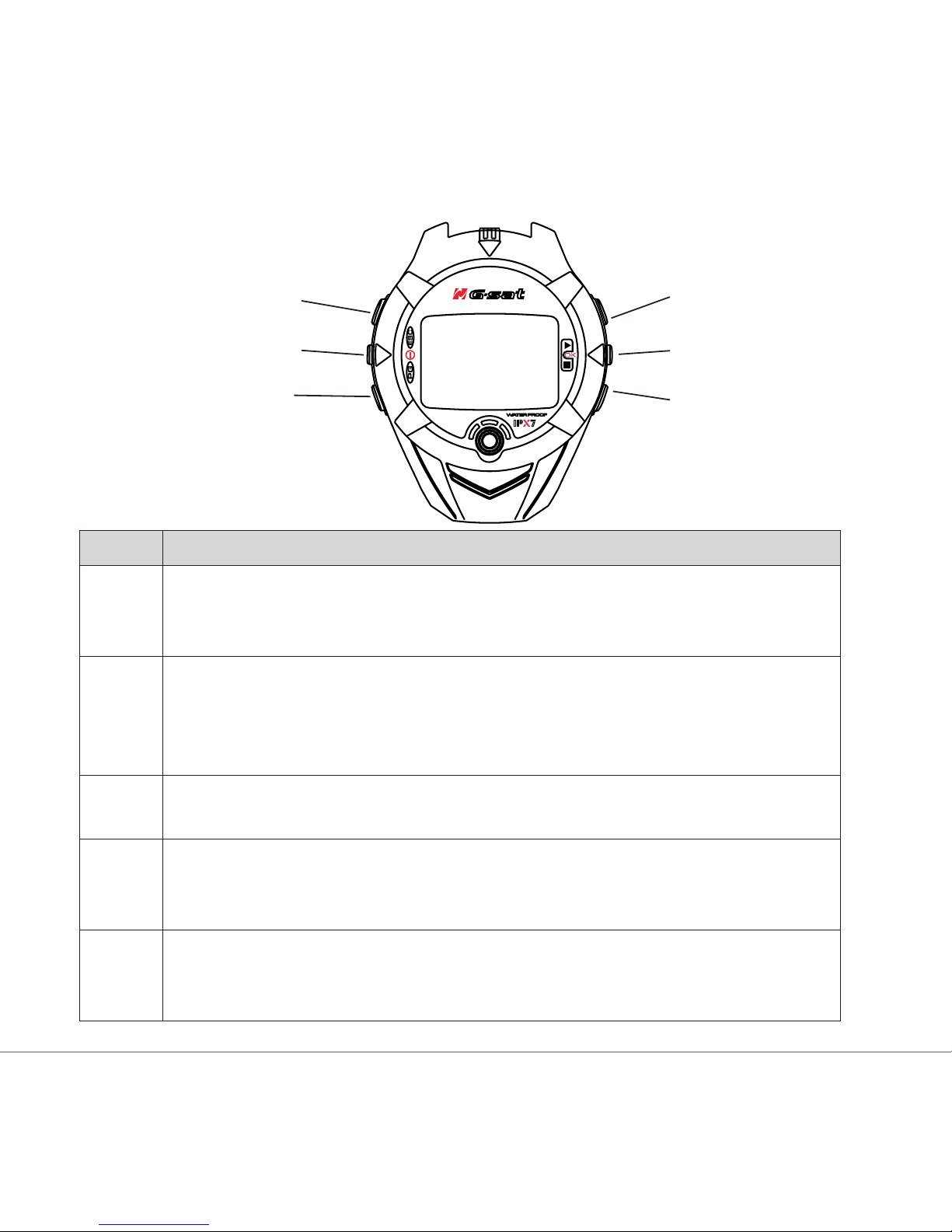
Button introduction
Button Description
ESC In Menu mode, press ESC button to escape from the current page and go
back to the previous page.
Press ESC button to split a lap when timer is running.
Power Press 2 seconds to turn on/off GH-615.
When GH-615 is on, quickly press this button will turn on/off the backlight.
Press and hold this button for 14 seconds to do hardware reset if the system
is halted.
PG
(page)
Switch between the screens of “Menu mode”, “Location mode”,
“Speedometer mode” and “Map mode”.
OK /
Enter
Press to enter the highlighted item.
Press to conrm data entry or feature selection in Menu mode.
In Speedometer mode, press to start/stop the timer.
Up /
Down
To move upward/downward for highlighting an item.
In Speedometer mode, press to switch between two views.
In Map mode, press to zoom in or zoom out.
Up
Down
OK / Enter
ESC
PG
Power
Altri manuali per GH-615B
1
Questo manuale è adatto per i seguenti modelli
1
Indice
Altri manuali Global Sat Orologio