
Goodmans XB4CDGX Manuale utente

XB4CDGX
CD Karaoke
User Guide
IMPORTANT: Please read all instructions carefully before use and keep for future reference
CDG522E XB4CDGX.indd 1 2009/8/25 4:54:46 PM

1
Introduction
Thank you for choosing this Goodmans CD Karaoke.
Your CD Karaoke will provide you with fun and entertainment. It can let you be
the “star” while singing with your favorite recordings and also display the song
lyrics on your TV screen.
It’s really easy to use; here are a few of the features:
Lyrics on TV screen - displays song lyrics when playing CD+G discs.
Auto Voice Control - lets you replace the original singer’s voice with your own
voice when playing a karaoke CD.
Balance Control - lets you adjust the balance between the prerecorded original
singer’s voice and the music when playing a karaoke CD.
Echo Control - lets you add an echo effect to your voice.
Auxiliary Input - lets you connect an auxiliary device such as an MP3 player so
you sing along to your favourite tracks.
Safety is important
Use of any electrical equipment should be undertaken with care. Please
read the safety section on page 10-12 before using your CD Karaoke. This
appliance is for household use only.

2
What’s in the box?
Contents
Introduction......................................................................................................1
What’s in the box...............................................................................................2
01 Your CD Karaoke........................................................................................3
02 Making Connections....................................................................................4
03 CD or CD+G Operation...............................................................................5CD or CD+G Operation...............................................................................5...............................................................................5
04 AdditionalFeatures......................................................................................7
05 Troubleshooting........................................................................................8Troubleshooting........................................................................................8........................................................................................8
05 Specifications...........................................................................................9Specifications...........................................................................................9.................................................................................9
07 Warnings.................................................................................................10.................................................................................................10..............................................................................10
08 Guarantee.................................................................................................13Guarantee.................................................................................................13..............................................................................13
CD Karaoke
This User Guide
MicrophoneScart Cable

3
Your CD Karaoke
Top
Front
Rear
01
MIC holder
CD Door
HANDLE
STANDBY
indicator
LED display
PROGRAM
indicator
REPEAT
indicator
PLAY/PAUSE
indicator
MIC VOLUME Knob
AUTO VOICE CONTROL Knob
BALANCE Knob
FUNCTION Switch
PLAY / PAUSE Button
SKIP Forward Button
MASTER VOLUME Control &
STANDBY-ON Button
ECHO +/– Buttons
SCART OUT Socket
AUDIO IN Sockets
Mains Power Cord
SKIP Backward Button
STOP Button
PROGRAM Button
REPEAT Button
MIC 1
MIC 2
SPEAKER
HANDLE
4
Making Connections
CONNECTING POWER
Connect the 3 pin plug to a suitable mains wall outlet.
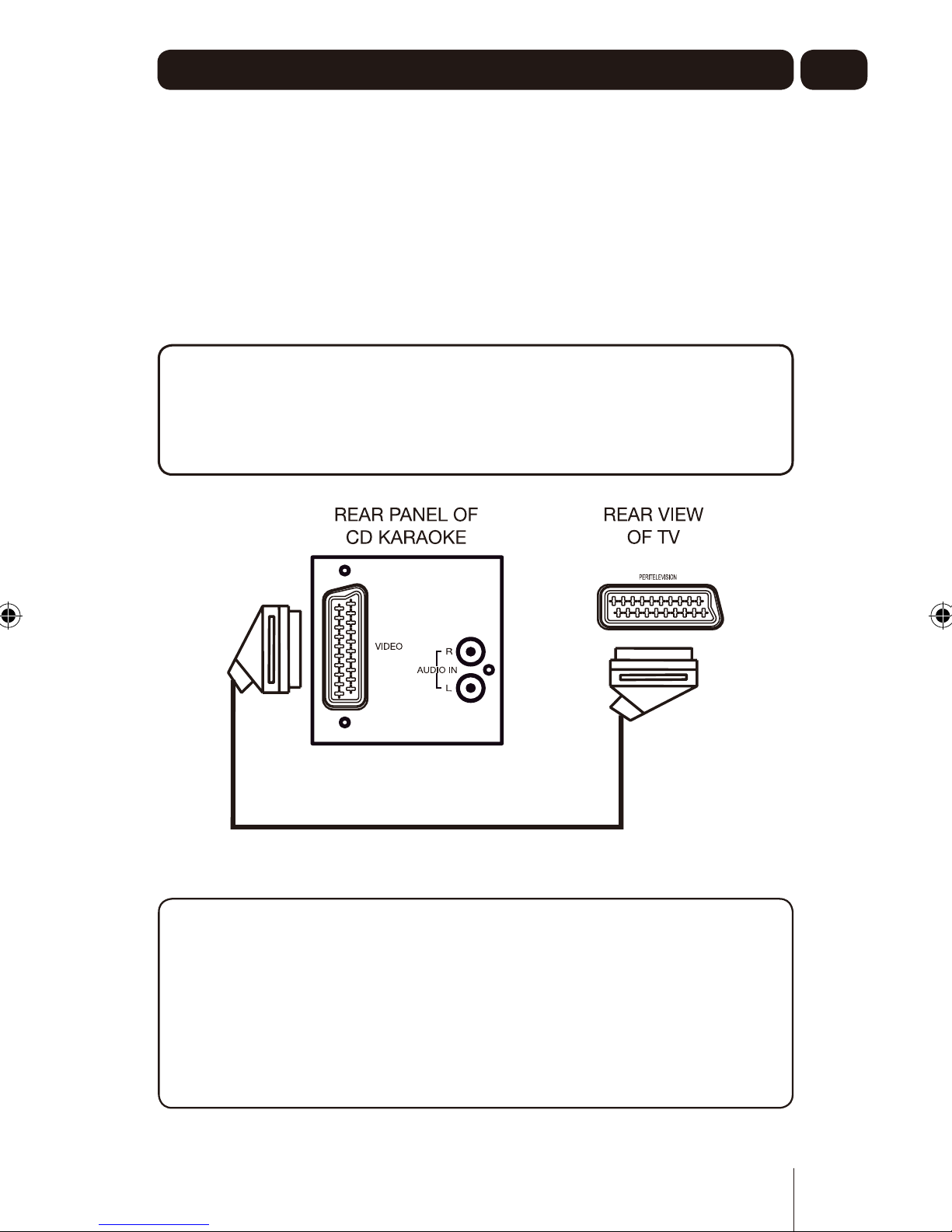
VIDEO CONNECTION
Please follow the steps below to display CDG lyrics on the TV screen:
1 Locate the scart cable.
2 Connect the scart cable to the SCART OUT socket of the back of the CD
Karaoke.
3 Connect the other end of the scart cable to the SCART IN socket on your TV
or VCR.
DON’T FORGET!
The sound from the CD Karaoke will also be heard through the speakers on
the TV set.
It is recommended not to have the volume of the TV set too high when using
the CD Karaoke.
DON’T FORGET!
When connecting the CD Karaoke to your TV set, you must specify the
correct input on your TV.
This is usually shown on the TV remote control as “AV”, “INPUT”, “AUX” or
“EXT” etc.
If you have difficulty in seeing the song lyrics from the Karaoke CD after
connecting to your TV set, please consult the user guide for your TV, or
alternatively contact our customer helpline on 0871 230 1777 for advice.
02

5
CD and CD+G Operation
Handling CDs
To remove a disc from its storage case, press
down on the centre of the case and lift the
disc out, holding it carefully by the edges.
Fingerprints and dust should be carefully wiped off the disc’s recorded surface
with a soft cloth before use.
DON’T FORGET!
Never use chemicals such as record sprays, antistatic sprays, benzene, or
thinners to clean compact discs.
These chemicals can damage the disc’s surface.
Switching On
Auto Power Off
1Press the
If no audio signal is continuously detected from CD or Aux In for more than
30 minutes, the unit will power-off automatically.
STANDBY/ON button to turn the unit ON.
2
1
To turn the CD Karaoke off, press the STANDBY/ON button again to turn the
unit off, the STANDBY indiicator will light.
Adjusting the Volume
1Rotate the MASTER VOLUME control to adjust the volume to a comfortable
level.
Playing a CD or CD+G Disc
1Slide the FUNCTION switch to the CD position.
2Lift up the CD door and carefully place a CD or CD+G onto the central
spindle.
DON’T FORGET!
Place the CD label side upwards
3Close the CD door. After a few seconds the display will show the total
number of tracks on the disc.
DON’T FORGET!
If no CD, or a scratched or dirty CD is loaded, the display will show “NO”.
03

6
CD and CD+G Operation
Playing/Pausing a track
1Press the PLAY/PAUSE button to begin playback of the first track. The
Play/Pause indicator will light.
2To pause playback , press the PLAY/PAUSE button. The Play/Pause
indicator will flash.
3To resume playback, press the PLAY/PAUSE button again.
4To stop playback of the CD, press the STOP button. The total number of
tracks will be shown in the display.
DON’T FORGET!
If you are playing a CD+G disc, the song lyrics will be displayed when you
connect the CD Karaoke to your TV set with the supplied scart lead.
Skipping Tracks
1During playback, press the SKIP / buttons to skip to the next or
previous track.
Searching tracks (audio CD only)
1 During playback, press and hold the SKIP / buttons to search
forwards or backwards through the current track.
2 To resume playback, release the SKIP / buttons.
Repeating Tracks
1 During playback, to repeat the current track, press the REPEAT button once.
The Repeat indicator will flash.
2 To repeat all tracks on the disc, press the REPEAT button twice. The Repeat
indicator will stay lit.
3 To cancel the Repeat function, press the REPEAT button again. The Repeat
indicator will turn off.
Programming Tracks
1 In STOP mode, press the PROGRAM button. The Program indicator will
flash and “0” will show in the display.
2 Use the SKIP / buttons to select the first track you wish to
program.
3 Press the PROGRAM button to enter this into the memory.
4 Repeat steps 2and 3until all the desired tracks are programmed into the
memory.
DON’T FORGET!
A maximum of 20 tracks can be programmed into the memory.
5To begin playback of the programmed tracks, press the PLAY/PAUSE
button.
6To clear the programmed tracks, press the STOP button twice.
03

7
Additional Features
Auto Voice Control
To replace the original singer’s voice with your own when a pre-recorded
multiplex karaoke disc is used:
1Rotate the Mic VOLUME to the desired level.
2Rotate the AUTO VOICE CONTROL to achieve a balance between playback
and microphone volume levels.
DON’T FORGET!
When the AUTO VOICE CONTROL is selected, the pre-recorded
singer’s voice on the karaoke CD will mute when you start to sing into the
microphone.
Balance Control
To adjust the balance between the original singer’s voice and the music when a
pre-recorded multiplex karaoke disc is used:
1Turn the BALANCE CONTROL between music and vocal to achieve the
desired effect.
Echo Control
1In stop mode or playback mode, press the ECHO + or - buttons to increase
or decrease the echo effect.
The echo effect value will show in the display.
DON’T FORGET!
There are 8 levels of echo effect available
2 When the desired echo level is reached, the display will return to the current
track number after a few seconds.
Auxiliary In Sockets
You can connect an auxiliary device to the CD Karaoke in the following way:
1Connect an RCA/Phono type lead to the AUDIO IN sockets on the rear of
the CD Karaoke.
2Connect the other end to your auxiliary device.
3Slide the FUNCTION switch to the AUX position.
4Turn on the auxiliary device and play the content in the usual way. The
sound will be heard through the CD Karaoke’s speaker.
04

8
05
Troubleshooting
Problem
No power.
No sound.
CD not reading corectly,
“”, “ ” or “ ” are
displayed.
No sound - if audio is
going through TV or VCR.
No song lyrics appear on
screen.
Possible Cause
No power plug connection at
the AC outlet.
Volume control is set to minimum.
The wrong function is selected.
Disc is inserted upside down.
Disc is dirty.
Disc is scratched.
A nonstandard disc is inserted.
Moisture has formed inside on the
CD lens.
Source Selection on TV or VCR is
not correct.
Scart lead is not connected properly
to the TV.
Source selector on TV is not set to
AV input.
Solution
Insert the power plug into the AC outlet.
Turn up the volume.
Select the correct function.
Insert disc correctly.
Wipe clean with soft cloth.
Use a new disc.
Only use discs bearing standard logo .
Wait about 20 to 30 minutes to let it dry out.
Follow directions of “Video Connection”.
Connect the scart cable to the SCART socket
and to the TV SCART IN.
Select the AV input on your TV.
Need extra help?
Don’t worry we are just at the other end of
the phone. If you are experiencing problems
using your new product, before returing it to
the retailer, just call 0871 230 1777.
Need a spare parts?
In the unlikely event of you needing spare
parts, please contact our spares department
on: 0871 230 0790

9
Specifications
Model Number •XB4CDGX
Power source •AC 230V ~ 50Hz
Power consumption •18W
Frequency response •100 – 18,000 Hz
Power Output •5W
Speaker •3” 4 ohms
Microphone •-74 dB 600ohms impedance
with ø6.3mm dynamic microphone
Unit dimensions •192 (D) x 199.3 (W) x 281.2 (H) mm
Unit weight •approx. 2.5 kgs
IMPORTANT: Due to continual revision and improvements to our products
design, specifications arer subject to change wihtout notice.
06
Altri manuali per XB4CDGX
1
Indice
Altri manuali Goodmans Sistema Karaoke

Goodmans
Goodmans XB12DCDG Manuale utente

Goodmans
Goodmans XB25CDG Manuale utente

Goodmans
Goodmans XB4CDGX Manuale utente

Goodmans
Goodmans XB5CDG Manuale utente

Goodmans
Goodmans XB4CDGXP Manuale utente

Goodmans
Goodmans XB6CDG Manuale di istruzioni

Goodmans
Goodmans XB6CDG Manuale utente

Goodmans
Goodmans XB13CDG Manuale utente

Goodmans
Goodmans 339562 Manuale utente

Goodmans
Goodmans XB13CDG Manuale utente


