GreenWorks PA321K Manuale utente

QUG301
EN OPERATOR MANUAL
FR MANUEL DE L'UTILISATEUR
QUARTER SHEET SANDER
ES MANUAL DEL OPERADOR
www.greenworkstools.com
LIJADORA DE 1/4 DE HOJA
PONCEUSE À QUART DE FEUILLE
Rev B1
G24SS14
PA321K


1 Description...................................4
1.1 Purpose...................................................... 4
1.2 Overview.................................................... 4
2 General power tool safety
warnings.......................................4
2.1 Work area safety........................................ 4
2.2 Electrical safety.......................................... 4
2.3 Personal safety...........................................4
2.4 Power tool use and care.............................5
2.5 Battery tool use and care........................... 5
2.6 Service....................................................... 5
3 Safety warnings for sander........ 5
4 Symbols on the product............. 6
5 Proposition 65............................. 6
6 Risk levels....................................6
7 Environmentally safe battery
disposal........................................7
8 Installation................................... 7
8.1 Unpack the machine...................................7
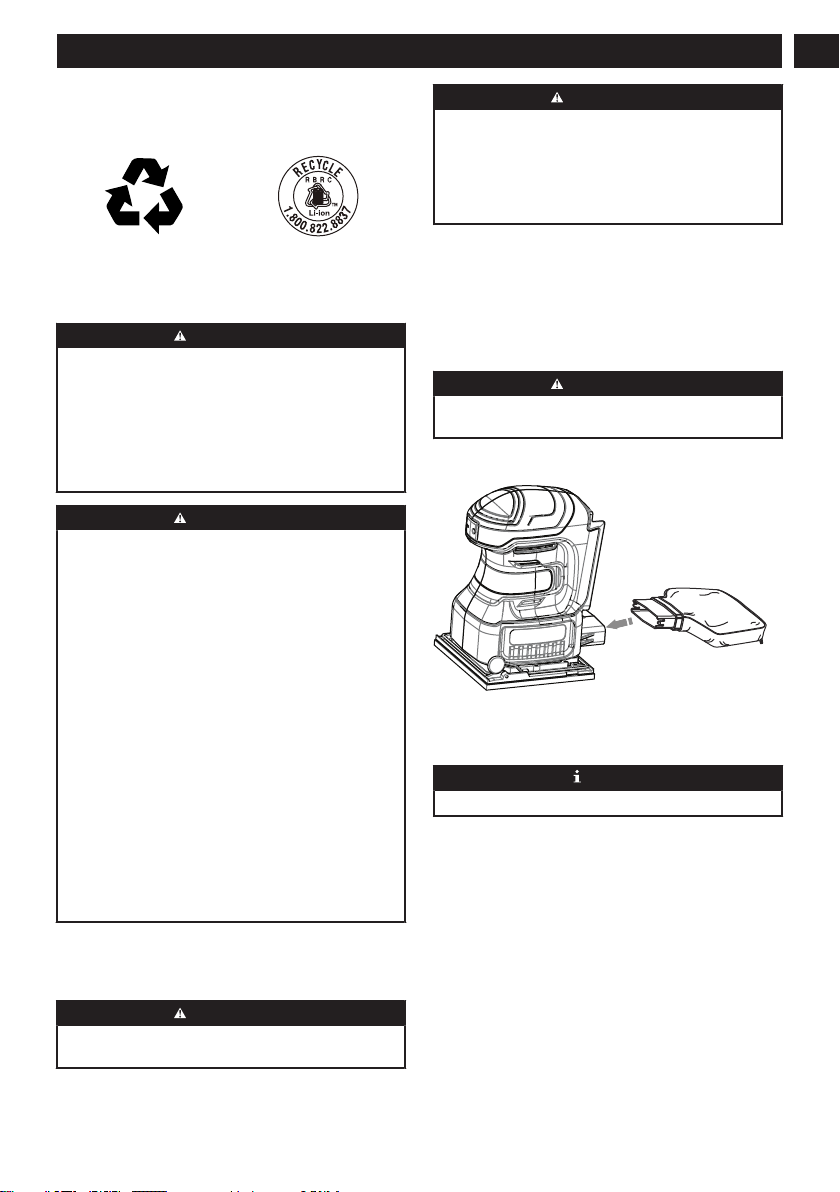
8.2 Install the dust bag..................................... 7
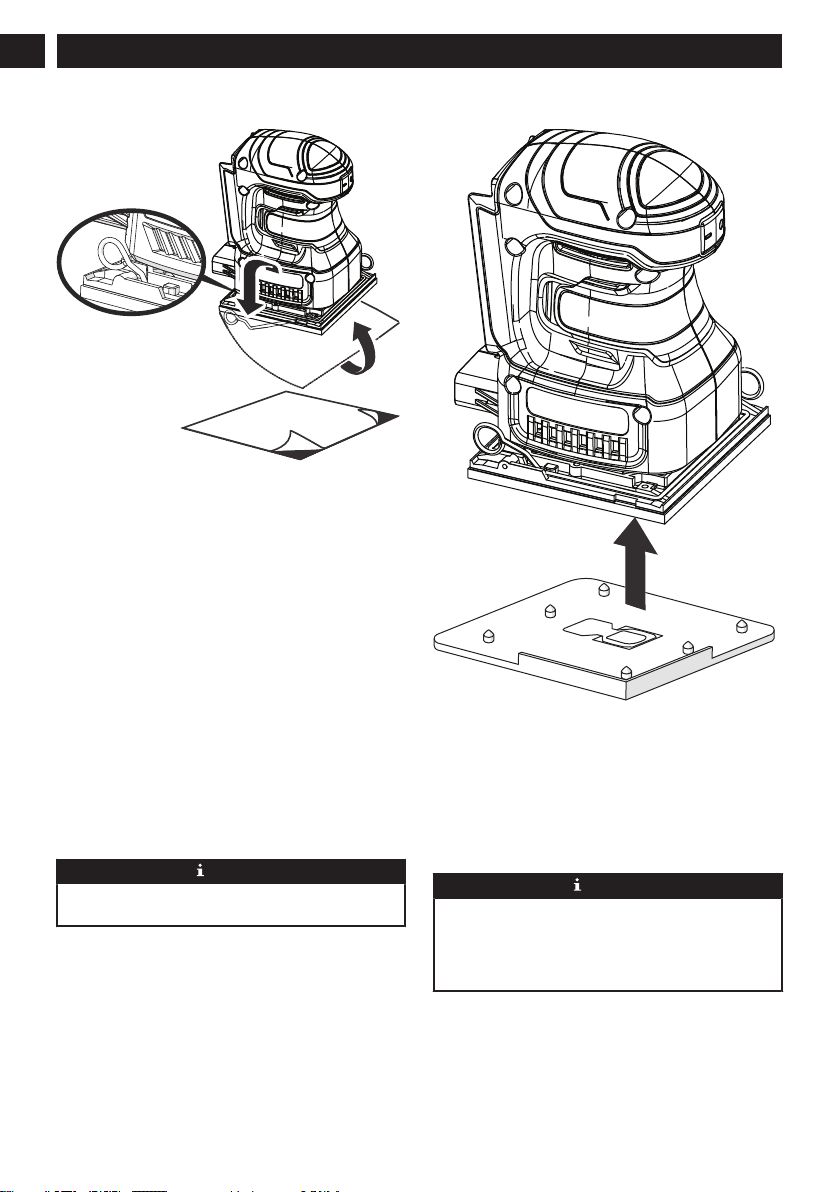
8.3 Install sandpaper........................................ 8
8.4 Paper punch............................................... 8
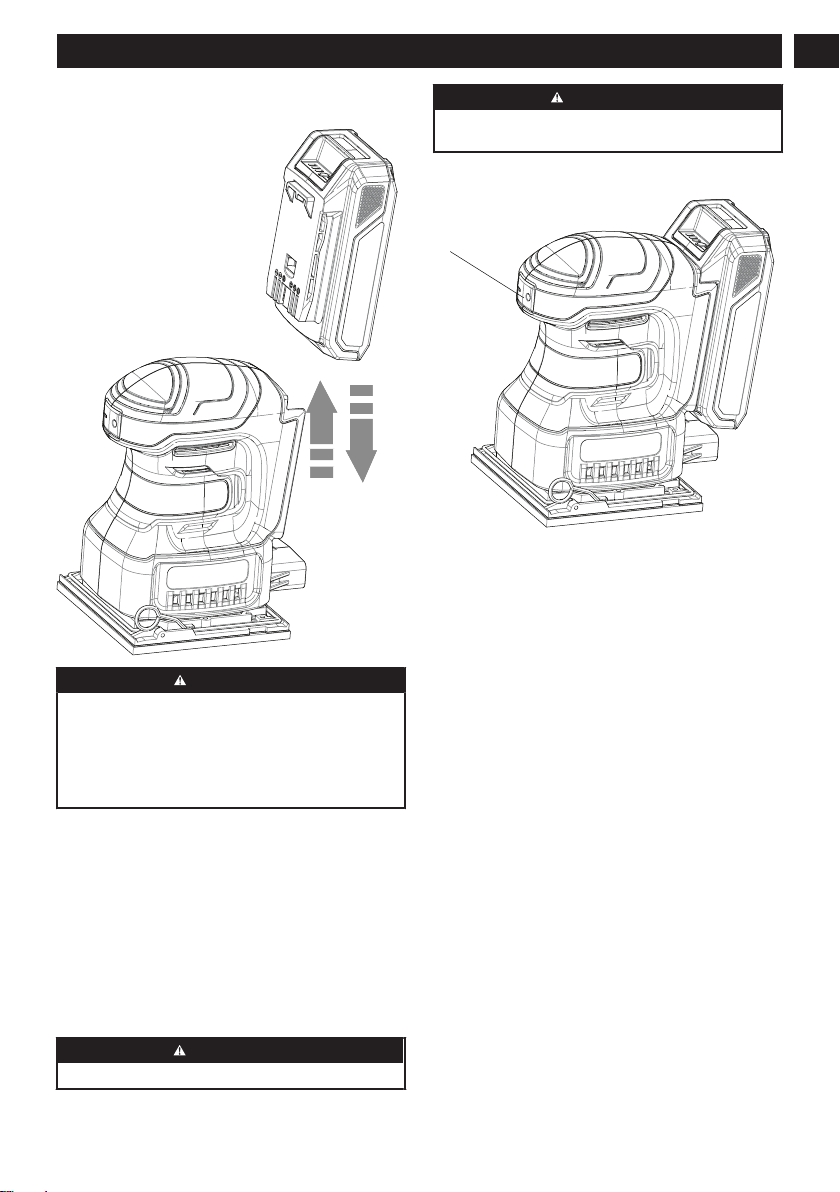
8.5 Install the battery pack............................... 9
8.6 Remove the battery pack........................... 9
9 Operation..................................... 9
9.1 Start the machine....................................... 9
9.2 Stop the machine....................................... 9
9.3 Replace the sanding sheets....................... 9
9.4 Operate the machine..................................9
9.5 Sandpaper selection.................................10
10 Maintenance...............................10
11 General manintenance..............10
12 Removing pressure sensitive
adhesive (PSA) sandpaper
before storage........................... 10
12.1 Clean the machine....................................11
12.2 Clean the dust box....................................11
13 Technical data............................11
14 Limited warranty........................11
3
English EN

1 DESCRIPTION
1.1 PURPOSE
You may use this product for the purposes listed
below:
• Sanding on wood surfaces
• Removing rust from and sanding steel surfaces
• Sanding plastics
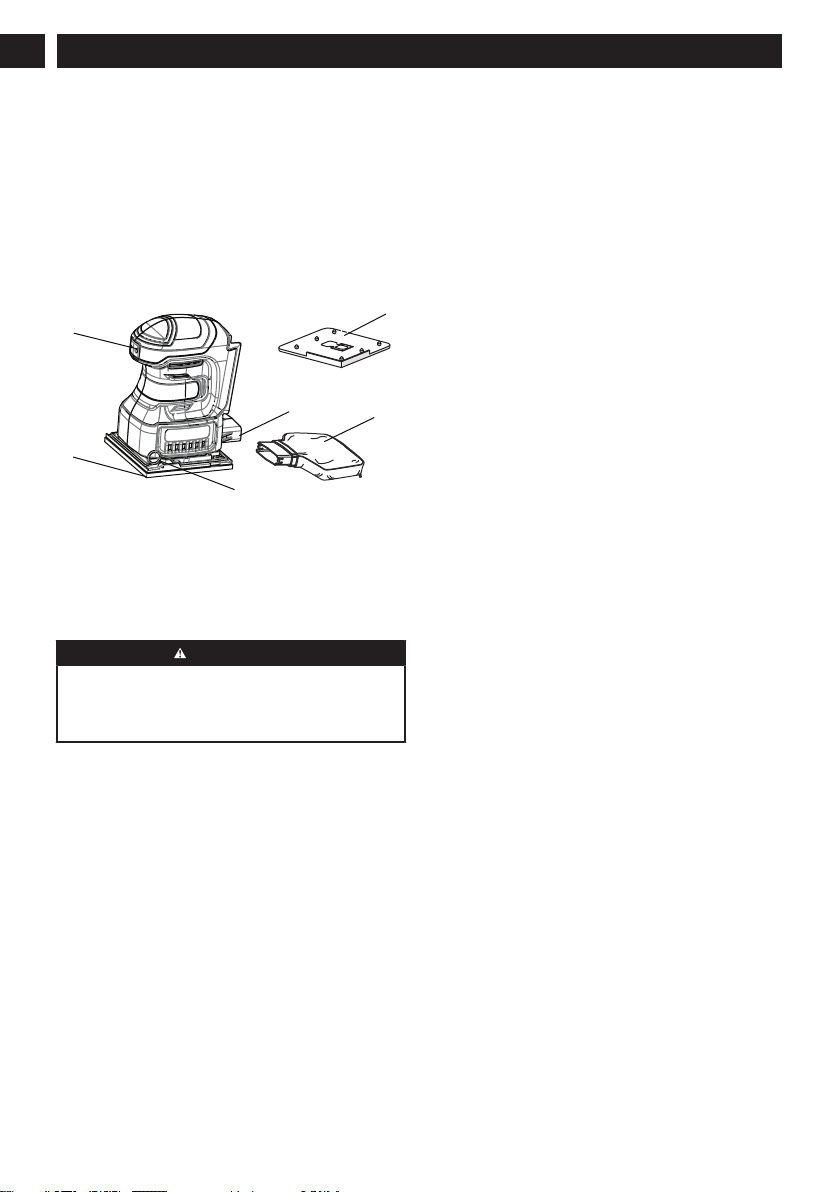
1.2 OVERVIEW
1ON-OFF Switch
2Cushion
3Dust exhaust port
4Lever
5Dust bag
6Paper punch
2 GENERAL POWER TOOL
SAFETY WARNINGS
WARNING
Read all safety warnings, instructions, illustrations
and specifications provided with this power tool.
Failure to follow all instructions listed below may result
in electric shock, fire and/or serious injury.
Save all warnings and instructions for future
reference.
The term "power tool" in the warnings refers to your
mains-operated (corded) power tool or battery-operated
(cordless) power tool.
2.1 WORK AREA SAFETY
•Keep work area clean and well lit. Cluttered or
dark areas invite accidents.
•Do not operate power tools in explosive
atmospheres, such as in the presence of
flammable liquids, gases or dust. Power tools
create sparks which may ignite the dust or fumes.
•Keep children and bystanders away while
operating a power tool. Distractions can cause you
to lose control.
2.2 ELECTRICAL SAFETY
•Power tool plugs must match the outlet. Never
modify the plug in any way. Do not use any
adapter plugs with earthed (grounded) power
tools. Unmodified plugs and matching outlets will
reduce risk of electric shock.
•Avoid body contact with earthed or grounded
surfaces, such as pipes, radiators, ranges and
refrigerators. There is an increased risk of electric
shock if your body is earthed or grounded.
•Do not expose power tools to rain or wet
conditions. Water entering a power tool will
increase the risk of electric shock.
•Do not abuse the cord. Never use the cord for
carrying, pulling or unplugging the power tool.
Keep cord away from heat, oil, sharp edges
or moving parts. Damaged or entangled cords
increase the risk of electric shock.
•When operating a power tool outdoors, use an
extension cord suitable for outdoor use. Use of
a cord suitable for outdoor use reduces the risk of
electric shock.
•If operating a power tool in a damp location is
unavoidable, use a residual current device (RCD)
protected supply. Use of an RCD reduces the risk
of electric shock.
2.3 PERSONAL SAFETY
•Stay alert, watch what you are doing and use
common sense when operating a power tool. Do
not use a power tool while you are tired or under
the influence of drugs, alcohol or medication. A
moment of inattention while operating power tools
may result in serious personal injury.
•Use personal protective equipment. Always wear
eye protection. Protective equipment such as a
dust mask, non-skid safety shoes, hard hat, or
hearing protection used for appropriate conditions
will reduce personal injuries.
•Prevent unintentional starting. Ensure the switch
is in the off-position before connecting to
power source and/or battery pack, picking up or
carrying the tool. Carrying power tools with your
finger on the switch or energising power tools that
have the switch on invites accidents.
•Remove any adjusting key or wrench before
turning the power tool on. A wrench or a key left
attached to a rotating part of the power tool may
result in personal injury.
•Do not overreach. Keep proper footing and
balance at all times. This enables better control of
the power tool in unexpected situations.
•Dress properly. Do not wear loose clothing or
jewellery. Keep your hair, clothing and gloves
away from moving parts. Loose clothes, jewellery
or long hair can be caught in moving parts.
4
English
EN

•If devices are provided for the connection of
dust extraction and collection facilities, ensure
these are connected and properly used. Use of
dust collection can reduce dust-related hazards.
•Do not let familiarity gained from frequent use
of tools allow you to become complacent and
ignore tool safety principles. A careless action
can cause severe injury within a fraction of a
second.
2.4 POWER TOOL USE AND CARE
•Do not force the power tool. Use the correct
power tool for your application. The correct power
tool will do the job better and safer at the rate for
which it was designed.
•Do not use the power tool if the switch does not
turn it on and off. Any power tool that cannot be
controlled with the switch is dangerous and must be
repaired.
•Disconnect the plug from the power source
and/or the battery pack from the power tool
before making any adjustments, changing
accessories, or storing power tools. Such
preventive safety measures reduce the risk of
starting the power tool accidentally
•Store idle power tools out of the reach of
children and do not allow persons unfamiliar
with the power tool or these instructions to
operate the power tool. Power tools are dangerous
in the hands of untrained users.
•Maintain power tools. Check for misalignment or
binding of moving parts, breakage of parts and
any other condition that may affect the power
tool’s operation. If damaged, have the power tool
repaired before use. Many accidents are caused
by poorly maintained power tools.
•Keep cutting tools sharp and clean. Properly
maintained cutting tools with sharp cutting edges
are less likely to bind and are easier to control.
•Use the power tool, accessories and tool bits
etc. in accordance with these instructions,
taking into account the working conditions and
the work to be performed. Use of the power tool
for operations different from those intended could
result in a hazardous situation.
•Keep handles and grasping surfaces dry, clean
and free from oil and grease. Slippery handles
and grasping surfaces do not allow for safe handling
and control of the tool in unexpected situations.
2.5 BATTERY TOOL USE AND CARE
•Recharge only with the charger specified by the
manufacturer. A charger that is suitable for one
type of battery pack may create a risk of fire when
used with another battery pack.
•Use power tools only with specifically
designated battery packs. Use of any other battery
packs may create a risk of injury and fire.
•When battery pack is not in use, keep it away
from other metal objects like paper clips, coins,
keys, nails, screws, or other small metal objects
that can make a connection from one terminal
to another. Shorting the battery terminals together
may cause burns or fire.
•Under abusive conditions, liquid may be ejected
from the battery; avoid contact. If contact
accidentally occurs, flush with water. If liquid
contacts eyes, additionally seek medical help.
Liquid ejected from the battery may cause irritation
or burns.
•Do not use a battery pack or tool that is
damaged or modified. Damaged or modified
batteries may exhibit unpredictable behavior
resulting in fire, explosion or risk of injury.
•Do not expose a battery pack or tool to fire
or excessive temperature. Exposure to fire or
temperature above 130°C (265 °F) may cause
explosion.
•Follow all charging instructions and do not
charge the battery pack or tool outside the
temperature range specified in the instructions.
Charging improperly or at temperatures outside
the specified range may damage the battery and
increase the risk of fire.
2.6 SERVICE
•Have your power tool serviced by a qualified
repair person using only identical replacement
parts. This will ensure that the safety of the power
tool is maintained.
•Never service damaged battery packs. Service
of battery packs should only be performed by the
manufacturer or authorized service providers.
3 SAFETY WARNINGS FOR
SANDER
• Use the machine only for dry sanding. Penetration
of water into the machine increases the risk of an
electrical shock.
• Be careful that no persons are put at risk through
sparking. Remove any combustible materials in
the vicinity. Sparking occurs when sanding metal
materials.
• Caution, fire hazard! Avoid overheating the object
being sanded as well as the sander. Always
empty the dust collector before taking breaks. In
unfavourable conditions, e. g., when sparks emit
from sanding metals, sanding debris in the dust
bag, micro filter or paper sack (or in the filter
sack or filter of the vacuum cleaner) can self-ignite.
Particularly when mixed with remainders of varnish,
polyurethane or other chemical materials and when
the sanding debris is hot after long periods of
working.
5
English EN

• When working with the machine, always hold it
firmly with both hands and provide for a secure
stance. The power tool is guided more secure with
both hands.
• Secure the workpiece. A workpiece clamped with
clamping devices or in a vice is held more secure
than by hand.
• Do not open the battery. Risk of short-circuiting.
• In case of damage and improper use of the battery,
vapours may be emitted. Ventilate the area and
seek medical help in case of complaints. The
vapours can irritate the respiratory system.
• Use the battery only in conjunction with your
power tool. This measure alone protects the battery
against dangerous overload.
• The battery pack can be damaged by pointed
objects such as nails or screwdrivers or by force
applied externally. An internal short circuit can occur
and the battery pack can burn, smoke, explode or
overheat.
4 SYMBOLS ON THE PRODUCT
The following symbols are important for reading and
understanding the operating instructions. Please take
note of the symbols and their meanings. The correct
interpretation of the symbols will help you to use the
machine in a better and safer manner.
Symbol Explanation
Safety alert
CE Conformity
Read and understand all instruc-
tions before operating the product,
and follow all warnings and safety
instructions.
Wear ear protection.
Wear eye protection
Wear a dust mask
Wear safety gloves
V Volts
Direct Current
min-1 No-load speed
Symbol Explanation
No-load orbital stroke rate
cm2Sanding sheet surface
mm Orbit diameter
Sanding plate diameter
5 PROPOSITION 65
WARNING
This product contains a chemical known to the
state of California to cause cancer, birth defects
or other reproductive harm. Some dust created by
power sanding, sawing, grinding, drilling, and other
construction activities contains chemicals known to
cause cancer, birth defects or other reproductive
harm. Some examples of these chemicals are:
• Lead from lead-based paints;
• Crystalline silica from bricks and cement and other
masonry products;
• Arsenic and chromium from chemically treated
lumber.
Your risk of exposure to these chemicals varies
depending on how often you do this type of work. To
reduce your exposure to these chemicals, work in a
well-ventilated area, and work with approved safety
equipment, such as dust masks that are specially
designed to filter out microscopic particles.
Save these instructions.
6 RISK LEVELS
The following signal words and meanings are intended
to explain the levels of risk associated with this product.
SYM-
BOL
SIGNAL MEANING
DANGER Indicates an imminently
hazardous situation, which,
if not avoided, will result in
death or serious injury.
WARNING Indicates a potentially haz-
ardous situation, which, if
not avoided, could result in
death or serious injury.
CAUTION Indicates a potentially haz-
ardous situation, which, if
not avoided, may result in
minor or moderate injury.
CAUTION (Without Safety Alert Sym-
bol) Indicates a situation
that may result in property
damage.
6
English
EN

7 ENVIRONMENTALLY SAFE
BATTERY DISPOSAL
The toxic and corrosive materials below are in the
batteries used in this machine: Lithium-ion, a toxic
material.
WARNING
Discard all toxic materials in a specified manner to
prevent contamination of the environment. Before
discarding damaged or worn out Li-ion battery,
contact your local waste disposal agency, or the local
Environmental Protection Agency for information and
specific instructions. Take the batteries to a local
recycling and/or disposal center, certified for lithium-
ion disposal.
WARNING
If the battery pack cracks or breaks, with or without
leaks, do not recharge it and do not use. Discard it
and replace with a new battery pack. DO NOT TRY
TO REPAIR IT! To prevent injury and risk of fire,
explosion, or electric shock, and to avoid damage to
the environment:
• Cover the terminals of the battery with heavy-duty
adhesive tape.
• DO NOT try to remove or destroy any of the
battery pack components.
• DO NOT try to open the battery pack.
• If a leak develops, the released electrolytes are
corrosive and toxic. DO NOT get the solution in the
eyes or on skin, and do not swallow it.
• DO NOT put these batteries in your regular
household trash.
• DO NOT incinerate.
• DO NOT put them where they will become part of
any waste landfill or municipal solid waste stream.
• Take them to a certified recycling or disposal
center.
8 INSTALLATION
8.1 UNPACK THE MACHINE
WARNING
Make sure that you correctly assemble the machine
before use.
WARNING
• If parts of the machine are damaged, do not use
the machine.
• If you do not have all the parts, do not operate the
machine.
• If parts are damaged or missing, contact the
service center.
1. Open the package.
2. Read the documentation provided in the box.
3. Remove all the unassembled parts from the box.
4. Remove the machine from the box.
5. Discard the box and packing material in compliance
with local regulations.
WARNING
For your personal safety, do not insert battery before
the tool is assembled completely.
8.2 INSTALL THE DUST BAG
1. Remove the battery pack
2. Slide the dust bag into the dust exhaust port on the
sander.
NOTE
Empty and clean the dust box in good time.
7
English EN

8.3 INSTALL SANDPAPER
The cushion on the sander gives you the option of
using either non-adhesive sandpaper that clamps to
the platen or adhesive backed sandpaper with pressure
sensitive adhesive backing that sticks to the cushion.
1. Remove the battery pack.
2. Inspect sandpaper before installing; do not use if
broken or defective.
3. If replacing sandpaper, remove old sandpaper. To
remove paper, release paper clamp by lifting up on
lever, and disengaging it from the tab on the platen.
4. Insert end of new 1/4 sheet sandpaper
approximately 1/2 in. under the paper clamp.
5. Lift up on paper clamp lever and lock into place.
Apply downward pressure to conform sandpaper to
platen.
6. Wrap sandpaper around cushion. Lift lever on
opposite end of sander and insert loose end
of sandpaper under paper clamp. Fit sandpaper
against cushion tightly.
7. Lift up on lever and lock into place.
NOTE
1/2 in. clamping of sandpaper is necessary for multi-
sheet stacking of paper.
8.4 PAPER PUNCH
A paper punch template has been supplied with the
sander for aligning and punching holes in sandpaper.
The punched holes must align with the holes in the
sander cushion. Punching the holes properly is a
necessary step for dustless sanding.
1. Install sandpaper on the sander.
2. Align sander cushion to paper punch as shown.
3. Push down on sander.
NOTE
Always wear eye protection with side shields marked
to comply with ANSI Z87.1. Failure to do so could
result in objects being thrown into your eyes resulting
in possible serious injury. If the sanding operating is
dusty, also wear a face or dust mask.
8
English
EN

8.5 INSTALL THE BATTERY PACK
WARNING
• If the battery pack or charger is damaged, replace
the battery pack or the charger.
• Stop the machine and wait until the motor stops
before you install or remove the battery pack.
• Read, know, and follow the instructions in the
battery and charger manual.
1. Align the lift ribs on the battery pack with the
grooves in the battery compartment.
2. Push the battery pack into the battery compartment
until the battery pack locks into place.
3. When you hear a click, the battery pack is installed.
8.6 REMOVE THE BATTERY PACK
1. Push and hold the battery release button.
2. Remove the battery pack from the machine.
9 OPERATION
WARNING
Always wear eye protection.
WARNING
Do not use any attachments or accessories not
recommended by the manufacturer of this product.
9.1 START THE MACHINE
1. Push ON button.
9.2 STOP THE MACHINE
1. Push OFF button.
9.3 REPLACE THE SANDING SHEETS
Remove any dust or debris from the sanding plate to
attach a new sanding sheets.
1. Lift the sanding sheet from the side and pull it off of
the sanding plate.
2. Put the sanding sheet with the Velcro facing up on
the dust box.
3. Push the cams of the dust box into two holes of the
sanding plate.
4. Roll off the sanding sheet from the dust box.
5. Push new the sanding sheet tightly against the
bottom side of the sanding plate.
9.4 OPERATE THE MACHINE
Surface sanding
1. Start the machine.
2. Put it with the complete sanding surface on the
surface to be worked and move the machine with
moderate pressure over the workpiece.
The removal capacity and the sanding pattern are
mainly determined by the selection of the sanding
sheet, the preselected orbital stroke rate and the
applied pressure.
9
English EN

Use only initial sanding accessories.
Rough Sanding
1. Attach a sanding sheet with coarse grain.
2. Apply only light pressure to the machine so that
it runs at a higher stroke rate and high material
removal is achieved.
Fine Sanding
1. Attach a sanding sheet with fine grain.
2. By lightly varying the application pressure or
changing the orbital stroke rate, the sanding plate
stroke rate can be reduced whereby the orbital
action is maintained.
Polishing
1. Select a low orbital stroke rate (level 1 – 4) when
polishing in order to avoid heating up the surface
excessively.
2. Apply the polish onto a somewhat smaller surface
than you intend to polish. Work the polishing agent
in with a suitable polishing tool applying it crosswise
or with circular motion and moderate pressure.
3. Clean the polishing accessories regularly to
ensure good polishing results. Wash out polishing
accessories with a mild detergent and warm water;
do not use paint thinner.
NOTE
Do not allow the polishing agent to dry out on the
surface, otherwise the surface can become damaged.
Do not subject the surface to be polished to direct
sunlight.
9.5 SANDPAPER SELECTION
• Selecting the correct size grit and type sandpaper
is an extremely important step in achieving a
high quality sanded finish. Aluminum oxide, silicon
carbide, and other synthetic abrasives are best for
power sanding. Natural abrasives, such as flint and
garnet are too soft for economical use in power
sanding.
• In general, coarse grit will remove the most material
and finer grit will produce the best finish in all
sanding operations. The condition of the surface
to be sanded will determine which grit will do the
job. If the surface is rough, start with a coarse grit
and sand until the surface is uniform. Medium grit
may then be used to remove scratches left by the
coarser grit and finer grit used for finishing of the
surface. Always continue sanding with each grit until
surface is uniform.
CAUTION
DO NOT use sander without sandpaper. Doing so will
damage the cushion.
10 MAINTENANCE
CAUTION
Do not let brake fluids, gasoline, petroleum-based
materials touch the plastic parts. Chemicals can
cause damage to the plastic, and make the plastic
unserviceable.
CAUTION
Do not use strong solvents or detergents on the plastic
housing or components.
WARNING
Remove the battery pack from the machine before
maintenance.
11 GENERAL MANINTENANCE
• Before each use, examine the machine for
damaged, missing, or loose parts such as screws,
nuts, bolts and caps.
• Clean the machine with a dry cloth. Do not use
slovents.
WARNING
Do not let brake fluids, gasoline, petroleum-based
materials touch the plastic parts. Chemicals can
cause damage to the plastic, and make the plastic
unserviceable.
CAUTION
Use only approved replacement parts.
12 REMOVING PRESSURE
SENSITIVE ADHESIVE (PSA)
SANDPAPER BEFORE
STORAGE
• Do not store the sander with the sandpaper
installed. Heat generated from sanding causes the
pressure sensitive adhesive to flow and form a tight
bond between the backing pad and sandpaper.
• Removing the sandpaper soon after you have
finished a sanding operation avoids letting the
adhesive set up. If the sandpaper is left on the
backing pad for an extended period of time after
use, the adhesive will set up and cause the
sandpaper to become difficult to remove.
• It may also tear when removing. When this situation
occurs, it becomes difficult to clean the backing pad
for the next sheet of sandpaper.
10
English
EN
Questo manuale è adatto per i seguenti modelli
2
Indice
Lingue:
Altri manuali GreenWorks Levigatrice