GVA G32HTC16 Manuale utente

32” (80cm) HD LED LCD TV
with Built-in DVD Player
G32HTC16
G32HTC16_IB_Final160623.indd 1 24/6/16 上午10:20

Contents
Safety Information and Warnings....................................................................................................... 4
Symbols..................................................................................................................................................................4
Caring for the Environment ................................................................................................................. 6
Responsible Disposal of the Packaging ......................................................................................................................6
Responsible Disposal of Appliance............................................................................................................................ 6
Preparation ........................................................................................................................................ 7
Unpacking the TV....................................................................................................................................................7
Installing / Removing the Base Stand ........................................................................................................................ 8
−Installing the Base Stand.................................................................................................................................. 8
−Mounting the TV to a Wall ..............................................................................................................................9
Front / Right Side View and Rear Controls............................................................................................................... 10
Rear View and Sockets .......................................................................................................................................... 11
Installing Batteries in the Remote Control ................................................................................................................. 12
Remote Control Operation Range ........................................................................................................................... 12
Remote Control ..................................................................................................................................................... 13
Connections .......................................................................................................................................16
Making Video and Audio Connections.................................................................................................................... 16
Connecting an AV Device Using an HDMI Cable...................................................................................................... 16
Connecting a Computer Using a VGA Cable ........................................................................................................... 17
Connecting an AV Device Using a Component (YPbPr) Cable.................................................................................... 17
Connecting an AV Device Using Composite Cable.................................................................................................... 18
Connecting a Coaxial Audio Receiver ..................................................................................................................... 18
Connecting Headphones........................................................................................................................................ 19
Initial Setup ...................................................................................................................................... 20
Turning the TV On for the First Time ........................................................................................................................ 20
−First Time Setup ............................................................................................................................................ 20
−Selecting the Input Source.............................................................................................................................. 22
−Channel Selection ........................................................................................................................................ 22
−Listening to the Radio (Radio Mode) ............................................................................................................... 22
−Display Channel Information.......................................................................................................................... 22
−Volume Adjustment ....................................................................................................................................... 22
Customising TV Settings .....................................................................................................................23
Picture Setting ....................................................................................................................................................... 23
Sound Setting........................................................................................................................................................24
−Stereo / Dual Sound Reception (ATV Mode) ...................................................................................................24
Channel Setting..................................................................................................................................................... 25
−Auto Scan .................................................................................................................................................... 25
−DTV Manual Scan (DTV Mode)...................................................................................................................... 26
−ATV Manual Scan (ATV Mode)...................................................................................................................... 27
−Auto Channel Update (DTV Mode)................................................................................................................. 28
−Channel Edit (DTV Mode).............................................................................................................................. 28
−Channel Edit (ATV Mode).............................................................................................................................. 29
−Favourite Manager ....................................................................................................................................... 30
−Signal Information (DTV Mode)...................................................................................................................... 31
Lock Setting .......................................................................................................................................................... 32
−Lock System.................................................................................................................................................. 32
−Channel Locks .............................................................................................................................................. 33
−Parental Rating (DTV Mode) .......................................................................................................................... 34
−Lock Keypad ................................................................................................................................................ 35
−New Password ............................................................................................................................................. 36
−Clear Lock.................................................................................................................................................... 36
Setup Setting......................................................................................................................................................... 37
−OSD Language............................................................................................................................................. 37
−Audio Languages (DTV Mode)....................................................................................................................... 37
G32HTC16_IB_Final160623.indd 2 24/6/16 上午10:20

−Subtitle (DTV Mode)......................................................................................................................................38
−Teletext ........................................................................................................................................................ 39
−Blue Screen .................................................................................................................................................. 40
−Mode Setting................................................................................................................................................40
−Time Settings ................................................................................................................................................ 41
−HDMI CEC Control........................................................................................................................................ 43
−PVR Settings (DTV Mode) ..............................................................................................................................45
−OAD (Over Air Download) ...........................................................................................................................46
−Restore Factory Default ................................................................................................................................. 47
Using the Features ............................................................................................................................ 48
EPG (Electronic Programme Guide) (DTV Mode) ...................................................................................................... 48
−Switch On / Off EPG.................................................................................................................................... 48
−Select a Programme......................................................................................................................................48
Digital Teletext (DTV Mode).................................................................................................................................... 49
−Teletext within Digital Service......................................................................................................................... 49
Entertainment ................................................................................................................................... 50
Connecting a USB Storage Device ..........................................................................................................................50
Viewing Photos ..................................................................................................................................................... 50
Listening to Music .................................................................................................................................................. 51
Viewing Movies..................................................................................................................................................... 52
My Text ................................................................................................................................................................ 52
PVR (Personal Video Recorder) ......................................................................................................... 54
Time Shift Function.................................................................................................................................................54
Recording DTV Programme onto a USB Storage Device ............................................................................................ 55
Timer Programming (DTV Mode) ............................................................................................................................ 56
Play Recorded Programme .................................................................................................................................... 58
Using the DVD Features..................................................................................................................... 60
Using the Built-in DVD Player..................................................................................................................................60
Compatible Disc Types...........................................................................................................................................60
−Supported Formats .......................................................................................................................................60
Basic DVD Playback Functions................................................................................................................................ 61
−Playing the DVD ........................................................................................................................................... 61
−Menu Playback (for DVD).............................................................................................................................. 61
−Stopping Playback........................................................................................................................................ 61
−Previous / Next (for DVD / CD / Multimedia discs) ......................................................................................... 61
−Forward / Backward (for DVD / CD / Multimedia discs) ................................................................................. 61
−Pause (for DVD / CD / Multimedia discs) ....................................................................................................... 61
−Repeat (for DVD / CD / Multimedia discs)...................................................................................................... 61
−Display (for DVD / Multimedia discs) ............................................................................................................. 62
−Angle (for DVD) ........................................................................................................................................... 62
−Zoom (for DVD)............................................................................................................................................ 62
−Goto (for DVD / CD / Multimedia discs) ........................................................................................................ 62
−Audio (for DVD / CD)................................................................................................................................... 63
−Repeat A-B (for DVD / CD) ........................................................................................................................... 63
Program (for DVD) ................................................................................................................................................ 63
Using the DVD General Setup Page ........................................................................................................................ 64
Using the DVD Audio Setup Page ........................................................................................................................... 65
Using the DVD Preference Setup Page..................................................................................................................... 65
Other Information..............................................................................................................................67
Maintenance......................................................................................................................................................... 67
Hints and Tips ....................................................................................................................................................... 68
Display Modes ...................................................................................................................................................... 70
Technical Specifications.......................................................................................................................................... 71
G32HTC16_IB_Final160623.indd 3 24/6/16 上午10:20

4
Symbols
The graphic symbols used in this manual or on the back cover of the set mean the following:
Read this manual in full before use
The lighting flash symbol is intended to alert the user to the enclosures that contain hazardous voltages
The exclamation symbol is intended to alert the user to the presence of important operating and maintenance
(servicing) instructions in the literature accompanying the appliance.
Important safety instructions
When using any electrical apparatus always observe safety regulations and use
basic safety regulations to reduce the risk of fire, electric shock and personal
injury, including the following.
1. Read, keep and follow these instructions, heeding all Warnings.
2. Keep out of reach of young children. This apparatus is not suitable for use by young children or infirm persons without
supervision. Young children must be supervised to ensure that they do not play with the apparatus.
3. WARNING. Do not insert any objects into any openings of an electrical apparatus.
4. WARNING. Do not touch any moving parts of any electrical apparatus.
5. WARNING. Do not use this apparatus near water. No dripping or splashing any water on this apparatus. To avoid the
risk of fire or electric shock, do not expose this apparatus to rain or moisture.
6. WARNING. No objects filled with liquid, such as vases, shall be placed on any electrical apparatus.
7. DO NOT immerse in any liquid whilst in use or in cleaning. Clean only with a damp cloth, dry with a dry towel. Do not
use harsh abrasives as these may damage plastic parts.
8. DO NOT block any ventilation openings. Keep away from curtains, newspapers and restricted areas. Install in
accordance with any specific manufacturer’s instructions. Always allow a sufficient gap around the apparatus to avoid
overheating.
9. DO NOT install near any heat sources such as radiators, gas heaters, stoves of other apparatus (including amplifiers)
that produce heat. Do not leave in direct sunlight. Do not expose batteries to excessive heat.
10.WARNING. Do not place any naked flame source, such as lighted candles on any electrical apparatus.
11.WARNING. Connect to a suitable 230-240V~ 50Hz power supply only.
12.Always unplug from the power source when any electrical apparatus is not in use.
13.DO NOT abuse or damage a power cord. If any power cord is damaged, it must be replaced by the manufacturer, its
service agent or a similarly qualified person in order to avoid a hazard. A replaceable cord must be replaced with an
authorised replacement from an authorised service agent only.
14.Only use attachments / accessories specified by the manufacturer.
15.Unplug this apparatus during lightening storms or when unused for long periods of time.
16.Attention is drawn to the environmental aspects of disposing of any battery.
17.Refer all servicing to qualified personnel. Servicing is required when the apparatus has been damaged in any way,
such as when the power supply cord or plug is damaged, liquid has been spilled or objects have fallen into the
apparatus, the apparatus has been exposed to rain or moisture, does not operate normally, or has been dropped.
18.DO NOT attempt to service any double insulated apparatus. Double insulated apparatus requires specialist servicing
and knowledge to retain the safety of the apparatus.
19.WARNING. This TV is for indoor use only. This TV is a double insulated product.
20.For household use only, this apparatus is not intended for commercial use.
21.If this apparatus is to be used by a third party, please supply these instructions with it.
22.No liability will be accepted for any personal injury or damage caused by failure to follow these instructions.
Safety Information and Warnings
G32HTC16_IB_Final160623.indd 4 24/6/16 上午10:20

Safety Information and Warnings
5
If a television is not positioned in a sufficiently stable location, it can be potentially hazardous due to falling. Many injuries,
particularly to children, can be avoided by taking simple precautions such as:
• Using cabinets or stands recommended by the manufacturer of the television.
• Only using furniture that can safely support the television.
• Ensuring the television is not overhanging the edge of the supporting furniture.
• Not placing the television on tall furniture (for example, cupboards, or book cases) without anchoring both the furniture
and the television to a suitable support.
• Not standing the television on a cloth or other materials placed between the television and supporting furniture.
• Educating children about the dangers of climbing or furniture to reach the television or its controls.
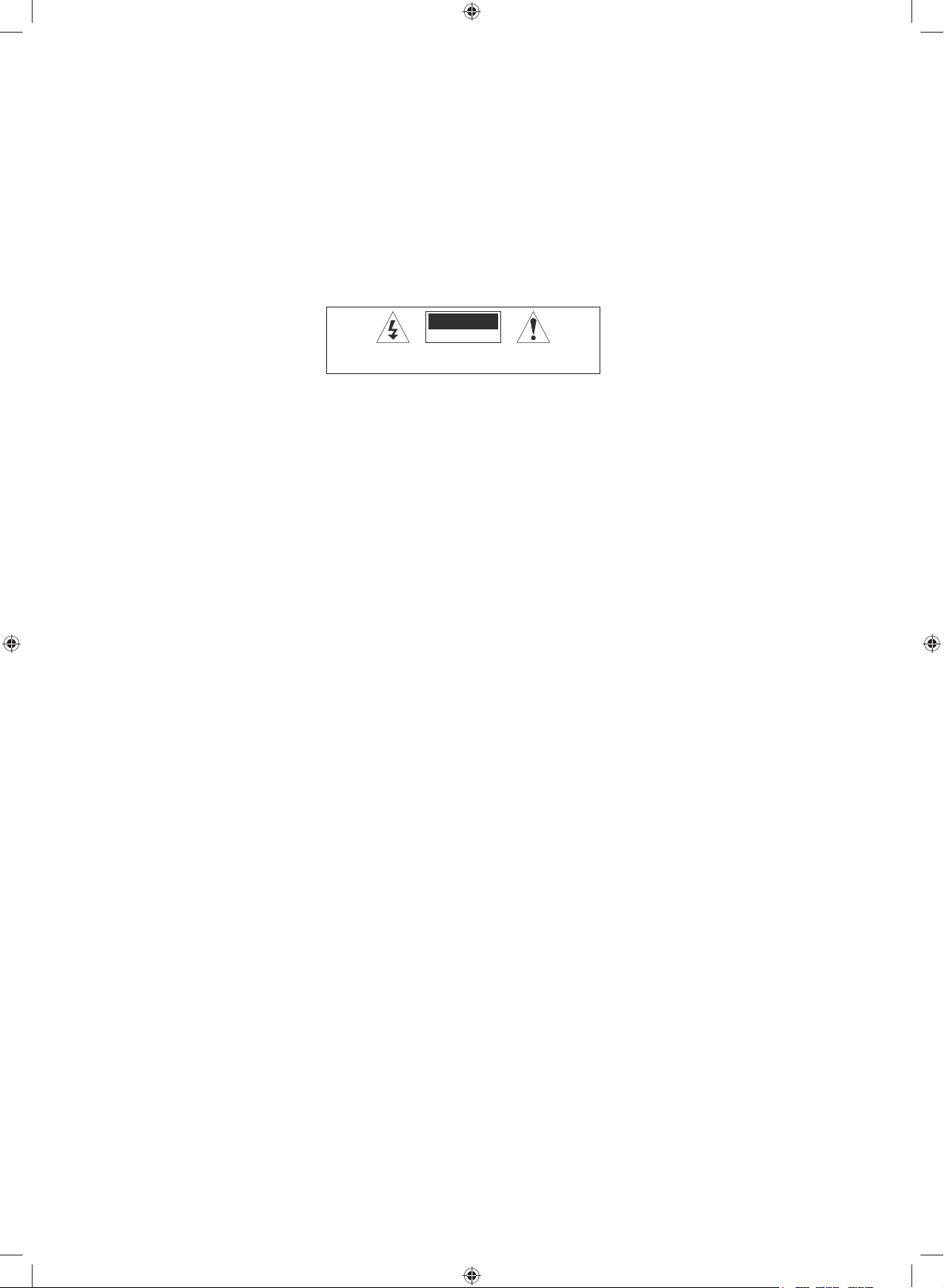
TOAVOID RISK OF ELECTRIC SHOCK, DO NOTREMOVE COVER (OR BACK).
NO USER-SERVICEABLE PARTS INSIDE. REFER SERVICING TO QUALIFIED
SERVICE PERSONEL. DO NOT BLOCK THE VENTILATION SLOTS ON THE
BACK-COVER.
RISK OF ELECTRIC SHOCK
DO NOT OPEN
CAUTION
G32HTC16_IB_Final160623.indd 5 24/6/16 上午10:20

6
Responsible Disposal of the Packaging
The packaging of your television has been selected from environmentally friendly materials and can usually be recycled.
Please ensure these packing materials are disposed of correctly.
Plastic wrapping can be a suffocation hazard for babies and young children, please ensure all packaging materials are out
of reach and are safely disposed of. Please ensure they are offered for recycling rather than throwing these materials away.
Responsible Disposal of Appliance
At the end of its working life, do not throw this television out with your household rubbish. An environmentally friendly
method of disposal will ensure that valuable raw materials can be recovered and used again.
Electrical and electronic appliances contain materials and substances which, if handled or disposed of incorrectly, could be
potentially hazardous on the environment and human health.
Observe any local regulations regarding the disposal of electrical consumer goods and dispose of it appropriately for
recycling. Contact your local authorities for advice on recycling facilities in your area.
The plug must be rendered useless and the cable cut off directly behind the appliance or the machine to prevent misuse.
Caring for the Environment
G32HTC16_IB_Final160623.indd 6 24/6/16 上午10:20

7
Unpacking the TV
Remove all packaging from the TV. Retain the packaging. If you dispose of it please do so according to local regulations.
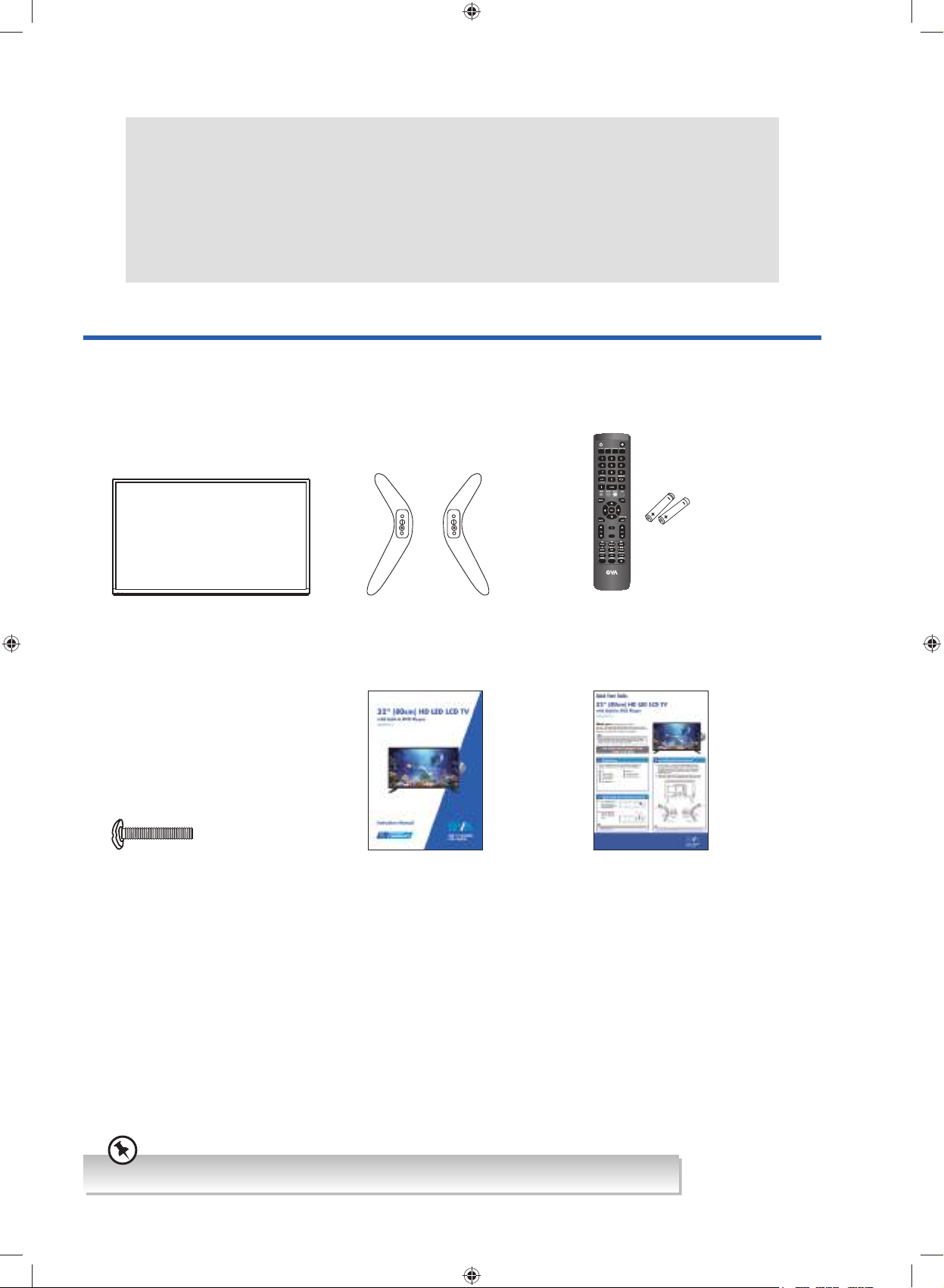
The following items are included:
Instruction Manual Quick Start Guide
TV Stand (Left) x 1
TV Stand (Right) x 1
Remote Control / AAA Batteries x 2
AUDIO
TV
Screw (4x20mm) x 4
Preparation
Thank you for purchasing your new GVA TV.
Your new TV has many features and incorporates the latest technology to enhance your viewing
experience. We recommend that you spend some time reading this instruction manual so that you fully
understand these features. You will also find some hints and tips to help you resolve any issues.
Read all the safety instructions carefully before use and keep this instruction manual for future
reference.
If you require additional assistance, please call our customer care center on 1300 725 885.
G32HTC16_IB_Final160623.indd 7 24/6/16 上午10:20

8
Preparation
1. Disconnect all cables connected to the TV.
2. Lay the TV down on a flat surface with the back side facing up, and ideally at the edge of a table so that the base of
the TV slightly overhangs on it. Please make sure a soft cushioned material (such as a pillow or thick piece of foam) is
placed beneath the screen.
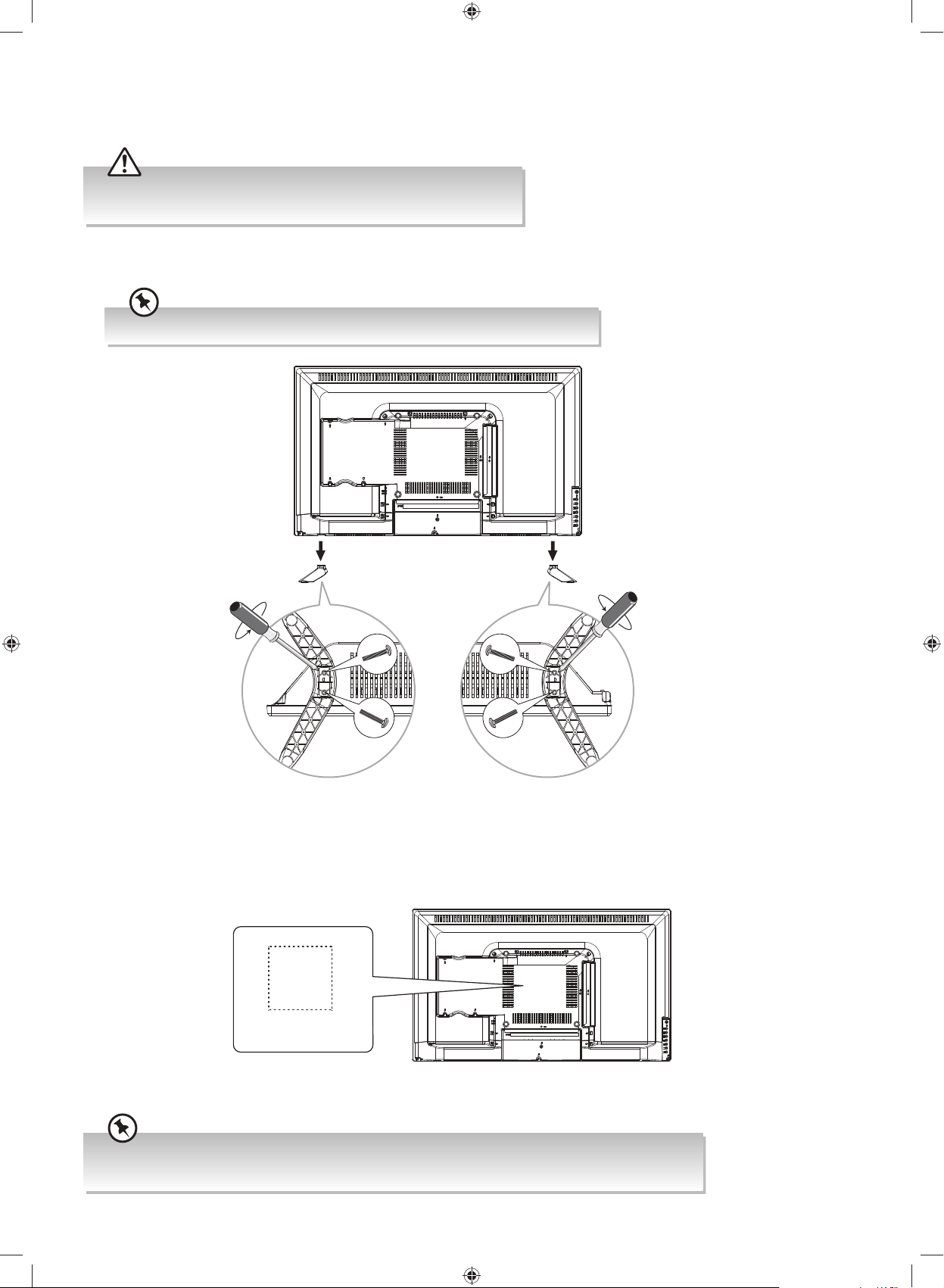
Installing the Base Stand
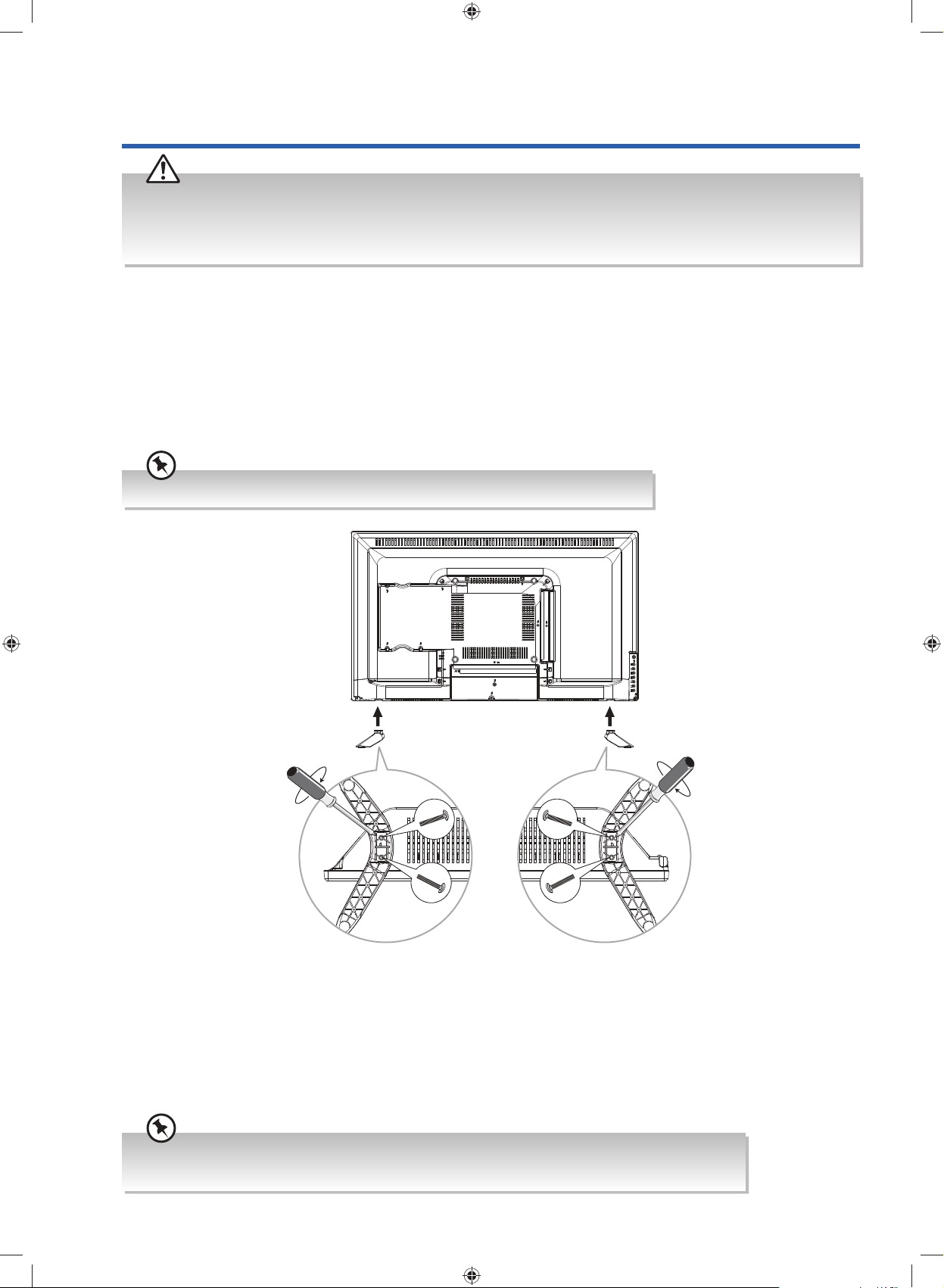
To install the TV stand, attach the TV stand to the TV. Align the screw holes, then secure with a screw driver (not included)
using the 4 screws provided.
Installing / Removing the Base Stand
• The LCD display is very fragile, and must be protected at all times when installing and removing the base stand. Be
sure that no hard or sharp object, or anything that could scratch or damage the LCD display, comes into contact
with it. DO NOT exert pressure on the front of the TV at any time because the screen could crack.
• It is recommended that two people take part in the base installation.
The screw holes will only align if the front of the base stand is at the front of the TV.
Screw x 2Screw x 2
screw in
screw in
• Please read this instruction manual carefully while setting up your TV.
• If you require additional assistance, please call our customer care center on 1300 725 885.
G32HTC16_IB_Final160623.indd 8 24/6/16 上午10:20

9
Preparation
unscrew
unscrew
1. To remove the stand assembly, untighten the screws holding the stand assembly to the rear of the TV. Slide the stand
assembly out.
2. Mounting on the wall. This TV is designed to be wall-mounted with a standard 200 mm x 200 mm mounting kit (sold
separately) designed for flat-panel TVs. Mount this TV according to the instructions included in the mounting kit. Due to
space restrictions, we recommend that you make all connections (refer to page 16-19 and page 50 for details) before
mounting on to the wall.
Mounting the TV to a Wall
• Please read this instruction manual carefully while setting up your TV.
• If you require additional assistance, please call our customer care center on 1300 725 885.
• Remove the stand assembly before mounting the TV onto the wall.
• It is recommended that two people take part in the installation.
Keep all the spare screws should you want to use the stand assembly option.
200 mm
200 mm
Four mounting holes
(size: M6 screw, not included)
G32HTC16_IB_Final160623.indd 9 24/6/16 上午10:20

10
Preparation
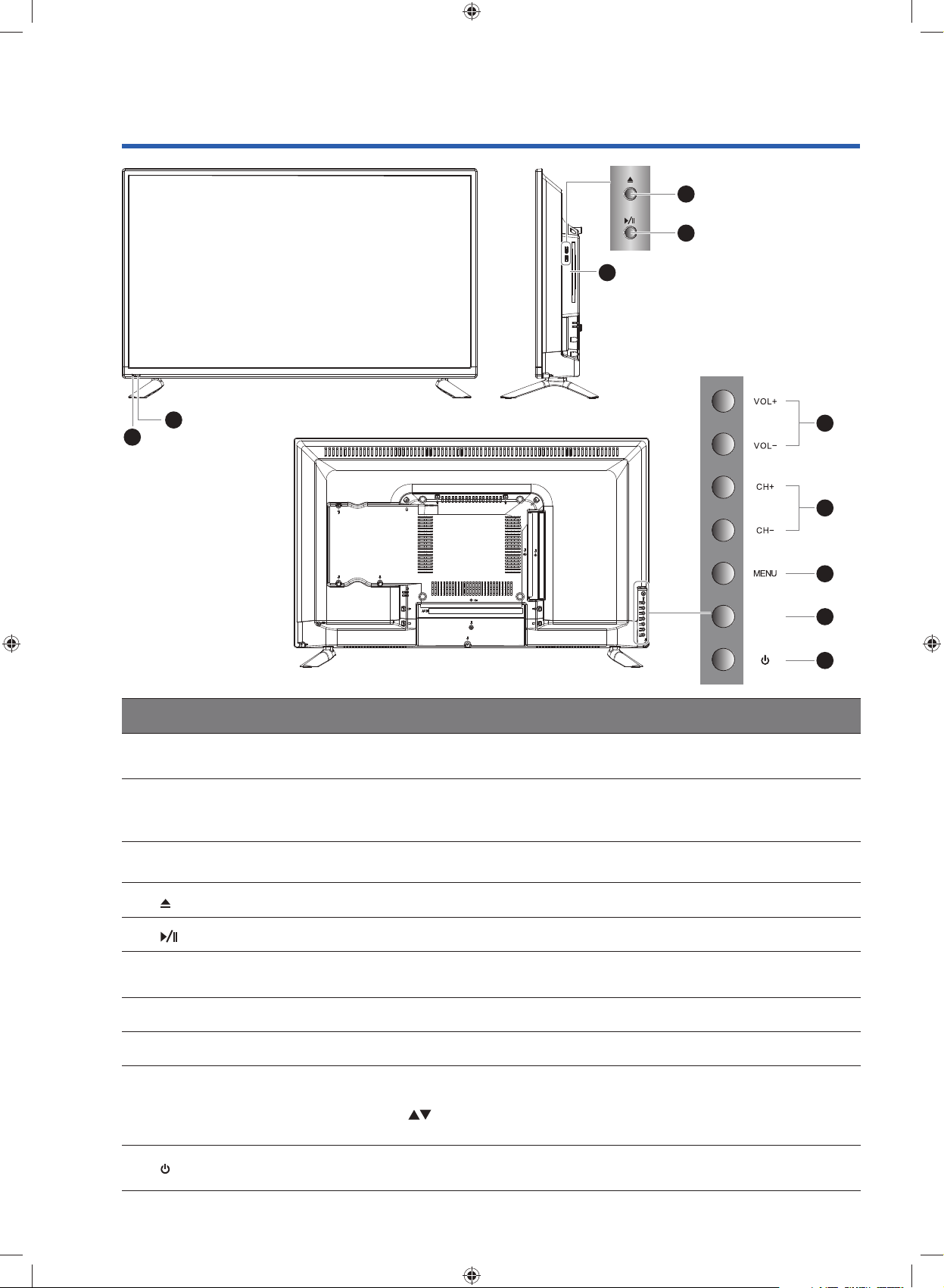
Item Description
1IR (Infrared Receiver) Receives IR signals from the remote control.
Do not put anything near the sensor, as its function may be affected.
2POWER LED
Illuminates blue when the TV is turned on. Illuminates red when the TV is in
standby mode. The LED will illuminate blue and then blink red and blue confirming
that a timer recording programme has started in the standby mode.
3 Disc Slot Insert a disc with the label side facing towards the front of the TV. (12 cm discs
only. Don't insert 8 cm discs.)
4 Press to eject disc. (DVD mode)
5 Press to start playback or pause. (DVD mode)
6 VOL + / – Adjusts the volume.
Press to select and adjust a setting in the OSD menu.
7 CH + / – Press to select a channel or select a sub-menu from the OSD menu.
8MENU Displays the OSD (on screen display) menu.
9 INPUT
Press to select among different input signal sources:
DTV / ATV / AV / YPbPr / HDMI 1 / HDMI 2 / HDMI 3 / PC / USB / DVD.
Use the buttons on the remote control to select the input, and then press the
OK button to confirm.
10 Switches the TV on from standby mode.
Switches the TV back to standby mode.
6
7
8
9
10
INPUT
Front / Right Side View and Rear Controls
3
1
2
4
5
G32HTC16_IB_Final160623.indd 10 24/6/16 上午10:20
Indice
Altri manuali GVA Combinazione TV DVD