
GVision IF2 Manuale utente

1
Package Contents
TV tuner (PAL or NTSC)
Remote controller
I/O port sticker
User’s manual
Setting up
1. Place the monitor face down on the soft-leveled surface.
2. Slide the Tuner Box into the slot and make sure the box is plugged in firmly.
3. Place the I/O port sticker inside the dotted area.
Rear View
WARNING When you disconnect the cord/cable, be sure to hold the connector instead of the
wire.
1. TV Antenna This can be connected with the TV cable connector.
2. S-Video This can be connected with the video-in Sconnector.
3. Video This can be connected with the video-in RCA connector.
4. Audio L/R This can be connected with the RCA audio L/R.
2
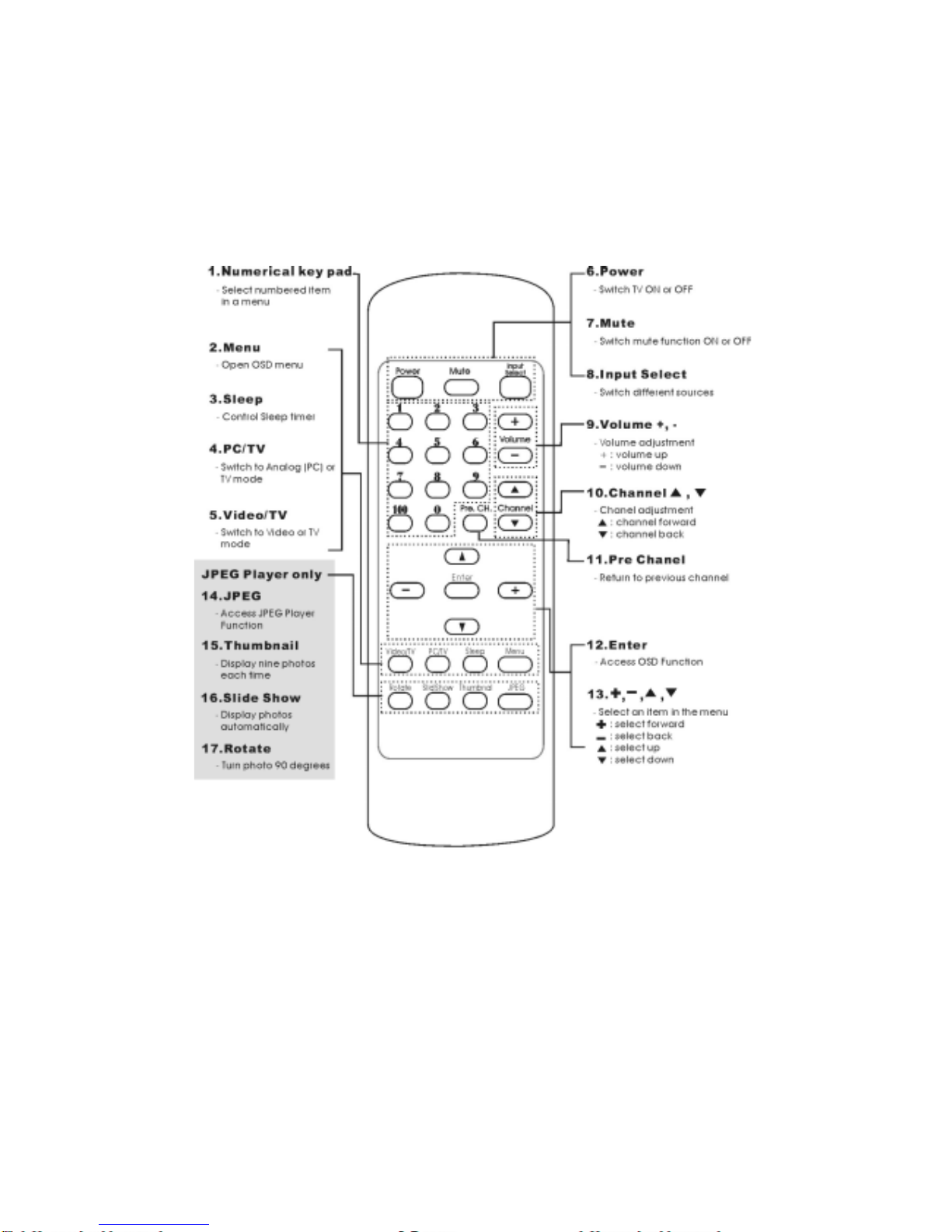
Remote Control I

3
1. Numerical key pad: Press the Numeric buttons to display the corresponding channels.
2. Menu: Press the Menu button to display the on-screen menu system. Press the Sor T
button to select the different OSD control options. Press the +or -button to adjust the
value of the control options.
3. Sleep: Press the Sleep button to set up the sleep time intervals.
4. PC/TV: Press the PC/TV button to switch from PC to TV mode or from TV to PC mode.
5. Video/TV: Press the Video/TV button to switch from Video to TV or from TV to Video
mode.
6. Power: Press the Power button to turn the TV on. To turn your TV off, press the Power
button again.
7. Mute: Press the Mute button to silence off temporarily. Press the Mute button again to
turn the sound back on.
8. Input Select: Press the Input Select button to access to different sources. You can view
the different sources by selecting the appropriate input.
9. Volume+/-: Press the Volume +button to increase the volume and the Volume -
button to decrease.
10. Channel S/T: Press the Channel Sbutton to display the next channel and the
Channel Tbutton to go back the previous channel.
11. Per Channel: Press the Per CH. button to return to the previous channel.
12. Enter: Press Enter button to access to the OSD function.
13. +, -, S, T: Press the Sor Tbutton to select the different OSD control option. Press
the +or -button to adjust the value of the control option.
14. JPEG: press the JPEG button to access JPEG Player functions.
15. Thumbnail: Press the Thumbnail button to show nine photographs on the screen. To
select multiple photographs from a thumbnail menu, highlight images with the +or -
button and press the Tbutton to select. Press the Tbutton again to return to the
thumbnail menu.
16. Slide Show: Photographs are displayed one after the other. Press the Slide Show button
to start the slide show and to stop it by pressing the Slide Show button again.
17. Rotate: Press the Rotate button one time to rotate the photograph 90 degrees clockwise.

4
Remote Control II (with MTS / NICAM function)

5
1. Numerical key pad: Press the Numeric buttons to display the corresponding channels.
2. Menu: Press the Menu button to display the on-screen menu system. Press the Sor T
button to select the different OSD control options. Press the +or -button to adjust the
value of the control options.
3. Sleep: Press the Sleep button to set up the sleep time intervals.
4. PC/TV: Press the PC/TV button to switch from PC to TV mode or from TV to PC mode.
5. MTS/NICAM: Press the MTS/NICAM button to access MTS/NICAM function.
6. Power: Press the Power button to turn the TV on. To turn your TV off, press the Power
button again.
7. Mute: Press the Mute button to silence off temporarily. Press the Mute button again to
turn the sound back on.
8. Input Select: Press the Input Select button to access to different sources. You can view
the different sources by selecting the appropriate input.
9. Volume+/-: Press the Volume +button to increase the volume and the Volume -
button to decrease.
10. Channel S/T: Press the Channel Sbutton to display the next channel and the
Channel Tbutton to go back the previous channel.
11. Per Channel: Press the Per CH. button to return to the previous channel.
12. Enter: Press Enter button to access to the OSD function.
13. +, -, S, T: Press the Sor Tbutton to select the different OSD control option. Press
the +or -button to adjust the value of the control option.
14. JPEG: press the JPEG button to access JPEG Player functions.
15. Thumbnail: Press the Thumbnail button to show nine photographs on the screen. To
select multiple photographs from a thumbnail menu, highlight images with the +or -
button and press the Tbutton to select. Press the Tbutton again to return to the
thumbnail menu.
16. Slide Show: Photographs are displayed one after the other. Press the Slide Show button
to start the slide show and to stop it by pressing the Slide Show button again.
17. Rotate: Press the Rotate button one time to rotate the photograph 90 degrees clockwise.

6
OSD Control Options – Video / S-Video
OSD Menu – Video / S-video Function
OSD Control Options - TV
OSD Menu –TV Function
CONTRAST
Adjust the contrast using +and−buttons.
BRIGHTNESS
Adjust the brightness using +and−buttons.
VOLUME
Adjust the speaker volume using + and – buttons.
CHANNEL
Press the Sor Tbutton to select the desired channel in sequence.
MTS/NICAM (option)
Press +or -button to select the MTS/NICAM settings. MTS: You can select the
Stereo (stereo audio), SAP (second audio program), or MONO (monophonic audio).
CH. SCAN
Press the +or -button to scan channels.
CH.ADD/DEL
Press the +or -button to add or delete channels.

7
LANGUAGE
This item is used to select OSD languages.
SATURATION
Adjust the video image color saturation using +or -button.
HUE
Adjust the video image hue using +or -buttons.
SHARPNESS
Adjust the sharpness using +or -buttons.
ADVANCE (option)
This item is used to select advanced functions.
TV SYSTEM
This table is used to select TV system in different countries. The segment as below:
NTSC USA, Taiwan, Canada, Mexico, Korea…
NTSC Japan Japan
PAL B/G Italy, Germany, Spain, Australia, New Zealand, Singapore, Malaysia, …
PAL D/K China, North Korea, Romania, …
PAL I Hong Kong, UK, South Africa, …
SECAM Vietnam, Russia, …
SECAM France France
INPUT SELECT
This item is used to switch to the PC analog, PC digital, Video, S-video, TV, or JPEG
player.
RECALL
Press +or −buttons to recall factory preset values on Contrast, Brightness, Volume, and
Colors.

8
Specifications
Video System NTSC, PAL B/G, PAL I, or PAL D/K
Terminals
TV antenna x 1set
S-video x 1set
Video (RCA) x 1set
Audio (RCA) x 2 sets
Operating Conditions Temperature 5oC ~ 35oC (41oF ~ 95oF)
Humidity
20% ~ 80% (no condensation)
Storage Conditions Temperature -20oC ~ 60oC (-4oF ~ 140oF)
Humidity
10% ~ 90% (no condensation)
Dimensions (HxWxD) Tuner 140 x 105 x 20 mm
Carton
220 x 165 x 58 mm
Weight (Net) 210g
Specifications are subject to change without notice.
WARNING Do not disassemble the monitor or tuner box. Contact your dealer if needed.
Indice
Altri manuali GVision Sintonizzatore TV


