GVS K-BUS KNX/EIB Manuale utente

K-BUS®KNX Gateway for IR configuration_V1.1
User manual

Contents
Chapter 1 Summary------------------------------------------------------------------------------------------------------------------------- 1
1.1 KNX Gateway for IR configuration---------------------------------------------------------------------------------------------1
1.2 DCA download and installation overview------------------------------------------------------------------------------------- 2
1.3 The IR Learner (BTIL-01/00.2)-------------------------------------------------------------------------------------------------- 3
Chapter 2 Software Introduction---------------------------------------------------------------------------------------------------------4
2.1 Software Interface------------------------------------------------------------------------------------------------------------------- 4
2.2 IR code configuration Interface-------------------------------------------------------------------------------------------------- 8
2.3 IR Code Convert Tool-------------------------------------------------------------------------------------------------------------- 9
Chapter 3 Demostration-------------------------------------------------------------------------------------------------------------------10
3.1 Communication settings---------------------------------------------------------------------------------------------------------- 10
3.2 IR configuration function---------------------------------------------------------------------------------------------------------11
3.2.1. New Controlled appliance------------------------------------------------------------------------------------------------- 11
3.2.2. Import\Export IR learning encoding data---------------------------------------------------------------------------- 14
3.3 Precautions---------------------------------------------------------------------------------------------------------------------------15

K-BUS®KNX/EIB KNX Gateway for IR configuration
1
Chapter 1 Summary
We provide KNX Gateway for IR with a configuration tool (KNX Gateway for IR configuration) or DCA, to
assist in the learning, testing and configuration of the IR code, as well as downloading the IR code to KNX
Gateway for IR which is configured by ETS and enables the KNX bus to control the IR device.
Note: KNX Gateway for IR configuration is a software that runs independently in PC. DCA is an APP
plugin of ETS, embedded in the product application.
In addition, the software should be used with IR Learner (BTIL-01/00.2). IR Learner is connected to the PC
via USB interface and used to learn the control codes of the keys of the IR Remote Controller, store the codes in
the configuration tool. IR Learner can learn more than 95% of the IR Remote Controller on the market. The
learning process is realized by operating the software, and you should put the IR detector of the Remote
Controller near to IR detector of the IR Learner as close as you can(within 3cm) to avoid the failure of learning.
And IR learner also has the functions for IR receiving emitting IR function, so it can test and verify whether the
learned control code has been learned correctly.
This manual provides detailed technical information about the KNX Gateway for IR configuration and IR
Learner for users as well as assembly and programming details, and explains how to use by the application
examples.
1.1 KNX Gateway for IR configuration
KNX Gateway for IR configuration is a software that runs independently in PC. Below describes the overall
framework of the software and the use of IR configuration function. The IR configuration function of this
software are only available in conjunction with the IR Learner and KNX Gateway for IR.
The functions are summarized as follows:
Used with IR Learner to assist in the learning, testing and configuration of the IR code, as well as
downloading the IR code to KNX Gateway for IR;
Support to save the IR configuration file and export it.

K-BUS®KNX/EIB KNX Gateway for IR configuration
2
Operating system: Win7 and above systems;
Operating environment: must install Microsoft.NET Framework 4.6.1 on the PC.
1.2 DCA download and installation overview
DCA ’s .etsapp file is obtained from the manufacturer or the shop of the MyKNX account(search “KNX
Gateway for IR Configuration App”). Then, add APP in the lower right corner of ETS5. If there is an old version
before, delete it and restart ETS5 to add a new version of APP. In the project configuration of KNX Gateway for
IR, you can see that the editing interface of the database has a DCA menu after the APP is added successfully.
Click to see the configuration interface of DCA.
Note: This function only supports to the version with ETS license, that is ETS dongle needs to be
installed on the computer, including ETS5Lite, ETS5 Supplementary, ETS5 Professional.
In order to use DCA normally, ETS must run in compatibility mode, which should be actived via ETS
Apps in ETS5, as shown as follow figure.

K-BUS®KNX/EIB KNX Gateway for IR configuration
3
1.3 The IR Learner (BTIL-01/00.2)
The IR Learner uses a common USB port to communicate, it is easy to learn the functional control codes of
the IR remote controller and store the codes to the configuration tool.
The design of the IR Learner is as a USB flash Disk, small and exquisite in size. The IR Learner is needed to
use only when it learns the functional control codes of the IR remote controller.
Attention: When learning, please put the the IR detector of the Remote Controller near to IR detector
of the IR Learner as close as you can(within 3cm) to avoid the failure of learning.
The IR Learner is provided with receiving and emitting IR function, so it can test and verify whether the
learned control code has been learned correctly.
For convenient to operate, suggest that connect the IR Learner to PC via a USB extension cord please.
①USB communication port
②IR detector. When learning, please put the IR detector of the Remote Controller near to IR detector of the IR Learner
as close as you can

K-BUS®KNX/EIB KNX Gateway for IR configuration
4
Chapter 2 Software Introduction
2.1 Software Interface
Double-click the software “KNX Gateway for IR configuration.exe” on the desktop or click on the Start
Interface to start the software, the initial interface shown as in Fig.2.1.
Fig.2.1(1) The initial interface
Note: In Windows 10, you need to right click on the software and select Run as Administrator, and
you need to set the screen scale display to 100% as shown below. Otherwise the interface of this program
will display abnormally.

K-BUS®KNX/EIB KNX Gateway for IR configuration
5
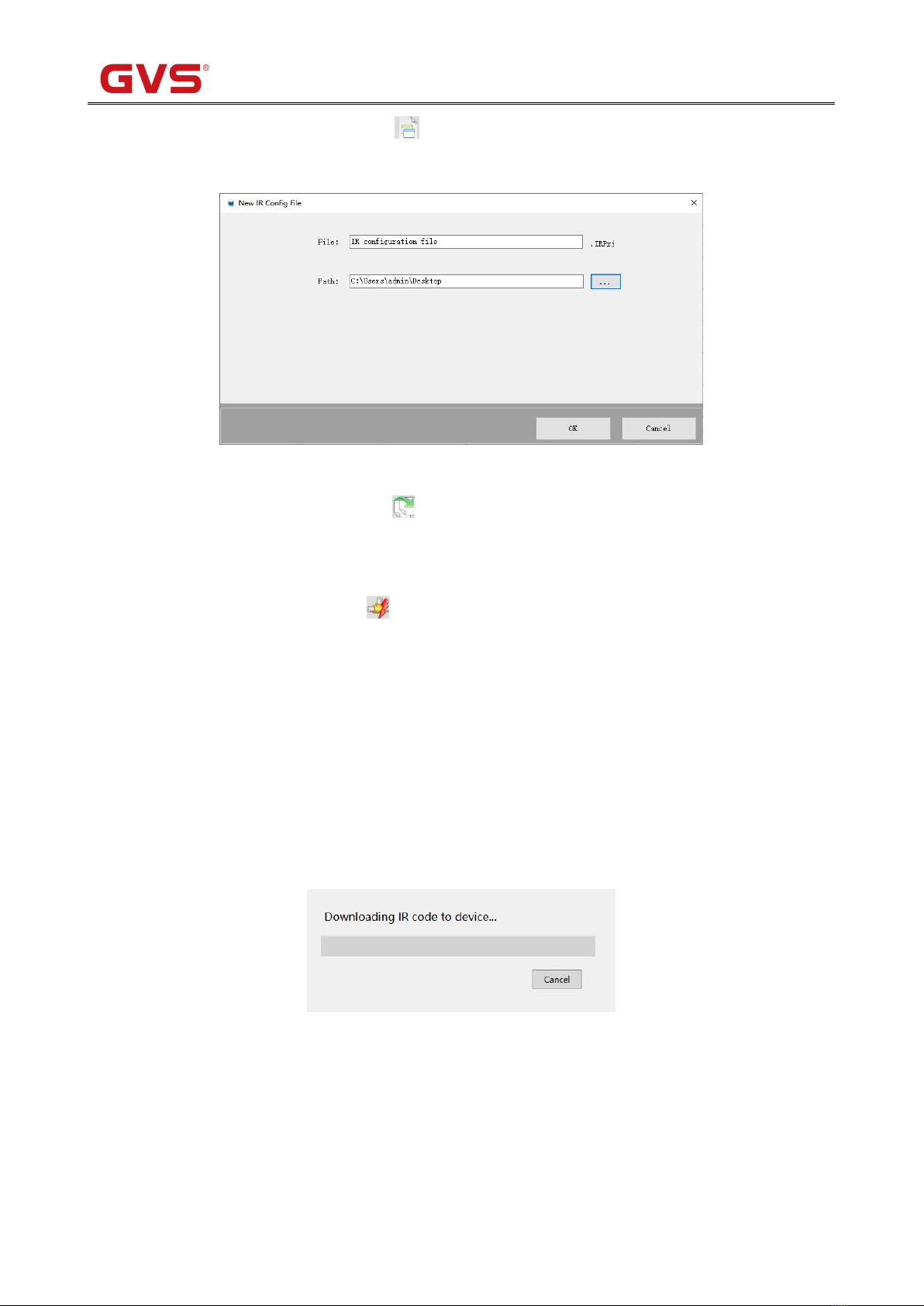
【New IR configuration file】: Click the icon to create a new configuration file (Currently only supports the
creation of the format.IRPrj), as the following Fig.2.1(2).
Fig.2.1(2) New IR configuration file
【Open the configuration file】: Click the icon to open the configuration file (Currently only supports the open
of the format.IRPrj).
【Connected to the bus】: Click the icon to connect or disconnect the communication between the software
and the bus. Note: The DCA does not require a bus connection, bus communication is normally performed
via the ETS software.
【Physical address】: Input the physical address. Support the input of the format xx.xx.xxx, such as 1.1.1.
【Download IR code】: Download the IR code to the KNX Gateway for IR via the KNX bus. Click it to pup up
the download window for the download task, and download one task at a time. User can cancel the current task
and view the progress via the window.
Fig.2.1(3) Down window

K-BUS®KNX/EIB KNX Gateway for IR configuration
6
Common download failure exceptions:
①The device with the entered physical address cannot be connected. For example, the device cannot connect
to KNX bus.
②Download is interrupted during an exception. For example, the device is removed, or the bus is abnormal
or the others, to make the sending telegram no response or incorrectly.
③The device to download is not a KNX gateway for IR.
④The physical address format entered is not a xx.xx.xxx.

K-BUS®KNX/EIB KNX Gateway for IR configuration
7
⑤Exist invalid IR code for the IR code configuration. If an IR number is not within 1~300, an error is
reported.
⑥There is not a interface connecting to software. If not connect the bus firstly to download, an error is
reported.
【Language( 语言)】: The drop-down menu is shown as Fig.2.1(4), select Chinese or English as the system
language.
Fig.2.1(4)【Language(语言)】drop-down menu

K-BUS®KNX/EIB KNX Gateway for IR configuration
8
2.2 IR code configuration Interface
IR configuration interface is used to configure the function of KNX Gateway for IR, through IR Learning
Code Manager, we can learn and record each IR encoding of the appliance remote controller's function, download
the configuration to the KNX Gateway for IR via the KNX bus, as shown in Fig.2.2.
Fig.2.2 IR Configuration
【IR learning Code manager 】: Manage the information of the controlled appliances which have IR remote
controlled function. It is mainly used for the controlled electrical new, delete, import or export IR learning code,
and the remote controlled function of appliance’s new and learning, test, and function modification.
【Appliance function detailed list 】: The appliance function detailed list is used to display the item sub
information which are selected by the learning code manager. we can check the appliance name of selected items,
electrical function, the frequency and pulse counting of the electrical function remote controller, also can pass the
test to verify the effectiveness of learning code. Double click on the Name, Function and IR code NO. to change
the information.
Note: If the IR code number is 0 or empty, user need to manually modify the number.
Indice
Manuali Portale popolari di altre marche

LST
LST M500RFE-AS Manuale utente

Kinnex
Kinnex Media Gateway Manuale utente

2N Telekomunikace
2N Telekomunikace 2N StarGate Manuale utente

Mitsubishi Heavy Industries
Mitsubishi Heavy Industries Superlink SC-WBGW256 Manuale utente

ZyXEL Communications
ZyXEL Communications ZYWALL2 ET 2WE Manuale utente

Telsey
Telsey CPVA 500 - SIP Manuale utente