
Hach SC4500 Manuale utente

DOC343.52.90690
SC4500
08/2022, Edition 3
User Manual


Table of Contents
Section 1 Specifications........................................................................................ 3
Section 2 General information............................................................................ 4
2.1 Safety information................................................................................................. 4
2.1.1 Use of hazard information.......................................................................... 4
2.1.2 Precautionary labels................................................................................... 4
2.1.3 Compliance and certification...................................................................... 5
2.2 Product overview.................................................................................................. 6
2.2.1 Optional expansion modules...................................................................... 7
2.3 Product components............................................................................................. 8
Section 3 Installation............................................................................................... 8
3.1 Installation guidelines........................................................................................... 9
3.2 Mechanical installation.......................................................................................... 9
3.2.1 Attach the instrument to a wall................................................................... 9
3.2.2 Attach the instrument to a pole................................................................. 10
3.2.3 Install the instrument in a panel................................................................ 11
3.3 Electrical installation........................................................................................... 12
3.3.1 Electrical connectors and fittings.............................................................. 12
3.3.2 Electrostatic discharge (ESD) considerations.......................................... 14
3.3.3 Power connections................................................................................... 14
3.3.3.1 Open the controller cover............................................................... 14
3.3.3.2 Remove the high-voltage barrier.................................................... 15
3.3.3.3 Wiring for power............................................................................. 15
3.3.3.4 Connect conduit or a power cord................................................... 17
3.3.4 Connect the high-voltage relays............................................................... 18
3.3.5 Install an expansion module..................................................................... 20
3.4 Close the cover................................................................................................... 20
3.5 Connect measurement devices.......................................................................... 21
Section 4 User interface and navigation...................................................... 22
4.1 Measurement window......................................................................................... 23
Section 5 Startup..................................................................................................... 23
5.1 Menu structure.................................................................................................... 24
5.2 Enter initial settings............................................................................................. 25
Section 6 Operation............................................................................................... 25
6.1 Configure the controller settings......................................................................... 25
6.2 Connect the instrument to a network.................................................................. 25
6.2.1 LAN connection........................................................................................ 25
6.2.2 WiFi network connection.......................................................................... 26
6.2.3 Cellular network connection..................................................................... 27
6.2.3.1 Configuration with Hach Cellular (Telenor) SIM............................. 27
6.2.3.2 Configuration with customer supplied SIM..................................... 27
6.3 Configure the sensors or analog inputs.............................................................. 27
6.4 Connect a USB flash drive (optional).................................................................. 28
6.4.1 Data download.......................................................................................... 29
6.4.2 Install controller firmware updates............................................................ 29
6.4.3 Install sensor firmware updates................................................................ 30
1

6.4.4 Restore the firmware................................................................................ 31
6.5 Configure the outputs......................................................................................... 31
6.5.1 Configure the high voltage relays............................................................. 31
6.5.2 Configure the analog outputs................................................................... 37
6.5.3 Configure the telegram ............................................................................ 38
6.5.4 Configure the Modbus TCP...................................................................... 39
6.5.5 Configure the Profibus DP........................................................................ 40
6.5.6 Configure the EtherNet/IP ....................................................................... 41
6.5.7 Configure the PROFINET ........................................................................ 41
6.6 Hach Controller Network Bus configuration........................................................ 42
6.7 Prognosys diagnostic system............................................................................. 42
6.8 Claros................................................................................................................ 42
6.9 Enter license key................................................................................................ 43
6.10 Show the instrument information...................................................................... 43
Section 7 Maintenance......................................................................................... 43
7.1 Clean the instrument........................................................................................... 44
7.2 Unlock the controller cover................................................................................. 44
7.3 Fuse replacement............................................................................................... 44
7.4 Battery replacement............................................................................................ 44
Section 8 Troubleshooting................................................................................. 45
Section 9 Replacement parts and accessories......................................... 47
Appendix A Telegram tag list .......................................................................... 49
Table of Contents
2

Section 1 Specifications
Specifications are subject to change without notice.
Specification Details
Dimensions (W x H x D) ½ DIN-144 x 144 x 192 mm (5.7 x 5.7 x 7.6 in.)
Enclosure UL50E type 4X, IEC/EN 60529–IP 66, NEMA 250 type 4X
Metal enclosure with a corrosion-resistant finish
Weight 1.7 kg (3.7 lb) (Controller weight without optional expansion modules)
Pollution degree Environment: 4; instrument: 2
Overvoltage category II
Protection class I, connected to protective earth
Environmental conditions Indoor and outdoor use
Power requirements AC controller: 100–240 VAC ±10%, 50/60 Hz; 1 A (50 VA with 8W sensor load,
100VA with 28W sensor load)
DC controller: 18–28 VDC; 2.5 A (12W with 9W sensor load, 36W with 20 W
sensor load)
Operating temperature –20 to 60 °C (–4 to 140 °F) (8 W (AC)/9 W (DC) sensor load)
–20 to 45 °C (–4 to 113 °F) (28 W (AC)/20 W (DC) sensor load)
Linear derating between 45 and 60 °C (–1.33 W/°C)
Storage temperature –20 to 70 °C (–4 to 158 °F)
Relative humidity 0 to 95%, non-condensing
Altitude 2000 m (6562 ft) maximum
Display 3.5-inch TFT color display with capacitive touchpad
Measurement Two device, digital SC connectors
Relays (high voltage) Two relays (SPDT);
Wire gauge: 0.75 to 1.5 mm2 (18 to 16 AWG)
AC controller
Maximum switching voltage: 100–240 VAC
Maximum switching current: 5 A Resistive/1 A Pilot Duty
Maximum switching power: 1200 VA Resistive/360 VA Pilot Duty
DC controller
Maximum switching voltage: 30 VAC or 42 VDC
Maximum switching current: 4 A Resistive/1 A Pilot Duty
Maximum switching power: 125 W Resistive/28 W Pilot Duty
Analog inputs (optional)3One 0-20 mA (or 4-20 mA) analog input on each analog input module
One analog sensor input on each sensor module
Maximum of two analog inputs
Analog outputs (optional)3Five 0–20 mA (or 4-20 mA) analog outputs on each analog output module1
Digital communication
(optional)3
Profibus DPV1 module, Modbus TCP, PROFINET module, EtherNet/IP™2 module
1Refer to the module documentation for additional information.
Note: Install only one module in one of the available slots.
2EtherNet/IP is a trademark of OVDA Inc.
English 3

Specification Details
Network connection3LAN version (optional): Two Ethernet connectors (10/100 Mbps), M12 female D-
coding connector; Cellular version and WiFi version (optional)4
USB port Used for data download and software upload. The controller records
approximately 20,000 data points for each connected sensor.
Compliance information CE. ETL certified to UL and CSA safety standards (with all sensor types), FCC,
ISED, KC, RCM, EAC, UKCA, SABS, CMIM
Warranty 1 year (EU: 2 years)
Section 2 General information
In no event will the manufacturer be liable for damages resulting from any improper use of product or
failure to comply with the instructions in the manual. The manufacturer reserves the right to make
changes in this manual and the products it describes at any time, without notice or obligation.
Revised editions are found on the manufacturer’s website.
2.1 Safety information
The manufacturer is not responsible for any damages due to misapplication or misuse of this product
including, without limitation, direct, incidental and consequential damages, and disclaims such
damages to the full extent permitted under applicable law. The user is soley responsible to identify
critical application risks and install appropriate mechanisms to protect processes during a possible
equipment malfunction.
Please read this entire manual before unpacking, setting up or operating this equipment. Pay
attention to all danger and caution statements. Failure to do so could result in serious injury to the
operator or damage to the equipment.
Make sure that the protection provided by this equipment is not impaired. Do not use or install this
equipment in any manner other than that specified in this manual.
2.1.1 Use of hazard information
D A N G E R
Indicates a potentially or imminently hazardous situation which, if not avoided, will result in death or serious injury.
WARNING
Indicates a potentially or imminently hazardous situation which, if not avoided, could result in death or serious
injury.
CAUTION
Indicates a potentially hazardous situation that may result in minor or moderate injury.
N O T I C E
Indicates a situation which, if not avoided, may cause damage to the instrument. Information that requires special
emphasis.
2.1.2 Precautionary labels
Read all labels and tags attached to the instrument. Personal injury or damage to the instrument
could occur if not observed. A symbol on the instrument is referenced in the manual with a
precautionary statement.
3Dependent on controller configuration.
4An external USB box WiFi is necessary for network connection on WiFi versions. An external
USB box cellular is necessary for network connection on cellular versions.
4 English

This is the safety alert symbol. Obey all safety messages that follow this symbol to avoid potential
injury. If on the instrument, refer to the instruction manual for operation or safety information.
This symbol indicates that a risk of electrical shock and/or electrocution exists.
This symbol indicates the presence of devices sensitive to Electro-static Discharge (ESD) and
indicates that care must be taken to prevent damage with the equipment.
Electrical equipment marked with this symbol may not be disposed of in European domestic or public
disposal systems. Return old or end-of-life equipment to the manufacturer for disposal at no charge to
the user.
2.1.3 Compliance and certification
CAUTION
This equipment is not intended for use in residential environments and may not provide adequate protection to
radio reception in such environments.
Canadian Radio Interference-Causing Equipment Regulation, ICES-003, Class A:
Supporting test records reside with the manufacturer.
This Class A digital apparatus meets all requirements of the Canadian Interference-Causing
Equipment Regulations.
Cet appareil numérique de classe A répond à toutes les exigences de la réglementation canadienne
sur les équipements provoquant des interférences.
FCC Part 15, Class "A" Limits
Supporting test records reside with the manufacturer. The device complies with Part 15 of the FCC
Rules. Operation is subject to the following conditions:
1. The equipment may not cause harmful interference.
2. The equipment must accept any interference received, including interference that may cause
undesired operation.
Changes or modifications to this equipment not expressly approved by the party responsible for
compliance could void the user's authority to operate the equipment. This equipment has been tested
and found to comply with the limits for a Class A digital device, pursuant to Part 15 of the FCC rules.
These limits are designed to provide reasonable protection against harmful interference when the
equipment is operated in a commercial environment. This equipment generates, uses and can
radiate radio frequency energy and, if not installed and used in accordance with the instruction
manual, may cause harmful interference to radio communications. Operation of this equipment in a
residential area is likely to cause harmful interference, in which case the user will be required to
correct the interference at their expense. The following techniques can be used to reduce
interference problems:
1. Disconnect the equipment from its power source to verify that it is or is not the source of the
interference.
2. If the equipment is connected to the same outlet as the device experiencing interference, connect
the equipment to a different outlet.
3. Move the equipment away from the device receiving the interference.
4. Reposition the receiving antenna for the device receiving the interference.
5. Try combinations of the above.
English 5

2.2 Product overview
D A N G E R
Chemical or biological hazards. If this instrument is used to monitor a treatment process and/or
chemical feed system for which there are regulatory limits and monitoring requirements related to
public health, public safety, food or beverage manufacture or processing, it is the responsibility of the
user of this instrument to know and abide by any applicable regulation and to have sufficient and
appropriate mechanisms in place for compliance with applicable regulations in the event of
malfunction of the instrument.
N O T I C E
Network and access point security is the responsibility of the customer that uses the wireless instrument. The
manufacturer will not be liable for any damages, inclusive however not limited to indirect, special, consequential
or incidental damages, that have been caused by a gap in, or breach of network security.
N O T I C E
Perchlorate Material—Special handling may apply. Refer to www.dtsc.ca.gov/hazardouswaste/perchlorate. This
perchlorate warning applies only to primary batteries (provided singly or installed on this equipment) when sold or
distributed in California, USA.
N O T I C E
The controller is supplied with a protection foil installed on the display. Make sure to remove the protection foil
before the controller is used.
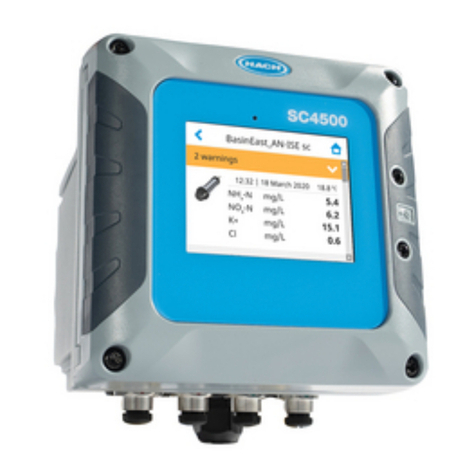
The SC4500 is a 2-channel controller for digital analytical devices (e.g., sensors and analyzers).
Refer to Figure 1.
The controller shows sensor measurements and other data on the display, can transmit analog and
digital signals, and can interact with and control other devices through outputs and relays. Outputs,
relays, sensors and expansion modules are configured and calibrated through the user interface on
the front of the controller or remotely for network connected controllers. The controller connects to
Claros with a cellular network5, WiFi network5 or through LAN connection. The Prognosys diagnostic
system5 shows the status of maintenance tasks and gives the status of the instrument condition.
The instrument display is a touchscreen. The instrument enclosure has a protective vent in the
bottom. Do not cover or remove the protective vent. Replace the protective vent if damage is seen.
Note: Some controller configurations have two Ethernet ports for LAN connectivity or for Modbus TCP/IP based
fieldbus communication with PLC/SCADA. Refer to LAN connection on page 25.
The controller is available with optional expansion modules. Refer to Optional expansion modules
on page 7.
6 English

Figure 1 Product overview
1 Label for module installation 7 USB cover
2 USB connection for external USB box (WiFi or
cellular connection)
8 Electrical connections and fittings
3 Expansion module (Slot 0)59 Protective vent
4 Additional expansion module slots
(Slots 1, 2, 3 and 4)
10 Cover for module installation
5 Touchpad display 11 High-voltage barrier
6 USB connection for data download and firmware
update
2.2.1 Optional expansion modules
The controller is available with optional expansion modules:
• Profibus DP interface module (Slot 0)—Used to connect the controller to a Profibus DP
(decentralized peripherals) network. Profibus DP is used to operate sensors and actuators with a
centralized controller in production (factory) automation applications.
• 4–20 mA output module (Slot 1)—Used for analog signaling or to control other external devices.
Note: Only one 4–20mA output module can be installed.
• EtherNet/IP module (Slot 2)—The controller can connect to a PLC through Industrial Ethernet
Protocol including a EtherNet/IP solution. Line, Star and Ring topologies are available.
• PROFINET module (Slot 2)—The controller can connect to a PLC through the Industrial Ethernet
Protocol, which includes a PROFINET solution. Line, Star and Ring topologies are available.
• 4–20 mA input module (Slot 3 or 4)—Lets the controller accept one analog input (0–20 mA or
4–20 mA) from an external device.
• pH/ORP module (Slot 3 or 4)—Lets the controller accept measurements from one pH or ORP
analog sensor.
Note: An expansion module can be installed in only one of Slots 0 ,1 and 2 (4–20 mA output, Profibus DP interface,
PROFINET or EtherNet/IP).
Note: Only two input devices6 can be connected to the controller at the same time. If more than two input devices
are connected, the controller will only see two of the devices. Refer to the module documentation for additional
information.
5Dependent on controller configuration. The expansion modules are factory-installed based on
controller configuration.
6Input devices are analog inputs from external devices, analog sensors and digital sensors.
English 7

2.3 Product components
Make sure that all components have been received. Refer to Figure 2. If any items are missing or
damaged, contact the manufacturer or a sales representative immediately.
Figure 2 Product components
1 SC4500 controller 7 Mounting foot (mounting bracket inserts) (2x)
2 Mounting hardware 8 Flat washer, ¼-inch ID (4x)
3 Sealing gasket for panel mount, Neoprene 9 Lock washer, ¼-inch ID (4x)
4 Vibration isolation gasket for pipe mount 10 Keps hexnut, M5 x 0.8 (4x)
5 Vibration isolation washer for pipe mount (4x) 11 Pan head screws, M5 x 0.8 x 15 mm (4x)
6 Bracket for wall and pipe mounting 712 Pan head screws, M5 x 0.8 x 100 mm (4x)8
Section 3 Installation
D A N G E R
Multiple hazards. Only qualified personnel must conduct the tasks described in this section of the
document.
7A bracket for panel mounting is available as an optional accessory. Refer to Replacement parts
and accessories on page 47.
8Used for variable diameter pipe mount installations.
8 English
Altri manuali per SC4500
9
Questo manuale è adatto per i seguenti modelli
1
Indice
Altri manuali Hach Controllori

Hach
Hach SC4500 Manuale rapido

Hach
Hach SC4500 Manuale rapido

Hach
Hach ORBISPHERE 410 Manuale

Hach
Hach AS950 AWRS Manuale utente

Hach
Hach EC1000 Manuale utente

Hach
Hach sc200 Manuale rapido

Hach
Hach SC4500 Manuale utente

Hach
Hach SC4500 Manuale utente

Hach
Hach sc200 Manuale utente

Hach
Hach SC4500 Manuale utente

Hach
Hach sc1000 Manuale utente

Hach
Hach sc200 Manuale rapido

Hach
Hach SC4500 Manuale utente

Hach
Hach ORBISPHERE 366 Series Manuale rapido

Hach
Hach SC1500 Manuale utente

Hach
Hach CD500 Manuale utente

Hach
Hach AS950 AWRS Manuale utente

Hach
Hach sc200 Manuale utente

Hach
Hach sc200 Manuale tecnico
Hach
Hach SC4500 Manuale utente


