
Haier LY22K3CWW2 Manuale utente

1MFBTFSFBEUIJTNBOVBMDBSFGVMMZCFGPSFPQFSBUJOHUIFVOJUBOELFFQJU
GPSGVUVSFSFGFSFODF
-FTFO 4JF EJFTF #FEJFOVOHTBOMFJUVOH WPS EFS FSTUFO 7FSXFOEVOH
EJFTFT (FSÊUFT CJUUF TPSHGÊMUJH EVSDI VOE CFXBISFO 4JF TJF GàS
[VLàOGUJHFT/BDITDIMBHFOBVG
-FHHFSF BUUFOUBNFOUF RVFTUP NBOVBMF QSJNB EJ NFUUFSF JO GVO[JPOF
MhBQQBSFDDIJPFDPOTFSWBSMPQFSGBSWJSJGFSJNFOUPJOGVUVSP
/FFNEFHFCSVJLTBBOXJK[JOH[PSHWVMEJHEPPSWPPSEBUVIFUUFMFWJTJFUPFTUFM
JOHFCSVJLOFFNUFOCFXBBSEF[FWPPSUPFLPNTUJHFSFGFSFOUJF
$)')4!,,#$4%,%6)3)/.
4%,%6)3)/..5-%2)15%%#2!.,#$
$)')4!,,#$46
4%,%6)3/2%,#$$)')4!,%
$)')4!,%,#$4%,%6)3)%
*/4536$5*0/."/6"-
."/6&-%h65*-*4"5*0/
#&%*&/6/(4"/-&*56/(
."/6"-&%**4536;*0/*
($*,4""/8*+;*/(
-JSFBUUFOUJWFNFOUDFNBOVFMBWBOUEhVUJMJTFSMBUÏMÏWJTJPO-FDPOTFSWFS
FOWVFEhVOFVUJMJTBUJPOVMUÏSJFVSF
1MFBTFSFBEUIJTNBOVBMDBSFGVMMZCFGPSFPQFSBUJOHUIFVOJUBOELFFQJU
GPSGVUVSFSFGFSFODF
-FTFO 4JF EJFTF #FEJFOVOHTBOMFJUVOH WPS EFS FSTUFO 7FSXFOEVOH
EJFTFT (FSÊUFT CJUUF TPSHGÊMUJH EVSDI VOE CFXBISFO 4JF TJF GàS
[VLàOGUJHFT/BDITDIMBHFOBVG
-FHHFSF BUUFOUBNFOUF RVFTUP NBOVBMF QSJNB EJ NFUUFSF JO GVO[JPOF
MhBQQBSFDDIJPFDPOTFSWBSMPQFSGBSWJSJGFSJNFOUPJOGVUVSP
/FFNEFHFCSVJLTBBOXJK[JOH[PSHWVMEJHEPPSWPPSEBUVIFUUFMFWJTJFUPFTUFM
JOHFCSVJLOFFNUFOCFXBBSEF[FWPPSUPFLPNTUJHFSFGFSFOUJF
$)')4!,,#$4%,%6)3)/.
4%,%6)3)/..5-%2)15%%#2!.,#$
$)')4!,,#$46
4%,%6)3/2%,#$$)')4!,%
$)')4!,%,#$4%,%6)3)%
*/4536$5*0/."/6"-
."/6&-%h65*-*4"5*0/
#&%*&/6/(4"/-&*56/(
."/6"-&%**4536;*0/*
($*,4""/8*+;*/(
-JSFBUUFOUJWFNFOUDFNBOVFMBWBOUEhVUJMJTFSMBUÏMÏWJTJPO-FDPOTFSWFS
FOWVFEhVOFVUJMJTBUJPOVMUÏSJFVSF

Contents
EN-1 Digital LCD Television Instruction Manual
Contents
Safety Warnings 2
WELCOME ............................................................. 2
IMPORTANT INFORMATION ................................ 2
About your LCD TV 5
GET TO KNOW YOUR TV....................................... 5
Front control panel............................................................... 5
Rear Terminals Control ........................................................ 5
GET TO KNOW YOUR TV WITH DVD .................... 6
Front control panel............................................................... 6
Rear Terminals Control ........................................................ 6
GET TO KNOW YOUR REMOTE CONTROL ........... 7
CONNECTING YOUR TV........................................ 8
ANTENNA CONNECTION .................................................... 8
IMPROVE YOUR SIGNAL ...................................................... 8
CONNECT YOUR PC TO THE TV ......................................... 8
CONNECT A DVD PLAYER TO YOUR TV .......................... 8
CONNECT A DVD PLAYER OR VCR TO YOUR TV .......... 8
Connection Option 1 ........................................................... 8
Connection Option 2 ........................................................... 8
SCART INPUT........................................................................... 8
HDMI INPUT............................................................................. 9
MOUNT YOUR TV ONTO THE WALL .................................9
PREPARATION OF YOUR REMOTE CONTROL...... 9
BATTERY INSTALLATION...................................................... 9
BATTERY CAUTION................................................................ 9
Getting Started 9
Setting up............................................................. 9
LOCATION................................................................................. 9
CONNECTION.......................................................................... 9
SWITCHING YOUR TV ON ..................................................10
TUNING YOUR TV ............................................... 10
SWITCHING TO AN EXTERNAL SOURCE OTHER
THAT TV...................................................................................10
AUTO SEARCH.......................................................................10
DIGITAL MANUAL SEARCH...............................................10
Analog Manual Search ......................................................11
Channel Edit..........................................................................11
RENAME..................................................................................12
MOVE .......................................................................................12
Setting favourite channel.................................................12
SKIP...........................................................................................12
GUIDE (Electronic Program Guide) ...............................12
COMMON INTERFACE ........................................ 13
Software Update function ...............................................13
Operation...............................................................................14
USING YOUR TV.................................................. 14
How to select the TV program........................................14
HOW to adjust volume......................................................14
CH.LIST function ..................................................................15
ADJUSTING PICTURE SETTINGS ....................... 15
Changing the Picture Setting .........................................15
ADJUSTING SOUND SETTINGS ......................... 15
Changing the Sound Setting ..........................................15
FUNCTION SETTINGS......................................... 16
TIME SETTINGS .................................................. 17
LOCK MENU SETTING ........................................ 19
SHORTCUT MENU DISPLAY ............................... 20
Using the features 22
Teletext functions.............................................. 22
Teletext....................................................................................22
USB MODE .......................................................... 23
TO USE THE USB DEVICE ...................................................23
When connecting/removing the USB device ...........23
Operating the USB device................................................24
Playing a Picture..................................................................24
Playing Music........................................................................24
Playing a Movie....................................................................25
Text ...........................................................................................25
Using External USB Disk For Recording........... 25
TIME SHIFT .............................................................................26
RECORDING ...........................................................................26
USING YOUR DVD PLAYER
(certain models only) ........................................ 27
ADDITIONAL DVD FUNCTIONS......................... 28
Reference Sections 29
TROUBLESHOOTING.......................................... 29
Specification ...................................................... 29

Safety Warnings
Digital LCD Television Instruction Manual EN-2
Safety Warnings
WELCOME
Thanks for buying this 19"/22"/40" HD Ready Digital LCD/LED LCD TV. This guide will help you set up and begin using
your TV.
First, check the contents of your box with the parts checklist below:
19"/22" /40" HD Ready Digital LCD/LED LCD TVt
Remote controlt
AAA batteryt ×2
Instruction Manualt
Warrantyt
TV Standt
5XScrews for TV stand(only for 40" model)t
Component adapter,Component audio adapter ,SCART adapter (only for 40" model)t
Cover button (only for 40" model)t
Now you can get started!
IMPORTANT INFORMATION
READ ALL INSTRUCTIONS BEFORE USE AND KEEP FOR FUTURE REFERENCE.
CAUTION
TO REDUCE THE RISK OF ELECTRIC SHOCK, DO NOT REMOVE COVER (OR BACK).NO USER SERVICEABLE PARTS INSIDE.
FOR ANY PROBLEMS, REFER SERVICING TO THE CUSTOMER HELP LINE. THERE IS A LIGHTNING ARROW SYMBOL IN
THE TRIANGLE: THIS SYMBOL INDICATES HIGH VOLTAGE IS PRESENT INSIDE. IT IS DANGEROUS TO MAKE ANY KIND OF
CONTACT WITH ANYINSIDE PART OF THIS PRODUCT.
THERE IS A EXCLAMATION MARK IN THE TRIANGLE: THIS SYMBOL ALERTS YOU THAT IMPORTANT LITERATURE
CONCERNING OPERATION AND MAINTENANCE HAS BEEN INCLUDED WITH THIS PRODUCT.
CAUTION:TO REDUCE THE RISK OF ELECTRIC SHOCK AND FIRE, DO NOT PUT THE TV SET NEAR
SOURCES OF HUMIDITY. DO NOT USE ANY ABRASIVE CLEANERS WHICH MAY SCRATCH OR DAMAGE
THE LCD SCREEN. AVOID CONTACT WITH OBJECTS THAT MAY SCRATCH THE LCD SCREEN.
NOTE: SERVICING THE UNIT YOURSELF IS UNAUTHORISED AND COULD LEAD TO INJURY OR PRODUCT
DAMAGE. REFER ALL SERVICING TO THE CUSTOMER HELPLINE.
TruSurround XT, SRS and the symbol are trademarks of SRS Labs, Inc. TruSurround XT technology is
incorporated under license from SRS Labs, Inc.
TruSurround XT® creates a truly immersive surround sound experience with rich bass and clear dialog from only
two speakers.

Safety Warningss
EN-3 Digital LCD Television Instruction Manual
The product should be tightly fixed to avoid
drop damages and even fire.
To avoid fire hazards, do not use this
product under direct sunlight or closely
to heat sources.
Do not locate the product close to water
or oil, which may cause fire hazards.
Unplug the power supply and antenna of
the product when there is a rainstorm,
especially
Thunderstorm.
Do not use damaged or worn electric plugs
and keep electric cord away from heat sources
to avoid electric shocks or fire hazards.
Do not connect excessive sockets in parallel
or share the same socket by multiple plugs
to avoid fire hazards.
The product must be placed on a solid and
stable surface to avoid collapse.
Unauthorized disassembly of the television
is prohibited to avoid electric shocks or fire
hazards. Contact
authorized after-sales
service if technical
service is needed.
Keep the product away from a transformer
or heat source to avoid fire hazards.
Disconnect the product from power supply
and contact authorized after-sales service
if abnormal sound is heard in the product.

Safety Warnings
Digital LCD Television Instruction Manual EN-4
Don‘t use or store inflammable materials
near the product to avoid explosion or fire
hazards.
Don’t place the product in a humid area to
avoid fire hazards.
The antenna of the product should be away
from electric cable to avoid
electric shocks.
Never touch the plug when your hand is wet
as this might cause electric shocks.
Always make sure that the televisionis well
plugged as poor electric
connection might cause fire.
When antenna is used, measures should be
taken to prevent water
from flowing down
along the cable into
the television.
Unplug the television, use soft fabric, never
chemicals, if you are going to make
cleaning of the product.
Make sure that no
water drops in the
product.
The plug and electric cable must be kept
clean to avoid electric
shocks or fire
hazards.
Disconnect the television from power supply
and antenna when there is a
rainstorm or thunderstorm
to avoid electric shocks
or fire hazards.
Disconnect the television from power supply
to avoid electric shocks or fire
hazards in a long
vocation.

About your LCD TV
EN-5 Digital LCD Television Instruction Manual
1. Put the small piece out of the base stand.
2. Position the column with the base stand.
4. Put the small piece in the base, also can use a screw.
3. Push the LCD TV onto the base.ˈRotate the machine about 15 degrees according
to the arrow on the base stand .
Installing the stand
Only for LED19/22T3

About your LCD TV
Digital LCD Television Instruction Manual EN-6
Installing the Stand
Only for LED40T3
1.Carefully place the TV screen side down on a table. We suggest that you place the
wrapping material fromthe TV package on the table top to protect the screen from
damage.
2.Position the stand with the bottom of the TV as shown below.
4.Attach the screw from the bottom of the stand to the TV.
3.Push the stand onto the TVDŽ
.

About your LCD TV
EN-7 Digital LCD Television Instruction Manual
About your LCD/LED LCD TV
GET TO KNOW YOUR TV
Only 19"/22" LCD Model
Front control panel
1Standby switch
2SOURCE !
3MENU
4VOL-
VOL+
5CH- "
CH+ "
6Power indicator
7Remote Sensor

About your LCD TV
Digital LCD Television Instruction Manual EN-8
Rear Terminals Control
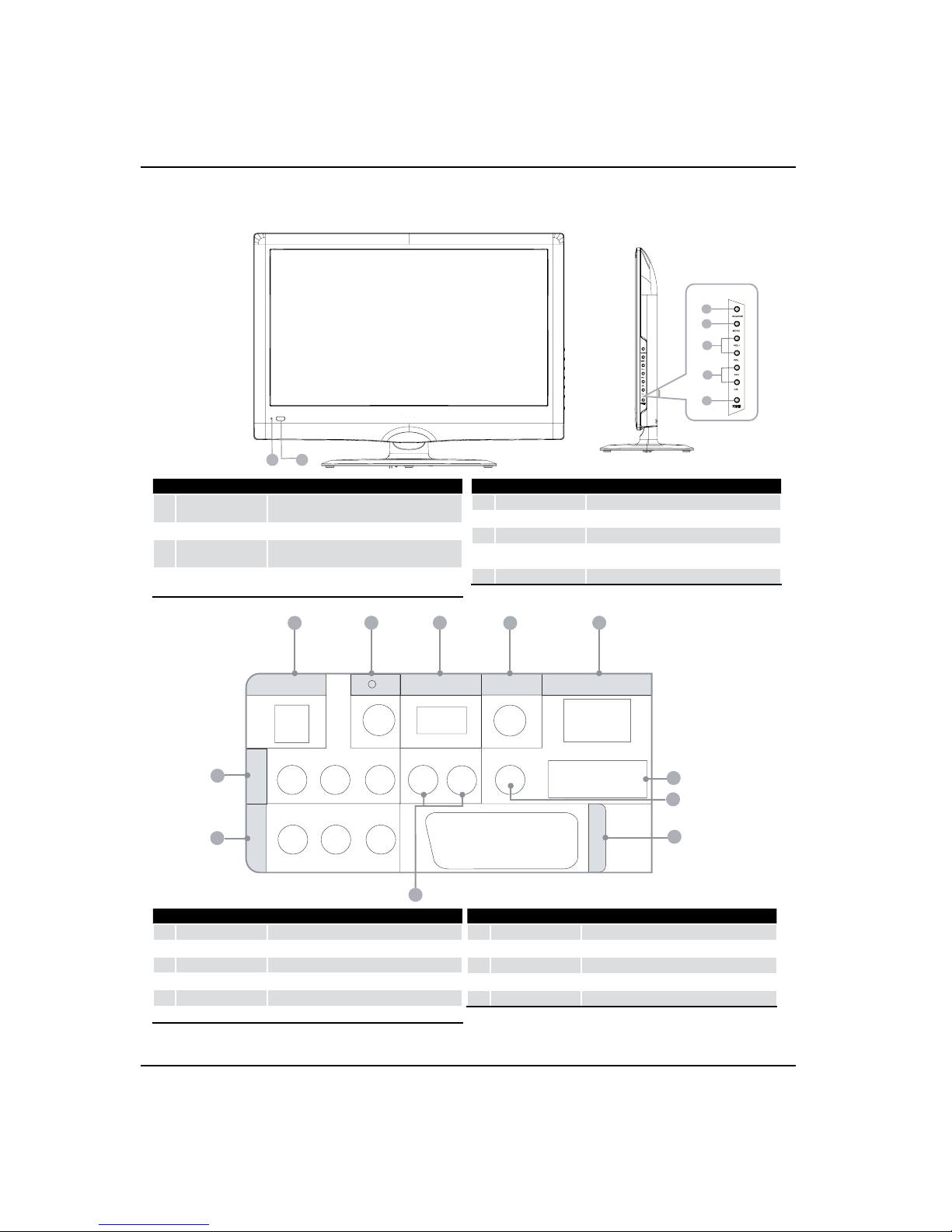
About your LCD TV
EN-9 Digital LCD Television Instruction Manual
67
1
2
4
3
5
DC IN USB DIGITALVOUT
(COAXIAL) HDMI IN
COMPONENT
IN
AV IN
Y Pb Pr
VIDEO L-AUDIO-R
L-AUDIO-R
PC/DVI AUDIO IN
PC IN
SCART
12 3 45
6
7
8
9
10
11
1DC IN input
2EARPHONE
output
3USB
input
4Digital output input
5HDMI IN
input
6PC IN input
7PC/DCI AUDIO IN
input
8TV SCART input
9AUDIO IN
input
>AV IN input
ACOMPONENT IN
input
1SOURCE Call the input Source menu/Conrm button
when operating menu.
2MENU
Press to select the main menu.
3VOL-
Volume down/Left orientation to adjust the item
in the OSD.
VOL+
Volume up/Right orientation to adjust the item
in the OSD.
4CH-
TV channel down/to select the item in the menu.
CH+
TV channel up/to select the item in the menu.
5POWER
6Power indicator
7Remote Sensor
Only 19"/22" LED LCD Model
Indice
Altri manuali Haier TV LCD

Haier
Haier LT32A1 Manuale utente

Haier
Haier L22C1120 Manuale utente

Haier
Haier HLA42K2 Manuale utente

Haier
Haier LE39M600CF Manuale utente

Haier
Haier LE39B50 Manuale utente

Haier
Haier HLH26BBTV Manuale utente

Haier
Haier LE24C700 Manuale utente

Haier
Haier HL24XK2 Manuale utente

Haier
Haier HL22F2 Manuale utente

Haier
Haier HLTDC15 - 15" LCD TV Manuale utente

Haier
Haier HLH326BB - 32" LCD TV Manuale utente

Haier
Haier 48LTV3002 Manuale utente

Haier
Haier L32A6A-A1 Manuale utente

Haier
Haier LT42M1CF Manuale utente

Haier
Haier LET32H320 Manuale utente

Haier
Haier L37A9A-A Manuale utente

Haier
Haier HL24XD2 Manuale utente

Haier
Haier HDMI LE19K300 Manuale utente

Haier
Haier HL32LE2 Manuale utente

Haier
Haier GRL-37POT Manuale utente


