
Haier HTN20R16 Manuale utente

Please read this manual carefully before using this TV set and keep it for future reference.
HTN20R16
OWNER S MANUAL'OWNER S MANUAL
20 Television" Colour
L-AUDIO-R TV/AV MENU VOL- VOL+ CH- CH+
VIDEO

PRECAUTIONS
FCC WARNING-This equipment may
generate or use radio frequency
energy.Changes or modifications to this
equipment may cause harmful
interference unless the modifications are
expressly approved in the instruction
manual.The user could lose the authority
to operate this equipment if an
unauthorized change or modification is
made.
CAUTION:USE OF CONTROLS OR
ADJUSTMENTS OR PERFORMANCE
OF PROCEDURES OTHER THAN
THOSE SPECIFIED HEREIN MAY
RESULT IN HAZARDOUS RADIATION
EXPOSURE.
LOCATION:INSIDE,NEAR THE DECK
MECHANISM.
CONTENTS
Before Operation
Basic operation
Warning and cautions...........................................................................
Installation..............................................................................................
.............................................................................
Preparation of the remote control.........................................................
Using the remote control......................................................................
Menu
..........................................................................
Specifications .......................................................................................
Function buttons and ......................................
Front panel of the TV set.....................................................................
Rear panel of the TV set.......................................................................
.....................................................................................
Others
................................................................................................
External Connections
Antenna Connection
Connection to the external audio and video equipment....................
Functions
Troubleshooting guide
Warranty
1
4
4
4
5
5
5
6
7
10
19
20
21
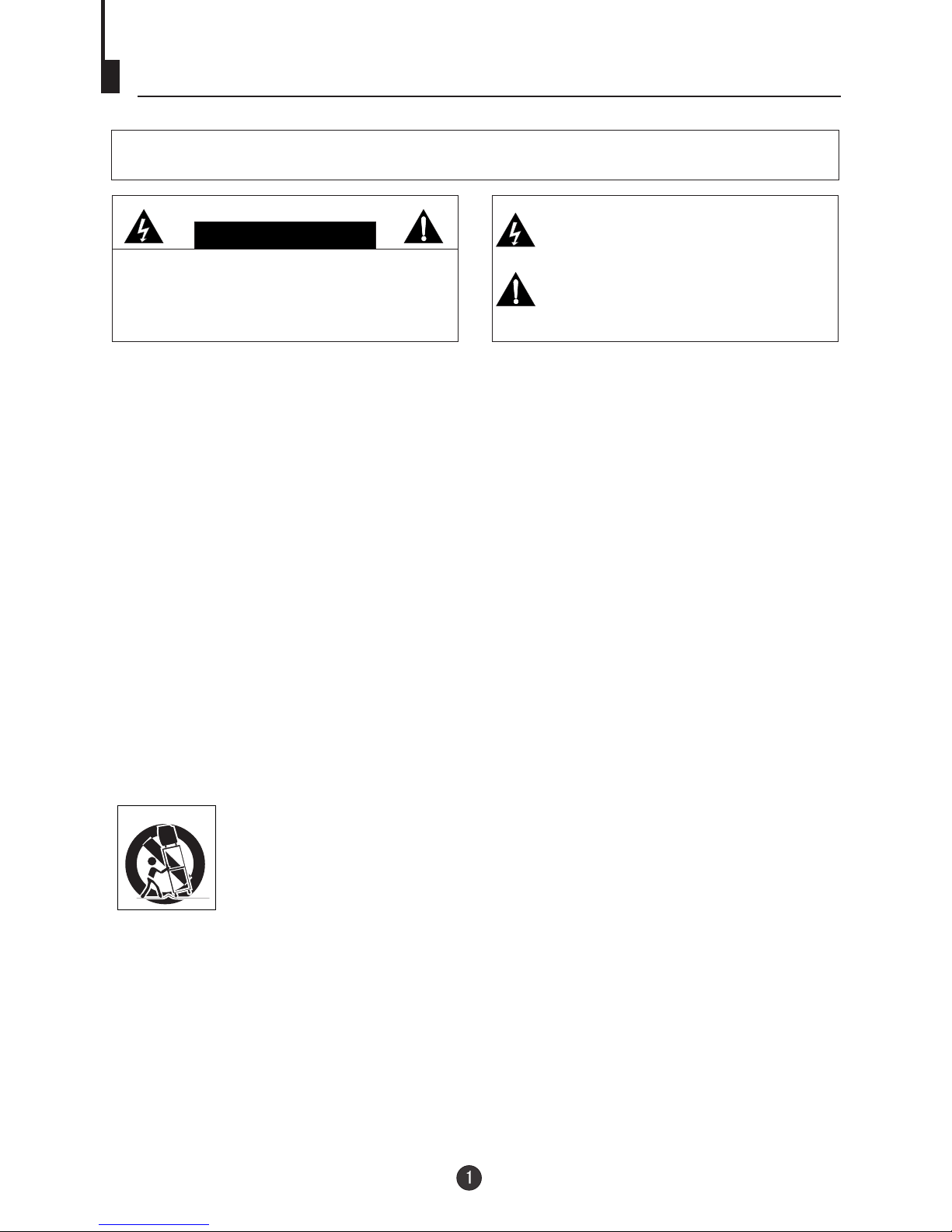
Important safety Instructions
WARNING:TO REDUCE THE RISK OF FIRE ORELECTRIC SHOCK, DONOT EXPOSE
THIS APPLIANCE TO RAIN OR MOISTURE.
CAUTION
RISK OF ELECTRICSHOCK
DO NOT OPEN
CAUTION: TO REDUCETHE RISK OFELECTRIC
SHOCK, DO NOTREMOVE COVER (OR BACK).
NO USER SERVICEABLEPARTS INSIDE.REFER
SERVICING TOQUALIFIED SERVICE PERSONNEL
THIS SYMBOL INDICATES THATDANGEROUS
VOLTAGECONSTITUTING ARISK OF ELECTRIC
SHOCK IS PRESENTWITHIN THIS UNIT.
THIS SYMBOL INDICATES THATTHERE ARE
IMPORTANT OPERATING AND MAINTENANCE
INSTRUCTIONS IN THELITERATURE
ACCOMPANYING THEAPPLIANCE.
The important noteis located on the rear ofthe cabinet.
IMPORTANT SAFEGUARDS
1. READ INSTRUCTIONS
All the safetyand operating instructionsshould be readbefore the unit is operated.
2. RETAIN INSTRUCTIONS
The safety andoperating instructions shouldbe retained forfuture reference.
3. HEED WARNINGS
All warnings onthe unit andin the operatinginstructions should beadhered to.
4. FOLLOW INSTRUCTIONS
All operating anduse instructions shouldbe followed.
5. CLEANING
Unplug this unitfrom the walloutlet before cleaning.Do not use liquid cleaners or aerosol
cleaners.
Use a dampcloth for cleaningthe exterior cabinetonly.
6. ATTACHMENTS
The manufacturer ofthis unit doesnot make anyrecommendations for attachments, as they
may cause hazards.
7. WATER AND MOISTURE
Do not usethis unit nearwater. Forexample, near abathtub, washbowl, kitchen sink,
laundry tub, ina wet basement,or near aswimming pool.
8. ACCESSORIES
Do not placethis unit onan unstable cart,stand, tripod, bracket, or table. The unit may fall,
causing serious injury, and seriousdamage to theunit.
(symbol provided byRETAC)
8A. Anappliance and cartcombination should bemoved with care.Quick
stops, excessive force,and uneven surfacesmay cause theappliance and
cart combination tooverturn.
9. VENTILATION
Slots and openingsin the cabinetback or bottomare provided for ventilation, and to ensure
reliable operation ofthe unit, andto protect itfrom overheating. These openings must not be
blocked or covered.The openings should never beblocked by placingthe unit on a bed,
sofa, rug, orother similar surface.This unit should never beplaced near or over a radiator or
heat source. This unit shouldnot be placedin a built-ininstallation such as a bookcase or
rack unless properventilation is providedor the manufacturer'sinstructions have been
adhered to.
10. POWER SOURCE
This unit shouldbe operated onlyfrom the typeof power source indicated on the rating plate.
If you arenot sure ofthe type ofpower supply to your home, consult your appliance dealer or
local power company. For unitsintended to operatefrom battery power, or other sources,
refer to therespective pages inthis Owner's Manualfor their operating instructions.
S3126A
Important safety Instructions
22
11. GROUNDINGOR POLARIZATION
This unit isequipped with apolarized alternating-current line plug (a plug having one blade
wider than theother). This plugwill fit into the power outlet only one way. This isa safety
feature. If youare unable toinsert the plugfully into theoutlet, try reversingthe plug. Ifthe
plug should stillfail to fit,contact your electricianto replace your obsolete outlet. Instead of
the polarized alternating-current line plug, your unit may be equipped with a 3-wire
grounding-type plug (aplug having athird (grounding) pin). This plug willonly fit into a
grounding-type power outlet.This too, isa safety feature. If you are unable to insert the plug
into the outlet,contact your electricianto replace yourobsolete outlet. Do not defeat the
safety purpose ofthe grounding-type plug.
12. POWER-CORD PROTECTION
Power-supply cords shouldbe routed sothat they arenot likely tobe walked on or pinched
by items placedupon or againstthem, paying particular attention to cords at plugs,
convenience receptacles, andthe point where they exit from the appliance.
13. LIGHTNING
Toprotect your unitfrom a lightningstorm, or whenit is leftunattended and unusedfor long
periods of time,unplug it fromthe wall outletand disconnect theantenna or cable system.
This will preventdamage to theunit due tolightning and powerline surges.
14. POWER LINES
An outside antennasystem should notbe located inthe vicinity ofoverhead power lines or
other electric lightor power circuits,or where itcan fall ontoor against suchpower lines or
circuits. When installingan outside antenna system, extreme care should be taken to keep
from touching suchpower lines orcircuits, as contactwith them mightbe fatal.
15. OVERLOADING
Do not overloadwall outlets andextension cords, asthis can result in a riskof fire orelectric
shock.
16. OBJECT AND LIQUID ENTRY
Do not pushobjects through anyopenings in thisunit, as theymay touch dangerous voltage
points or shortout parts thatcould result infire or electricshock. Never spillor spray any
type of liquidinto the unit.
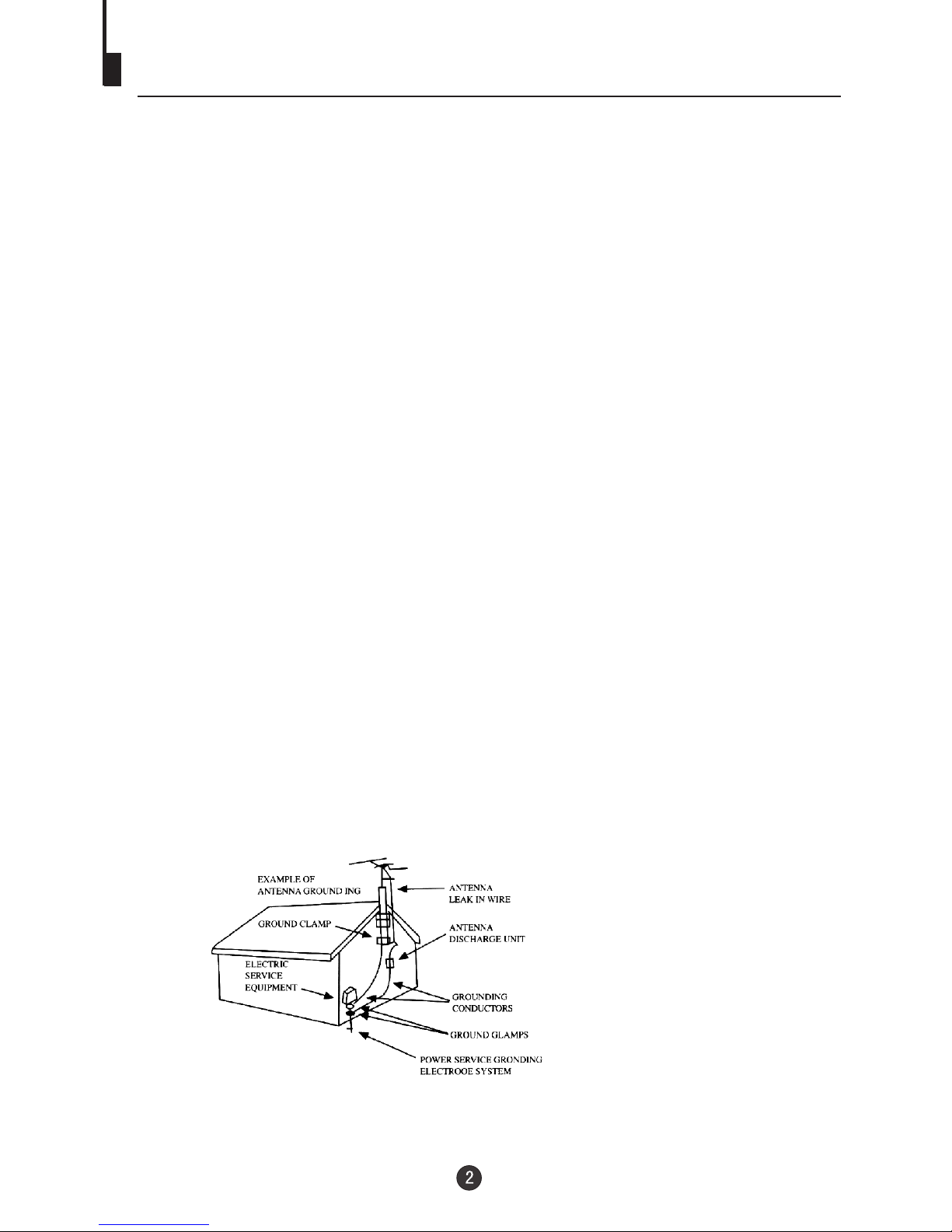
17. OUTDOOR ANTENNA GROUNDING
If an outsideantenna or cablesystem is connectedto the unit,be sure theantenna or cable
system is groundedto provide someprotection against voltage surges and built-up static
charges, Section 810of the NationalElectrical Code (NEC), ANSI/NFPA70, provides
information with respectto proper grounding of the mastand supporting structure,
grounding of thelead-in wire toan antenna discharge unit, size of grounding conductors,
location of antennadischarge unit, connection to grounding electrodes, and requirements
for the groundingelectrode.
18. SERVICING
Do not attemptto service thisunit yourself asopening or removingcovers may expose you
to dangerous voltageor other hazards.Refer all servicing to qualified service personnel.
Important safety Instructions
19. DAMAGE REQUIRINGSERVICE
Unplug this unitfrom the walloutlet and referservicing to qualified service personnel under
the following conditions:
a. When thepower-supply cord orplug is damaged.
b. If liquidhas been spilled,or objects havefallen into the unit.
c. If theunit has beenexposed to rainor water.
d. If theunit does notoperate normally byfollowing the operating instructions. Adjust
only those controlsthat are coveredby the operatinginstructions, as an improper
adjustment of othercontrols may resultin damage and will often require extensive
work by aqualified technician torestore the unitto its normal operation.
e. If theunit has beendropped or thecabinet has been damaged.
f. When theunit exhibits adistinct change inperformance, this indicates a need for
service.
20. REPLACEMENT PARTS
When replacement partsare required, besure the servicetechnician uses replacement parts
specified by themanufacturer or thosethat have thesame characteristics as the original part.
Unauthorized substitutions mayresult in fire,electric shock or other hazards.
21. SAFETY CHECK
Upon completion ofany service orrepairs to thisunit, ask the service technician to perform
safety checks todetermine that theunit is in proper operating condition.
22. HEAT
The product shouldbe situated awayfrom heat sourcessuch as radiators, heat registers,
stoves, or otherproducts (including amplifiers)that produce heat.
23. CONNECTING
When you connectthe product toother equipment, turnoff the power and unplug all of the
equipment from thewall outlet. Failureto do somay cause an electric shock and serious
personal injury. Read the owner's manual of the other equipment carefully and follow the
instructions when makingany connections.
24. SOUND VOLUME
Reduce the volumeto the minimumlevel before youturn on the product. Otherwise, sudden
high volume soundmay cause hearingor speaker damage.
25. SOUND DISTORTION
Do not allowthe product outputdistorted sound fora longtime. It may cause speaker
overheating and fire.
26. NOTE TO CABLE TV SYSTEM INSTALLER
This reminder isprovided to callthe Cable TV system installer'sattention to Article 820-40 of
the NEC thatprovides guidelines forproper grounding and,in particular, specifies that the
cable ground shallbe connected tothe grounding systemof the building, as close to the point
of cable entryas practical.
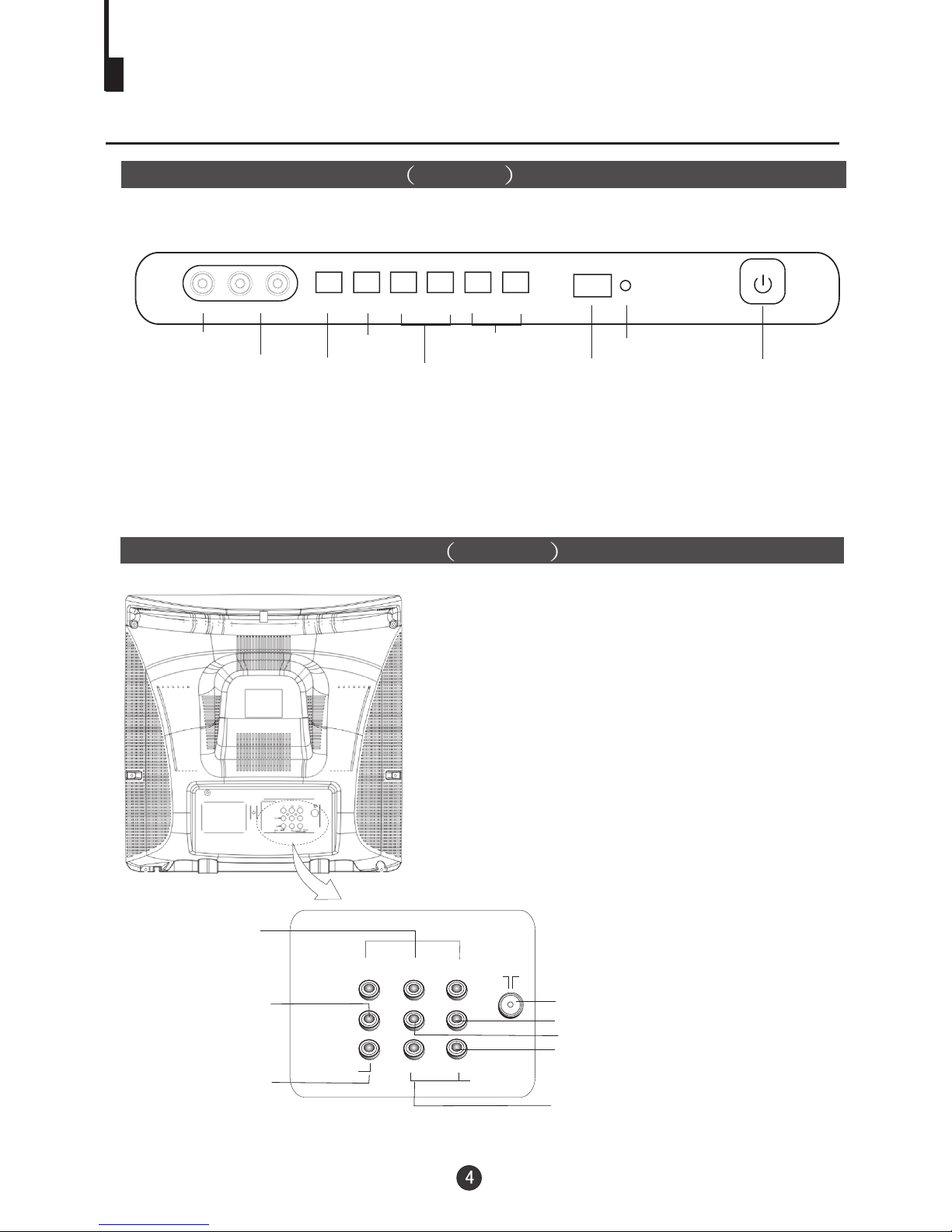
Function Buttons and External
Connections
Rear panel of the TV set Video 2
Front panel the TV set Video 1
OUT
IN
VIDEO L R
AUDIO
Audio left channelinput terminal
Audio right channelinput terminal
Audio left channeloutput terminal
Audio right channeloutput terminal
Antenna input socket
Video input terminal
Video output terminal
YCb Cr
Component video
input terminal
VIDEO IN jack
AUDIO IN (L/R) jacks
L-AUDIO-R TV/AV MENU VOL- VOL+ CH- CH+
VIDEO
TV/AV
switching
MENU
Volume
decrease/
increase
Channel
down/up Signal
Receiver
Indicator light
Power Switch
Installation
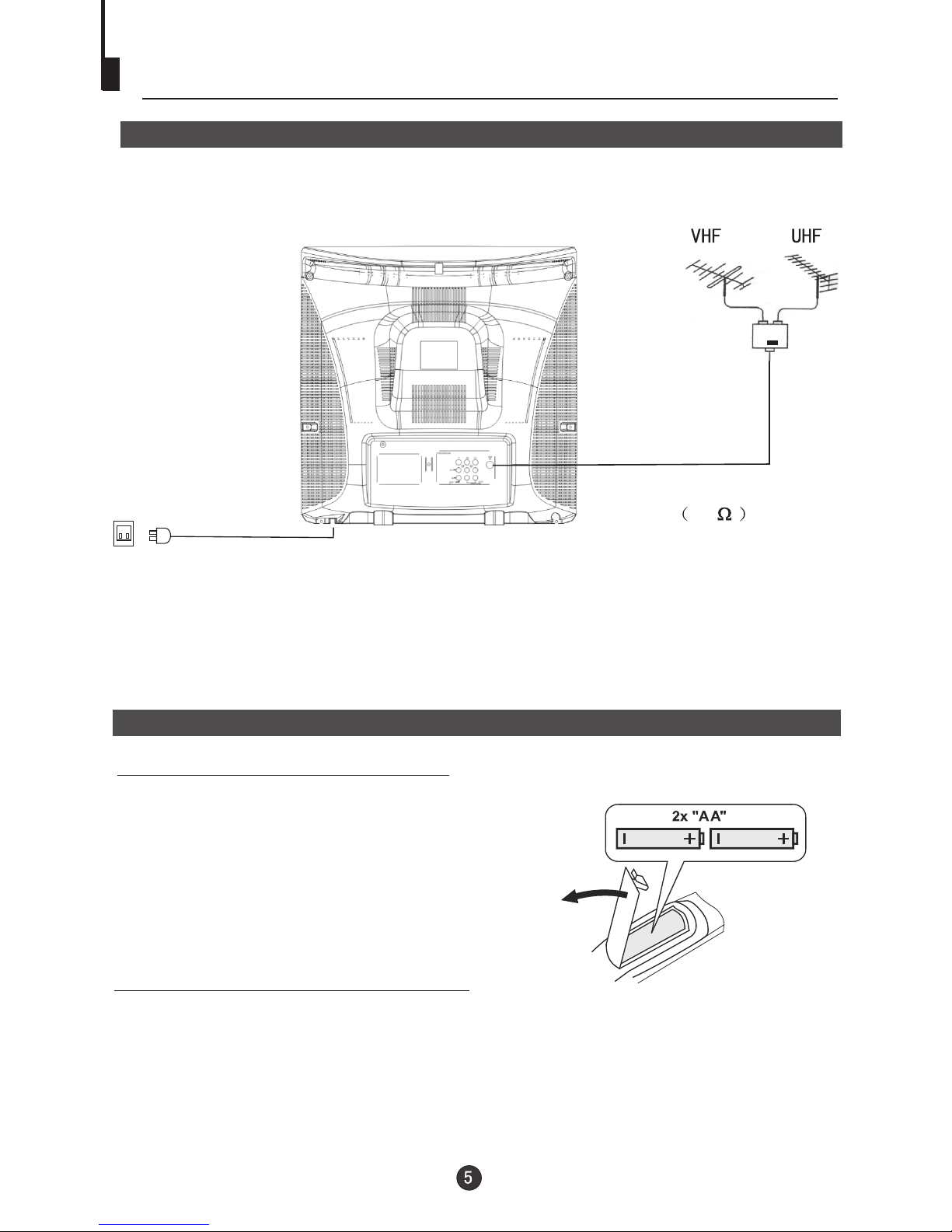
Antenna connection
Generally speaking, to enjoy a clearer picture, we recommend that you use a CATV
system or an outdoor antenna .In different places, the suitable antenna type and position
may vary.
Preparation for the remote control
Battery installation
Tips for remote operation
Remove the battery cover.
!When the remote control will not be used for a long period of time or when the
batteries are worn out, remove the batteries to prevent leakage.
! Do not throw the batteries into fire. Dispose of used batteries in the specified
manner.
! Do not drop, dampen or disassemble the remote control.
Insert two size AA batteries matching
the +/-polarities of the battery to the +/-
marks inside the battery compartment.
!
!
Note:
* It is recommended that a 75 ohm coaxial antenna is used to avoid
interference.
*To avoid interference from electrical signals, do not bind the antenna cable
together with any mains lead.
AC power socket
Mixer
(not incl.)
Antenna/ CATV input
75 standard
coaxial type

Connecting the TV set to the other video and audio equipment
The figure belowshows how to connect external equipmentusing AV signals.
There is also an AV input on the front of your television. Use the Left Audio input
(white terminal on the TV), if you are connecting equipment with mono sound. The
MONO sound willbe delivered by both left andright speakers.
Connection of AV input /output terminal
DVD Player
VCR
Audio right
output
Audio left
Video
Audio right
input
Audio left
Video
output
output
input
input
Audio left output
Audio right output
Video output
DVD player
VCR
Component video inputs

Using the Remote Control
Power Switch
Go to TV Menu
Adjusting
Adjusting
Channel / Track Selection
Return to Previous Channel
Select 1 or 2 Digit Channel / Track Number Inputting
TV / AV Mode Selection
CCD ( closed caption) On / Off
Mute Sound
Adjust Picture Mode
Exit On Screen Display
Channel
Volume
On Screen Display
Buttons on the remote control
1
2
4
5
67
8
9
13
10
11 12
3
Remote Features
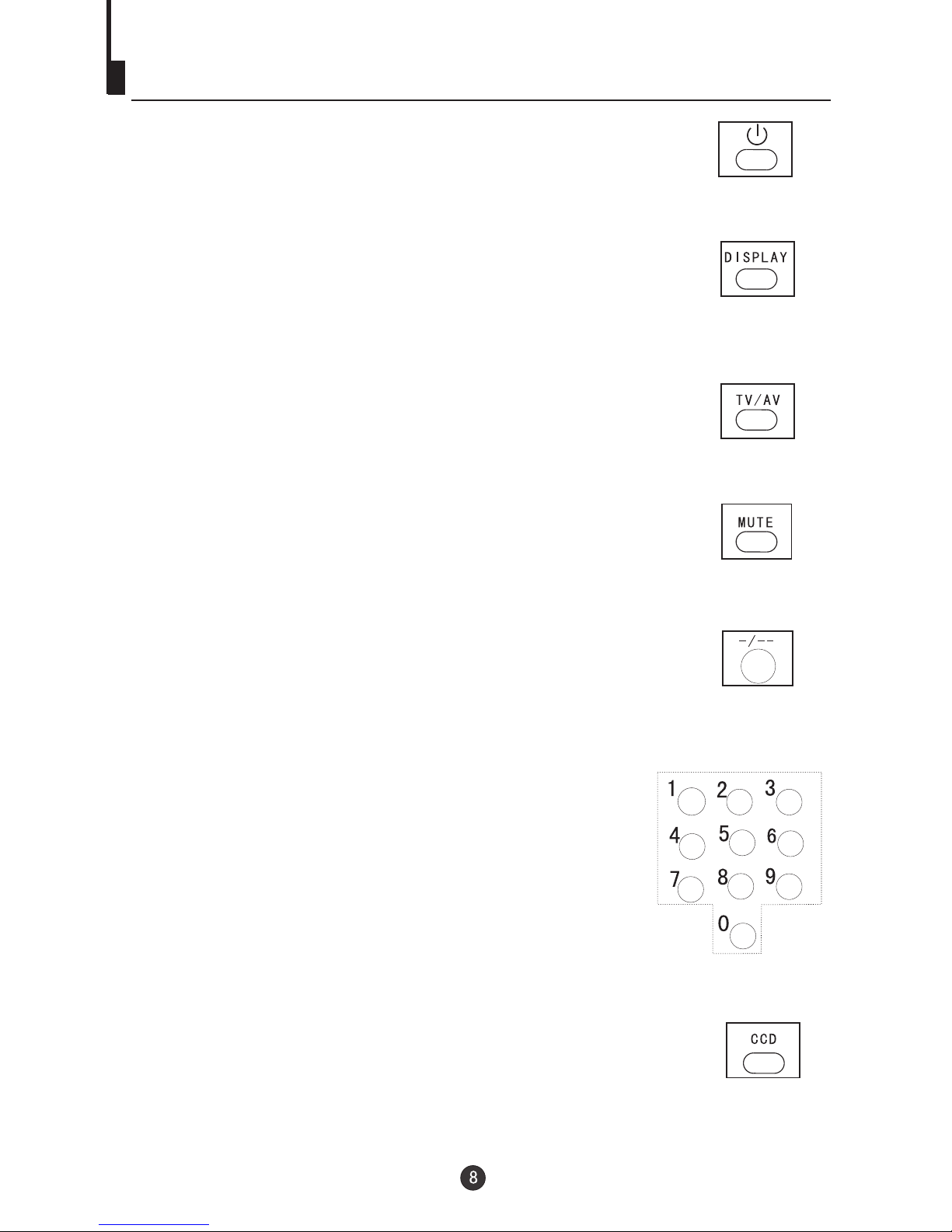
Power Button:
To turn power ON or OFF , press power button on remote control.
Control
System and ChannelDisplay Button:
This will show you the current channel number. System type will
also be displayed if set.
TV/AV input Button:
This button has three settings: A)TV, B)VIDEO 1, C)VIEDO 2,
D)DVD .Pressing this button will cycle you through each input
type.
Mute Button:
Press mute button to turn off the TV volume.
Direct Channel Access Selection:
one of the procedures noted below to access a channel.
Selection:
channel
number digit.
Selection:
When you want to select two-digit channel. Press the digit
button twice, thenenter the two channel digits .
Follow
One Digit Channel
When you want to select one digit channel ,press 0 and
Two Digit Channel
CCD Button:
Press CCD buttonto set the C.Caption (Closed ).Captioning
Using the Remote Control (Continued)
Indice
Altri manuali Haier TV

Haier
Haier K15PFCD2602TXT Manuale utente

Haier
Haier LYF24Z6 Manuale utente

Haier
Haier HL26B-A Manuale utente

Haier
Haier L26A9A Manuale utente

Haier
Haier 29F9D Manuale utente

Haier
Haier L26K3 Manuale utente

Haier
Haier HT-3718 Manuale utente

Haier
Haier 25T8D Manuale utente

Haier
Haier HL32K2a Manuale utente

Haier
Haier 29T9D Manuale utente

Haier
Haier HL22R3 Manuale utente

Haier
Haier HTAF21C Manuale utente

Haier
Haier LT32R1 Manuale utente

Haier
Haier 29FA1 Manuale utente

Haier
Haier NS-13CTV Manuale utente

Haier
Haier 29F3A Manuale utente

Haier
Haier 29T9B Manuale utente

Haier
Haier HL42XZK2a Manuale utente

Haier
Haier TV-8888-09 Manuale utente

Haier
Haier LC-2710D Manuale utente


