
Hawking HOW2R1 Manuale utente
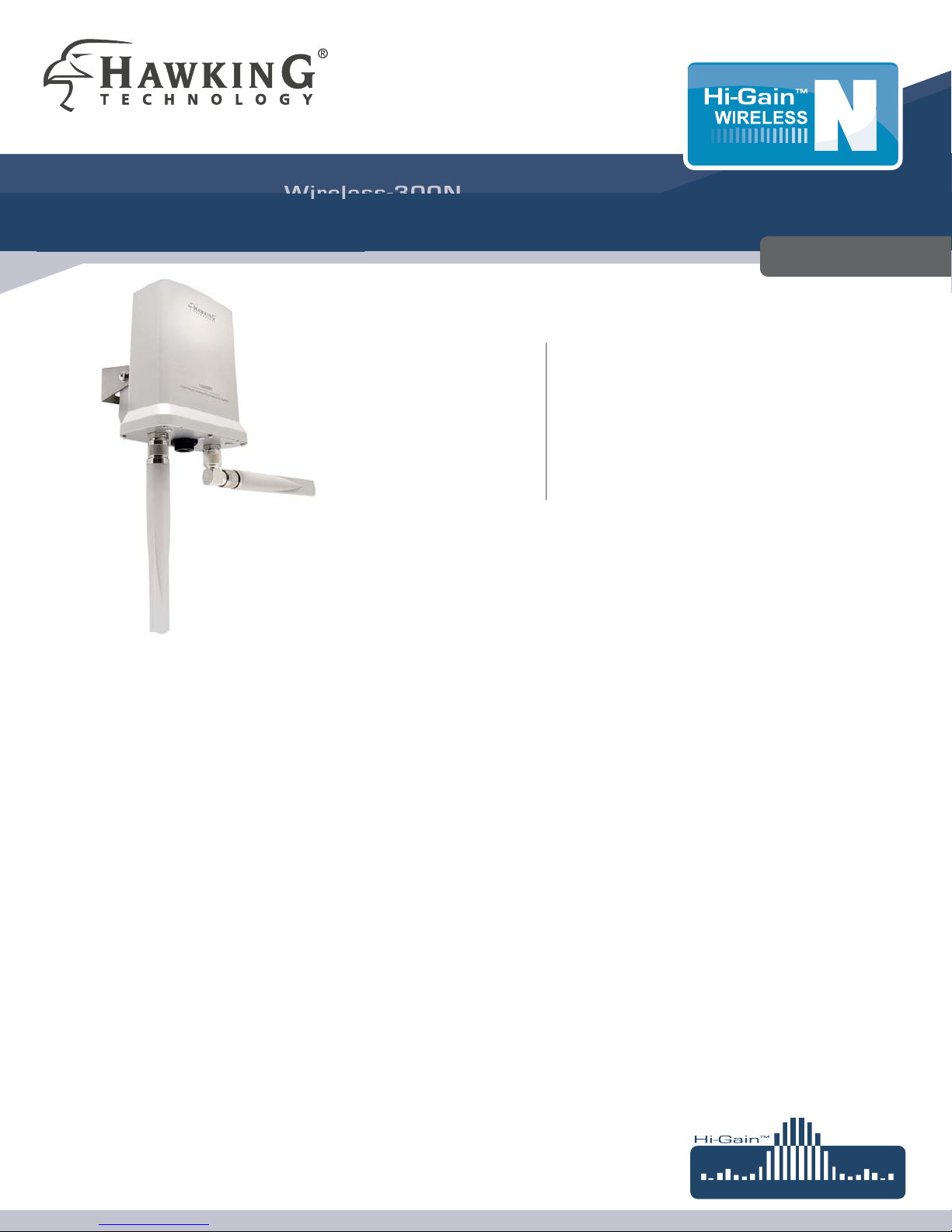
Hi-Gain™Outdoor
W
W
i
i
re
re
l
l
e
e
ss
ss
-300
-300
N
N
Dual Radio Smart Repeater
Dual Radio Wireless Repeater
Unleash your Wireless Network with the Hawking Hi-Gain
™
Outdoor 2.4GHz Wireless-300N Dual
Radio Smart Repeater, HOW2R1. The HOW2R1 outdoor smart repeater connects and repeats your
existing wireless network with up to 64X the power output and 8X the distance of a standard Wireless-G
device. Similar to the Hawking’s HW2R1 Smart Repeater with dual radio design, the HOW2R1 Outdoor
Smart Repeater is engineered with two powerful Wi-Fi radios, one radio is dedicated to receiving signals
from a wireless source, access point or router, and the other radio is used to rebroadcasting wireless
signals throughout your surroundings. To further enhance its wireless range and coverage, the WiFi
receiving radio is connected to an 11dBi directional antenna, integrated internally in the HOW2R1. In
addition, two external 5dBi antennas are connected to the rebroadcasting WiFi radio to effectively
elimnates wireless deadspots inside and outside of your home or office.
This powerful repeater is not only robustly design to withstand outdoor environment, it also packed with wireless security features,
such as MAC access control, IEEE 802.11x authentication,WPA,WPA2, hidden ESSID, and the basic WEP encryption. With data
transfer rate of up to 300Mbps, the HOW2R1 is an ideal solution for High Performance Wireless Solution, extending your wireless
signals for your home or your business, or providing wireless access to RV parks or Marine docks. The possibilities are endless.
Features
Connects and repeats any 2.4GHz 802.11b/g/n Wireless Network
• Eliminate Wireless Dead Spots inside and outside your Home or Office with high power output of up to 200mW
Increase your wireless distance of up to 8X and power output of up to 64X compared to a standard wireless 802.11g network*
Engineered with two WiFi radios - one receiving radio and one rebroadcasting radio
Built-in 11dBi Directional Antenna is dedicated to receiving wireless signals
Two 5dBi external Omni-Directional Antennas are dedicated to rebroadcasting wireless signals
• Easy Setup: Install and Configure in less than 1 Minute
• Heavy duty, waterproof design
System Requirements:
• One computer (Mac or PC) with an available CD or DVD-Rom drive
• Internet Web Browser (Internet Explorer, Safari, etc.)
• A Wired or Wireless networking adapter (i.e. Airport card, built-in Ethernet adapter, etc.)
• A Wireless Internet connection (such as a HotSpot, etc.)
* Actual distance and data output power may vary depending on your networking environment.
PACKAGE CONTENTS:
One Hi-Gain™Outdoor Wireless-N Dual Radio Smart Repeater
Two 5dBi Hi-Gain Outdoor Omni-Directional Antennas
One Power over Ethernet DC Injector
L-shape Antennas Connector
One Waterproof Gasket Kit for RJ-45
Power Cable and Power Transformer
Ethernet Cable
Wall & Pole Mounting Kit
Setup CD-Rom
MODEL: HOW2R1
Hi-Gain™ Outdoor
W
i
r
e
l
e
s
s
-
N
Dual Radio Smart Repeater
MODEL: HOW2R1
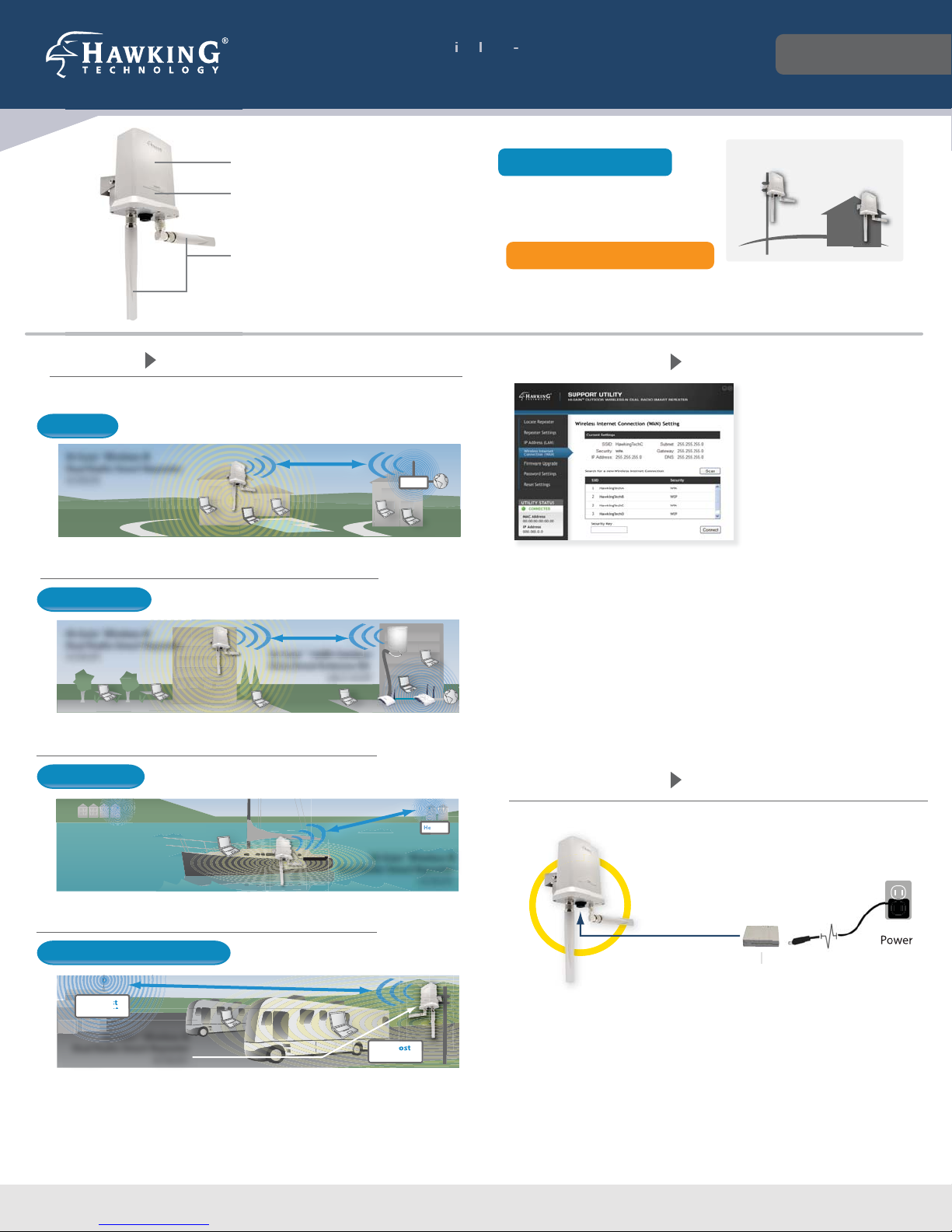
SOLUTIONS
H
ot
S
p
ot
Hi-Gain™Wireless-N
Dual Radio Smart Repeater
HOW2R1
HOME USE
Extend a wireless signal to your backyard
Hi-Gain™14dBi Outdoor
Directional Antenna Kit
HAO14SDP
Hi-Gain™Wireless-N
Dual Radio Smart Repeater
HOW2R1
FOR THE OFFICE
Connect the network and internet connection from one
oce to another
ot
S
p
ot
Hi-Gain™Wireless-N
Dual Radio Smart Repeater
HOW2R1
FOR MARINERS
Connect to an on shore wireless Internet connection to
provide wireless Internet access to your boat or yacht
Hi-Gain™Wireless-N
Dual Radio Smart Repeater
HOW2R1
FOR OUTDOOR APPLICATIONS
Extend the range of a camp ground’s
wireless Internet
RV Host
HotSpot
RV Host
Repeater
Hi-Gain™Wireless-N
Dual Radio Smart Repeater
HOW2R1
By combining your power and data connections into a single cable, PoE simplifies
the setup of the Hi-Gain™ Outdoor Wireless-N Dual Radio Smart Repeater. The
included Power over Ethernet DC Injector provides power and network access
(through your home or business router or network connection), and combines
them into a single RJ-45 connection for the HOW2R1. This allows you to install the
HOW2R1 outdoor in hard to reach locations without worrying about running
both power and Ethernet cables.
HARDWARE SETUP
Power over Ethernet (PoE)
Injector (Included)
Data/Power Power
SUPPORT UTILITY
The included Windows based Smart Repeater Support Utility is
a powerful tool for administrators to configure and
troubleshoot wireless connections for multiple Smart
Repeaters. The Support Utility allows administrators to upgrade
firmware, reset devices to factory settings, adjust IP settings,
scan and connect to wireless Internet networks and view
current system settings. The Utility uses a proprietary
communication protocol to connect to the Smart Repeater
without having to know the correct IP settings.
Internal 11dBi Directional Antenna - Receive Wi-Fi Signal
Two Built-in Wi-Fi Radios: Receiving and Rebroadcasting signals
Two External 5dBi Omni-Directional - Rebroadcast Wi-Fi Signal
OUTDOOR WALL OR POLE
MOUNTING KIT
INCLUDED
RECEIVE WIRELESS SIGNALS
REBROADCAST WIRELESS SIGNALS
MODEL: HOW2R1
Hi-Gain™ Outdoor
W
ir
eless
-
N
Dual Radio Smart Repeater
SPECIFICATIONS:
Bridge Specifications (Receiving):
802.11n 150M Wireless WAN
xDedicated RJ-SMA Antenna Port
xReal Time LED Signal Strength Display
xSupports WPA, WPA2, WEP Wi-Fi Security
Network Bridging Mode:
xPass through Settings from a wireless Internet connection
Antenna: Internal 11dBi Directional
Ouput Power
x11n: 18 ± 1.5dBm, 11g: 21 ± 1.5dBm, 11b: 23 ± 1.5dBm
Local Network Specifications (Rebroadcasting):
RJ-45 Ethernet 10/100M Port
802.11n 300Mbps Wireless LAN
xTwo dedicated RJ-SMA Antenna Ports
xSupports WPA, WPA2, WPS (Wi-Fi Protected Setup), WEP Wi-Fi
Security
Broadband Router Features
xDHCP Server, Firewall, Demilitarized Zone (DMZ), Port
Forwarding, Quality of Service, Virtual Servers / Port Forwarding,
Network Address Translation, Access Control-Mac & IP Address
Filtering, URL Blocking, Denial of Service (DoS), Remote
Management
Antenna:Two external 5dBi Omni-Directional
Ouput Power
x11n: 14 ± 1.5dBm, 11g: 15 ± 1.5dBm, 11b: 17 ± 1.5dBm
Hardware Specifications:
Connectors/Ports/Switches
xTwo N-Type Connectors
xOne 10/100M Ethernet Ports (LAN)
Power:
x48V, 0.5 Switching Power Adapter (POE)
Dimension / Weight
xPOE Injector: 3 x 2¼ x ¾ in / app. 0.10 lb.
xRepeater: 7 x 5½ x 3 in / app. 1.10 lb (excludes antennas)
Temperature
xOperating: -20~70˚C , Storage: -40~80˚C
Humidity
xOperating: 10~90% (Non-Condensing)
xStorage: 5~95% (Non-Condensing)
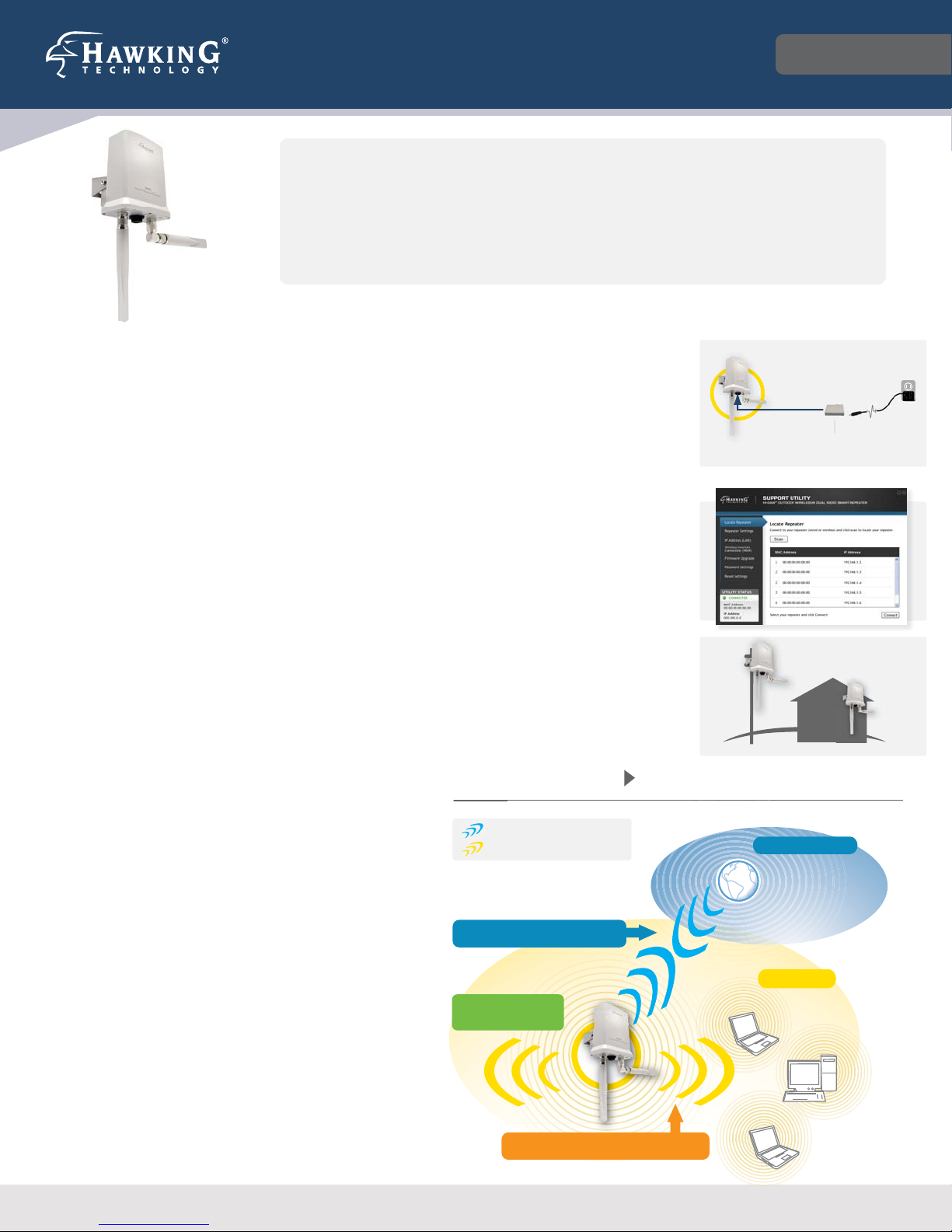
POWER ON & CONNECT!
It’s easy to install, it’s easy to use! Everyone can do it.
STEP 1: Power on the Repeater
Connnect the included Ethernet cable
to the Repeater, and Power over
Ethernet Injector. Finally, connect the
power adapter to an available wall
socket.
STEP 2: Configure the Repeater
Insert the included CD and open the
Support Utility. Configure the
Repeater, and you’re ready to go!
STEP 3: Mount the Repeater
Find a safe location to mount the
Hi-Gain Outdoor Wireless-N Smart
Repeater.
Power over Ethernet (PoE)
Injector (Included)
Data/Power
Power
Specifications are subject to change without prior notice. * Actual distance and data output power may vary depending on your networking environment.
©2010 Hawking Technologies, Inc. All righs reserved.
NETWORK DIAGRAM
Wireless Internet Connection
(wireless hot spot)
Local Area
WIRELESS INTERNET CONNECTION
LOCAL WIRELESS NETWORK
WIREL
E
LO
CA
L
External Location
Hi-Gain™ Antenna provide
more connection range.
REBROADCASTS WIRELESS SIGNALS
RECEIVES WIRELESS SIGNALS
HAWKING TECHNOLOGIES, INC.
35 HAMMOND, SUITE 150 xIRVINE, CA 92618
SALES: (888) 662-8828 FAX: (949) 206-9072
Altri manuali Hawking Ripetitore

Hawking
Hawking HW2R1 Manuale utente

Hawking
Hawking HAW2DR Manuale utente

Hawking
Hawking HOW2R1 Manuale utente

Hawking
Hawking HDW2R1 Manuale utente

Hawking
Hawking HW2R1 Manuale utente

Hawking
Hawking HOW2R1 Manuale utente

Hawking
Hawking HI-GAIN HAW2R1 Manuale utente

Hawking
Hawking Hi-Gain HOW2R1 Manuale utente

Hawking
Hawking HW2R1 Manuale utente

Hawking
Hawking HI-GAIN HAW2R1 Manuale utente


