
HEAD BLACK HAWK Z Manuale utente

USER’S MANUAL
1
User Guide : BLACK HAWK Z
Hardware Features
MAIN CHIPSET
CPU
High-Performance multimedia and codec specialized MIPS
24KEc
MEMORY
1Gb
DDR3 SDRAM
64Mb
AdditionalFlash
VIDEO DECODER
TRANSPORTSTREAM
MPEG-2 ISO/IEC 13818-2
MPEG-4 Part 2
PROFILE LEVEL
MPEG-2 MP@ML, MPEG-2 MP@HL
MPEG-4 AVC/H.264 [email protected], MPEG-4 H.265 HEVC
VIDEO FORMAT
4:3, 16:9, Letter Box
VIDEO RESOLUTION
1080p, 1080i, 720p, 576p, 576i, 480p, 480i
AUDIO DECODER
AUDIO DECODING
MPEG/MusiCam Layer I & II, AC3 Down Mix
AUDIO MODE
Mono / Dual / Joint Stereo / Stereo
AUDIO BIT RATE
32Kbits/s –384Kbits/s
SAMPLING FREQUENCY
32, 44.1, 48KHz
TUNER / DATAINPUT/OUTPUT
DVB-T2
1 x T2 Signal Input
SCARTOUTPUT
RGB and Y-Cb-Cr
HD Out
1 x HD Out
USB
1 x (USB 2.0 Host), Front & Rear
Ethernet and USB-WiFi
RJ-45 Ethernet and USB WiFi support
POWERSUPPLY
INPUT VOLTAGE
DC 5V 1.5A
TYPE
AdapterType
PROTECTION
Separateinternal fuse
The input should be protected against lighting.
PHYSICAL CHARACTERISTICS
DIMENSION (W x H x D)
180 x 40 x 100 (mm)
NETWEIGHT
Approx. 0.7Kg

2
USER’S MANUAL
OPERATING TEMPERATURE
0℃ to+45℃
STORAGE TEMPERATURE
-10℃ to+70℃
Unpacking List
Unpack the receiver and check to make sure that all of the following items are included in the packagi
ng.
1 x Digital Set Top Box
1 x Remote
1 x User’s Guide
1x 5V 1.5AAdaptor
1 x 1m HD cable
2 x 1.5V battery

USER’S MANUAL
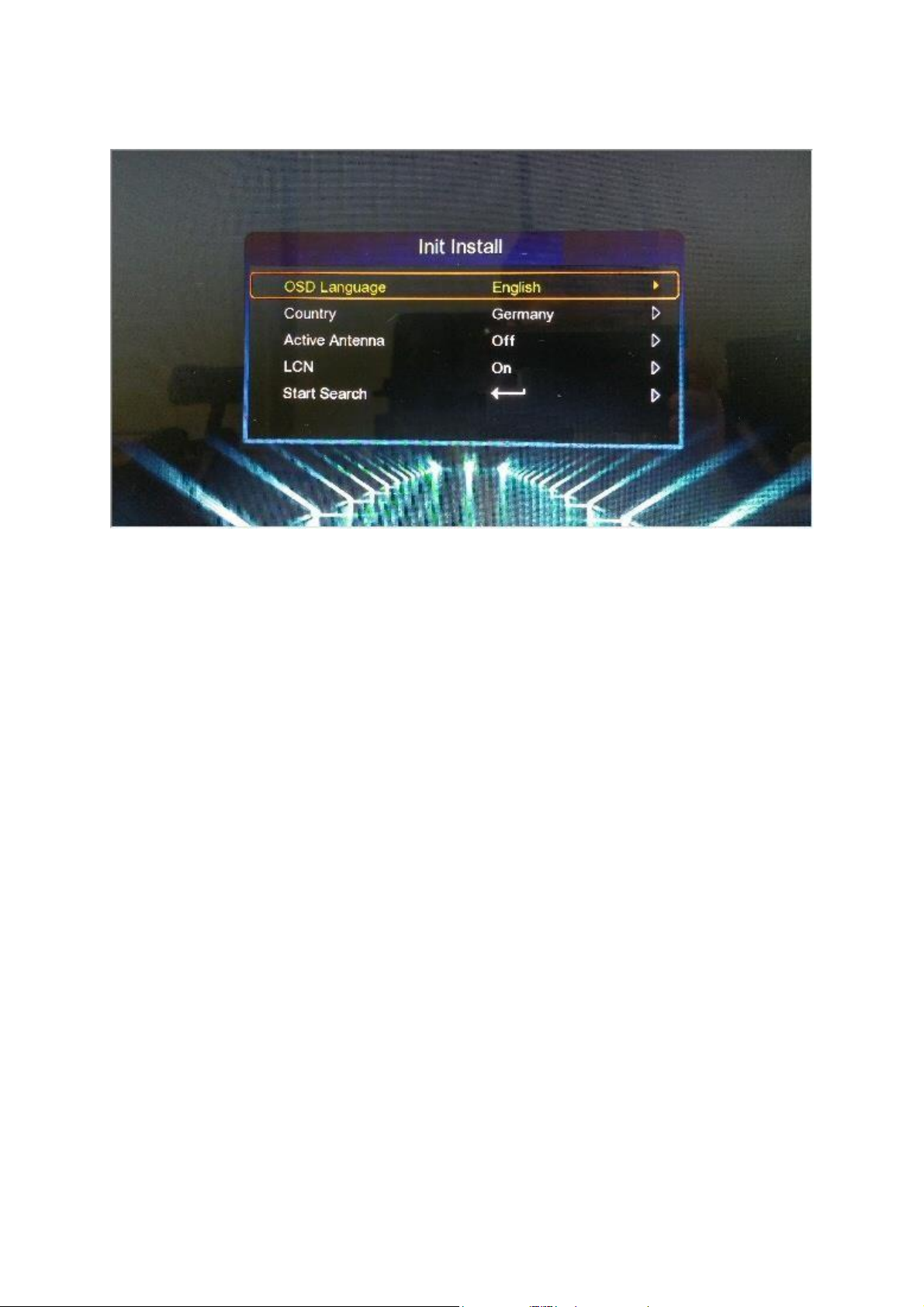
[ Init Install ]
Youcan see this menu after first time booting.
1. OSD Language :
- Youcan select the default OSD display languages.
2. Country :
- Youcan select the searching country.
3. Active antenna :
- Youcan select the active antenna ON and OFF.
4. LCN :
- Youcan select the LCN channel number display.
5. Start search :
- You can start the channel searching.
3

USER’S MANUAL
[ Main Menu ]
1. Channel :
- Youcan manage the channels in this menu
- Channel manager, Favorite list etc.
2. Installation :
- Youcan install the antenna setting and searching channels.
- Auto search
- Manual search
- Channel filter
- Country
- LCN
- Active antenna
3. MediaAPPS:
- Youcan enjoy some media apps for YouTube etc.
4. Multimedia :
- Youcan play the multimedia files in your USB memory.
- Movie, Music, Photo, Record manager, Disk manager, EBook etc
5. CAS :
Youcan setup CAS etc.
6. Setting :
Languagesetting
AVsetting Ether
net config Upgra
de
Factoryreset
Version Oth
ers
4

USER’S MANUAL
[ Init Install ]
Sie können dieses Menü nach dem ersten Start sehen.
1. OSD-Sprache:
- Sie können die Standard-OSD-Anzeigesprachen auswählen.
2. Land:
- Sie können das Suchland auswählen.
3. AktiveAntenne:
- Sie können die aktiveAntenne EIN undAUSauswählen.
4. LCN:
- Sie können die Anzeige der LCN-Kanalnummer auswählen.
5. Suche starten:
- Sie können die Kanalsuche starten.
5

USER’S MANUAL
[ Hauptmenü ]
1 Kanal :
- In diesem Menü können Sie die Kanäle verwalten
- Channel Manager, Favoritenliste usw.
2. Installation:
- Sie können die Antenneneinstellung und Suchkanäleinstallieren.
- Automatische Suche
- Manuelle Suche
- Kanalfilter
- Land
- LCN
- AktiveAntenne
3. Medien-APPS:
- Sie können einige Medien-Apps für YouTube usw. genießen.
4. Multimedia:
- Sie können die Multimedia-Dateien in Ihrem USB-Speicher abspielen.
- Film, Musik, Foto, Aufnahmemanager, Festplattenmanager, EBook etc
5. CAS:
Sie können CAS usw. einrichten.
6. Einstellung: Sprachei
nstellungen AV-Einste
llung Ethernet-Konfig
Aktualisierung
Werkseinstellungen zurückgesetzt
Ausführung
Andere
6

USER’S MANUAL
[ Init Install ]
Vous pouvez voir ce menu après le premier démarrage.
1. Langue OSD:
-Vous pouvez sélectionner les langues d’affichage OSD par défaut.
2. Pays:
-Vous pouvez sélectionner le pays de recherche.
3. Antenne active:
-Vous pouvez sélectionner l’antenne active activée ou désactivée.
4. LCN:
-Vous pouvez sélectionner l'affichage du numéro de canal LCN.
5. Lancer la recherche:
-Vous pouvez lancer la recherche de chaînes.
7

USER’S MANUAL
[ Menu principal ]
1. Canal:
- Vous pouvez gérer les canaux dans ce menu
- Gestionnaire de chaînes, liste de favoris, etc.
2. Installation:
- Vous pouvez installer le réglage de l'antenne et rechercher des canaux.
- Recherche automatique
- Recherche manuelle
- Filtre de canal
- pays
- LCN
- antenne active
3. APPS médias:
- Vouspouvez profiter de certaines applications multimédia pour YouTube.
4. Multimédia:
- Vouspouvez lire les fichiers multimédia dans votre clé USB.
-Film, musique, photo, gestionnaire d’enregistrements, gestionnaire de dis
ques, livres électroniques, etc.
5. CAS:
Vouspouvez configurer CAS, etc.
6. Réglage:
Réglage de la langue
RéglageAV Configura
tion Ethernet améliore
r Réinitialisation d'usin
e version
D'autres
8
USER’S MANUAL
[ Installazione iniziale ]
Puoi vedere questo menu dopo il primo avvio.
1. Lingua OSD:
-È possibile selezionare le lingue di visualizzazione OSDpredefinite.
2. Paese:
-È possibile selezionare il paese di ricerca.
3. Antenna attiva:
-È possibile selezionare l'antenna attiva ON e OFF.
4. LCN:
-È possibile selezionare la visualizzazione del numero del canale LC
N.
5. Inizia la ricerca:
-Puoi avviare la ricerca dei canali.
9
Indice
Lingue:


