
High Great MARK Manuale utente

MARK


Contents
Reading Suggestions ................................................1
Symbols................................................................................................................1
Downloading the APP.....................................................................................1
Overview......................................................................2
Introduction .......................................................................................................2
Features Highlights..........................................................................................2
Aircraft Diagram ...............................................................................................4
Aircraft ........................................................................6
On/Off Switch and Power Indicator............................................................6
Aircraft Status Indicator ...............................................................................6
VIO Positioning..................................................................................................7
Propellers...........................................................................................................8
Replacing the Propellers ......................................................................9
Battery ..................................................................................................................9
Charging the Battery.............................................................................10
Camera ..............................................................................................................10
Signal Frequency ...........................................................................................11
Micro-USB Port ..............................................................................................11
Wi-Fi Reset Button ........................................................................................11
APP ............................................................................12
APP Overview ..................................................................................................12
APP Operation Interface .............................................................................12
APP Settings ....................................................................................................13

Shenzhen HighGreat Innovation Technology Development Co., Ltd
Shenzhen HighGreat Innovation Technology Development Co., Ltd
Personal Center Settings.............................................................................14
Media Library...................................................................................................15
Photo Thumbnails .........................................................................................15
Advanced Functions Instructions..........................17
Memory Cruise................................................................................................17
Memorizing By Hand-holding............................................................18
Memorizing Once Flying.......................................................................18
Target Tracking................................................................................................19
Short Movie......................................................................................................20
Geo Fence..........................................................................................................20
Gesture Recognition......................................................................................21
Disclaimer ...............................................................22
Battery Safety Instruction......................................24
FCC Statement.........................................................27
MARK FAQ's.............................................................28
Warranty Card.........................................................29

Shenzhen HighGreat Innovation Technology Development Co., Ltd
Shenzhen HighGreat Innovation Technology Development Co., Ltd
>>1
Legend
Symbols
Warning Tips
supports Android 4.3 and later versions, iOS 9.0 and later versions
Reading Suggestions
We have provided the following materials for MARK users:
(MARK Item List)
(Battery Safety Instruction)
(Disclaimer)
(MARK User Manual)
Downloading the App
Before usingthis product, you need to download and install the FlightGo
APP.You can scan the following QR codes, or search for FlightGo in App
Store or Google Play, or download from website www.hg-fly.com.
To learn how to use MARK, we suggest you read them in this order
(MARK Item List), (Battery Safety Instruction), (Disclaimer), (MARK
User Manual).
Shenzhen HighGreat Innovation Technology Development Co., Ltd
Shenzhen HighGreat Innovation Technology Development Co., Ltd
2<<

Shenzhen HighGreat Innovation Technology Development Co., Ltd
Shenzhen HighGreat Innovation Technology Development Co., Ltd
>>3
MARK is equipped with a professional high-definition camera, the
SONY IMX 214, 13MP. Supports 3840x2160 photo and 4K video
recording.
Electronic Image Stabilization (EIS)
MARK is equipped with electronic image stabilization (EIS), which
reduces or eliminates vibration in video. With EIS, Videos are
stabilized at a resolution of 1920 x 1080p at 30 fps.
Object Tracking and Follow Me
Definition
Using advanced image recognition technology, MARK can follow
and record video on a moving object you've chosen.
Short Video Production
MARK has kinds of autonomous one-key operation for short video
production,such as orbit 360˚ shot mode, dronie mode.
Intelligent Operation
When flying outdoors, the FlightGo APP supports multiple one-touch
flight operations with just one tap on the screen, such as One-key
Takeoff, One-key Landing, and One-key Return.
One-Touch Sharing
Directly share your photos and videos with your friends on SNS.
Shenzhen HighGreat Innovation Technology Development Co., Ltd
Shenzhen HighGreat Innovation Technology Development Co., Ltd
4<<
Aircraft Diagram
1
4
3
2
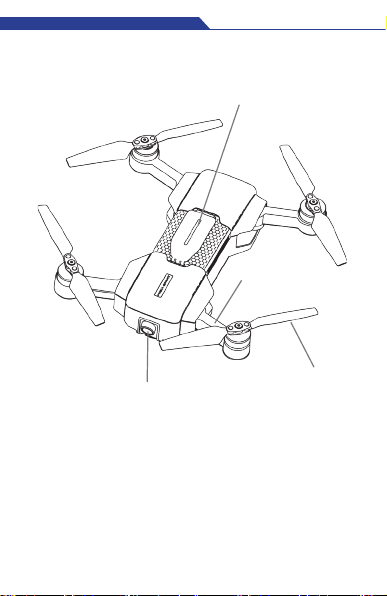
1. Camera
2. Arm
3. Propeller Holder(Detachable)
4. Propeller
Shenzhen HighGreat Innovation Technology Development Co., Ltd
Shenzhen HighGreat Innovation Technology Development Co., Ltd
>>5
Aircraft Diagram
1
4
3
2
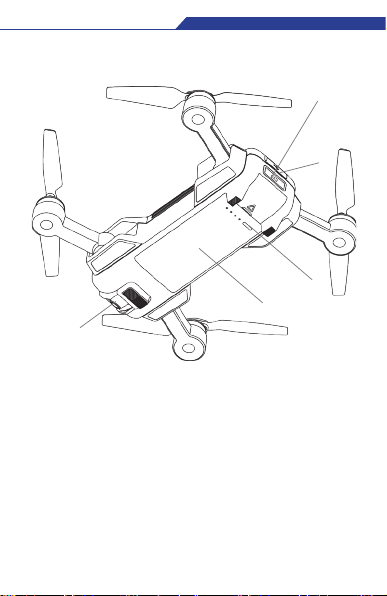
1. Camera
2. Arm
3. Propeller Holder(Detachable)
4. Propeller
5. VIO Positioning Camera
6. Battery
7. Power Level Indicators
8. Power Button, Indicator Light
9. Micro-USB Port
&Wi-Fi Reset Button
5
6
7
8
9

Shenzhen HighGreat Innovation Technology Development Co., Ltd
Shenzhen HighGreat Innovation Technology Development Co., Ltd
6<<
Aircraft
MARK principally consists of five systems: flight system, positioning,
communications, power supply and the camera system. This
section will explain the functions of each.
On/Off Switch and Power Indicator
The On/Off Switch has a built in Power Indicator.
Hold the On/Off Switch for 3 seconds. Wait until the Power
Indicator shows solid green, then remove your finger and MARK
will switch on. After a few seconds, MARK will make a noise, alerting
you that the ESC has turned on.
After connecting to the APP, the Power Indicator will flash green.
Hold the On/Off Switch for 3 seconds. Wait until the green light of
the Power Indicator goes out, then remove your finger and MARK
will switch off.
Drone Status Indicator
On the tail of the aircraft, there’s an RGB indicator that shows
the status of MARK. The Status Indicator’s colors and
corresponding meanings are as follows:
Solid light green------- Aircraft is initiating
Green light single flash ------- VIO visual positioning
Red&Green lights flash alternately-----
-------
-------
--------
-------
Aircraft is reporting an
error
Solid light Red Aircraft is working on entertainment
function
Blue light single flash VIO positioning not working
Solid light Blue Aircraft is working on Memory Cruise
flying
Solid light Purple Hardware inside damaged
Indice
Altri manuali High Great Quadricottero


