HJC SMART 10A Istruzioni per l’uso

PREMIUM MOTORCYCLE
ACTION CAMERA
FOR HJC HELMETS
APPLICATION MANUAL
ENGLISH

SMART HJC 10A 2
Contents
1. Precautions for use
Precautions for use - General 3
Precautions for use - Battery 4
Precautions for use - SD card 5
Precautions for use - GPS 6
Precautions for use - Waterproof 7
2. Product description
Product components 8
Components and descriptions 9
How to assemble - General 12
How to assemble - F70 13
How to assemble - i90 & RPHA 90,
RPHA 90S, RPHA 90S CARBON 15
How to assemble - Precautions (standard) 17
How to operate (Firmware upgrade) 18
3. Application / PC Viewer
Installing the SMART HJC 10A app 19
Connecting SMART HJC 10A to a smartphone 20
Before connecting SMART HJC 10A to the app 21
Application - Settings (Android) 22
Application - Settings (iOS) 23
After connecting SMART HJC 10A to the app 24
Application - Camera settings 25
Application - Live view 29
Application - Gallery 30
Application - SNS streaming 31
SMART HJC 10A PC Viewer 38
4. Others
Voice list 41
Sound effects 43
Points to check before requesting for warranty service and FAQ 44
Product specifications 46

SMART HJC 10A 3
Precautions for use - General
1. This device features home-use (class B) electromagnetic compatibility
and is suitable for use in any location, including homes.
2. Using third-party components with the authentic parts enclosed in the
product may lead to faults or accidents. Damages caused by such
components will invalidate the free warranty service, and the manufacturer
will not take any responsibility for the damages.
3. Do not arbitrarily dismantle, repair, or modify the product as it may lead
to electric shocks, product damages, or loss of recorded videos and data.
If any anomalies are found, please contact our customer center before
taking action.
4. After purchasing the product, ensure that it operates and records
videos properly.
5. Please maintain the camera lens’ condition by regularly cleaning it with a
soft cloth. Contamination of the lens with foreign objects may lead to degraded
image-recording quality.
6. The product utilizes a camera. Abrupt changes in brightness (e.g., when
passing through tunnels, when the backlight is strong, or if no light source is
available at night) may lead to degraded image-recording quality.
7. Please check recorded images regularly to ensure the product’s normal
operation and the SD card’s good condition. If any anomaly occurs, stop using
the product and contact our customer center.

3. Use this product outdoors only when riding a motorcycle.
Keep it indoors when not in use.
SMART HJC 10A 4
Precautions for use - General Precautions for use - Battery
1. Using the product while driving may lead to accidents; stop the vehicle
at a safe place before use.
2. For the stable use of the product, ensure that it is operated at the
following temperature.
- SMART HJC 10A operating temperature : -10℃ – 50℃
- Battery charging temperature : 0℃ – 45℃
1. The battery is a consumable and has a six-month warranty period.
2. Using a third-party battery may lead to explosions or fire, make sure to use
an authentic battery.
3. Plugging or unplugging the charging cable with wet hands may lead to fire
or electric shock accidents; make sure to do so with dry hands.

SMART HJC 10A 5
Precautions for use - SD Card
1. Please regularly maintain the SD card as it is consumable*, and its
service life will be shortened with continued recording. However, using the
card with regular formatting may extend its service life. Before formatting,
make sure to back up important image files. If the SD card is not
recognized, please replace (purchase) it with a new one.
(*consumable : The SD card has a six-month warranty provided by the
manufacturer.)
2. In replacing (purchasing) an SD card, ensure its authenticity
(class 10 or higher).
3. Before removing the SD card, ensure that the product is turned off.
Removal of SD card with the power on may lead to the loss of data or damages
to the product.
4. If the SD card needs to be stored in a separate place, ensure that it is not
exposed to moisture, dust, or high heat as these may lead to a deformed or
malfunctioning SD card.
5. Please back up and store important data in a separate storage medium
(HDD, CD, etc.) if it is needed to be stored for a long time.

SMART HJC 10A 6
Precautions for use - GPS
1. The GPS system is affected by weather, satellite conditions, and the
surrounding geography. Because the GPS functions through the
communicationof the product’sreceiving antenna and dedicated artificial
satellites, various weather conditions (cloudy/rainy/snowy weather, etc.) or
changes in the surrounding geography (around tall buildings, under land
bridges, in tunnels/underpasses/parkinglots, or around other
interferences) may make thereception unstable.
2. TheGPS signal reception does not affect video recording. When the GPS
signal is lost, only the location coordinates and the driving speed will not be
recorded.
3. GPS connection may be slow on the first use after purchase or a long
period of no use, taking 5 to 30 min at most to check the satellite location
andreceive GPS signals.
4. In the hot summer or cold winter, GPS reception may become unstable or
takea longer time.
* What is GPS?
GPS is astate-of-the-art satellite navigation system that measures accurate
time and distance through three or more dedicated satellites above the earth.
Moreover, the current location is calculated through triangulation. Through GPS
technology, the product records vehicle location and driving speed at the time of
video recording and provides additional situational information on the recorded
videos.In addition, it also hasa function that enables theviewingof the driving
route on an Internet map service interface with the stored locational information.

SMART HJC 10A 7
Precautions for use - Waterproof
1. Precautions for mounting the rubber cap to the body
As shown in the figure, insert the protruding part of the rubber cap tightly into the body’s hole,
and press down the rubber cap to ensure that there is no gap between the cap and body.
2. Precautions for opening/closing the battery-holder cover
If the battery-holder cover is not tightly closed, rainwater may seep into it. Therefore, after closing,
check if the cover isclosed tomatch the point indicated on the corresponding part.
3. Precautions for mounting/demounting the battery holder to/from the body
The battery holder can be mounted/demounted to/from the body. Mount/demount the battery
holder in a placefree from rainwater. If the vehicle was exposed to rain, mount/demount the battery holder after
the rainwater is fully dried.

Micro SD Card
Removal Tool
SMART HJC 10A 8
Product components
The components of the product are subject to changes without notice to improve product performance.
Besides the basic components, additional accessories are sold separately.
Camera Body Battery holder Battery
USB cable for
charging
Micro SD card
(32GB)
Charging cradle Quick start guide
카메라부
이미지센서
카메라렌즈
*
별매품
본체부
SD카드소켓/USB소켓
멀티버튼
LED
램프
방전표시LED
캠홀더
*
별매품
쉴드
배터리장착부
배터리
충전표시LED

SMART HJC 10A 9
Components and descriptions
1. SMART HJC 10A components

SMART HJC 10A 10
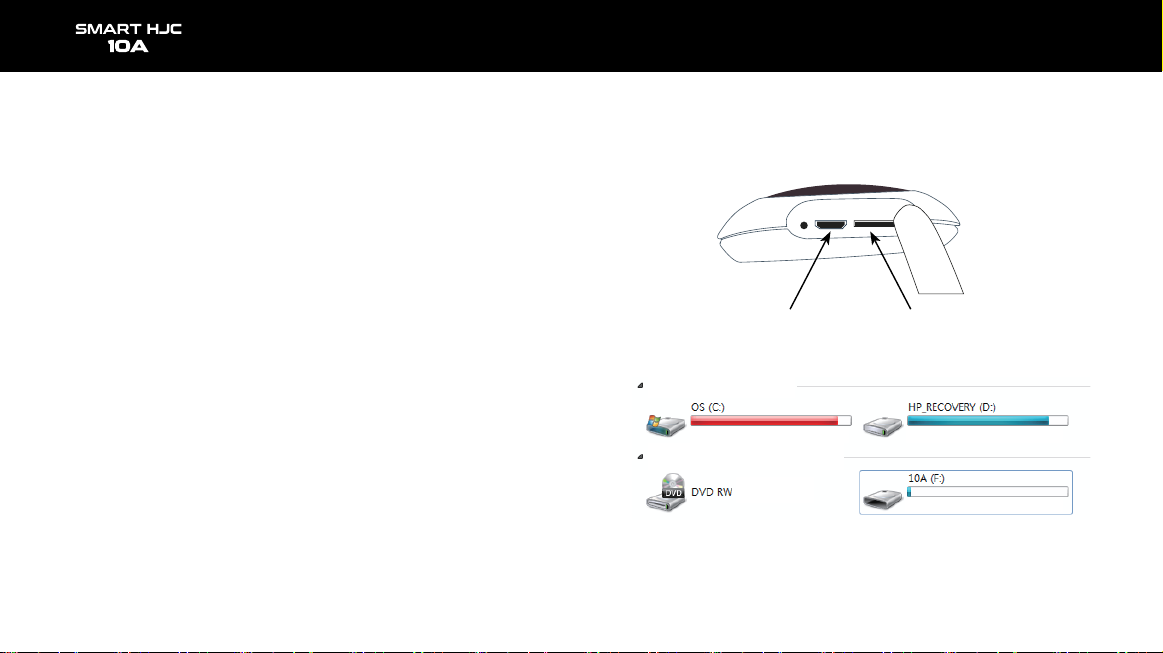
2. Micro SD card slot and micro USB port
- Micro SD card slot : Insert the included (or purchased) SD card into the slot.
Please use an SD card that supports SD High Capacity (SDHC), Class 10, or higher.
- Micro USB port : For battery charging
· If a PC USB port is connected to the product’s USB port through a USB cable,
the SD card of the product will be recognized as external storage.
Component names and description
Micro USB port Micro SD card slot
Hard disk drive (2)
Portable media device (2)
Indice