
Honeywell VENTI Series Manuale utente
Honeywell
VENTI Series
HICC-0100P/HICC-0100N Box Camera
User Guide

Revisions
Issue Date Revisions
A 11/03 New document for HICC-0100 release.
Generally describes the functionality in the
firmware of the HICC-0100 camera.

Honeywell
i
Contents
1About This Document ..................................................................................................1
Overview of Contents ..........................................................................................1
2Product Overview ........................................................................................................2
Features ..............................................................................................................2
Camera Parts and Definitions..............................................................................2
Camera Overview..........................................................................................2
Camera Parts and Definitions........................................................................3
3Installation and Connections........................................................................................5
Before You Begin ................................................................................................5
Unpack Everything ..............................................................................................5
Equipment Required............................................................................................5
Camera Installation .............................................................................................5
Checking Unpacked Camera.........................................................................6
Mounting........................................................................................................6
Network Camera Diagram .............................................................................6
Hardware and Software Requirements .........................................................6
Connecting the Camera to a Personal Computer................................................7
Setting IP.......................................................................................................7
Connecting the Camera to a Personal Computer..........................................7
Using “IP Finder” to Search Camera’s IP Address ..............................................9
4Overview of Navigation and Controls.........................................................................10
Live View...........................................................................................................10
Image Parameters.............................................................................................10
Basic ...........................................................................................................11
Compression ...............................................................................................13
Alarm...........................................................................................................17
OSD ............................................................................................................19
FTP Recording ............................................................................................19
SD Recording ..............................................................................................21
E-mail Recording.........................................................................................24
Audio ...........................................................................................................26
Network Settings ...............................................................................................27
Basic ...........................................................................................................27
Admin Function .................................................................................................31
Administrator ...............................................................................................31
User List ......................................................................................................31
Date/Time....................................................................................................32
Event Log ..........................................................................................................34
Information ........................................................................................................35
5Troubleshooting .........................................................................................................36
Technical Support .............................................................................................36
Problem: Lens out of Optical Focus ..................................................................36
6Specifications ............................................................................................................37
7Glossary ....................................................................................................................40

Honeywell
ii
Honeywell
i
Cautions and Warnings
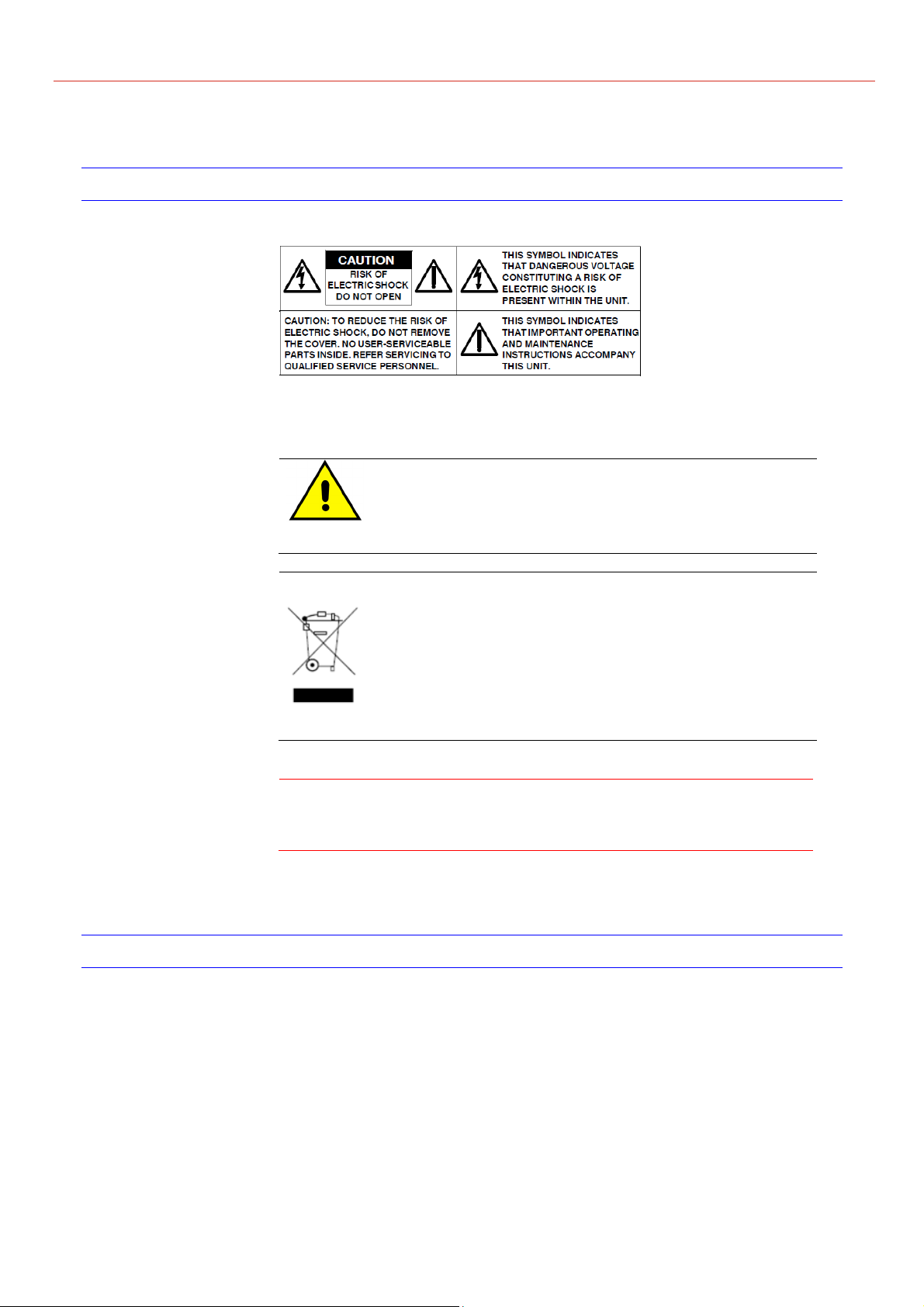
Installation and servicing should be performed only by qualified and
experienced technicians to conform to all local codes and to maintain your
warranty.
12V DC/24V AC models require the use of CSA
Certified/UL Listed Class 2 power adapters to ensure
compliance with electrical safety standards. Power
over Ethernet (PoE) should meet the IEEE802.3af PoE
standards.
WEEE (Waste Electrical and Electronic Equipment).
Correct disposal of this product (applicable in the
European Union and other European countries with
separate collection systems). This product should be
disposed of, at the end of its useful life, as per applicable
local laws, regulations, and procedures.
Caution When powering the camera from 24V AC, a UPS source
should be considered to ensure satisfactory performance.
FCC Compliance Statement
Information to the user: This equipment has been tested and found to
comply with the limits for a Class B digital device, Pursuant to Part 15 of the
FCC Rules; these limits are designed to provide reasonable protection against
harmful interference in a residential installation. This equipment generates,
uses, and can radiate radio frequency energy and, if not installed and used in
accordance with the instruction manual, may cause harmful interference to
radio communications. However, there is no guarantee that interference will
not occur in a particular installation.

Honeywell
ii
If this equipment does cause harmful interference to radio or television
reception, which can be determined by turning the equipment off and on, the
user is encouraged to try to correct the interference. For example, try
reorienting or relocating the receiving antenna, increasing the separation
between the equipment and receiver, or connecting the equipment to an outlet
on a different circuit.
Caution
Changes or modifications not expressly approved by the party
responsible for compliance could void the user’s authority to
operate the equipment.
This Class B digital apparatus complies with Canadian ICES-003.
Manufacturer’s Declaration of Conformance
Europe
The manufacturer declares that the equipment supplied with this guide is
compliant with the essential protection requirements of EMC directive
2004/108/EC and General Product Safety Directive GPSD 2001/95/EC,
conforming to requirements of standards EN 55022 for emissions, EN
50130-4 for immunity.
Warranty and Service
Subject to the terms and conditions listed on the Product warranty, during the
warranty period Honeywell will repair or replace, at its sole option, free of
charge, any defective products returned prepared.
In the event you have a problem with any Honeywell product, please cal
Customer Service at 1.800.796.CCTV for assistance or to request a Return
Merchandise Authorization (RMA) number.
Be sure to have the model number, serial number, and the nature of the
problem available for the technical service representative.
Prior authorization must be obtained for all returns, exchanges, or credits.
Items shipped to Honeywell without a clearly identified Return Merchandise
Authorization (RMA)number may be refused.

Honeywell
1
1 About This Document
Thank you for purchasing HICC-0100P/N Box Camera.
This user guide is designed to be a reference tool for the installation and
operation your system including the camera’s features, functions and detailed
explanation of the menu tree.
Overview of Contents
This document contains the following chapters:
Chapter 2, Product Overview, introduces the main functions and system
requirements of the camera.
Chapter 3, Installation and Connections, provides detailed instructions on
installing the camera and connecting wires.
Chapter 4, Overview of Navigation and Controls, introduces how to
navigate in the main menu window and operate the controls.
Appendix A, Troubleshooting, lists common problems encountered when
setting up the network camera.
Appendix B, Specifications, provides specifications for the HICC-0100P/N
Box Camera.
Appendix C, Glossary, explains terms and initializations used in this guide.

Product Overview
2
2 Product Overview
Honeywell HICC-0100P/N box camera provide high quality image over a
network connection.
Table 2-1 Network Camera Model Numbers
Model Number Description
HICC-0100P CMOS Network Box, D1, H.264, PAL BNC output
HICC-0100N CMOS Network Box, D1, H.264, NTSC BNC output
Features
This chapter introduces the features and specifications of HICC-0100P/N Box
Camera.
1/4" color CMOS sensor
H.264, MPEG-4 and MJPEG compression
D1, CIF, QCIF, VGA, QVGA resolution
Dual digital video streams simultaneously, independently configurable
Supports both Dynamic and Static IP address assignment
Multiple levels of password protected remote access prevents unauthorized
users from altering system settings
Includes advanced IP Finder software to make system setup easy
Web server for remote setup of camera video and network parameters
Motion detection
Supports input and output alarm contacts
Local video out with BNC interface
Two-way audio
Supports video/audio multi-casting
Local storage in SD card
On-line firmware upgrade
DC12V, AC24V and IEEE 802.3af POE choice of power inputs
Camera Parts and Definitions
Camera Overview
Honeywell
3
Camera Parts and Definitions
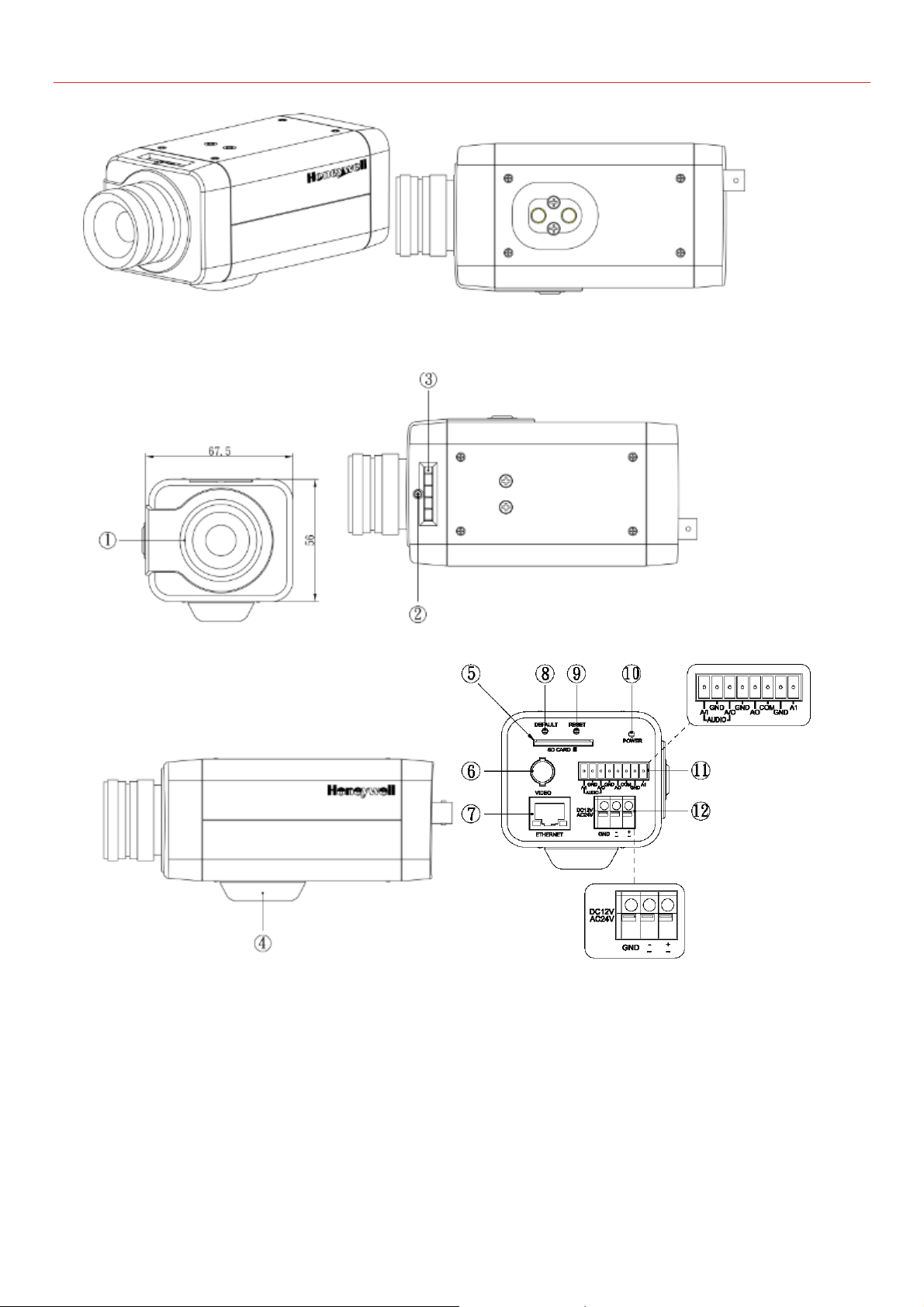
1. CS mount: connect the lens with the camera
2. Screw
3. Back focus Adjustment
4. Base: connect the camera with the tripod
5. SD card slot: insert a SD card into this slot for recording and storage
6. Video: video output port

Product Overview
4
7. RJ45 Ethernet Connector/ PoE: insert the RJ45 cable for network
connection. It also supports PoE (Power over Ethernet).
8. Default: reset all of the camera parameters to factory default.
9. Reset Button: restart the system.
10. Power Indicator: Red light indicates power connection.
11. I/O Connector: Input/ Output Connector
12. Power Terminal: DC12V/AC24V, red port: power +/white port: power –/
black port: GND. Make sure to connect the power connector to correct ports (+
and –) when the power supply is DC12V.
Questo manuale è adatto per i seguenti modelli
2
Indice
Altri manuali Honeywell Macchina fotografica digitale

Honeywell
Honeywell Pentax Spotmatic Manuale utente

Honeywell
Honeywell Spotmatic Iia Manuale utente

Honeywell
Honeywell HPXD2 Manuale utente

Honeywell
Honeywell HD-SDC-3300P Manuale utente

Honeywell
Honeywell NEXH Series Guida del prodotto

Honeywell
Honeywell HCC-745NTW/PTW Manuale utente

Honeywell
Honeywell PERFORMANCE LITE 2MP SD Manuale utente

Honeywell
Honeywell ExitView Istruzioni operative e di manutenzione

Honeywell
Honeywell Color Camera Manuale utente

Honeywell
Honeywell 2450Cm Series Manuale utente


