Hopeland HF340 Manuale utente

HF340/380
Sharp 340/380
User Manual

Welcome to become user of Hopeland RFID products.
Thank you for choosing the multi-port reader Sharp 340/380,
hope to bring convenience for your work

CONTENTS
1. TECHNICAL SPECIFICATIONS ..................................................................................................................5
1.1 FEATURES.....................................................................................................................................................5
1.2 FCC/CE RULES............................................................................................................................................5
1.2.1 Part 15 FCC Rules...............................................................................................................................5
1.2.2 CE Rules..............................................................................................................................................6
1.3 MAIN FUNCTIONS AND TECHNICAL PERFORMANCE..........................................................................................7
1.3.1 Product Features..................................................................................................................................7
1.3.2 Performance Parameters.....................................................................................................................7
1.3.3 Environmental Parameters ..................................................................................................................8
2. SKETCH MAP..................................................................................................................................................9
2.1 PHYSICAL CONSTRUCTION .............................................................................................................................9
2.2 NET WEIGHT.................................................................................................................................................9
2.3 INTERFACE DIAGRAM.....................................................................................................................................9
2.3.1 Power, Communication and I/O Interfaces ..........................................................................................9
2.3.2 I/O Interface Definition .......................................................................................................................10
2.3.3 Coaxial RF Feeder Cable (optional) ..................................................................................................13
2.3.4 Network Connection Diagram............................................................................................................13
3. INSTALLATION INSTRUCTIONS..................................................................................................................14
3.1 PRECAUTIONS.............................................................................................................................................14
3.2 INSTALLATION CONDITIONS ..........................................................................................................................15
3.3 DEVICE CONNECTION ..................................................................................................................................15
3.3.1 Connect Power Adapter Or PoE Switch ............................................................................................15
a. Connect Power Adapter ......................................................................................................................15
b. Connect PoE Switch............................................................................................................................15
3.3.2 Connect External Antenna and RF Cable..........................................................................................16
3.3.3 Connect to PC....................................................................................................................................16
3.4 INSTALL READER .........................................................................................................................................17
3.5ACCEPTANCE ..............................................................................................................................................17
3.5.1Structural Acceptance.........................................................................................................................17
3.5.2 Performance Acceptance...................................................................................................................17
4. WEB PAGE OPERATION INSTRUCTIONS..................................................................................................18

4.1 SYSTEM LOGIN............................................................................................................................................18
4.1.1 Login ..................................................................................................................................................18

4.1.2 System Navigation.............................................................................................................................18
4.2 PARAMETER CONFIGURATION.......................................................................................................................19
4.2.1 Antenna Configuration .......................................................................................................................19
4.2.2 RFID Configuration ............................................................................................................................20
4.2.3 Network Configuration .......................................................................................................................21
4.2.4 Output Configuration..........................................................................................................................22
4.2.5 GPI Configuration...............................................................................................................................23
4.2.6 Web Parameter Configuration Example ............................................................................................24
4.3 SYSTEM MANAGEMENT................................................................................................................................27
4.3.1 System Management.........................................................................................................................27
4.3.1.1 Clock Sync ..................................................................................................................................28
4.3.1.2 Application Upgrade....................................................................................................................28
4.3.1.3 Baseband Upgrade .....................................................................................................................30
4.3.2 Change Password..............................................................................................................................32
5. COMMON FAILURES....................................................................................................................................33
5.1 DAILY MAINTENANCE ...................................................................................................................................33
5.2 COMMON FAILURE ANALYSIS AND SOLUTION.................................................................................................33
6. PACKAGING ACCESSORIES AND STORAGE ...........................................................................................35
6.1 PACKAGE....................................................................................................................................................35
6.2ACCESSORIES.............................................................................................................................................35
6.3 STORAGE REQUIREMENTS...........................................................................................................................36
7. AFTER-SALE SERVICE ................................................................................................................................37

Sharp 340/380 user manual
1.Technical Specifications
1.1 Features
Sharp HF340/380 is a high performance four-port/eight-port fixed UHF RFID reader, it
supports ISO18000-6C/6B protocols. The work frequency includes China standard dual
frequency 920MHz~ 925MHz and 840MHz - 845MHz, FCC 902MHz ~ 928MHz and ETSI
865MHz ~ 868MHz.
Output power from 0 ~ 33dBm optional, with long identification distance, fast reading speed,
high accurate rate, strong anti-interference ability, good protection performance and easy
installation.
1.2 FCC/CE Rules
1.2.1 Part 15 FCC Rules
This device complies with Part 15 of the FCC Rules. Operation is subject to the following
three conditions:
This device may not cause harmful interference
This device must accept any interference received, including interference that may cause
undesired operation.
The distance between user and products should be no less than 20cm
NOTE: This equipment has been tested and found to comply with the limits for a Class B
digital device, pursuant to Part 15 of the FCC Rules. These limits are designed to provide
reasonable protection against harmful interference in a residential installation. This
equipment generates, uses and can radiate radio frequency energy and, if not installed and
used in accordance with the instructions, may cause harmful interference to radio
communications. However, there is no guarantee that interference will not occur in a particular
installation. If this equipment does cause harmful interference to radio or television reception,
which can be determined by turning the equipment off and on, the user is encouraged to try
to correct the interference by one or more of the following measures:
-- Reorient or relocate the receiving antenna.
-- Increase the separation between the equipment and receiver.

Sharp 340/380 user manual
-- Connect the equipment into an outlet on a circuit different from that to which the receiver is
connected.
-- Consult the dealer or an experienced radio/TV technician for help.
Note: The manufacturer is not responsible for any radio or TV interference caused by
unauthorized modifications to this equipment. such modifications could void the user’s
authority to operate this equipment
Changes or modifications not expressly approved by the party responsible for compliance
could void the user's authority to operate the equipment.
1.2.2 CE Rules
Manufacturer: Shenzhen Hopeland Technologies CO., Ltd.
Address: 17/F, Block A, Clou Bldg, Baoshen Road, Hitech Industrial Park North, Nanshan
District, 518007, Shenzhen, China
Hereby, Shenzhen Hopeland Technologies CO., Ltd. declares that this device is in
compliance with the essential requirements and other relevant provisions of Directive
2014/53/EU
Importers: XXXXXXX
Address: XXXXXXX
A copy of the declaration of conformity can be obtained with this user manual; this product is
not restricted in the EU.
Hardware Version: V2
Software Version: V0.1.12
The wireless operation frequency
RFID: 865MHz-868MHz, Max EIRP Power 30.14dBm
Safety warning and Attentions
If use adapter, adapter must be comply 2014/30/EU Directive
Adapter Caution: Adapter shall be installed near the equipment and shall be easily accessible.
Do not store or use your product in temperatures higher than 70ºC RF Exposure Statement
The distance between user and products should be no less than 20cm

Sharp 340/380 user manual
1.3 Main Functions And Technical Performance
1.3.1 Product Features
Support protocol: ISO18000-6B/C EPC C1G2
Built-in Linux OS
Rich communication interfaces:RJ-45, RS232, RS-485, USB, WiFi, Bluetooth, Wiegand
interface
Support tag data filtering
RSSI support: the strength of the signal can be sensed.
Adjustable RF output power
Working mode: fixed frequency/frequency hopping optional
Support for tag caching, breakpoint continuation
Support antenna detection function
Support online upgrade
I/O interface: 4 optocoupler inputs, 4 relay outputs (drive capacity: DC 30V/ 2A, AC
125V/0.3A)
Support web management Platform
1.3.2 Performance Parameters
Working frequency: GB,920MHz~925MHz、GB,840MHz~845MHz、FCC,902MHz~
928MHz、ETSI,865MHz~868MHz
RF output power (port):35dBm±1dB(MAX)
Output power adjustment: 1 dB step
Reading distance: 0m~20m (related to factors such as transmitting power, antenna type,
tag type and application environment)
Channel occupied bandwidth: <200KHz
RS232 interface communication rate: 115200bps(default),19200 bps,9600bps
RS485 interface communication rate: 115200bps(default),19200 bps,9600bps

Sharp 340/380 user manual
Support weigand format 26,34,66
AC-DC power adapter:AC input 100V~240V,50Hz~60Hz DC output 24V/2.5A
POE: IEEE802.3af/at/bt standard (optional)
High protection level: IP53
1.3.3 Environmental Parameters
Working temperature: -20℃~+70℃
Working humidity: 5%~90%RH (+25℃)

Sharp 340/380 user manual
2. Sketch map
2.1 Physical construction
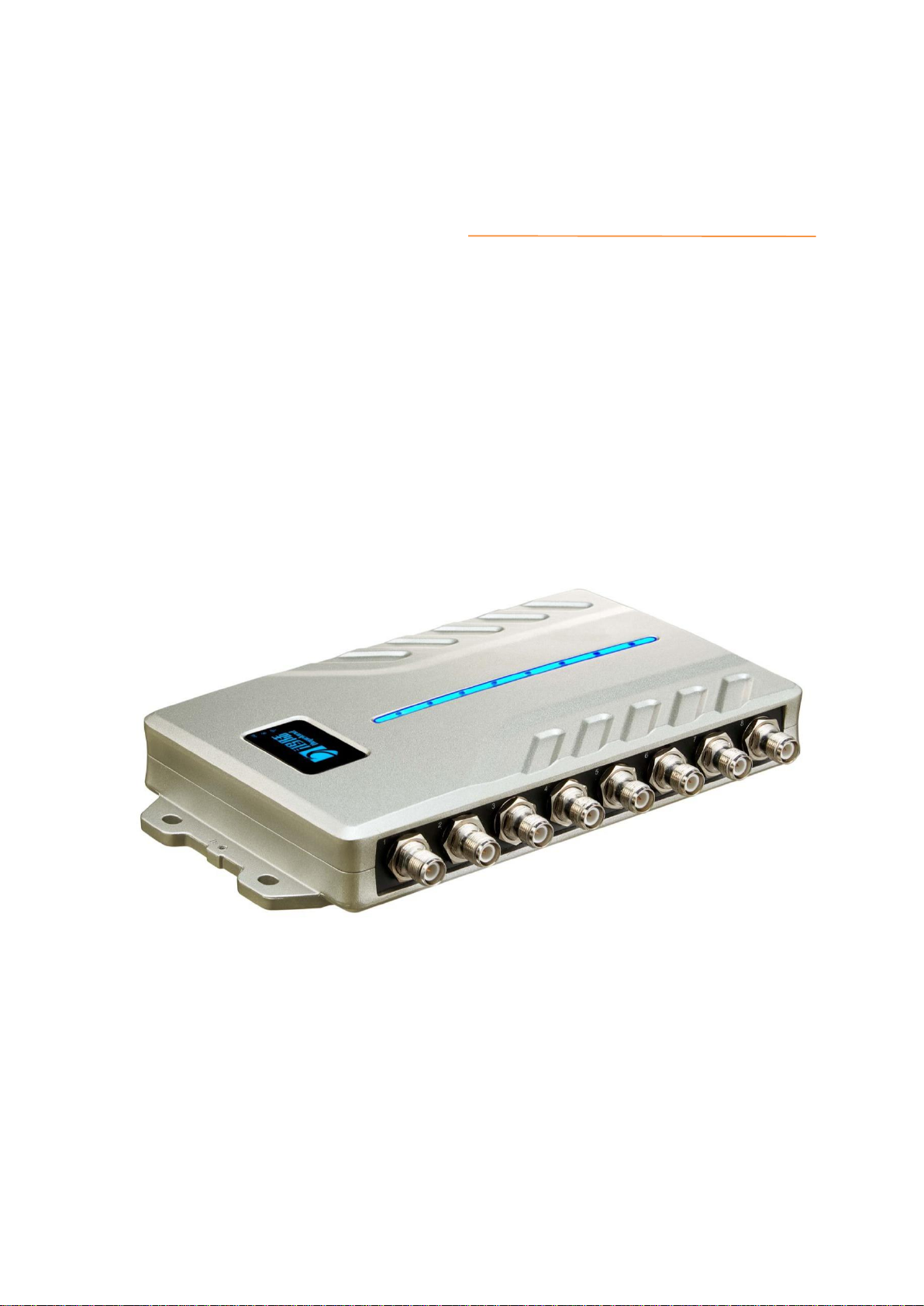
Figure 2-1 Structure diagram of Sharp 340/380 reader
Sharp 340/380 Reader Volume Parameter is:
241mm×132mm×36mm
2.2 Net Weight
HF340: 0.9kg
HF380: 1kg
2.3 Interface Diagram
2.3.1 Power, Communication and I/O Interfaces

Sharp 340/380 user manual
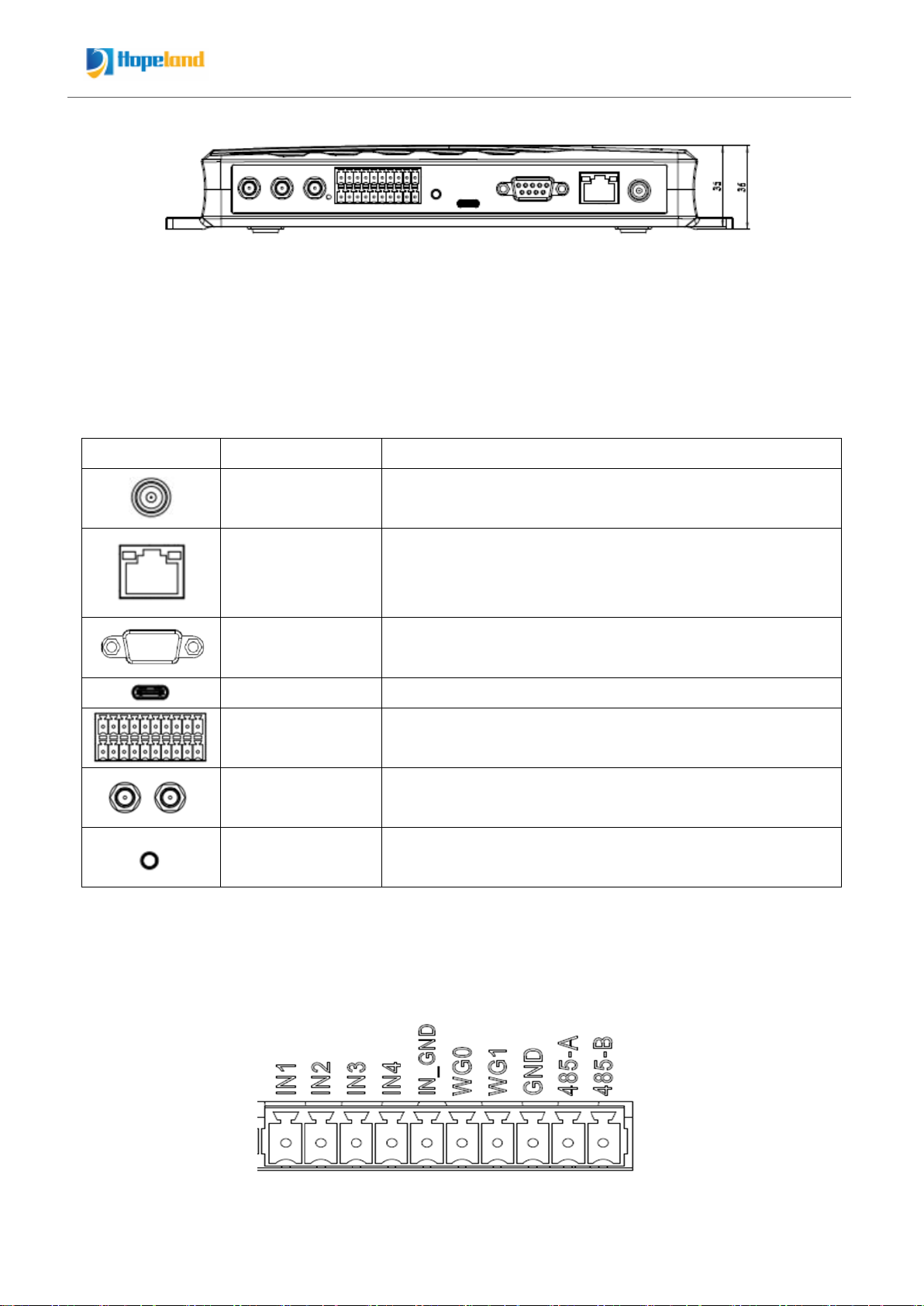
Figure 2-2 Schematic diagram of reader power, communication and I/O interfaces
Picture 2-2 is a schematic diagram of the reader and the power supply, communication and
I/O interface panel. For details, see Table 2-1.
Table 2-1 Reader power supply, communication and I/O interfaces
Interface ID
Interface Name
Detailed Description
Power supply
interface
DC, 10~30V, power capacity not less than 30W.
Ethernet interface
10/100M Ethernet interface, reader control and
communication interface.
POE:IEEE802.3af/at/bt standard (optional)
RS232
Serial port, reader control and communication interface.
USB interface
The USB TYPE-C interface can be connected to a computer
I/O interface
See 2.3.2 for detailed definition
Antenna (optional)
The left first one is WIFI, the second one is Bluetooth
antenna
Reset button
Long press for 10 seconds to restore factory settings
2.3.2 I/O Interface Definition
Upper Row:
Questo manuale è adatto per i seguenti modelli
3
Indice
Altri manuali Hopeland Lettore di schede