
Horstmann ChannelPlus H27ZXL Series 2 Istruzioni operative
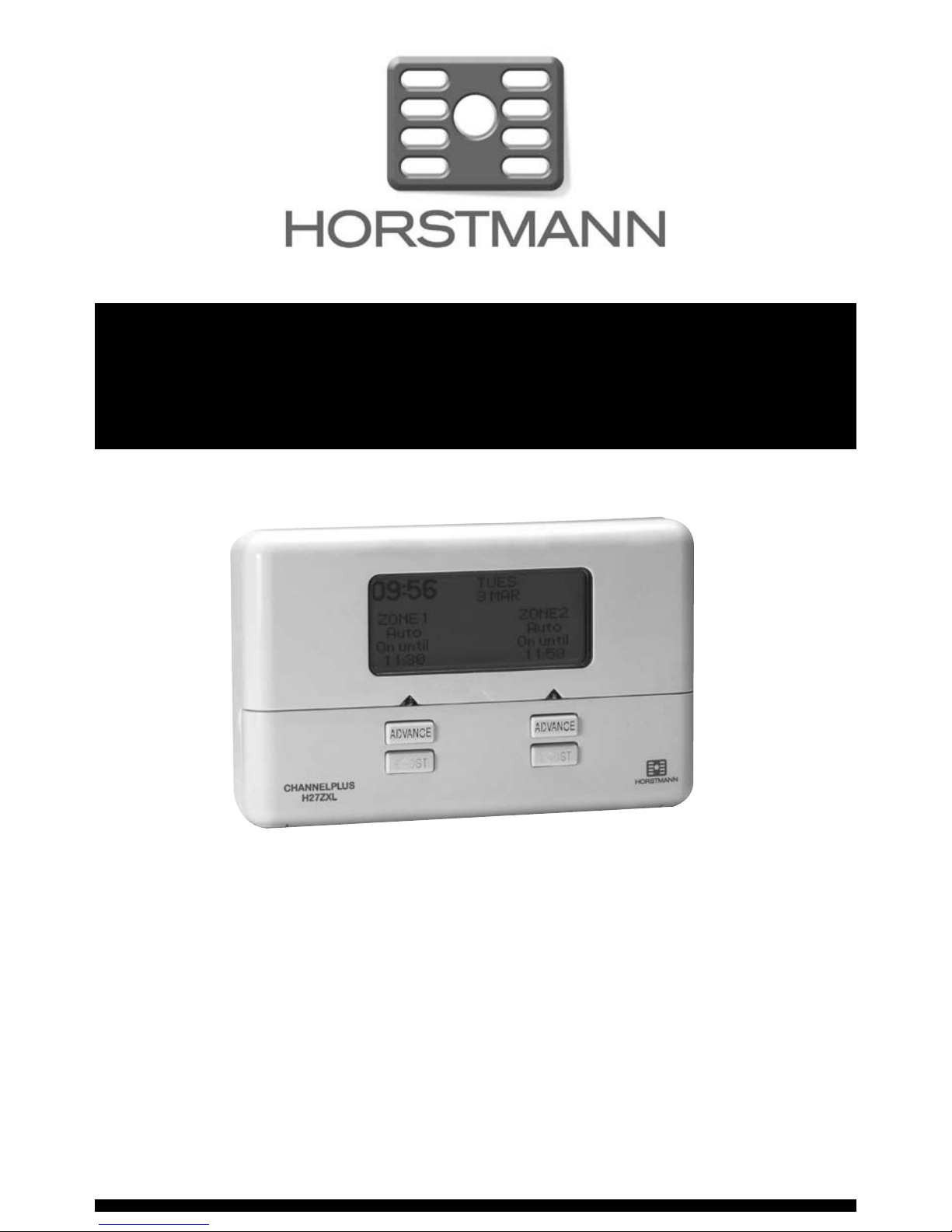
Two Zone Central Heating Programmer
The ChannelPlus family of electronic programmers offer a range of advanced features
coupled with simplied ‘menu driven’ programming all designed to help save energy.
The Horstmann ChannelPlus H27ZXL series 2 is designed to give independent time control
over two separate zones on a 7 day weekly programme.
Each zone offers up to 3 programmed On/Off operations per day
for each day of the week.
For day to day operation each zone has a manual 1 or 2 hour boost button
as well as an advance button to bring forward the next programmed operation.
The back lit display, automatic clock and menu driven programming are all features
designed to make the operation of the ChannelPlus H27ZXL as simple as possible to use.
All series 2 ChannelPlus programmers are direct replacements for earlier ChannelPlus models.
ChannelPlus H27ZXL Series 2
User Operating Instructions
1
2
The ChannelPlus H27ZXL Series 2 Programmer
The simple instructions contained in this user guide are designed to help with the
programming and operation of the unit. Most of the following instructions require the front
ap to be lowered. Please replace the ap when normal operation is required.
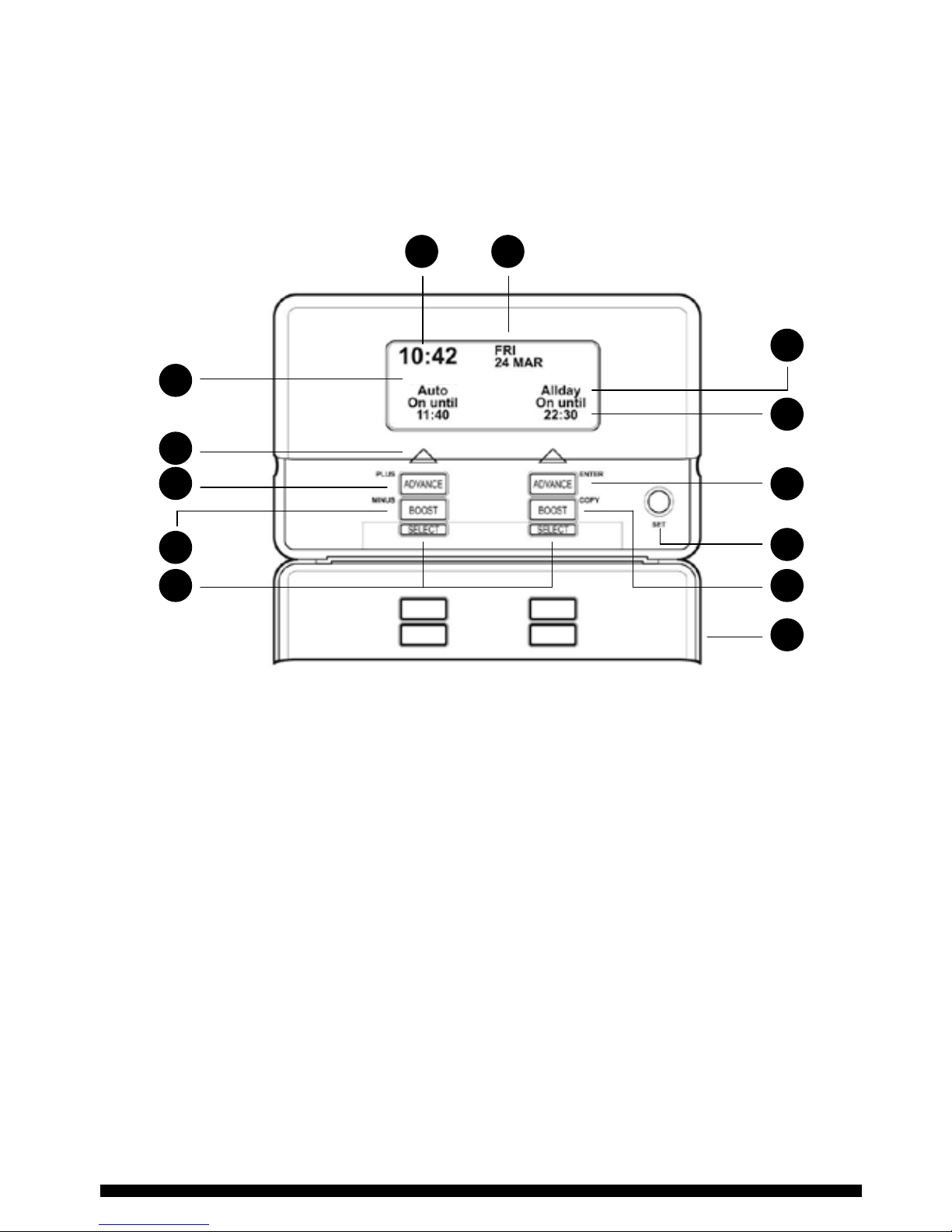
PRODUCT OVERVIEW - DETAIL SHOWN WITH THE FLAP LOWERED
1 Current time of day
2 Day of week and date
3 Channel Heading
4 Current Channel programme
5 Next On/Off time
6 Channel ON indicator
7 ADVANCE and ENTER button ILLUMINATED WHEN ACTIVE
8 ADVANCE and PLUS button ILLUMINATED WHEN ACTIVE
9 BOOST and COPY button ILLUMINATED WHEN ACTIVE
10 BOOST and MINUS button ILLUMINATED WHEN ACTIVE
11 Programme Select buttons (Coloured Blue)
12 SET button (Coloured Green)
13 Front Flap (Lowered)
1
3
6
8
10
11
4
5
7
12
9
13
2
Zone 1 Zone 2
Display Information
The ChannelPlus H27ZXL Series 2
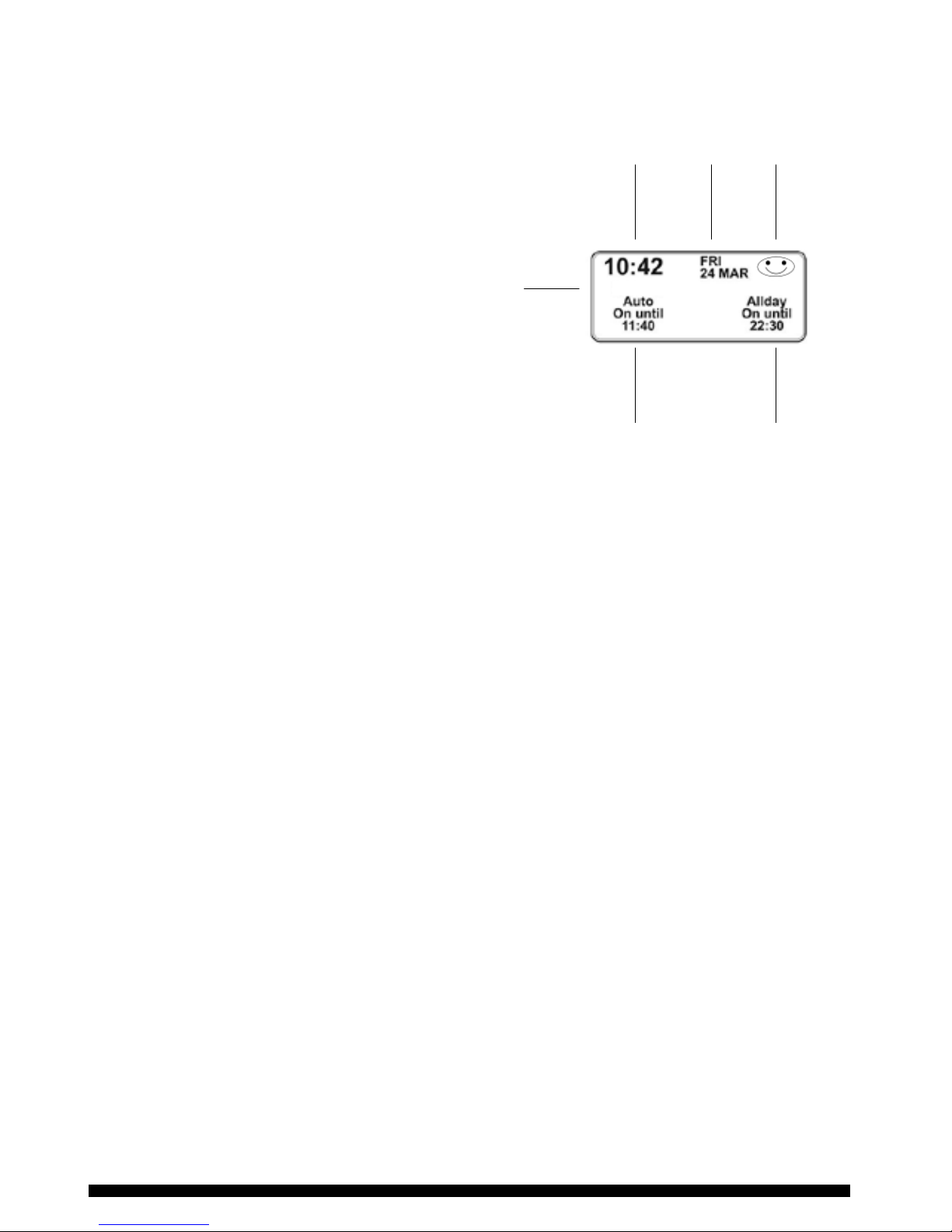
programmer has a fully graphical, back-
lit display. In the normal run mode the
display is divided into 2 sections, each
section represents a controlled channel.
The information displayed will change
depending upon the settings made and
which mode you are in. During different
programming modes and/or setting
screens the current time, day/date,
holiday indicator will only appear when
necessary, this is to reduce confusion
during the programming process. This is
explained further in later sections of this
guide.
ACTIVATING THE BACK–LIT DISPLAY
The display will illuminate for
approximately 1 minute whenever a
button is pressed.
To illuminate the display for viewing
purposes only press the green menu
button under the front ap twice.
SETTING AND ADJUSTING
When setting or adjusting, the programmer will automatically return to the running mode
if no buttons are pressed for approximately 1 minute.
If the setting or adjusting has not been nished, please start the procedure again.
TIME OF DAY
The ChannelPlus H27ZXL incorporates a factory set clock and calendar which means that no
adjustments should be necessary to the time of day and BST/GMT time changes take place
automatically.
3
Time
Day
Date
Channel
header
Holiday
function
active
Zone 1
status
Zone 2
status
Zone 1 Zone 2

4
Manual Overrides
BOOST FUNCTION - 1 OR 2 HOUR TEMPORARY OVERRIDE
The boost facility will allow the user to either activate a channel which is currently ‘OFF’
for 1 or 2 hours, or to extend a current ‘ON’ period by 1 or 2 hours. To indicate the boost
being activated the ‘BOOST’ button under the selected channel will stay illuminated for the
duration of the boost/extension period. The display will also indicate the extension to the
time visually on the screen.
ADVANCE FUNCTION - BRINGS FORWARD THE NEXT ON OR OFF OPERATION
The advance facility will allow the user to either bring a channel ‘ON’ which is currently
‘OFF’ or switch a channel ’OFF’ which is currently ‘ON’. To indicate the advance feature
being activated the ‘ADVANCE’ button under the selected channel will stay illuminated
until the next programme switching time, the user display will change to also indicate the
status of the channel and the next switching time.
Press the BOOST
button once for a
1 hour Boost
Press ADVANCE
button once to
move to the next
ON/OFF time
Press the BOOST
button twice for a
2 hour Boost
To cancel the advance
press the ADVANCE button
again. This will return
the unit to its normal
programme
Press BOOST button
a third time to
cancel the period
and return to the
normal programme

5
Programme Override Facilities
With the ChannelPlus H27ZXL Series 2 programmer operating in the normal running mode
it is possible to alter the functionality of the programme on each individual channel by
means of the blue ‘select’ buttons under the front ap.
The options include;
AUTO - Programmer follows all programmed ‘ON’ and ‘OFF’ times.
ALL DAY - Channel operates from 1st ‘ON’ time until 3rd ’OFF’, ignoring all switching
times in between.
ON - Channel will be constantly ‘ON’.
OFF - Channel will be constantly ‘OFF’, there is the ability to turn off heating
during summer without altering the programme times. 1 or 2 hour boost
still available.
All of the settings above will be permanent, i.e. unaffected by programme times, until
alteration by the user.
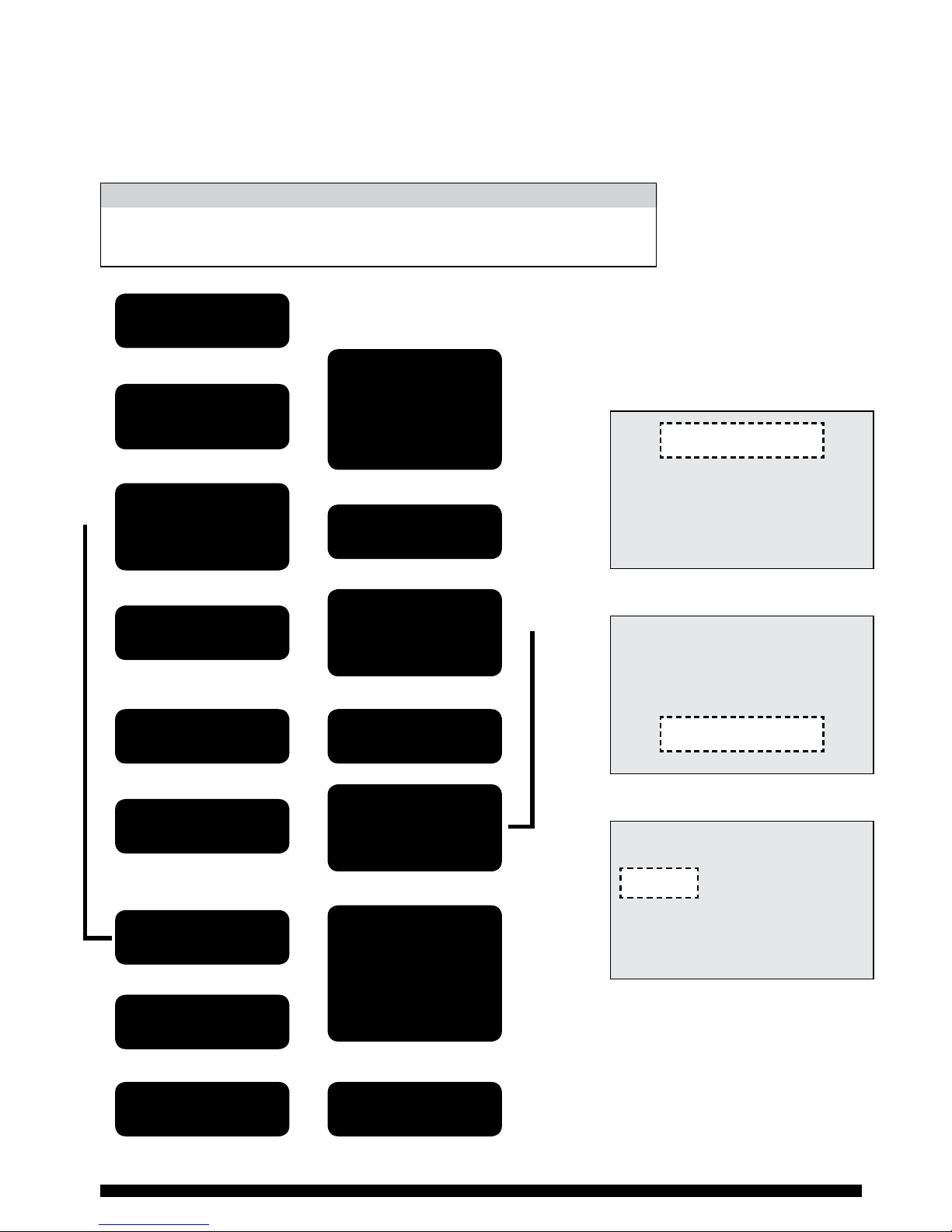
The diagram below illustrates how to alter the setting, it assumes that the channel is in the
AUTO mode to begin with. As both channels are totally independent it is possible to have
them set differently if necessary.
Press SELECT
once.
Programme
goes from
AUTO to
ALL DAY
Channel
will operate
from first ON
until last OFF
period
Press SELECT
again.
Programme
goes from
ALL DAY to
ON
Channel
will be
continuously
ON
Press SELECT
again.
Programme
goes from
ON to OFF
Channel
will be
continuously
OFF
Press SELECT
again.
Programme
goes from
OFF to AUTO
Programme
will return
to normal
ON and OFF
times
6
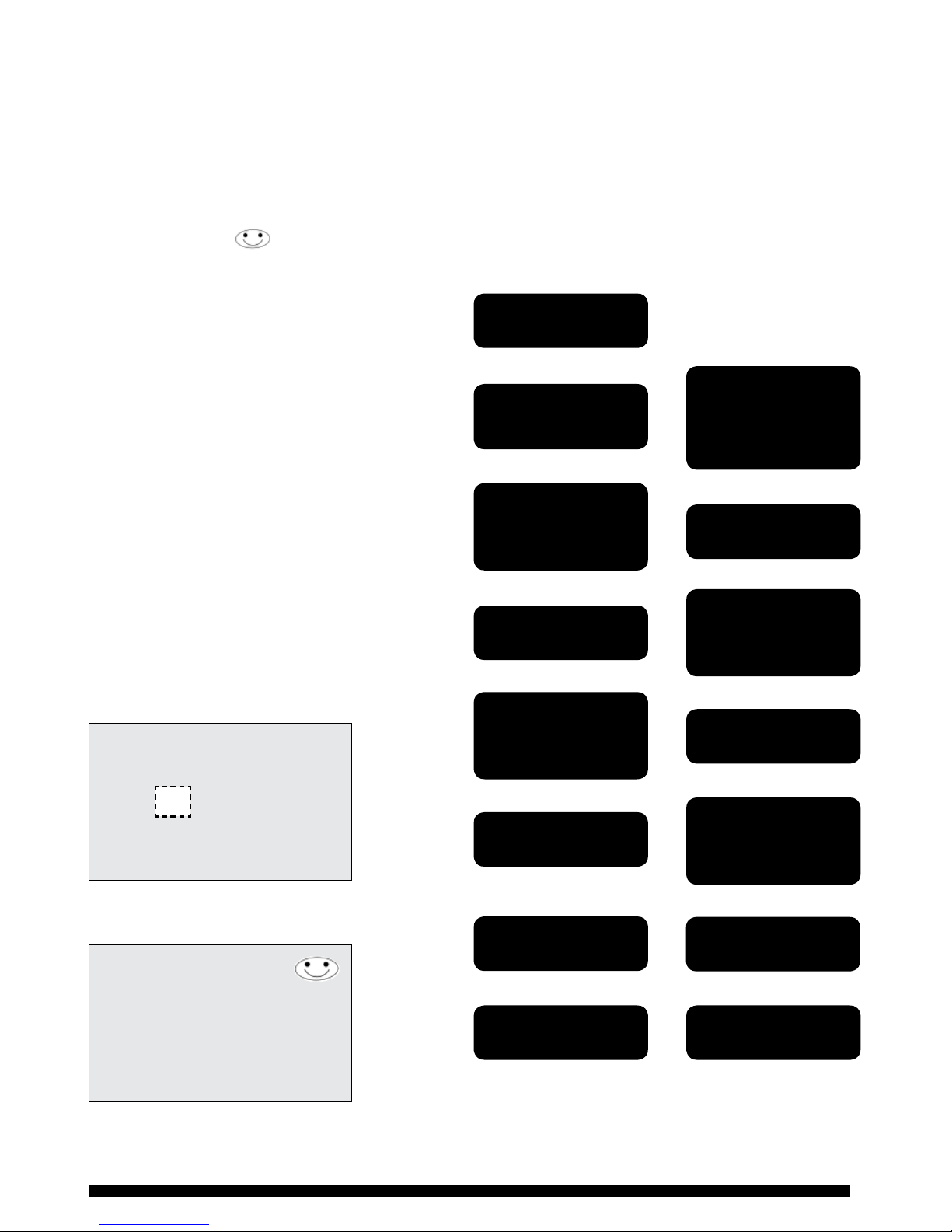
Setting the Programme Times
The programme times have been preset as shown in the chart below.
If any changes are required to the programme times please
complete the operation as described in the owchart left.
1st ON 1st OFF 2nd ON 2nd OFF 3rd ON 3rd OFF
Mon - Fri 6.30AM 8.30AM 12.00PM 12.00PM 4.30PM 10.30PM
Sat/Sun 7.30AM 10.30AM 12.00PM 12.00PM 5.00PM 11.00PM
DEFAULT TIME SETTINGS - AM/PM
ZONE 1
ZONE 2
SET HOLIDAY MODE
SET DEFAULTS
ZONE 1 TIMES
FOR
ZONE 1
WEDNESDAYS
Press the green
‘SET’ button
Use the ‘+’ and ‘-’
buttons to select
required day
Repeat process for
the 2nd and 3rd
time settings
Use the ‘+’ and ‘-’
buttons to adjust
required ON time
Use the ‘+’ and ‘-‘
buttons to select
the Channel to be
adjusted
If you require this
programme on any
other day of the
week use ‘+’ and
‘-’ buttons to select
day and copy
Open cover
Press ‘ENTER’
Press ‘ENTER’
Press ‘ENTER’
Press ‘ENTER’
Programme the
remaining days
Press the green
‘SET’ button
Press the green
‘SET’ button Close cover
Adjust OFF time
SETTING ZONE 1 - WEDNESDAYS
ON 06.30 ON 12.00 ON 16.30
OFF 08.30 OFF 12.00 OFF 22.30
PERIOD 1 PERIOD 2 PERIOD 3
ON 06.30
SAMPLE DISPLAYS
ADJUSTING SETTINGS
When carrying out any alterations to
the programmed times and settings
the programmer will return to its
normal run mode in 1 minute if no
adjustments are made in that time.
Enter the required on and off times
Select the day to set
Select the required zone setting
7
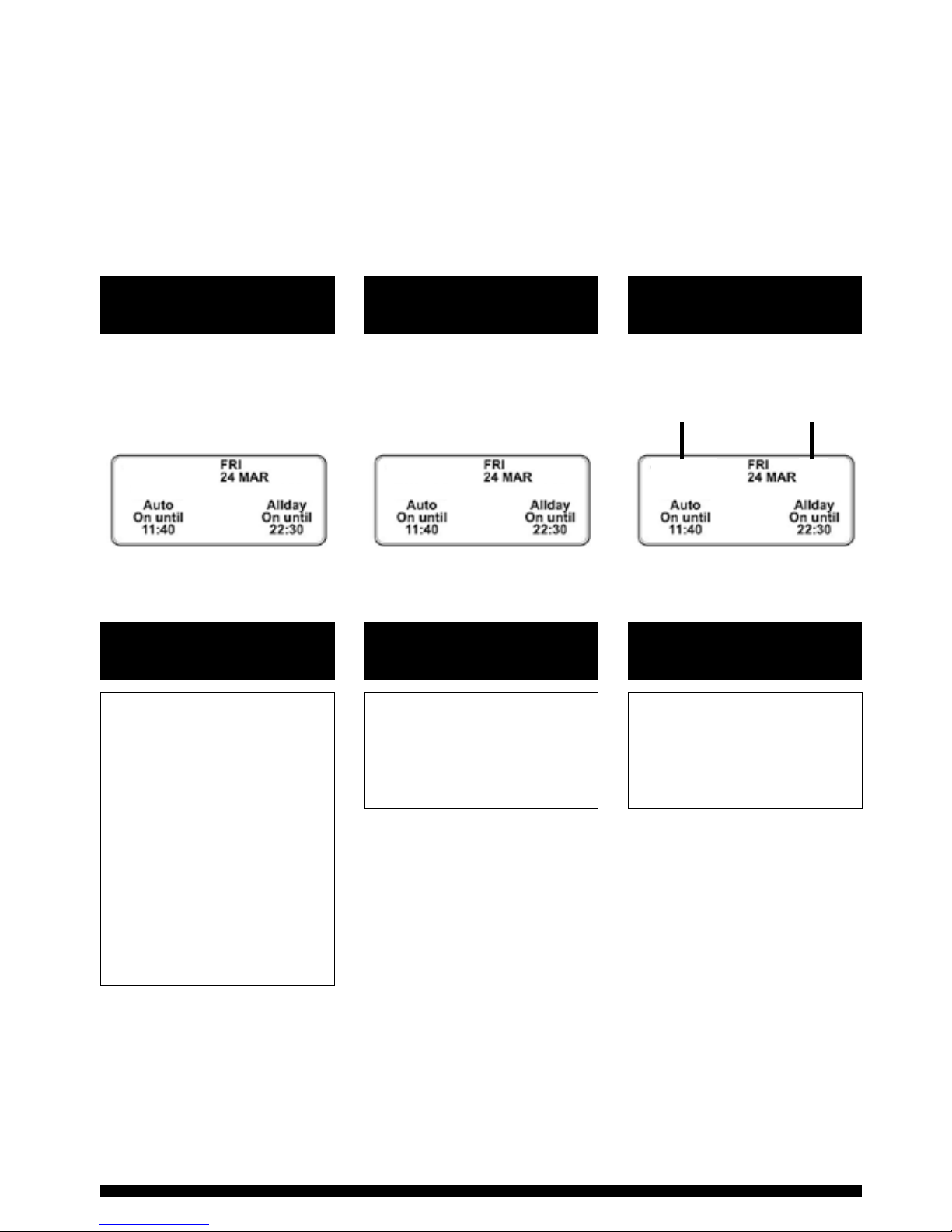
Setting the Holiday Mode
The holiday mode can be used to suspend the program function of the ChannelPlus
programmer, it can be set in advance of your departure date and for as long a period as
required. The holiday function operates from mid-day to mid-day, this means it can be
easily set to ensure your home is warm for your return. When the holiday mode has been
set a smiley face will appear on the display. When the holiday mode is active only the
day/date and smiley face will be displayed.
To cancel an active holiday period please
press any of the Select buttons under the
front ap.
PLEASE NOTE: Any alteration to the current
time or date will cancel any Holiday
programme set.
N.B. Do not use the holiday
programme when conditions are
such that frost damage to the heating
system is possible (unless a frost
protection thermostat is tted to
your system).
Press the green
‘SET’ button
Use the ‘+’ and ‘-’
buttons to adjust
START DATE
Repeat process for
end period
Use the ‘+’ and ‘-’
buttons to adjust
START MONTH
Use the ‘+’ and ‘-’
buttons to select
‘HOLIDAY MODE’
Open cover
Press ‘ENTER’
Press ‘ENTER’
Press ‘ENTER’
Press ‘ENTER’
Press ‘ENTER’
Press the green
‘SET’ button
Press the green
‘SET’ button
Close cover
Use the ‘+’ and ‘-’
buttons to adjust
START YEAR
SETTING HOLIDAY MODE
START AT MID-DAY ON
SEPT 2009
FINISH AT MID-DAY ON
21 SEPT 2009
THURS 16 SEPT
SAMPLE DISPLAYS
Enter holiday dates
Display when holiday mode is set
1
8
Adjusting Default Settings
The ChannelPlus H27ZXL Series 2 has a number of default settings which are normally
installed. These settings are designed to reduce the need for user intervention upon
installation of the programmer. However it is possible to customise the user display by
following the procedures in the following pages. The factory default normally installed are
illustrated below;
Time and Date
Options
Clock Options
Options
Headings
Options
Time and calendar
are factory set
The programmer has
been set with the current
time and date during
manufacture.
No alteration should be
required to the time and
date. However, if any
modication is required
please refer to the
owchart on page 9
Time displayed in
24hr clock format
24 hour
or
AM/PM
Channel heading set to
standard installation
i.e. Hot Water and Heating
Heating/Water
Zones
Channels
10.42
Zone 1 Zone 1 Zone 1Zone 2 Zone 2 Zone 2
22.42
9
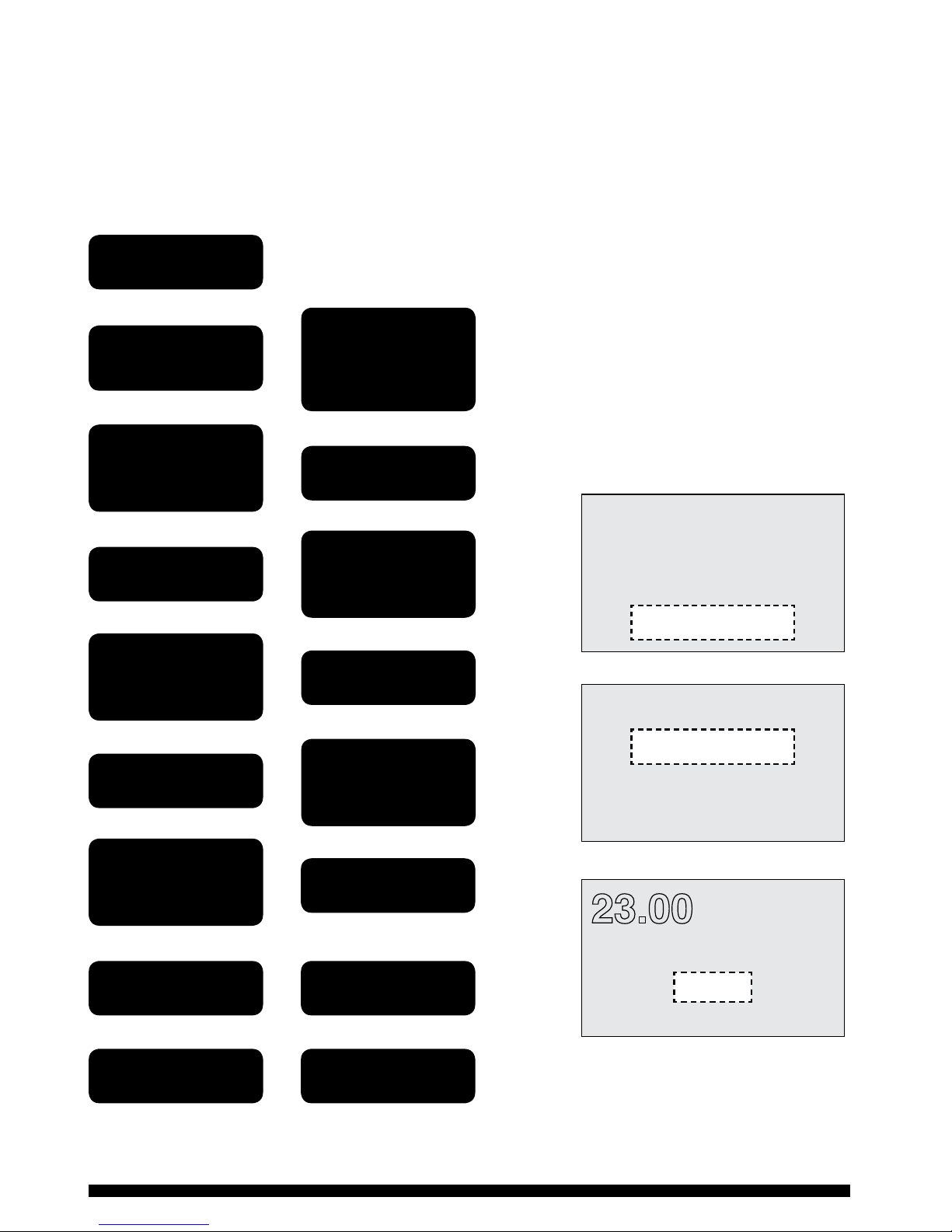
Adjusting Time and Date - see note below
The ChannelPlus H27ZXL Series 2 programmer has been set with the current time and date
during manufacture. No alteration should be required to the time and date, however if any
modication is required please refer to the owchart below.
PLEASE NOTE: Any alteration to the current time or date
will cancel any Holiday programme set. It will also
cause any boost or advance operations to be cancelled.
Press the green
‘SET’ button
Use the ‘+’ and ‘-’
buttons to adjust
‘TIME AND DATE’
Use the ‘+’ and ‘-’
buttons to adjust
THE MONTH
Use the ‘+’ and ‘-’
buttons to adjust
THE YEAR
Use the ‘+’ and ‘-’
buttons to adjust
THE CURRENT TIME
Use the ‘+’ and ‘-’
buttons to select
‘SET DEFAULTS’
Open cover
Press ‘ENTER’
Press ‘ENTER’
Press ‘ENTER’
Press ‘ENTER’
Press ‘ENTER’
Press ‘ENTER’
Press the green
‘SET’ button
Press the green
‘SET’ button
Close cover
Use the ‘+’ and ‘-’
buttons to adjust
THE DAY
ZONE 1
ZONE 2
SET HOLIDAY MODE
SET DEFAULTS
SET DEFAULTS
TIME AND DATE
CLOCK OPTIONS
HEADINGS
TIME AND DATE
23.00
30 SEP 2009
SAMPLE DISPLAYS
SET DEFAULTS
TIME AND DATE
23.00
30 SEP 2009
10
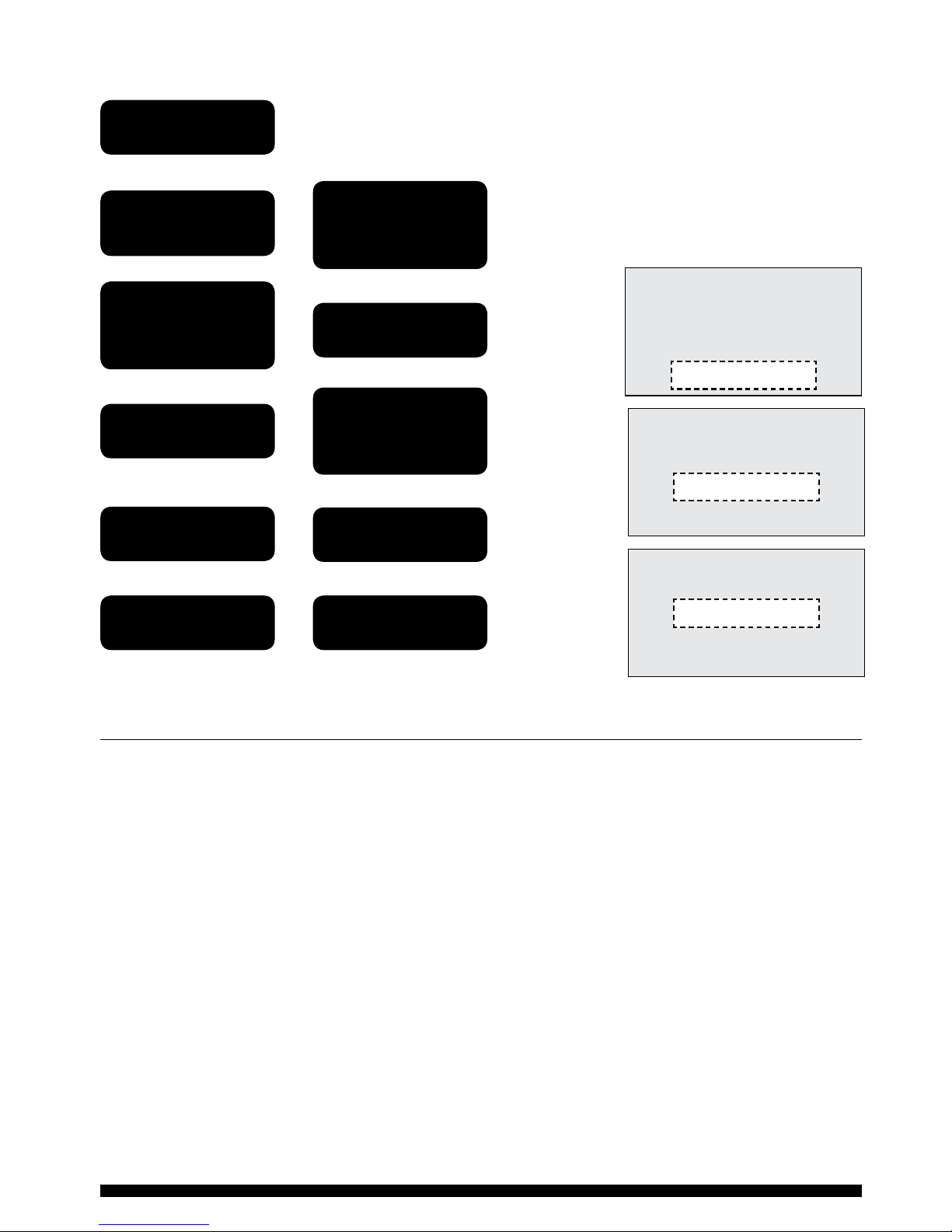
Adjusting Clock Options
The programmer has been preset to display the time in 24 hour
clock format, should you prefer AM/PM format then please use
the procedure given in the owchart
opposite.
General Information
BATTERY
The programmer is tted with a non-rechargeable, non-serviceable long life battery,
which will maintain the clock and programmed time settings with the mains supply
disconnected.
THIS RESERVE SHOULD BE SUFFICIENT TO COVER POWER INTERRUPTIONS DURING THE LIFE OF
THE UNIT.
During power interruptions the display will be blank.
SERVICE AND REPAIR
This programmer is NOT user serviceable. Please do not dismantle the unit. In the unlikely
event of a fault developing please refer to the RESETTING THE CHANNELPLUS H27ZXL
section on the right. If this fails to resolve the problem please contact a local heating
engineer or a qualied electrician.
Press the green
‘SET’ button
Use the ‘+’ and ‘-’
buttons to adjust
‘CLOCK OPTIONS’
Use the ‘+’ and ‘-’
buttons to adjust
24 HRS OR AM/PM
Use the ‘+’ and ‘-’
buttons to select
‘SET DEFAULTS’
Open cover
Press ‘ENTER’
Press ‘ENTER’
Press ‘ENTER’
Press the green
‘SET’ button
Press the green
‘SET’ button
Close cover
SAMPLE DISPLAYS
ZONE 1
ZONE 2
SET HOLIDAY MODE
SET DEFAULTS
SET DEFAULTS
TIME AND DATE
CLOCK OPTIONS
HEADINGS
CLOCK OPTIONS
24 HOURS
AM/PM
SET DEFAULTS
CLOCK OPTIONS
24 HOURS
Indice
Altri manuali Horstmann Controllori

Horstmann
Horstmann ChannelPlus H21XL Manuale utente

Horstmann
Horstmann CentaurStat 7 Manuale utente

Horstmann
Horstmann CentaurPlus C27 Istruzioni operative

Horstmann
Horstmann ServicePlus S21 Istruzioni operative

Horstmann
Horstmann CentaurPlus C11 Manuale utente

Horstmann
Horstmann CentaurStat 7 Istruzioni operative

Horstmann
Horstmann ChannelPlus H37VXL Series 2 Istruzioni operative

Horstmann
Horstmann CentaurStat 7 Manuale utente

Horstmann
Horstmann ChannelPlus H27XL Series 2 Istruzioni operative


