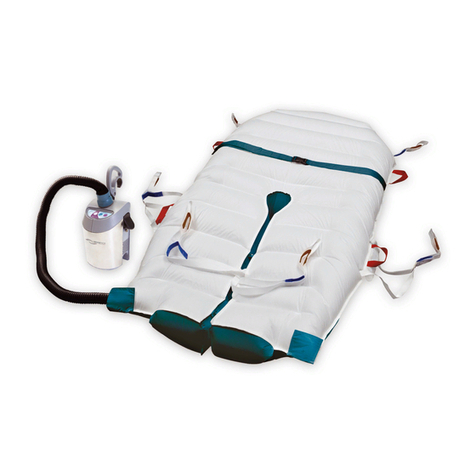
Hovertech hovermatt Manuale utente

HOVERMATT®USER MANUAL
1
Rev A HMManual
HOVERMATT® Introduction .................................04
General System Information
AIR SUPPLY ........................................................... 18
Table of Contents
Part Identification - Mattress .................................................. 05
Part Identification - Air Supply .................................................. 06
Air Supply Keypad Functions .................................................. 07
Instructions for Use ............................................................ 08
Product Specifications/Required Accessories ............................. 09, 10
Electromagnetic Compatibility Chart ......................................... 11 - 14
Cleaning ......................................................................... 15
Preventative Maintenance/Infection Control .............................. 16
Frequently Asked Questions .................................................. 17
Symbol References ............................................................ 02
Intended Use and Precautions .................................................. 03
Components Parts List ............................................................ 29
Warranty Statement ............................................................ 30, 31
Returns and Repairs ............................................................ 32
Part Identification ............................................................ 19
Power Cord / Clamp Replacement ........................................ 20
Handle Replacement ............................................................ 21
Feet or Bumper Replacement .................................................. 22
Hose Removal ...................................................................... 23
Air Filter and Air Filter Cover Replacement ............................. 24
Dust Cover/Hose Attachment Snap Replacement ................... 25
Metal Cover Replacement ................................................. 26
Cord Strap Replacement ................................................. 27
Troubleshooting ..................................................................... 28

HOVERMATT®USER MANUAL
2
Rev AHMManual
Symbol Reference
Type BF Applied Part
This End Up
Attention! Please read
accompanying documents.
Keep Dry
Temperature
Declaration of Conformity to
Medical Device Directive Humidity
Functional Earth (Ground)
Alternating Current
Date of Manufacture
Underwriters Laboratory Agency Approval
120 V~:
Medical Equipment with respect to electrical
shock, fire and mechanical hazards only in
accordance with UL 60601-1,
IEC/EN 60601-1, CAN/CSA C22.2 No. 601.1
230 V~:
Medical Equipment with respect to electrical
shock, fire and mechanical hazards only in
accordance with UL 60601-1,
IEC 60601-1-2 CAN/CSA C22.2 No. 601.1
~

HOVERMATT®USER MANUAL
3
Rev A HMManual
Intended Use and Precautions
• Indications:
Patients unable to assist in their own lateral transfer. Patients whose weight or girth poses
a potential health risk for the caregivers responsible for repositioning or laterally
transferring said patients.
• Contraindications:
Patients who are experiencing thoracic, cervical or lumbar fractures who are deemed
unstable.
• Intended Care Settings:
Hospitals, long term or extended care facilities
• Precautions:
Caregivers must verify that any and all caster brakes have been engaged prior to
transfer.
Additional caregivers are recommended when moving a patient over 750 lbs / 340kg.
Never attempt to move a patient on an uninflated HoverTech mattress.
Caregivers must verify that the opposite side-rail on the receiving surface is in an upright
and locked position prior to transfer.
Route the power cord in a manner to ensure freedom from hazard.
Avoid blocking the air intakes of the air supply.
Never leave patient unattended on an inflated device.
Use this product only for its intended purpose as described in this manual. Only
use attachments and / or accessories that are authorized by HoverTech International.
WARNING: For safety, always use two people during patient transfer.
CAUTION: Avoid electric shock. Do not open Air Supply.
WARNING: Reference product specific user manuals for additional operating instructions.
HoverJack® Air Patient Lift system is not UL classified

HOVERMATT®USER MANUAL
4
Rev AHMManual
Introduction
Using the HoverMatt® Air Transfer System
The HoverMatt® air transfer system is used to assist with lateral transfers and
repositioning anywhere in the hospital. It is radiolucent and artifact free, so patients
may remain on the HoverMatt® transfer mattress for all ancillary procedures,
including Diagnostic Radiology, Nuclear Medicine, MRI, or Radiation Therapy. The
patient weight limit for the HoverMatt® air transfer system is 1,200lbs / 544kg. It is
available in four different widths to accommodate the body mass of the patient.
The Principle of the HoverMatt® Technology
After the patient is placed on the HoverMatt® transfer mattress, low pressure air from
the small air supply will inflate the mattress. At the same time the air is supporting
the patient, the air is escaping from the perforations in the underside of the Hover-
Matt® transfer mattress. The escaping air acts as a lubricant to reduce friction, which
facilitates effortless transfers. With less force needed to transfer a patient, there is
less physical effort and strain expended by caregivers, which results in a reduction of
workers’ compensation injuries. The HoverMatt® air patient transfer system requires
the caregiver to exert a force of approximately 15% of the patient’s body weight for
the transfer.
The Purpose of HoverMatt® Technology
Consistent utilization of the HoverMatt® air transfer system dramatically reduces back
injuries to staff that are caused by lateral transfers and repositioning. In addition,
fewer staff members are required to perform these tasks and a more comfortable
transfer is provided for the patient.

HOVERMATT®USER MANUAL
5
Rev A HMManual
Part Identification - Mattress
Transfer Handles (6)
Single-Patient Use:
Transfer Handles (8)
Air Supply Hose Attaches to Either
Side. Snap on HoverMatt® Flap
Connects to Snap on Hose End.
Close Flap to Secure.
Patient Safety Straps (2)
(DO NOT USE TO TRANSFER)
Label Includes Model #,
Serial #, and Instructions for Use.

HOVERMATT®USER MANUAL
6
Rev AHMManual
Part Identification - Air Supply
Air Filter Cover
Hose Nozzle
Hose
Hose Release Button
Control
Panel Label
Carrying Handle/
Attachment Hook
Power Cord
Strap
Power Cord
(US/UK/Euro/Aust)

HOVERMATT®USER MANUAL
7
Rev A HMManual
Air Supply Keypad Functions
The Adjustable Keypad function has four different settings. Pressing the
button once will result in the lowest inflation setting available. A second
press of the button increases the air pressure and rate of inflation. Pressing
the button a third time will again increase the rate of inflation. A fourth press
of the button results in the highest inflation rate and air pressure available
for HoverTech Accessories. The STANDBY button may be pressed at any time
to cease all air flow.
NOTE: The LED will indicate the inflation speed by the number of flashes
(i.e. two flashes equals the second inflation speed).
All of the settings in the Adjustable range are substantially lower than the
HoverMatt® and HoverJack® settings. The Adjustable function is not to be
used for transferring; it is only for use with HoverTech Accessories, which
require a lower pressure for slow inflation.
Standby: Used to stop inflation/air flow.
HoverMatt® 28 /34: For use with 28” & 34” HoverMatt® Air Transfer
Mattresses.
HoverMatt® 39 /50 & HoverJack®: For use with 39” & 50” HoverMatt® Air
Transfer Mattresses and 32” & 39” HoverJack® Air Patient Lifts.
Transfer Speed High
Adjustable/
Pressure Setting
Transfer Speed LowStandby
Power IndicationAdjustable Speed
Indication

HOVERMATT®USER MANUAL
8
Rev AHMManual
Instructions for Use
1. Patient should be in a horizontal position for transfer/repositioning on the appropriate width
mattress. [28”w (71 cm) – 34”(86 cm) – 39”w (99 cm) – 50”w (127 cm)]
Regardless of ease of patient movement, for safety, always use a minimum
of two caregivers for the transfer.
2. Place the HoverMatt® transfer mattress underneath patient using log-rolling technique and
attach patient safety straps. Whatever the patient is lying on to keep the bed mattress clean can
be placed on top of the HoverMatt® transfer mattress to help keep it clean.
3. Plug the Air Supply power cord into an electrical outlet.
4. Insert the air supply hose nozzle into mattress in one of the two entries located parallel to the foot
end, and snap in place.
5. Be sure transfer surfaces are as close as possible and brake the wheels.
6. If possible, transfer from a higher surface to a lower surface.
7. Turn on air supply by choosing the appropriate speed based on the mattress width.
8. Grasp transfer handles and pull patient on an angle, either head first or feet first, until patient is
in desired position.
9. Ensure that the patient is centered on the receiving equipment prior to deflation,
especially if the width of the equipment receiving the patient is less than the width of the transfer
mattress.
10. Turn off air supply by pressing the standby button and employ the bed/stretcher rails.
NEVER LEAVE PATIENT UNATTENDED ON AN INFLATED HOVERMATT® AIR
TRANSFER SYSTEM.
HOVERMATT®
Use for sizes: 28 & 34
HOVERMATT®
Use for sizes: 39 & 50

HOVERMATT®USER MANUAL
9
Rev A HMManual
Product Specifications/Required Accessories
• Classification:
EQUIPMENT NOT SUITABLE FOR USE IN THE PRESENCE OF A FLAMMABLE
ANESTHETIC MIXTURE WITH AIR, OR WITH OXYGEN OR NITROUS OXIDE.
Not for use with Oxygen or Oxygen Enriched Atmospheres.
Type of Protection against electric shock: CLASS I EQUIPMENT
Degree of protection against electric shock: TYPE BF APPLIED PART
Protection against ingress of water: Ordinary (not protected).
Mode of operation: CONTINUOUS OPERATION
To remove supply mains, unplug equipment from wall
• Patient Weight Limit: 1,200lbs / 544kg
• Use Temperature: 50° to 104° F (10° to 40° C)
• Use Humidity: 10% to 70% Non-Condensing
• Storage/Shipping Temperature: -40° to 176° F (-40° to 80° C)
• Storage/Shipping Humidity: 10% to 70% Non-Condensing
• Power Input: 120 V~, 60 Hz, 10 A (North American version)
• Air Supply Dimensions: 12.5 x 7 x 7 inches (31.75 x 17.8 x 17.8 cm)
• Air Supply Weight: 11 lbs. (5 kg)
• Air Supply Material: Fire Retardant ABS/Stainless Steel
230 V~, 50 Hz, 6 A (Australian Version)
• Power Cord Length: 10 metre

HOVERMATT®USER MANUAL
10
Rev AHMManual
Product Specifications/Required Accessories
Required Accessory:
HoverTech International Air Supply
Part# HTAIR1200 (North American Version)
All HoverTech International Products are Latex-Free.
RE-USABLE
HOVERMATT®
AIR TRANSFER SYSTEM
SINGLE-PATIENT USE
HOVERMATT®
AIR TRANSFER SYSTEM
Material: Nylon Twill Nylon Twill & Non-Woven
Construction: RF-Welded Sewn
Width: 28” (71 cm), 34” (86 cm),
39” (99 cm) or 50” (127 cm)
34” (86 cm) & 39” (99 cm)
Length: 78” (198 cm) 78” (198 cm)
Part# HTAIR2300 (Australian Version)
For a full product listing go to www.statina.com.au
Altri manuali per hovermatt
1
Indice
Altri manuali Hovertech Attrezzature mediche

Hovertech
Hovertech Hoverjack HJBSC-200 Manuale utente

Hovertech
Hovertech HOVERMATT T-Burg Manuale utente

Hovertech
Hovertech HOVERSLING Split-Leg Manuale utente

Hovertech
Hovertech HoverJack Manuale utente
Hovertech
Hovertech AirWedge Manuale utente

Hovertech
Hovertech Hoverjack Evacuation Manuale utente

Hovertech
Hovertech Q2 ROLLER Manuale utente

Hovertech
Hovertech Q2Roller Manuale utente
Hovertech
Hovertech hovermatt Manuale utente
Hovertech
Hovertech HOVERJACK HJ3202T Manuale utente