
HSM Profi Pack P425 Manuale utente

ProfiPack P425
1.531.999.202 c – 05/2022
OPERATING INSTRUCTIONS
05/2022 ProfiPack P425 9
english
1
Intended
use, warranty
The ProfiPack P425 is exclusively designed for the manufacture of packaging padding
made from cardboard. The machine comes with a 2 year warranty. The warranty period is
6 months when used in multiple shifts. The warranty does not cover wear, damage caused
by improper handling, natural wear or the intervention of third parties
.
2 Explanation of symbols and safety instructions
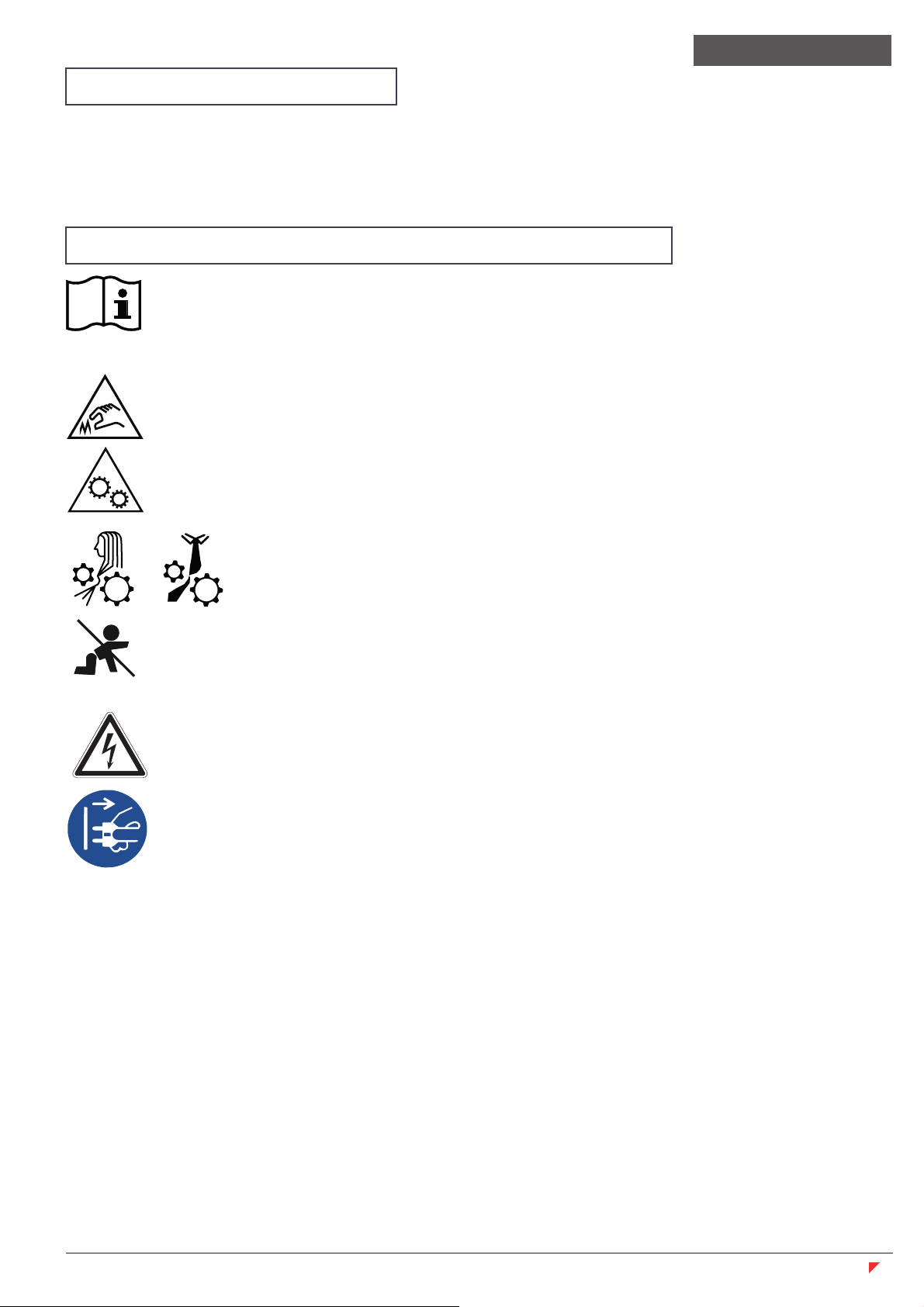
Before starting up the machine for the first time, read the operating manual, and
keep it for later use and to pass on to any subsequent users.
Please observe all of the safety instructions attached to the Profipack.
Risk of injury from the cutting unit
Cutting injuries are possible because of the sharp cutting unit.
Risk of injuries from sharp blades!
Never reach into the slot of the paper feed.
Risk of injury from being pulled in!
Do not go near the infeed opening with long hair, loose clothing, ties,
scarves, necklaces, bracelets etc. Do not shred any material that
tends to form loops, e.g. tapes, bindings and soft plastic film.
Danger to children and other persons!
This equipment is not suitable for use in locations where children are likely to be
present.
Danger from electric current
Dangerous mains voltage can lead to electrocution in the event of improper
handling of the machine.
Check the machine and cable regularly for damage.
Switch offthe Profipack and disconnect from the power supply in the event of
damage, improper operation and also before changing location or cleaning.
Make sure that the power plug is easily accessible.
Before you insert the power plug, make sure that the voltage and frequency of your
power supply comply with the information on the name plate.
Prevent liquids getting into the Profipack.
The machine must not be placed in the vicinity of a radiator or other heat source.
The ventilation slots must not be blocked or covered and there must be at least 5 cm
space between the shredder and any wall or furniture.
Never pull the plug out of the socket using the power cable. Always pull out the plug
directly.
Ser
vice work may only be carried out by HSM customer service and the service engineers
from our contract partner.
For our customer service addresses see page 168.
Translation of the original operating manual
10 ProfiPack P425 05/2022
english
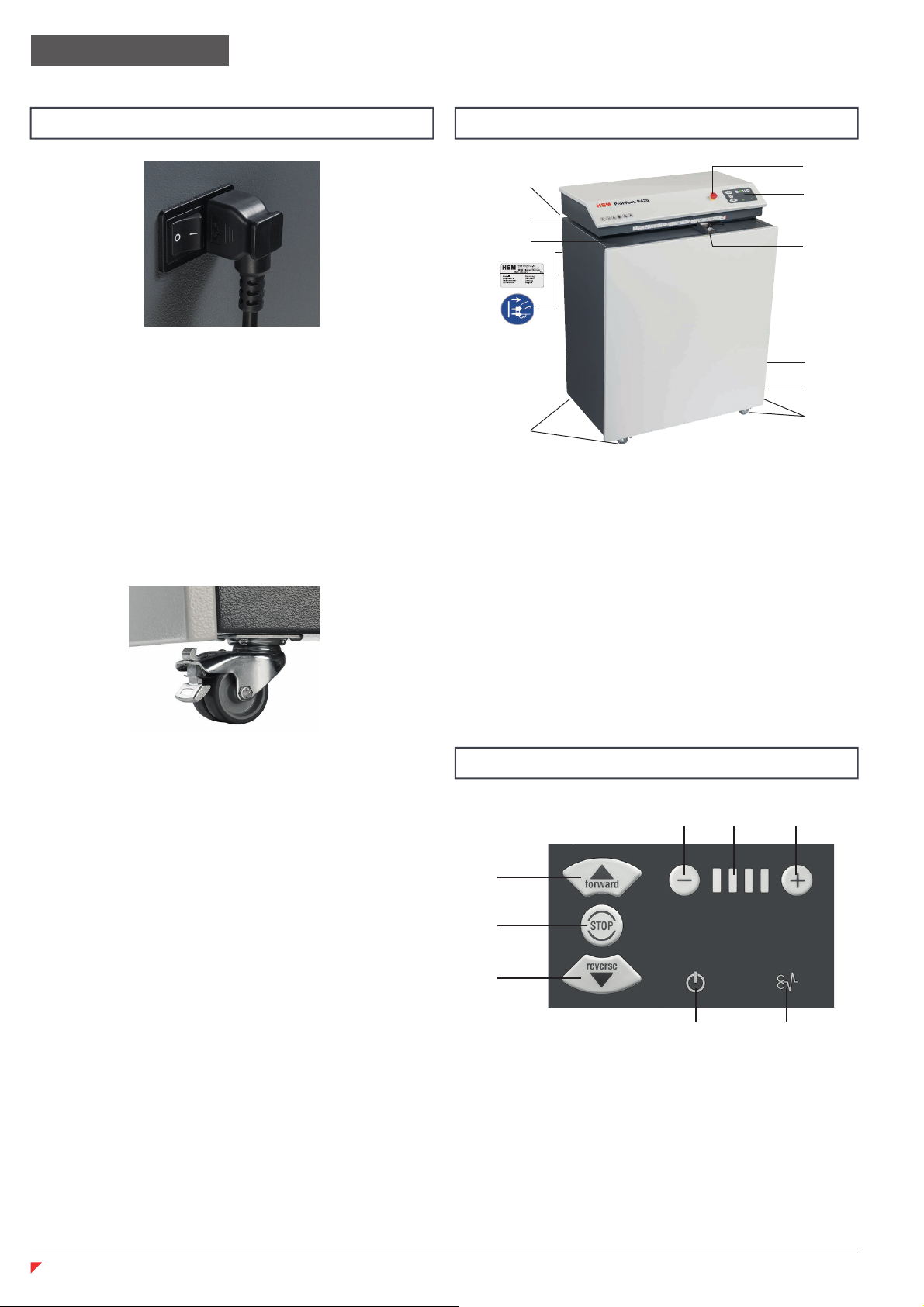
1 Feed opening
2 Safety notice
3 Warning sticker / type plate
4 Operator control panel
5 Emergency stop button
6 Limit stop
7 Rolls
8 “Slide” flap
9 Connection for suction device
10 Cable holder
4 Overview
5 Display and control panel
1 Forward button
2 Stop button
3 Reverse button
4 Settings buttons
5 “Speed” display
6 “Ready for operation” display
7 “Blockage” display
Connect the power cable to the machine.
The machine must be connected to a power
source which meets the specifications on the
nameplate. Make sure that the power cable
is unobstructed and that nobody can tread
on it. Connect the power plug of the machine
into a properly installed socket.
3 Transportation and installation
• Lock the front castors by pressing
down the brake lever.
1
3
2
4 45
6 7
Note:
The HSM ProfiPack 425 can also be sup-
plied with a built-in suction device.
Using a suction device you can extract dust
while processing the cardboard.
If your device has the built-in suction device,
there is a connection for the suction device
on the right side (9).
If your device does not have this apparatus,
you can fit the components later when
needed.
ProfiPack conversion kit:
Order number x.xxx.xxx.xxx
Dust extractor:
Order number 2.412.111
1
3
5
7
7
2
4
6
8
9
10

05/2022 ProfiPack P425 11
english
Switching the system on
•
Unlock the emergency stop button
by turning it anti-clockwise.
•
Move the power switch at the right-
hand side to position “I”.
“Ready for operation” display flashes.
The “Ready for operation” display illumi-
nates constantly after a short period of time.
The machine is ready to operate.
Press the “Forward button”.
The cutting unit starts up.
The operating speed can be controlled in
4 levels using the - and + adjustment buttons.
Changing the settings during operation is
possible.
6 Operation
Feed in cardboard
• Cardboard is processed at a width of up to
425 mm.
• Wider cardboard is automatically trimmed.
• The cutting unit is switched offusing
the stop button.
425 mm
Switch off
Switch the mains switch on the right side to
position “0”.
Adjustable limit stop
Lever up: For moving
Lever down:Limit stop fixed

12 ProfiPack P425 05/2022
Removing material residue
Observe the following for all work on the compression flap:
Wear gloves.
Perforating cardboard
• Lever (1) is in lower position
• Catch bolt is engaged
• Feed in the cardboard
1
Padding cardboard
• Pull catch bolt (1)
• Pull lever (2) upwards.
• Feed in approx. 2 linear metres of cardboard
• Push the lever (2) downwards.
• Feed in the cardboard
1
2
Remove material residue when changing from “Padding cardboard”
to “Perforating cardboard”.
Switch offthe machine. Turn the power switch to the “0” position.
Remove residual material on the pressing plate by hand.
Switch on the machine.
Turn the power switch to the “I” position.
Push in compact cardboard to order to clear the shaft of any residual material.
Remove any remaining residual material by hand.
CAUTION
2
1
2
1
2

05/2022 ProfiPack P425 13
Switch offthe machine and disconnect the
power plug. When cleaning, only use a soft
cloth and a mild soap-water solution. How-
ever, no water must enter the equipment.
8 Cleaning
Dispose of the machine in an envi-
ronmentally sound way at the end
of its service life. Observe the
current regulations when doing
this. As legislation is subject to
ongoing changes, we request that
you contact your local authorities at the
appropriate time. As the manufacturer, HSM
would be glad to advise you on the disposal
of your old machine.
9 Disposal/Recycling
Blockage
Press the “Reverse button” to remove mate-
rial in the event of problems.
The cutting unit reverses slowly and
slides the cardboard back.
Note
If a large quantity of cardboard has already
been pulled in before the blockage occurred,
you can also press the forward button.
This makes the cutting unit run forwards
slowly and shreds the remaining cardboard.
During this function, the “Ready for
operation” and “Blockage” indicators flash
alternately.
For all other malfunctions, check whether the
motor was overloaded before contacting our
customer service. Let the machine cool down
for approx. 15 – 20 mins. before restarting.
7 Troubleshooting
english

14 ProfiPack P425 05/2022
10Technical data
Grid dimension 5 x 100 mm
Cutting capacity Up to 3 positions
Operating speed 8.5 – 14.0 m/min
Working width 425 mm
Infeed height 20 mm
Power supply 100V-240V / 50-60Hz , 220V-240V / 50-60Hz
Operating mode Continuous operation
Power consumption max. 1.87 kW
Ambient conditions for transport,
storage and operation:
Temperature
relative humidity
height above SL
-10 °C up to +25 °C
max. 90%, non-condensing
max. 2,000 m
Noise emission
(idle / under load)
60 – 62 dB(A)
66 – 67 dB(A)
Size W x D x H (mm) 770 x 570 x 1040
Weight 170 kg
english
This document shredder meets the applicable harmonisation legislation of the European Union:
• Low Voltage directive 2014/35/EU
• EMC directive 2014/30/EU
• RoHS directive 2011/65/EU
The EU declaration of conformity can be requested from the manufacturer.
• Electrical Equipment (Safety) Regulations 2016
• Electromagnetic Compatibility Regulations 2016
• The Restriction of the Use of Certain Hazardous Substances in Electrical and Electronic Equipment
Regulations 2012
The EU declaration of conformity can be requested from the manufacturer.

168 ProfiPack P425 05/2022
HSM GmbH + Co. KG
Austraße 1-9
88699 Frickingen / Germany
Tel. +49 7554 2100-0
Fax +49 7554 2100 160
www.hsm.eu
Gratis Hotline
DE, AT, IT, ES, BE, NL, LU
Tel. 00800 44 77 77 66
E-Mail
HSM Vertrieb Deutschland
HSM Vertrieb Österreich
HSM Vertrieb Schweiz
HSM Verkoop België, Nederland,Luxemburg
HSM Commerciale Italia
HSM Ventas Portugal
HSM Técnica de Oficina y
Medioambiente España, S.L.U.
Calle de José Echegaray, 10
28100 Alcobendas, Madrid
Spain
Tel. +34 91 103 4859
Fax +34 91 103 4858
www.hsm.eu
HSM France SAS
Parc de Genève
240, Rue Ferdinand Perrier
69800 Saint-Priest
France
Tél. +33 472 210580
Fax +33 472 517481
www.hsm.eu
HSM of America LLC
419 Boot Road
Downingtown, PA 19335
USA
Tel. +1 800 613-2110
Fax +1 484 698-7978
www.hsm.us
Indice
Altri manuali HSM Attrezzature per l'imballaggio


