
Huali Precision Mould UHD02 Manuale utente

Digital Camera
Auto focus function (AF)
Instruction Manual
UHD02

1
Preface
Thank you for purchasing this digital camera. Please read
this manual before operating this product. After you finish
reading this manual, store it in a safe place for future
reference.
Contents covered in this user manual refer to the latest
information in preparation of this user manual. Screen
displays, illustrations, etc. adopted in this manual are
intended to explain operation of the camera in detail. Due to
differences in technology development and production
batches, they may be slightly different from digital cameras
you actually use.
Disclaimer notice: Considerable effort has been made to
ensure that this manual isfree of inaccuracies and omissions.
However, there is no guarantee that there will be no errors or
omissions in this manual.
Safety Precautions:
1.Be sure to read, understand and follow the safety
precautions below when using the camera. Please make
sure that the way you operate the camera is correct.
2.Do not point the camera directly at the sun or other strong
light sources, or your eyesight may be damaged.
3.Do not trigger the flash in close to human or animal eyes.
Your eyesight may be damaged when facing a strong light
source if the distance is too close. Please pay special
attention to keep more than 1 meter (39 inches) away from

2
baby.
4.Please store this equipment out of the reach of children
and infants. It can cause serious injury to children if the
camera or battery is accidentally damaged.
5.Do not attempt to disassemble or modify any part not
described in this guide. Unpacking or modifying of camera
may result in a high voltage shock. Internal inspection or
warranty shall be the responsibility of qualified service
personnel designated by company or corresponding camera
dealer.
6.Please stop operating camera immediately if there are
smoke or unpleasant smell on any parts of camera,
otherwise it may cause fire or electric shock. Turn off camera
immediately and remove camera’s battery or unplug power
cord from electrical outlet. Make sure the camera has
stopped emitting smoke or unpleasant smell.
7.Please stop operating camera immediately if you
accidentally drop camera to the ground or damage its casing,
otherwise it may cause fire or electric shock. Turn off camera
immediately and remove camera’s battery or unplug power
cord from electrical outlet.
8.Do not expose or immerse the camera to water or other
liquids. This camera is not waterproof. Please dry with a soft
cloth if the case is exposed to liquid or salt water. Turn off
camera immediately and remove camera’s battery or unplug
power cord from electrical outlet if water or other materials
immerse into the camera.
9.Do not store this equipment out of damp or dusty place.

3
10.Your hands may feel hot because temperature of camera
body will rise after a long time of us. Please be careful when
operating this equipment for a long time.
11.Please unplug the battery if you not use the camera. The
battery shall be charged once every 6 months. Use the
camera again to discharge the battery when it is fully
charged, so that life of the camera and battery can be
maintained.
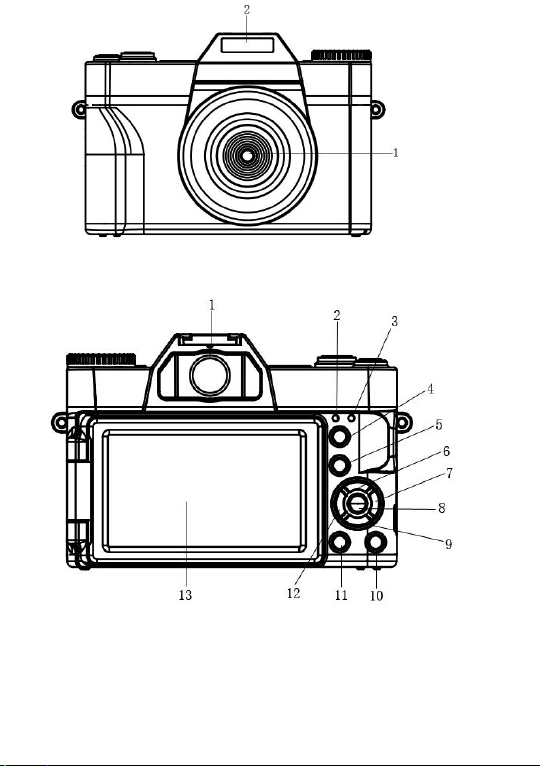
Part Name
1:Power
2:Shoot button
3:Speaker
4:Hot-shoe
5:Mode button
4
1:Lens 2:Flash
1: Hot-shoe
2: Charging Indicator
3: Working Indicator

5
4: T-Zoom in
5: W- Zoom out
6: Up / Flash light
7: Right / Continuous shooting
8: OK
1: Battery door 2: Tripod slot 3: Memory slot
1: MIC interface
2: USB interface
3: HDMI interface
9: Down / Delete
10: Menu
11: Display
12: Left / Delay
13: LCD display

6
Preparation of the Camera
Install battery
This camera uses high capacity rechargeable external
lithium battery. Please put the battery into the battery slot
correctly according to the battery and battery compartment
slot.
Battery charging
The following symbols indicate the current remaining battery
power.
icon
Remaining battery power
60%-100%
30%-60%
5%-30%
≤5%
When the battery logo is red, it means the battery needs to
be charged. Please charge it in time, otherwise it may shut
down automatically due to low battery.
(1) When charging with this camera, use USB line to connect
the power adapter and the camera, and then connect the
power supply to charge. When charging, the red light is
always on, and the red light is off after fully charged.
Tips: The camera will turn on automatically when
charging. The battery will be fully charged faster when
charged in the off state.
(2) When charging with standard external charger, put the

7
battery into the charger directly.
(3) Battery charging time (estimated)
In the normal environment, it takes 3 hours to be fully
charged.
(4) Continuous working hours (estimated)
When [system] is set to photo mode and all other settings
are factory default settings, it can work for 1.5 hours.
When [system] is set to video mode and other resolutions,
and all other settings are factory default settings, it can work
for 1.5 hours.
Note: The battery is recommended to start charging in a
temperature range of 10 ° C to 30 ° C. In a lower
temperature, the battery may not be able to or need more
time to be fully charged. When charging in a high
temperature, it may shorten battery life.
The fully charged battery will naturally consume electricity. In
order to ensure sufficient power, charging in advance is
recommended.
When the camera is not used for a long time, please charge
the battery every 3 months. Then let the battery discharge to
maintain the battery life.
Install / remove memory card
The camera supports Micro SD card, must use class 10 card,
the highest support 256GB.
insert Micro SD card with label up into card slot at bottom of
the camera until it clicks to confirm that the installation is in
place. Press memory card will pop up automatically if press it

8
inward again.
Notes:
Turn off power of the camera before replacing memory
card.
Insert card in the correct direction. Do not use too
much force when inserting card to avoid damaging
card or camera parts. Please check if the direction is
correct if card can’t insert.
Please format memory card first if it is used for the
first time, or has been used on other cameras.
The estimated recording time is just for reference and the
specific time may be different depending on the memory
card and battery condition.
unit:Min
Note: If there is documents not recorded by this camera or
4K
2.7K
1080P
720P
30
FPS
30
FPS
60
FPS
30
FPS
120
FPS
60
FPS
30
FPS
16G
45
80
80
160
80
160
160
32G
90
170
170
300
170
300
300
64G
180
350
350
620
350
620
620
128G
360
720
720
1320
720
1320
1320
256G
720
1440
1440
2640
1440
2640
2640
9
saved by PC in the memory card, the recording time may be
reduced or data may be unable to recorded properly.
Format memory card
A memory card first used in this camera is recommended to
be formatted, or failure, such as, inability to record may
occur.
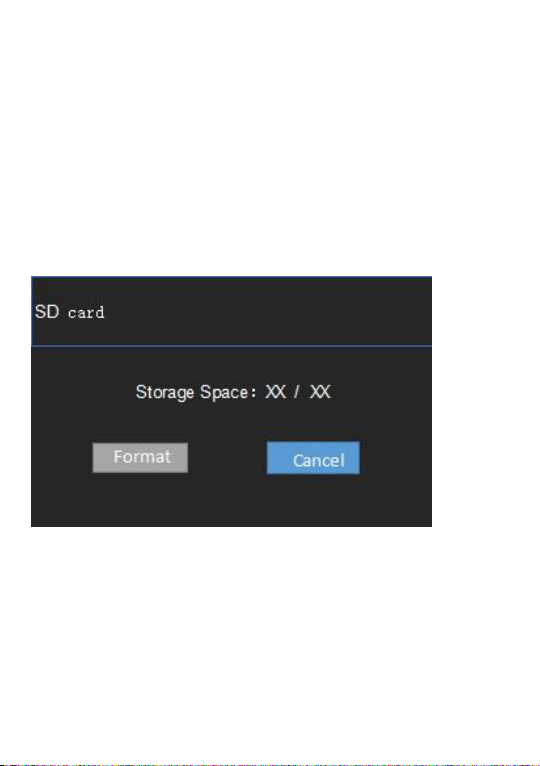
When first using a memory card in this camera, the format
window will pop up automatically. As shown in the figure:
You can also enter the system menu of this camera
sub-menu”format”, press OK button, enter the format window
in the above figure to carry out formatting. You can also
format the memory card on your computer.
Turn on the power
Press power button, working indicator lights up, screen lights
up, and the camera is turned on.
Indice


