
Huawei HiSecEngine USG6000F Series Manuale utente
HiSecEngine USG6000F Series
Quick Start
Issue 04
Date 2022-11-24
HUAWEI TECHNOLOGIES CO., LTD.

Copyright © Huawei Technologies Co., Ltd. 2022. All rights reserved.
No part of this document may be reproduced or transmitted in any form or by any means without prior
written consent of Huawei Technologies Co., Ltd.
Trademarks and Permissions
and other Huawei trademarks are trademarks of Huawei Technologies Co., Ltd.
All other trademarks and trade names mentioned in this document are the property of their respective
holders.
Notice
The purchased products, services and features are stipulated by the contract made between Huawei and
the customer. All or part of the products, services and features described in this document may not be
within the purchase scope or the usage scope. Unless otherwise specied in the contract, all statements,
information, and recommendations in this document are provided "AS IS" without warranties, guarantees
or representations of any kind, either express or implied.
The information in this document is subject to change without notice. Every eort has been made in the
preparation of this document to ensure accuracy of the contents, but all statements, information, and
recommendations in this document do not constitute a warranty of any kind, express or implied.
Huawei Technologies Co., Ltd.
Address: Huawei Industrial Base
Bantian, Longgang
Shenzhen 518129
People's Republic of China
Website: https://e.huawei.com
Issue 04 (2022-11-24) Copyright © Huawei Technologies Co., Ltd. i

Contents
1 About This Document.............................................................................................................1
2 Device Introduction and Cable Connection.......................................................................3
2.1 USG6615F, USG6625F............................................................................................................................................................ 4
2.2 USG6635F, USG6655F, USG6685F......................................................................................................................................6
2.3 USG6710F, USG6715F............................................................................................................................................................ 7
2.4 USG6725F................................................................................................................................................................................ 10
3 Accessing the Internet......................................................................................................... 12
4 Appendix..................................................................................................................................14
4.1 Activating Licenses............................................................................................................................................................... 14
4.2 Supplier's Declaration of Conformity (SDoC)............................................................................................................. 14
4.3 Obtaining Product Documents and Technical Support............................................................................................15
HiSecEngine USG6000F Series
Quick Start Contents
Issue 04 (2022-11-24) Copyright © Huawei Technologies Co., Ltd. ii

1 About This Document
Overview
Thank you for using USG6000F series products. This document shows the product
appearance and provides the essential information required for cable connections
and initial conguration of the USG6000F, helping you quickly complete the initial
installation and conguration of the USG6000F. For detailedhardware description,
refer to the
Hardware Guide
. For detailed congurations, refer to the
Conguration Guide
.
The following table lists the product version related to this document.
Product Name Version
● USG6615F
● USG6625F
● USG6635F
● USG6655F
● USG6685F
● USG6710F
● USG6715F
● USG6725F
V600R020C10
V600R021C00
V600R021C10
V600R022C00
Intended Audience
This document is intended for installation personnel and administrators who
install and maintain USG6000F. The installation personnel or administrators must
have experience in the installation and maintenance of networking devices.
Symbol Conventions
The symbols that may be found in this document are dened as follows.
HiSecEngine USG6000F Series
Quick Start 1 About This Document
Issue 04 (2022-11-24) Copyright © Huawei Technologies Co., Ltd. 1

Symbol Description
Indicates a hazard with a high level of risk which,
if not avoided, will result in death or serious
injury.
Indicates a hazard with a medium level of risk
which, if not avoided, could result in death or
serious injury.
Indicates a hazard with a low level of risk which,
if not avoided, could result in minor or moderate
injury.
Indicates a potentially hazardous situation which,
if not avoided, could result in equipment damage,
data loss, performance deterioration, or
unanticipated results.
NOTICE is used to address practices not related to
personal injury.
Supplements the important information in the
main text.
NOTE is used to address information not related
to personal injury, equipment damage, and
environment deterioration.
Update History
Updates between document issues are cumulative. Therefore, the latest document
issue contains all updates made in previous issues.
Issue 01 (2021-01-29)
Initial commercial release.
Issue 02 (2021-08-20)
The second commercial release.
Issue 03 (2022-05-12)
The third commercial release.
● Added the USG6685F.
● Added the USG6710F, USG6715F.
● Added the USG6725F.
Issue 04 (2022-11-24)
The fourth commercial release.
HiSecEngine USG6000F Series
Quick Start 1 About This Document
Issue 04 (2022-11-24) Copyright © Huawei Technologies Co., Ltd. 2
2 Device Introduction and Cable
Connection
D ANGER
● Deactivate power whenever possible before performing maintenance on power
cables.
● Always wear a properly-grounded wrist strap before touching the device.
● Laser beams will cause eye damage. Do not look into bores of optical modules
or optical bers without eye protection.
NO TE
● Figures in the document are for reference only and may be dierent from actual
devices.
● The type and quantity of items in a packing list vary with the product model. Check the
delivered items against the actual packing list.
● Some devices are delivered with dust plugs. Cover idle optical interfaces with dust plugs.
Keep the unused dust plugs for future use.
● The power cable varies according to the delivery country.
● To use adjustable mounting ears at the rear or adjustable guide rails, purchase them
separately.
HiSecEngine USG6000F Series
Quick Start 2 Device Introduction and Cable Connection
Issue 04 (2022-11-24) Copyright © Huawei Technologies Co., Ltd. 3

2.1 USG6615F, USG6625F
Device and Auxiliary Materials
Figure 2-1 Appearance and auxiliary materials of the USG6615F, USG6625F
Cable Connection
Connect cables according to Figure2 and power on the device. As device does not
provide a power switch, it starts up immediately after receiving power. When the
SYS indicator on the frontpanel is blinking (once every two seconds), the device is
running and ready for conguration.
HiSecEngine USG6000F Series
Quick Start 2 Device Introduction and Cable Connection
Issue 04 (2022-11-24) Copyright © Huawei Technologies Co., Ltd. 4
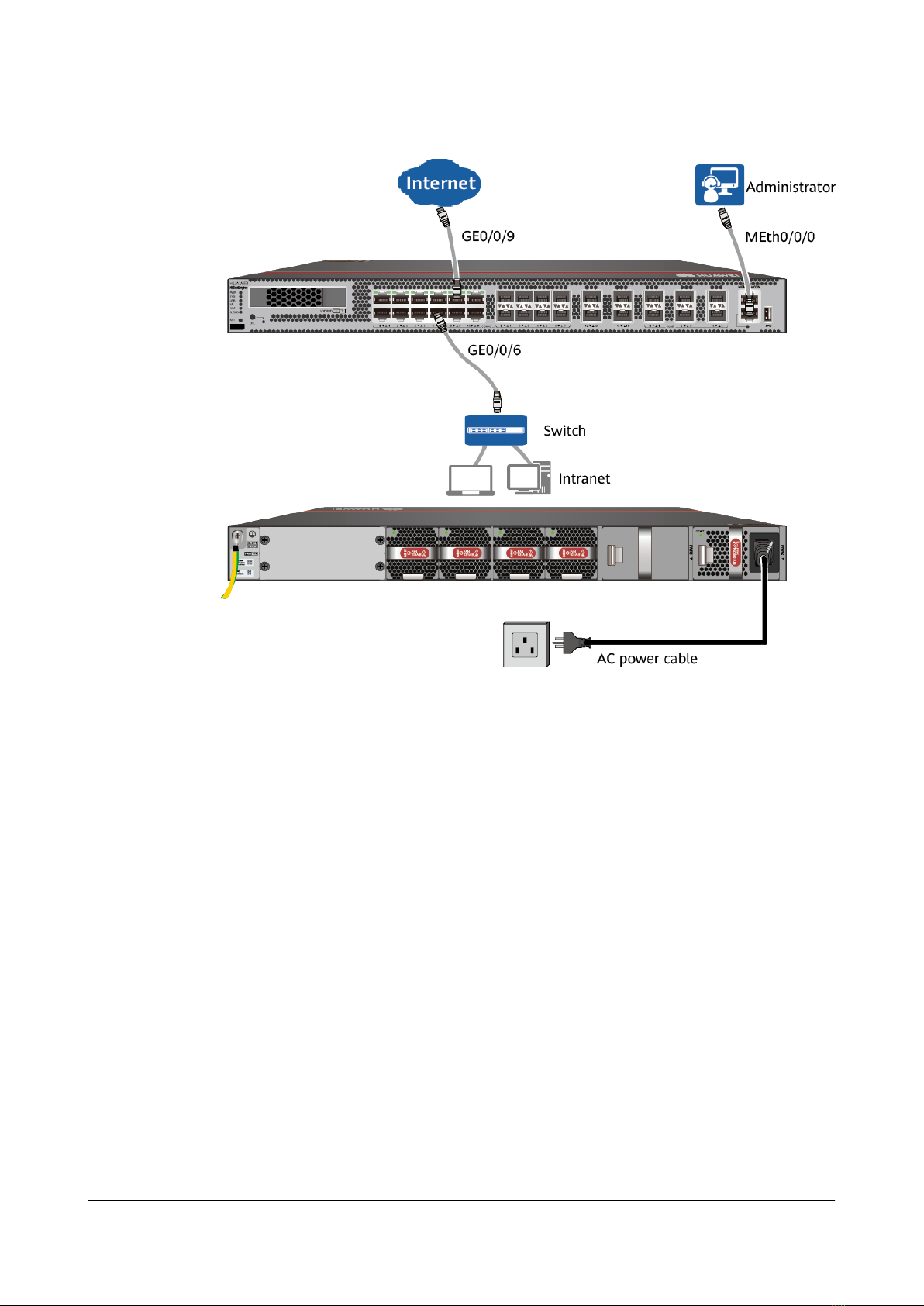
Figure 2-2 Connecting cables of USG6615F, USG6625F
HiSecEngine USG6000F Series
Quick Start 2 Device Introduction and Cable Connection
Issue 04 (2022-11-24) Copyright © Huawei Technologies Co., Ltd. 5
2.2 USG6635F, USG6655F, USG6685F
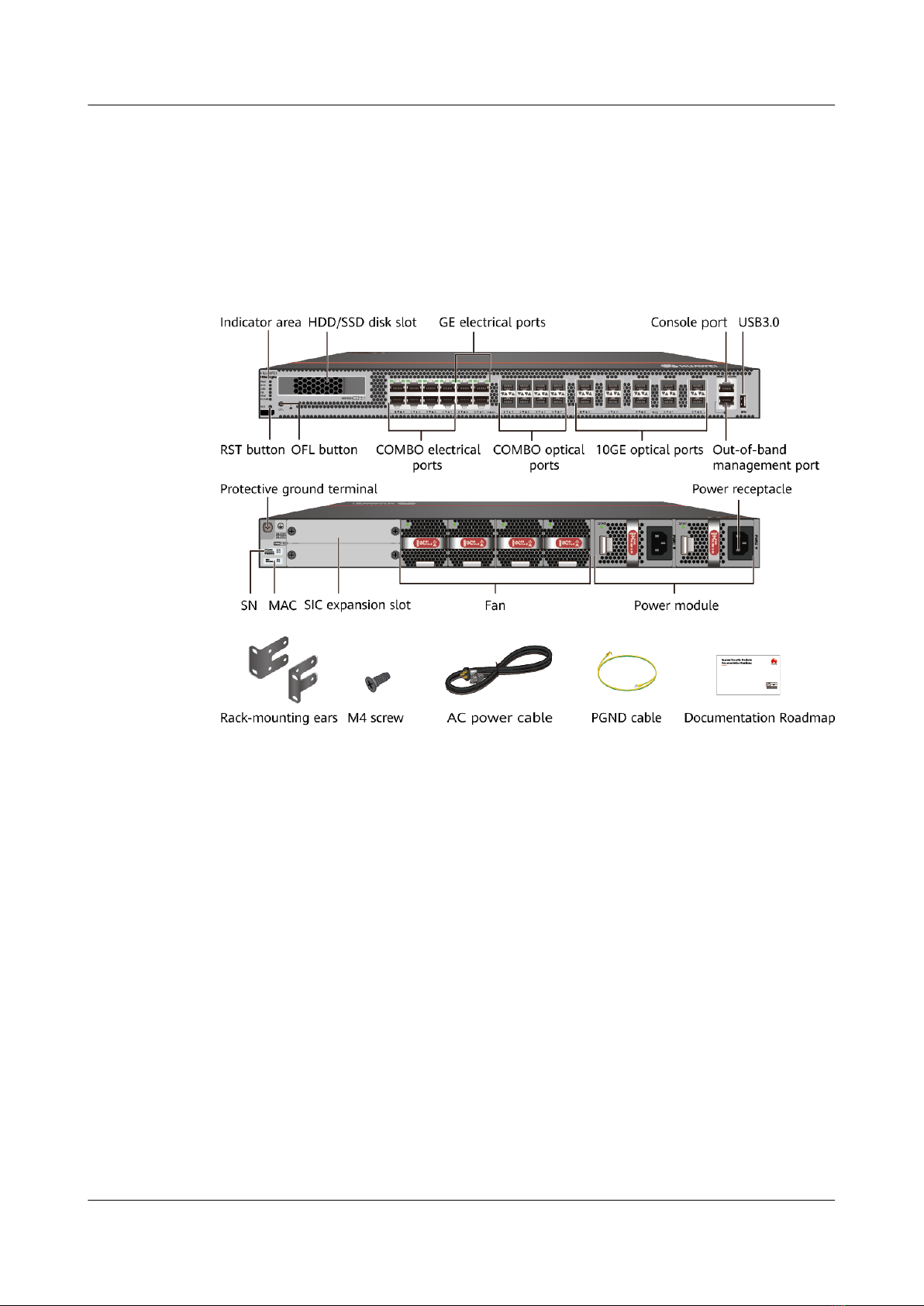
Device and Auxiliary Materials
Figure 2-3 Appearance and auxiliary materials of USG6635F, USG6655F,
USG6685F
Cable Connection
Connect cables according to Figure2 and power on the device. As device does not
provide a power switch, it starts up immediately after receiving power. When the
SYS indicator on the frontpanel is blinking (once every two seconds), the device is
running and ready for conguration.
HiSecEngine USG6000F Series
Quick Start 2 Device Introduction and Cable Connection
Issue 04 (2022-11-24) Copyright © Huawei Technologies Co., Ltd. 6

Figure 2-4 Connecting cables of USG6635F, USG6655F, USG6685F
2.3 USG6710F, USG6715F
Device and Auxiliary Materials
In the preceding gure, the AC model is used as an example. The USG6715F AC
and DC models dier only in the power supply mode.
HiSecEngine USG6000F Series
Quick Start 2 Device Introduction and Cable Connection
Issue 04 (2022-11-24) Copyright © Huawei Technologies Co., Ltd. 7
Indice
Altri manuali Huawei Firewall

Huawei
Huawei USG6000 Series Istruzioni per l'installazione

Huawei
Huawei Eudemon8000E Series Manuale utente

Huawei
Huawei USG9500 Series Istruzioni per l'installazione

Huawei
Huawei Quidway Eudemon 200 Manuale utente

Huawei
Huawei USG6306 Manuale utente

Huawei
Huawei USG6000 Series Manuale di installazione e funzionamento

Huawei
Huawei NIP6830 Manuale utente

Huawei
Huawei USG6000E Series Istruzioni per l'installazione

Huawei
Huawei USG9500 Series Istruzioni per l'installazione


