
Hunt HNR-09EE Manuale utente

°
USER MANUAL
09 CHANNELS
NETWORK VIDEO RECORDER
2
INSTRUCTION MANUAL
To obtain the best performance and ensure device function correctly, please read this instruction manual carefully and
completely.
FCC Compliance
USER-INSTALLER CAUTION: YOUR AUTHORITY TO OPERATE THIS FCC VERIFIED EQUIPMENT
COULD BE VOIDED IF YOU MAKE CHANGES OR MODIFICATIONS NOT EXPRESSLY APPROVED BY THE
PARTY RESPONSIBLE FOR COMPLIANCE TO PART 15 OF THE FCC RULES.
NOTE: THIS EQUIPMENT HAS BEEN TESTED AND FOUND TO COMPLY WITH THE LIMITS FOR A
CLASS A DIGITAL DEVICE, PURSUANT TO PART 15 OF THE FCC RULES. THESE LIMITS ARE
DESIGNED TO PROVIDE REASONABLE PROTECTION AGAINST HARMFUL INTERFERENCE WHEN THE
EQUIPMENT IS OPERATED IN A COMMERCIAL ENVIRONMENT. THIS EQUIPMENT GENERATES, USES,
AND CAN RADIATE RADIO FREQUENCY ENERGY AND IF NOT INSTALLED AND USED IN
ACCORDANCE WITH THE INSTRUCTION MANUAL, MAY CAUSE HARMFUL INTERFERENCE TO RADIO
COMMUNICATIONS.
OPERATION OF THIS EQUIPMENT IN A RESIDENTIAL AREA IS LIKELY TO CAUSE HARMFUL
INTERFERENCE IN WHICH CASE THE USER WILL BE REQUIRED TO CORRECT THE INTERFERENCE AT
HIS OWN EXPENSE.
THIS CLASS A DIGITAL APPARATUS MEETS ALL REQUIREMENTS OF THE CANADIAN
INTERFERENCE-CAUSING EQUIPMENT REGULATIONS.
WARNINGS, CAUTIONS & COPYRIGHT
WARINGS
TO REDUCE THE RISK OF FIRE OR ELECTRIC SHOCK, DO NOT EXPOSE THIS PRODUCT TO RAIN OR
MISTURE.
DO NOT INSERT ANY METALLIC OBJECT THROUGH VENTILATION GRILLS.
CAUTION
Explanation of Graphical Symbols
The lightning flash with arrowhead symbol, within an equilateral triangle, is intended to alert the
user to the presence of insinuated "dangerous voltage" within the products enclosure that may be of
sufficient magnitude to constitute a risk of electric shock to persons.
The exclamation point within an equilateral rhombus is intended to alert the user to the presence of
important operating and maintenance (servicing) instruction in the literature accompanying the
product.
USERS OF THE SYSTEM ARE RESPONSIBLE FOR CHECKING AND COMPLYING WITH ALL FEDERAL,
STATE, AND LOCAL LAWS AND STATUTES COIPCERNING THE MONITORING AND RECORDING OF
VIDEO AND AUDIO SIGNALS. ULTRAK SHALL NOT BE HELD RESPONSIBLE FOR THE USE OF THIS
SYSTEM IN VIOLATION OF CURRENT LAWS AND STATUTES.
COPYRIGHT
THE TRADEMARKS MENTIONED IN THE MANUAL ARE LEGALLY REGISTERED TO THEIR RESPECTIVE
COMPANIES.
CAUTION: TO REDUCE THE RISK OF ELECTRIC SHOCK.
DO NOT REMOVE COVER (OR BACK).
NO USER-SERVICEABLE PARTS INSIDE.
REFER SERVICING TO QUALIFIED SERVICE PERSONNEL.
RISK OF ELECTRIC SHOCK
DO NOT OPEN
CAUTION

3
TABLE OF CONTENTS
1 INTRODUCTION...................................................................................................................... 4
1.1 FEATURE.......................................................................................................................4
1.2 SPECIFICATION..........................................................................................................4
2 HARDWARE OVERVIEW......................................................................................................8
2.1 FRONT PANEL .............................................................................................................8
2.2 ALARM TRIGGER.....................................................................................................10
2.3 IR REMOTE CONTROL ..............................................................................................12
3 SYSTEM SETUP .....................................................................................................................13
3.1 MENU SETUP INTERFACE(GUI)...........................................................................13
3.2 LIVE VIEWING AND POP-UP MENU....................................................................15
3.3 CAMERA SETUP........................................................................................................19
3.4 RECORD SETUP ........................................................................................................27
3.5 ALARM SETUP...........................................................................................................29
3.6 NETWORK SETUP ....................................................................................................33
3.7 AUTHORITY SETUP .................................................................................................38
3.8 DISK MANAGEMENT...............................................................................................40
3.9 SYSTEM SETUP .........................................................................................................41
4 NVR PLAYBACK....................................................................................................................46
4.1 TIME SEARCH ...........................................................................................................48
4.2 EVENT SEARCH ........................................................................................................48
4.3 BACKUP.......................................................................................................................49
4.4 SYSTEM LOG .............................................................................................................50
5 BACKUP PLAYBACK ...........................................................................................................51
5.1 MAIN SCREEN SETTING.........................................................................................51
5.2 PLAYBACK OPERATION ........................................................................................54
6 NETWORK VIEWING & PLAYBACK............................................................................... 57
6.1 IP ADDRESS SETUP ON PC SITE...........................................................................57
6.2 OPTIONAL MICROSOFT INTERNET EXPLORER SETUP..............................59
6.3 LOGIN ..........................................................................................................................61
6.4 REMOTE CONTROL.................................................................................................62
6.5 CONFIGURE ...............................................................................................................67
APPENDIX A: RECORDING TIME LAPSE (HOURS).............................................................80
APPENDIX B: HDD COMPATIBLE TABLE .............................................................................. 81
APPENDIX C: ERROR MESSAGE LIST.................................................................................... 83

4
1 INTRODUCTION
1.1 FEATURE
H.264 & MJPEG decompression format support.
Real-time Display & Playback.
Support Mega Pixel Camera for each channel.
Support CMS (Central Management System)
Audio Backup / Audio Streaming.
Graphic User Interface ( GUI ).
Support time-point backup function under Ethernet remote control mode. User
can select any time period to process backup from remote side.
Support time-search & event-search function under Ethernet remote control mode.
Up to four online clients for independent remote control; individual live-time,
play-back & time-search function available
Support PPPoE/ Static/ DHCP IP & DDNS.
Powerful mobile surveillance function, support i-Phone & Android
Support log function
1.2 SPECIFICATION
MODEL
9CH NVR
System
OS
Embedded Linux
connector
Ethernet
RJ-45, 10/100/1000 Mbps x1
VGA
output
D-SUB output
HDMI
output
HDMI output
USB 2.0
Front : 2 ports
Power
DC-12V, 5A
Video and Audio
Video input
9 channels
Audio input
9 channels
NVR Functions
Camera Name
Max. 20 characters
Screen Split Control
1, 4, 9
Image Control
Contrast / Brightness / Saturation / Hue
Recording mode
Manual / Schedule / Alarm

6
Pre Recording
1~5 sec
Watermark
Support
Searching and Playback
Search Method
Date / Time / Event
Date/ Time / Event Search
Selectable on the calendar
Log Search
Through the log data to find the video event / time
Backup Type
USB
Remote Client Software
Monitoring Environment
Hunt CMS, Iprosecu M.V2 for I phone / I pad , Iprosecu
A.M.V2 for Android phone / Android pad, Web site
IP cam Live View
9 Channels
Remote Search
Web site remote time / event search
System Monitoring and Recovery
Monitoring
Watchdog
Alarm
Alarm Input
8 alarm in
Alarm output
1 relay out
Peripheral Devices
Audio in
3.5 ØEarphone stereo jack
Audio out
3.5 ØEarphone stereo jack
RS 485
2- pin terminal
STORAGE & BACKUP DEVICE
INTERNAL HDD SUPPORT
SATA HDD x 4
EXTERNAL USB BACKUP
DEVICE
(PAN DRIVE, HDD,
BURNER)
USB x2
E-SATA
x1
RAID
N/A
Networking
Type
Static/ DHCP/ PPPoE/DDNS
Environment
Operating Temp.
0 - 45 ℃/ 32~113 F
Humidity
0~80% RH (non-condensing)
Language
Type
English / Traditional Chinese / Simple Chinese / Russian /
Italian / Japanese / Czech / France / Germany / Spanish /
Portuguese

7
Physical
Color
Black
Dimensions (W x H x D)
360 x 60 x 311 mm
Weight
4 KG
* SPECIFICATIONS ARE SUBJECT TO CHANGE WITHOUT NOTICE

8
2 HARDWARE OVERVIEW
2.1 FRONT PANEL
NVR OPERATION
NO.
LABEL
OPERATION
1
LED
Led Indicator
2
4321
5
76 8
1992120
10 11 12
16 17 18
151413 24
23
22
/
USB Connector/ USB Mouse Connector
3
MIC IN
Microphone input(Phone Jack)
4
AUDIO OUT
Earphone output(Phone Jack)

9
BACK PANEL
NO.
LABEL
OPERATION
1
E-SATA
E-SATA interface
2
VIDEO OUT
(VGA)
Connect to LCD monitor
3
POWER
Connect to power adapter (AC 12V/5A)
4
VIDEO OUT
(HDMI)
HDMI video output
5
ETHERNET
RJ-45 connector
6
ALARM IN/
RELAY OUT/
RS-485
8 alarm in/ 1 relay out/ RS485
7
FAN
The fan louvers

10
2.2 ALARM TRIGGER
There are four types of alarms: Motion detection, Video Loss Alarm, External Alarm, and
Digital Input from Camera. Following are the possible action when alarm is triggered.
Every action is configurable (Ex. the screen display pattern, the relay triggered time.etc) and
will be explained in the later chapter.
A. When Motion detection happens:
a. The live screen pattern can be switch to single channel screen or split screen.
b. External relay/ built-in buzzer can be triggered.
c. Alarm timepoint can be recorded in the event list, and you can search for the event in
playback.
d. On the channel which the alarm triggered, the icon pops up to remind the user.
e. The pre/ post-alarm recording video can be sent to e-mail/ uploaded to FTP.
f. CGI can be sent to an http server.
B. When External Alarm or Digital Input from Camera happen:
a. External relay/ built-in buzzer can be triggered.
b. Alarm timepoint can be recorded in the event list, and you can search for the event in
playback.
c. On the channel which the alarm triggered, the icon pops up to remind the user.
d. The pre/ post-alarm recording video can be sent to e-mail/ uploaded to FTP.
e. CGI can be sent to an http server.
C. When Video Loss Alarm happens:
a. External relay/ built-in buzzer can be triggered.
b. Alarm timepoint can be recorded in the event list, and you can search for the event in
playback.
c. On the channel which the alarm triggered, the icon pops up to remind the user.
d. CGI can be sent to an http server.
11
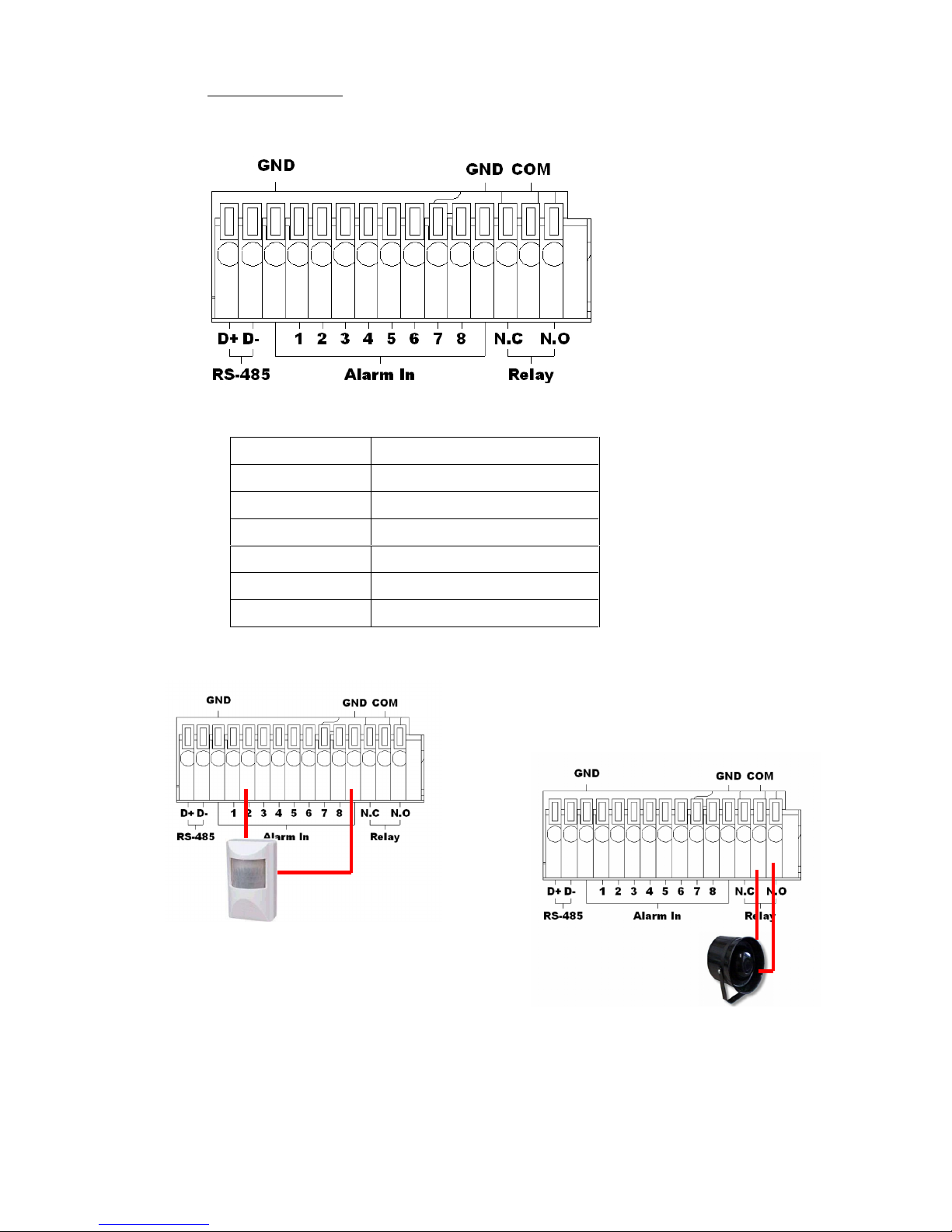
D. Alarm in connecter
EX1:Connect GND & Alarm to external IR detector.
EX2:Connect N.O & COM to external siren.
Depending on the external device type,
You may connect N.C & COM to external device.
D+
RS-485: sends +/ receives +
D -
RS-485: sends -/ receives -
GND
Ground
ALARM IN 1-8
Alarm input
N.C
Relay: Normally close
N.O
Relay: Normally open
COM
Relay: Common
Indice
Altri manuali Hunt Hardware di rete


Manuali Hardware di rete popolari di altre marche

Matrix Switch Corporation
Matrix Switch Corporation MSC-HD161DEL Manuale utente

B&B Electronics
B&B Electronics ZXT9-IO-222R2 Manuale utente

Yudor
Yudor YDS-16 Manuale utente

D-Link
D-Link ShareCenter DNS-320L Manuale utente

Samsung
Samsung ES1642dc Istruzioni per l’uso

Honeywell Home
Honeywell Home LTEM-PV Istruzioni per il montaggio


