
HydroQuip Ultimate Plus Series Manuale utente

ULTIMATE PLUS SERIESULTIMATE PLUS SERIES
SOLID-STATE
SYSTEM OPERATION MANUALSYSTEM OPERATION MANUAL
8600
2
3
80 0
0
MTE E
REOHT
EA RS YSTEM

CONTENTS
1
Important Safety Instructions
Major Component Illustration
Heater Operation
Spaside Control
Filtration Programming
Economy Programming
Warm Weather Conditions
Chemical Water Treatment
Troubleshooting
Warranty Information
2
4
5
6-8
9
10
18
13
13
14-15
Additional Features/Freeze Protection 11
Error Identification 12

2
DANGER To reduce the risk of injury, do not permit children to use this product
unless they are closely supervised at all times.
WARNING - RISK OF CHILD DROWNING. Extreme caution must be exercised to
prevent unauthorized access by children. To avoid accidents, ensure that children
cannot use a spa or hot tub unless they are supervised at all times.
DANGER To reduce the risk of injury to persons, do not remove suction fittings.
Spa location must accommodate sufficient drainage of water around the base of the
structure, as well as the power source compartment.
Prolonged immersion in water that is warmer than normal body temperature can result
in a dangerous condition known as HYPERTHERMIA. The causes, symptoms,
and effects of hyperthermia may be described as follows: Hyperthermia occurs
when the internal temperature of the body reaches a level several degrees above
the normal body temperature of 98.6BF. The symptoms of hyperthermia include
dizziness, fainting, drowsiness, lethargy, and an increase in the internal
temperature of the body. The effects of hyperthermia include (1) unawareness of
impending hazard, (2) failure to perceive heat, (3) failure to recognize the need to
exit spa, (4) physical inability to exit spa, (5) fetal damage in pregnant women, (6)
unconsciousness resulting in danger of drowning. WARNING The use of alcohol,
drugs or medication can greatly increase the risk of fatal hyperthermia in hot tubs
and spas.
DANGER - RISK OF ELECTRICAL SHOCK. Install at least 5 feet (1.5m) from all
metal surfaces. (A spa may be installed within 5 feet of metal surfaces if each
metal surface is permanently connected by a solid copper conductor attached to
the wire connector on the terminal box that is provided for this purpose. Refer to
NEC and local codes in effect at the time of installation.)
A pressure wire connector is provided on the control box to permit connection of a
solid copper bonding conductor between this point and any equipment, metal
enclosures of electrical equipment, metal water pipe, or conduit within 5 feet
(1.5m) of the unit as needed to comply with local requirements.
Bond accessible metal to the dedicated connector on the equipment grounding bus,
bond the equipment ground bus to the local common bonding grid as part of the
installation in the form of (1) a reinforced concrete slab for support, (2) a ground
plate provided beneath the hot tub or spa, or (3) a permanent ground connection
that is acceptable to the local inspection authority.
DANGER RISK OF ELECTRICAL SHOCK. Do not permit any electrical appliance,
such as a light, telephone, radio, or television, within 5 feet (1.5m) of a spa or hot
tub.
To reduce the risk of injury:
The water in a spa or hot tub should never exceed 104BF (40BC). Water temperatures
between 100BF (38BC) and 104BF (40BC) are considered safe for a healthy adult.
Lower water temperatures are recommended for extended use (exceeding 10-15
minutes) and for young children.
Excessive water temperatures have a high potential for causing fetal damage during
the early months of pregnancy, pregnant or possibly pregnant women should limit
spa or hot tub water temperatures to 100BF(38BC).
IMPORTANT SAFETY INSTRUCTIONS
READ AND FOLLOW ALL INSTRUCTIONS
!
!
!
!
!

Before entering the spa or hot tub, the user should measure the water temperature
with an accurate thermometer.
The use of alcohol, drugs, or medication before or during spa or hot tub use may lead
to unconsciousness with the possibility of drowning.
Persons suffering from obesity or with a medical history of heart disease, low or high
blood pressure, circulatory system problems, or diabetes should consult a
physician before using a spa or hot tub.
Persons using medication should consult a physician before using a spa or hot tub
since some medication may affect heart rate, blood pressure, and circulation.
This appliance is provided with a ground-fault-circuit-interrupter located on the control
box. Before each use and with the unit operating, push the test button. The unit
should stop operating and the reset button should appear. Push the reset button.
The unit should now operate normally. If the interrupter does not perform in this
manner, a ground current is flowing indicating the possibility of electrical shock.
Disconnect the power, or unplug from receptacle, until the fault has been
identified and corrected.
Connected to a grounded, grounding type receptacle only. NEVER connect the spa to
an extension cord.
Do not bury the cord.
WARNING To reduce the risk of electrical shock, replace damaged cord immediately.
A terminal marked “G” or “ground” is provided in the wiring box located inside the
equipment compartment. To reduce the risk of electric shock, connect the
terminal or connector to the grounding terminal of your electrical service or supply
panel with a continuous green insulated copper wire in accordance with National
Electric Code Table 250-95 and any other local codes in effect at the time of the
installation.
The electrical supply for this product must include a suitably rated switch or circuit
breaker to open all ungrounded supply conductors to comply with Section 422-30
of the National Electric Code, ANSI/NFPA 70 1987. The disconnecting means
must be readily accessible to the tub occupant but installed at least 5 feet (1.5m)
from the tub water.
WARNING - Do not install indoors. This unit uses a gas heater that requires proper
ventilation and is intended for outdoor use only.
Install at least 5 feet (1.5m) from tub water using nonmetallic plumbing. Install blower
no less than 1 foot (305mm) above the maximum water level to prevent water
from contacting electrical equipment. Install in accordance with the installation
instructions.
To reduce the risk of drowning from hair and body entrapment, install a suction
fitting(s) with a marked flow rate in gallons-per-minute that equals or exceeds the
flow rate marked on the equipment assembly.
For Units with a GFCI (Ground Fault Circuit Interrupter)
For Cord and Plug Connected Units
For Permanently Installed Units
For Permanently Installed Units not Provided with an Internal Disconnecting Method
For Units with Gas Heaters
For UL Listed Equipment Assemblies
3
INTRODUCTION
Congratulations on your new purchase. Hydro-Quip Equipment & Control Systems
are constructed of the finest materials and assembled under the strictest quality
control standards. With proper care and maintenance your system will provide you
with many years of reliable performance.
The following pages contain informative information concerning the operation and
care of your system.
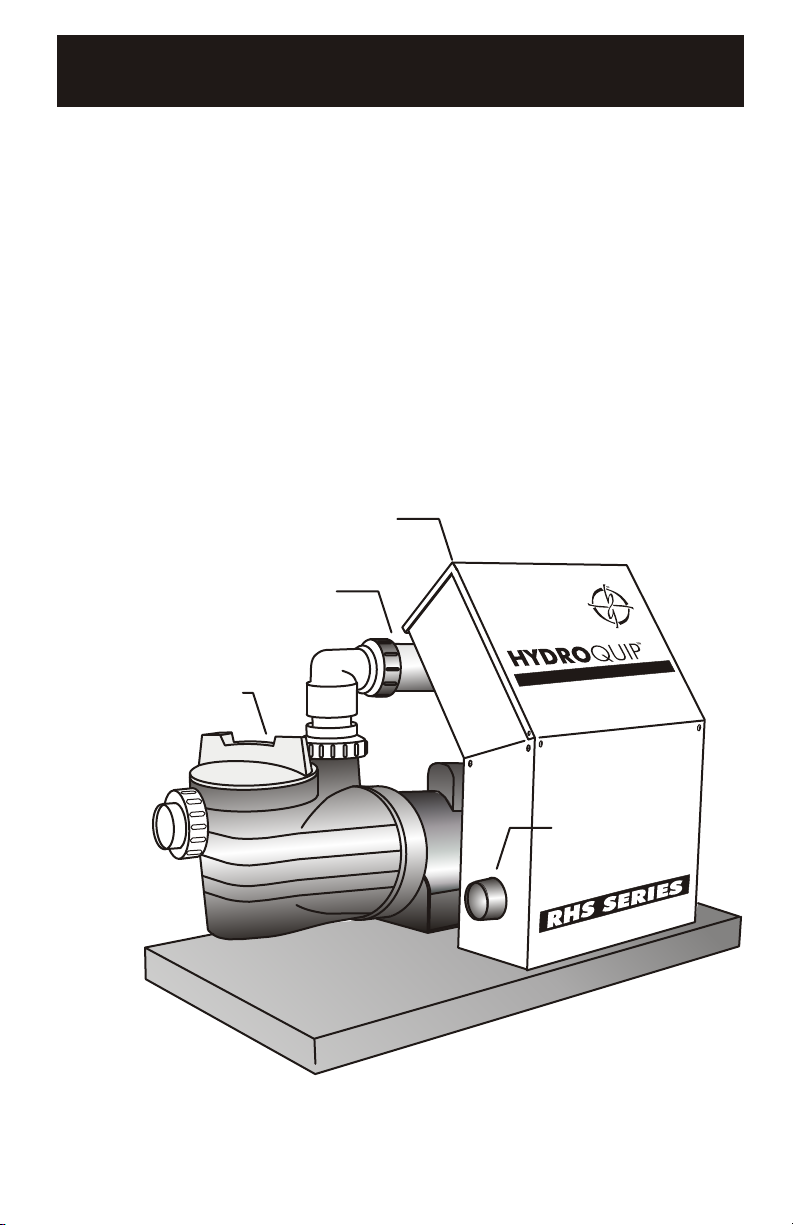
Major Components
Pump Assembly
Heater Assembly
Control Box
8000
ROT TE
EME HEA ER SYST M
4
(Note: Your Control may differ from the illustration below although the
basic operation and configuration will be the same.)
Air Blower

5
HEATER OPERATION
The control system may be supplied with one of three different
heater configurations: 5.5kw electric, 11kw electric or Gas
Heater Ready. In all cases a Gas heater circuit has been
provided in the event a gas heater is to be used to “boost” the
heat output of the system.
For reference a covered 300 gallon spa will heat at a rate
described below based on the heater wattage used.
5.5kw (5500w) - A heat rise of 6-8°F can be expected
11kw (11,000w) - A heat rise of 12-16°F can be expected
Gas Heater - Heat rise varies based on wattage of gas heater
(5.5kw = 18766 BTU/hr)
6
1 2
3
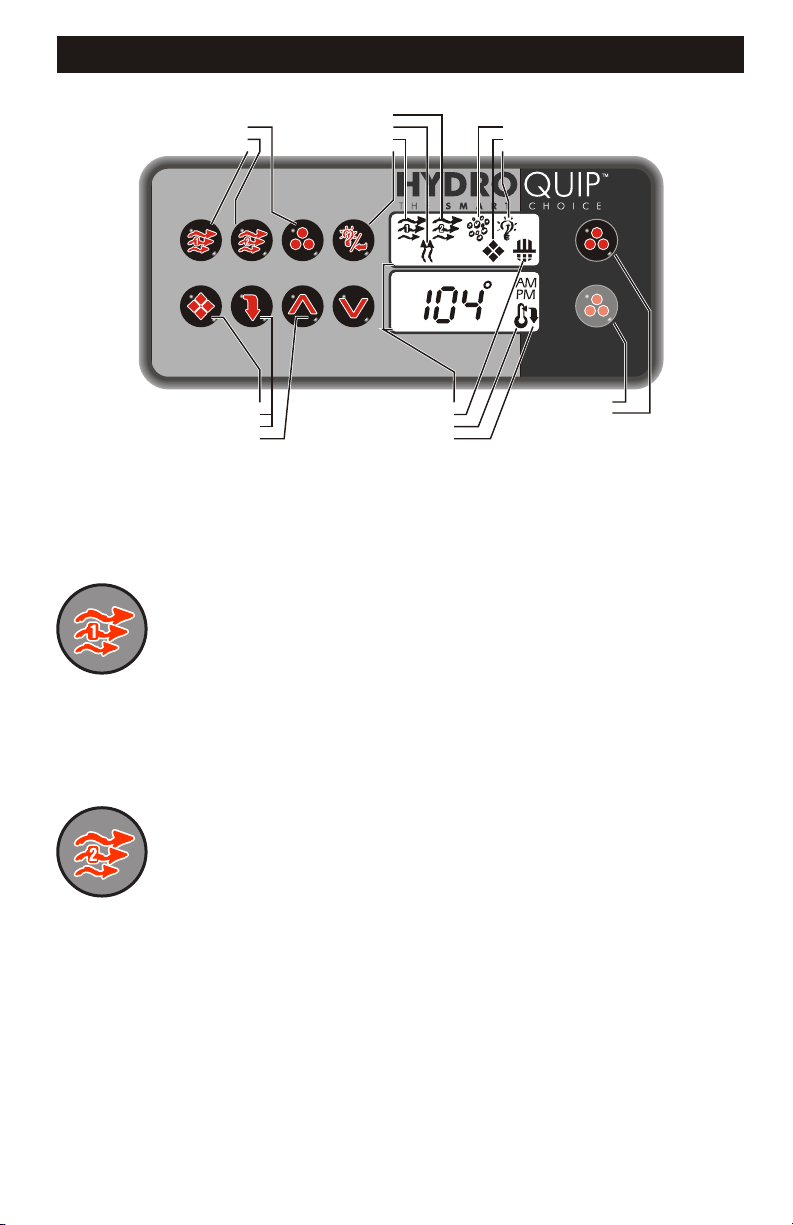
YOUR SPASIDE CONTROL
PUMP 2 ICON
HEATER ON ICON
PUMP 1 ICON
LIGHT/ENTER KEY
PROGRAM KEY
ECONOMY/NORMAL
MODE KEY
UP/DOWN ARROWS
LCD WINDOWS
FILTERING ICON
TEMPERATURE SET ICON
ECONOMY MODE ICON
BLOWER/LIST KEY
PUMP 2 KEY
PUMP 1 KEY
AIR BLOWER ICON
PROGRAM MODE ICON
LIGHT ON ICON
Default System Operation: When power is applied, or there is a temporary loss of
power, the system will initiate its default programming. The filter cycle will begin 24-
hours after the system has been powered up. The filtration cycle will be active for 1-
hour and will repeat every 24-hours. The temperature will be maintained at 95BF.
Pump 1 Key:
Pump 2 Key:
Press this key once to turn Pump 1 on. A second press will
turn it off. For dual speed pump operation; Press this key once to turn Pump 1 onto
Low speed, press this key a second time to turn Pump 1 onto High speed, a third
Press will turn the pump off. A built-in timer will shut the pump off after 20 minutes of
operation unless done so manually. The Pump 1 Icon will appear on the LCD while
the pump is running in High speed and flash while it is in Low speed. If the filter icon
appears, a filtration cycle has begun and you will not be able to turn the pump off.
Press this key once to turn Pump 2 on. A second press will
turn it off. For dual speed pump operation; Press this key once to turn Pump 2 onto
Low speed, press this key a second time to turn Pump 2 onto High speed, a third
Press will turn the pump off. A built-in timer will shut the pump off after 20 minutes of
operation unless done so manually. The Pump 2 Icon will appear while the pump is
running in High speed and flash while it is in Low speed.
AUXILIARY 2 KEY
AUXILIARY 3 KEY
7
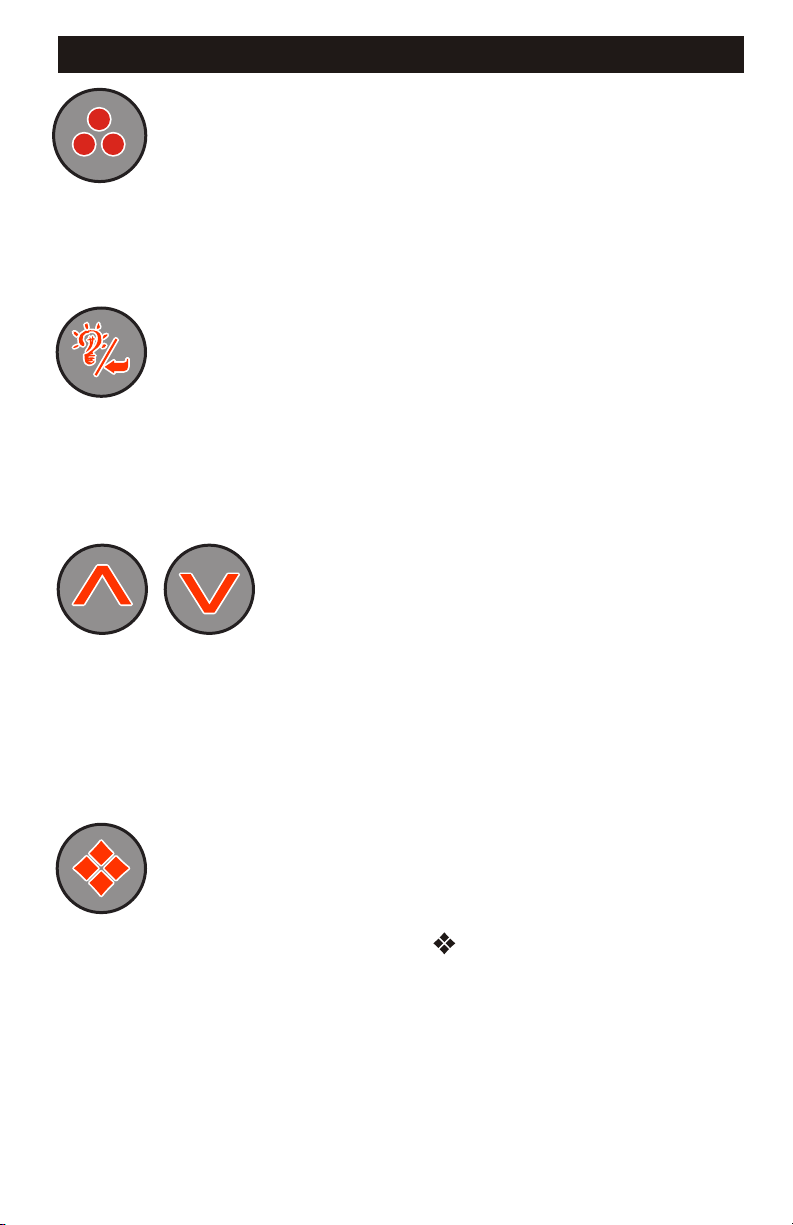
Blower Key:
Light/Enter Key:
Temperature Set Keys:
Press this key to turn the Blower on and off. If equipped with
a multiple speed blower; press this key once to turn Blower onto High speed, a
second press will turn the Blower onto Medium speed, a third press will turn the
Blower onto Low speed and a fourth press will turn the Blower off. A built-in timer will
shut the blower off after 20 minutes of operation unless done so manually. The Blower
Icon will appear while the blower is running in High speed and flash while it is in
Medium and Low speeds.
Press this key to turn the light onto its highest intensity, a
second press will turn the light onto medium, a third press will turn the light onto low
and a fourth press will turn it off. If equipped with Fiber Optic: Press this key once to
show “L1”. Use the Up arrow key to turn the light onto High, Medium, Low and Off.
Press the light key a second time, “F1” will appear. Use the Up arrow key to turn the
Fiber Optic wheel and light on, Fiber Optic wheel off with light on and both Off. The
light will automatically shut off after 2 hours. The Light Icon will appear while the light
is on.
Press the Up Arrow key to increase
the desired temperature. Press the Down Arrow key to decrease the temperature. The
temperature can be adjusted in 1BF increments from 59BF to 104BF (5BC to 40BC). The
new setting will remain on the display for 5 seconds as a confirmation. During this
time the Set Point icon will be appear to let you know this is the desired and not the
actual temperature. After 5 seconds the display will return to the current temperature
reading. When the temperature drops to 1BF below the set temperature, the heater will
be turned on until the temperature is 1BF above the set temperature. The heater icon
will appear while the heater is on and flash when there is a call for heat and the heater
has not yet been activated.
Programming Parameters: There are various parameters that may be
programmed. Follow these procedures to set each parameter: Press and hold the
Program Key for 5-seconds, the program icon ( ) will appear. You may continue to
press the Program key to access the desired parameter to be modified. Once you
have reached the parameter to be modified, press the Enter (Light) key. Use the Up &
Down Arrow keys to adjust the value. If no key has been pressed for 15-seconds the
programming mode is exited. During programming all keys other than the Program,
Enter (Light) and Up & Down Arrow keys will be ignored.
1
SPASIDE CONTROL - Continued
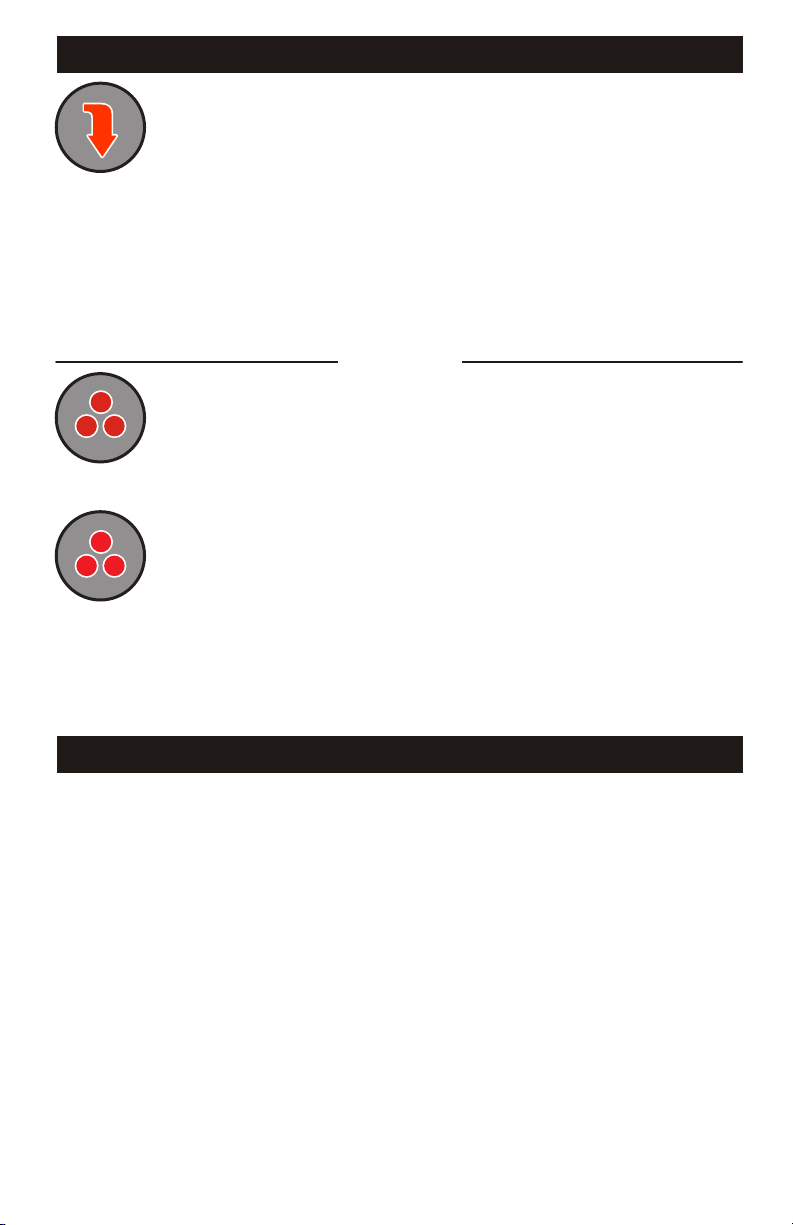
Economy Mode: Press this key to toggle between Economy and Normal
operation. The Normal Mode will automatically maintain the water temperature at the
desired set point. If the set point has not been programmed, the temperature will
remain at 95F. The Economy Mode will maintain the water temperature at 20F
below the set point until manually removed from this mode. When the Economy Mode
is used the factory programming is overridden until midnight of the current day. When
the Economy Mode is active, the Economy icon will appear solid in the display
Window. (SEE Page #10 for additional details)
A built-in timer will shut the pump off after 20 minutes of
operation unless done so manually.
will automatically shut off after 2 hours. The Light Icon will appear while the
fiber optics are activated.
B B
Auxiliary 2 Key: If equipped, press this key to turn Pump 3 on. A second
press will turn Pump 3 off.
Auxiliary 3 Key: If equipped, press this key to turn on Fiber Optic
lighting and color wheel. A second press will turn the color wheel off while the light is
still activated. A third press will turn both the light and color wheel off. Fiber Optic
lighting
2
3
SPASIDE CONTROL - Continued
OPTIONAL
ADDITIONAL FEATURES
Inverted Display: The lower display can be inverted for easy viewing inside or outside
the spa. Press and hold the Economy key for 2 seconds to toggle between inverted and
normal display modes.
Panel Lock: It is possible to lock all of the spaside control keys. Press and hold the Pump
1 key for 5 seconds, “LocF” will appear indicating all the keys have been locked. To
unlock keys, simply press and hold the Pump 1 key for 5 seconds until “Uloc” will appear
indicating the spaside has returned to normal operation.
8
Temperature Readout: To change the temperature display from Fahrenheit to
Celsius or visa-versa simply press-and-hold the “Light” button for approx 5 seconds.

9
Time of Day: This is the first parameter and will appear with the hour flashing. Use
the Up or Down Arrow keys to adjust the hour from 00: to 11:. Press the Program key
again to adjust minutes, use the Up or Down Arrow keys to adjust the minutes from
:00 to :59. Press the Program key to confirm the new setting and move to the next
parameter to be programmed.
AM (Morning) Filter Cycle Start Time: (”Fon1”) appears in the display. Use the
Up/Down Arrow keys to adjust the hour from 00 to 11. Press the Program key again and
set the minutes using the Up/Down Arrow keys from 00 to 59. Press the Program key to
confirm the new setting and move to the next parameter to be programmed.
AM (Morning) Filter Cycle Duration: (”Fdu1”) appears in the display. Use the
Up/Down Arrow keys to adjust from OFF to 12. Press the Program key to confirm the
new setting and move to the next parameter to be programmed.
PM (Evening) Filter Cycle Start Time: (”Fon2”) appears in the display. Use the
Up/Down Arrow keys to adjust the hour from 12 to 23. Press the Program key again
and set the minutes using the Up/Down Arrow keys from 00 to 59. Press the Program
key to confirm the new setting and move to the next parameter to be programmed.
PM (Evening) Filter Cycle Duration: (”Fdu2”) appears in the display. Use the
Up/Down Arrow keys to adjust from OFF to 12. Press the Program key to confirm the
new setting and move to the next parameter to be programmed.
To Access & Adjust “Standard Programming”:
!Press and hold the Program key for approximately 5-seconds. The “Program”
icon will appear.
!The first parameter is the time setting. The time will appear with the hour flashing
!Press the Light/Enter Key to unlock the value for modification.
!Use the Up & Down Arrow keys to increase or decrease the setting.
!Once the desired setting has been achieved, press the Program key to save
the change and move onto the next parameter. (See settings below)
FILTRATION PROGRAMMING
Questo manuale è adatto per i seguenti modelli
2
Indice
Altri manuali HydroQuip Pompa dell'acqua


Manuali Pompa dell'acqua popolari di altre marche


Sykes AmeriPumps
Sykes AmeriPumps GP100M Guida alla risoluzione dei problemi

DUROMAX
DUROMAX XP WX Series Manuale utente

BRINKMANN PUMPS
BRINKMANN PUMPS SBF550 Manuale utente

Franklin Electric
Franklin Electric IPS Manuale utente

Xylem
Xylem e-1532 Series Manuale utente

Milton Roy
Milton Roy PRIMEROYAL Manuale utente