
i-mate JAMA 101 Manuale utente

contents
Chapter 1.Getting to know your Device / 07
1.1 Getting Started 10
1.2StatusIndicators 11
1.3 Entering Information 13
Chapter 2.Personalising your phone // 16
2.1 Today Screen 17
2.2 Start Menu 19
2.3 Ring Tone and Notification 20
2.4 General Settings 23
2.5 Security 31
Chapter 3.Using your phone /34
3.1 Making a Call 35
3.2 Receiving a Call 38
3.3 In-Call Options 39
3.4 Special Dialing Requirements 40
3.5 Additional Settings 40
Chapter 4.Getting connected 44
4.1 Automatic setup of your data connections / 45
4.2 Manual setup of your data connections /45
4.3 Bluetooth /48
4.4 Beams /53 1
i-mat
e
™

JAMA101
Chapter 5.Messaging //55
5.1 Text messaging /56
5.2 Email /60
5.3 Windows Live Message /71
Chapter 6.Synchronizing //79
6.1 Introduction to ActiveSync /80
6.2 Installing and Configuring ActiveSync /80
Chapter 7.Applications & Multimedia 93
7.1 Contacts ///94
7.2 Calendar ///96
7.3 Tasks ///99
7.4 Camera & Video Recorder /101
7.5 Using Pictures & Videos /105
7.6 Using Windows Media Player /109
7.7 Internet Explorer Mobile /117
7.8 Notes /121
7.9 Word Mobile /123
7.10 Excel Mobile /125
7.11Viewing Slide Shows with PowerPoint Mobile128
7.12 Internet Sharing 129
7.13 Using Terminal Services Client /131
7.14 File Explorer 132
7.15 Adding more programs to your device 133
2
i-mate™

Chapter 8.Maintaining you phone /135
8.1 Maintaining your phone 136
8.2 Resetting your Phone 137
8.3 Installing your SIM card 138
8.4 Managing Programs Memory 139
Appendix. Other Applications /141
A.1 Battery Information 142
A.2 PC Requirement to Run ActiveSync 4.2 143
A.3 Specifications 148
3
i-mat
e
™

JAMA101
Copyright ® 2006 i-mate. All Rights reserved.
No part of this manual, including the product and software described in
it, may be reproduced, transmitted, stored in a retrieval system, or
translated into any language in any form, by any means, without prior
written permission from i-mate.
i-mate provides this publication “as is” without warranty of any kind. This
information could include technical inaccuracies or typographical
errors. i-mate may make improvements and/or changes in the product.
Information and specifications contained in this document are subject
to change at any time without notice.
The information contained in this document does not affect or change the
product specifications or warranties. i-mate is not liable for any damages
resulting from the use of this product.
IMPORTANT SAFETY INFORMATION
Please read the following information carefully before
you start using your device to avoid any damages
caused by improper usage:
•The device is not charged when you take it out of
the box. The battery should be charged for at least 8
hours before first use. Do not remove the battery while
charging.
•Do not use batteries, which have not been specified
by the manufacturer, as this may cause leakage or
rupture.
•Do not change the battery with an unspecified AC
Adapter, as this may cause damage to both the device
and the battery.
4
i-mat
e
™

•When discarding the batteries, dispose of them
in a proper manner, according to the battery
manufacturer’s instructions and your local laws.
•Power off the device and remove the battery before
inserting the SIM card. Make sure the SIM card snaps
correctly into the SIM socket.
•Do not open or tamper with the device cover as it will
void your warranty.
•Do not press hard on this product, as it may cause
damage to the screen or the internal components.
•Do not use the device at gas or refuelling stations,
chemical plants and places containing explosives or
flammable materials.
•Do not strike, shake or heat the device in a way which
may cause battery leakage or rupture and damage to
the device.
•Do not scratch the screen with hard objects.
•Do not clean the screen with chemical detergents. Only
use cloths, specifically designed for cleaning liquid
displays, to wipe the screen.
•Do not expose the device to direct sunlight, or leave the
device in a humid environment, for extended periods
of time, as this may cause damage to the device and
battery.
•Do not immerse the device in water.
•The device may interfere with the navigation and/ or
communication systems on aircraft. The use of the
device on aircraft is prohibited by laws in most
countries.
•Use hands-free devices, if you need to use the
telephony services, while driving a vehicle.
5
i-mat
e
™

JAMA101
Interference with Medical Equipment Functions
This product may cause medical equipment to malfunction. The use of
this device is forbidden in most hospitals and medical clinics.
Non-ionizing Radiation
This product should be operated in the suggested normal condition
only to ensure the radiative performance and safety of the interference. As
with other mobile radio transmitting equipment, users are advised that for
satisfactory operation of the equipment and for the safety of
personnel, it is recommended that no part of the human body be allowed to
come too close to the antenna during operation of the equipment.
Trademark Information
Microsoft, MS-DOS, Windows, Windows NT, Windows Server, Windows
Mobile, ActiveSync, Excel, Internet Explorer, MSN, Outlook, PowerPoint
and Word are either registered trademarks or trademarks of Microsoft
Corporation in the United States and/or other countries.
6
i-mat
e
™

Chapter
.
G
e
tt
i
n
g
t
o
K
no
w
Y
ou
r
D
e
v
i
c
e
1.1 Getting Started
1.2 Status Indicators
1.3 Entering Information

Device View
No.
Item
F
unction
1.
T-Flash Card Slot Lets
y
ou insert an external stora
g
e card.
2.
Ear Piece For use during phone calls.
3.
Left Soft KEY Performs the command shown in the label above the button.
4.
Start menu KEY Press and hold on one second to display your START menu.
5.
TALK Button Press to answer an incoming call or dial a number.
6.
Earphone Jack
Allows you to listen to audio media or use the phone’s hands-
free kit.
7.
Right Soft KEY Performs the command shown in the label above the
button.
8.
OK Button Press to confirm your data entries or exit the program in use.
9.
END Button Press to end the phone call.
8
i-mat
e
™

No.
Item
F
unction
10.
Centre Button Carry out the selection from the Navigation pad scrolling by
pressing the center button.
11.
Navigation Pad Press this multi-directional control up, down, left, or right to
move through menus, program instructions.
12.
Mini-USB
Connector Connects to the AC adapter or USB cable.
13.
Reset Button Use this button to soft reset the device.
14.
Microphone Speak into the microphone when receiving or making a phone
call or voice recording.
15.
Volume Controller Scroll up or down to adjust the volume.
16.
CAMERA Button Press to launch the camera. Press again to take a picture.
17.
Stylus Use the stylus to write, draw, or select items on the touch
screen.
18.
Camera Lens Used for capturing photos and videos.
19.
External Speaker Allows you to listen to audio media or
Hands-free calls.
20.
Mirror Aim camera lens for self portraits.
9
i-mat
e
™
JAMA101
Chapter 1
.
Getting
to
Know
your
Device
1 Getting Started
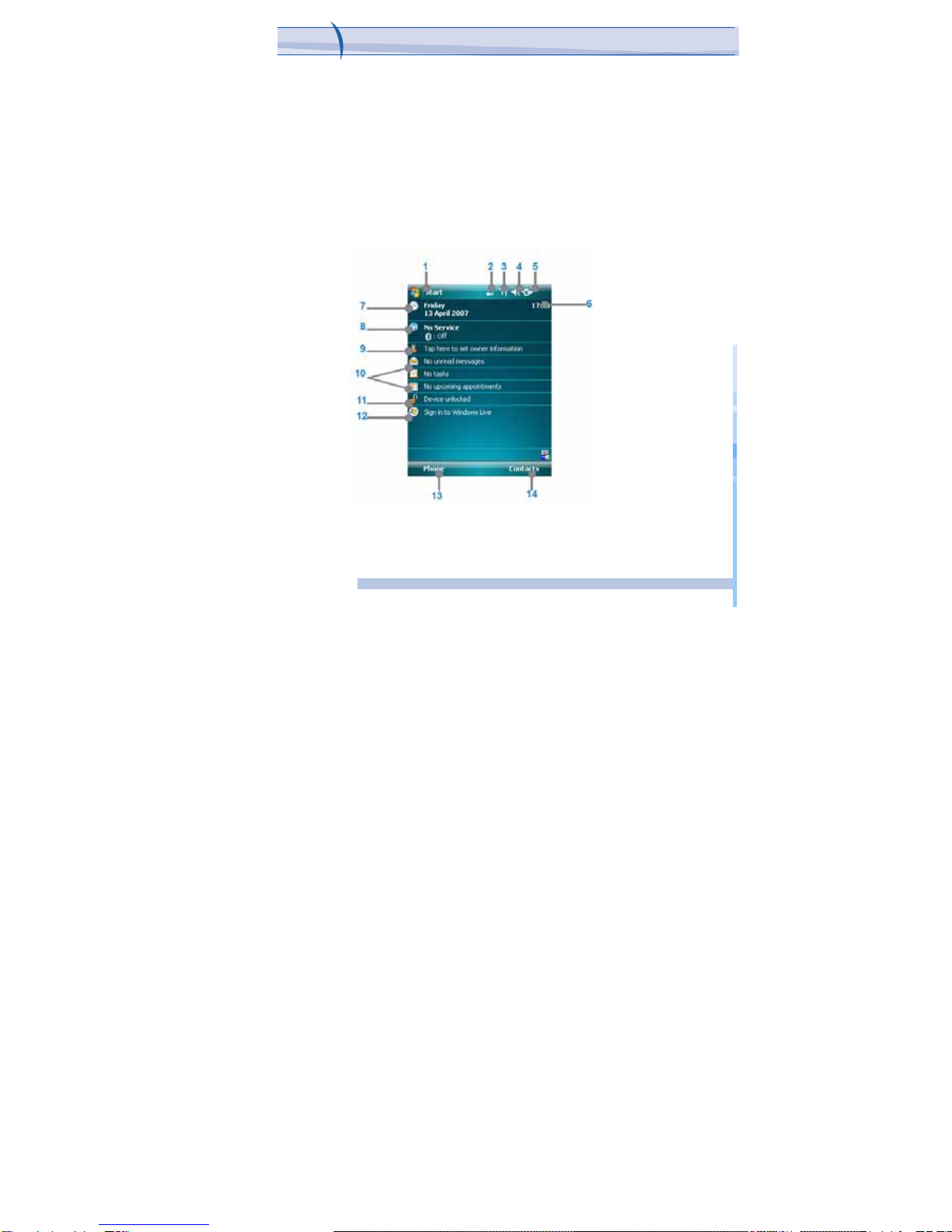
When you turn on the device for the first time, you are asked to
complete a screen calibration process. Calibrating the device screen
involves tapping the center of a cross with the stylus as the cross moves
around the screen. This process ensures that when you tap the screen with
your stylus, the tapped item is activated.
The Today screen displays important information, such as upcoming
appointments and status indicators. You can tap a section on the screen to
open the associated program. If at any point you need to access the Today
Screen, just press/tap Start > Today.
10
i-mat
e
™
Indice
Altri manuali i-mate Telefono cellulare

i-mate
i-mate JAMA 201 Manuale utente

i-mate
i-mate 810-F Manuale utente

i-mate
i-mate I306SP Manuale utente

i-mate
i-mate SPL Manuale utente

i-mate
i-mate SP2 Manuale utente

i-mate
i-mate Pam Manuale utente

i-mate
i-mate Ultimate 6150 Manuale utente

i-mate
i-mate JAMA Manuale utente

i-mate
i-mate PM10A Manuale utente


