
I/O Magic 16X Manuale utente

MagicDVD 16X
Multi-purpose DVD-ROM
USER’S GUIDE

Dear I/OMagic Customer:
Congratulations on the purchase of your MagicDVD 16X Multi-purpose DVD-ROM.
We can assure you that it is made from new state-of-the-art chipsets and components.
Your product has also gone through the most rigorous test and quality assurance
procedures in the industry.
All of the employees at I/OMagic want to express our sincere gratitude for your decision
to purchase our product. Our commitment to you is to provide a product that is easy to
install and use. I/OMagic will also assist you with installation, if needed, and ensure
that our resellers provide you the highest level of sales and service.
I/OMagic began with one PCMCIA sound product in 1993. Since then our company has
grown and now offers more than fifteen products in the multimedia market, including
internal CD-ROM drives, PCMCIA CD-ROM drives, 3D stereo sound cards, Wavetable
sound cards, 3D video cards, PCMCIA card readers, and PCMCIA modems. In the
coming months we will introduce our consumer TV video conferencing, scanners, USB
devices and many other exciting technologies.
We encourage you to browse our web site at http://www.iomagic.com to thoroughly
review our complete product offering. We hope you enjoy using your new product, and
look forward to earning your business in the coming years.
Sincerely,
Michael R. Dendo
Vice President of Sales

DANGER INVISIBLE LASER RADIATION WHEN OPEN AVOID DIRECT
EXPOSURE TO BEAM
VORSICHT INSICHTBARE LASERSTRAHLUNG WENN ABDECKUNG
GEÖFFNET NICHT DEM STRAHL AUSSETSEN
ATTENTION RADIATION DU FAISCEAU LASER INVISIBLE EN CAS
D’OUVERTURE. EVITER TOUTE EXPOSITION AUX RAYONS.
CLASS 1 LASER PRODUCT
APPAREIL A LASER DE CLASSE 1
LASER KLASSE 1
LUOKAN 1 LASERLAITE
PRODUIT LASER
CATEGORIE 1

Copyright Statement
It is a criminal offence, under applicable copyright laws, to make unauthorised copies of
copyright-protected material, including computer programs, films, broadcasts and sound
recordings. This equipment should not be used for such purposes.
Notice: I/OMagic Corporation makes no warranty of any kind with regards to this
material, including, but not limited to, the implied warranties of
merchantability and fitness for a particular product.
I/OMagic Corporation shall not be liable for errors contained herein or for
incidental consequential damages in connection with the furnishing,
performance, or use of this material.
Every effort has been made to ensure that the information in this manual is
accurate. I/OMagic Corporation is not responsible for printing or clerical
errors.
Mention of third party products is for information purposes only and
constitutes neither an endorsement nor a recommendation. I/OMagic
Corporation assumes no responsibility with regards to the performance of
these products.
This document contains proprietary information, which is protected by
copyright (see below).
The information contained in this document is subject to change without
notice.
Trademarks: Microsoft is a registered trademark of Microsoft Corporation. Windows,
Windows 95 and the Windows 98 logo are trademarks of Microsoft
Corporation. IBM is a registered trademark of International Business
Machines Corporation. All other trademarks and product names used
within this manual are the property of their respective companies and are
hereby acknowledged.
Copyright: © 2000 I/OMagic Corp. all rights reserved. No part of this publication may
be reproduced, transmitted, transcribed, stored in a retrieval system, or
translated into any language or computer language, in any form, by any
means, without prior written consent of I/OMagic.
Warranty: I/OMagic Corporation warrants that the products it sells will be free from
defects in materials and workmanship. Consult the warranty card for
complete warranty information.

FCC Compliance Statement
This device complies with Part 15 of the FCC Rules. Operation is subject to the following two
conditions:
1. This device may not cause harmful interference, and
2. This device must accept any interference received, including interference that may
cause undesired operation.
FCC Warning Statement
This equipment has been tested and found to comply with the limits for a Class B digital
device, pursuant to Part 15 of the FCC Rules. These limits are designed to provide reasonable
protection against harmful interference in a residential installation. This equipment generates,
uses and can emit radio frequency energy and, if not installed or used in accordance with the
instructions, may cause interference to radio communications. However, television reception
interference can be determined by turning the equipment off and on. The user is encouraged to
correct the interference by one or more of the following measures:
! Reorient or relocate the receiving antenna
! Increase the separation between the equipment and the receiver
! Connect the equipment into an outlet different from that to which the receiver is
connected
! Consult the dealer or an experienced radio/TV technician for help.
CAUTION
Changes or modifications not expressly approved by the party responsible for compliance
could void the user’s authority to operate the equipment.
FOR EUROPE
“The drive is in conformity with the EMC directive and low-voltage directive.”

Table of Contents
INTRODUCTION 1
PACKAGE CONTENTS 2
SYSTEM REQUIREMENTS 2
HARDWARE DESCRIPTION 3
FRONT PANEL 3
REAR PANEL 4
SPECIFICATIONS 5
INSTALLATION 6
Handling Static-Sensitive Devices 6
Host Interface Connections 6
HARDWARE INSTALLATION 7
Setting-up the “Mode Select” Jumper 7
Connecting to a Primary IDE Controller 8
Connecting a Secondary IDE controller 8
Attaching your MagicDVD 16X DVD-ROM Drive to your computer 8
DRIVER INSTALLATION 11
Windows 95/98 Installation 11
SOFTWARE INSTALLATION 11
Power DVD Playback Software 11
POWER DVD PLAYBACK SOFTWARE 13
FEATURES 13
BEFORE YOU BEGIN 15
POWERDVD INTERFACE 16
To Playback DVD Titles: 16
To Playback MPEG Files: 16
Express Menu 17
Getting additional help 17
TROUBLESHOOTING 18
CONTACTING I/OMAGIC 24
REGISTER YOUR I/OMAGIC PRODUCT 25

I
IN
NT
TR
RO
OD
DU
UC
CT
TI
IO
ON
N
With MagicDVD 16X Multi-purpose DVD-ROM, today's demanding interactive
programs are no obstacle for your PC. The MagicDVD transfers CD-ROM data at up
to 40X speeds and DVD-ROM data at up to 16X speeds. The MagicDVD is the
complete solution for all your DVD / CD-ROM needs. The most popular formats for
DVD and CD-ROM are supported, including:
! DVD-ROM & Video ( Single & Dual Layer)
! DVD-R, DVD-RW
! CD-ROM (Mode 1 and 2).
! CD-ROM-XA
! CD-R, CD-RW, CD-DA
! Photo CD (Single and Multi-session).
! CD-EXTRA ( CD-PLUS ), HYBRID CD, CD-Text
Our Power DVD playback software, supports navigation features allowing you to enjoy
the versatility and interactivity of DVD. The basic navigation functions include play, fast
forward / backward, stop / pause, audio volume adjustment, drive detection, and many
more. Power DVD also supports the advanced functions such as seamless multi-angle
switching, multi-language (up to 32-languages channels), and menu selections of sub-
title and sub-pictures.
MagicDVD 16X multi-purpose DVD-ROM and Power DVD are the perfect combination
for your PC’s DVD experience.

2
Package Contents
The MagicDVD 16X Multi-Purpose DVD-ROM package contains the following
items:
! MagicDVD 16X drive.
! MagicDVD User’s manual (This Document).
! Data cable (IDE cable).
! Power DVD Playback Software.
System Requirements
Minimum system requirements for playing DVD movies utilizing Power DVD
software:
! Pentium II processor at 266 MHz or better.
! Windows 95 / 98.
! 16 Bit Sound Card (Optional for sound).
! AGP/PCI display card with DirectDraw Overlay support.
! 32 MB Ram.
Minimum system requirements for MagicDVD 16X Multi-Purpose DVD-ROM:
! Pentium II processor at 266 MHz or better running Windows 95 / 98 or
higher.
! One available (working) E-IDE port.
! 8 MB of RAM (16 Recommended).
! 16 MB of free hard disk space or better.
3
H
HA
AR
RD
DW
WA
AR
RE
E
D
DE
ES
SC
CR
RI
IP
PT
TI
IO
ON
N
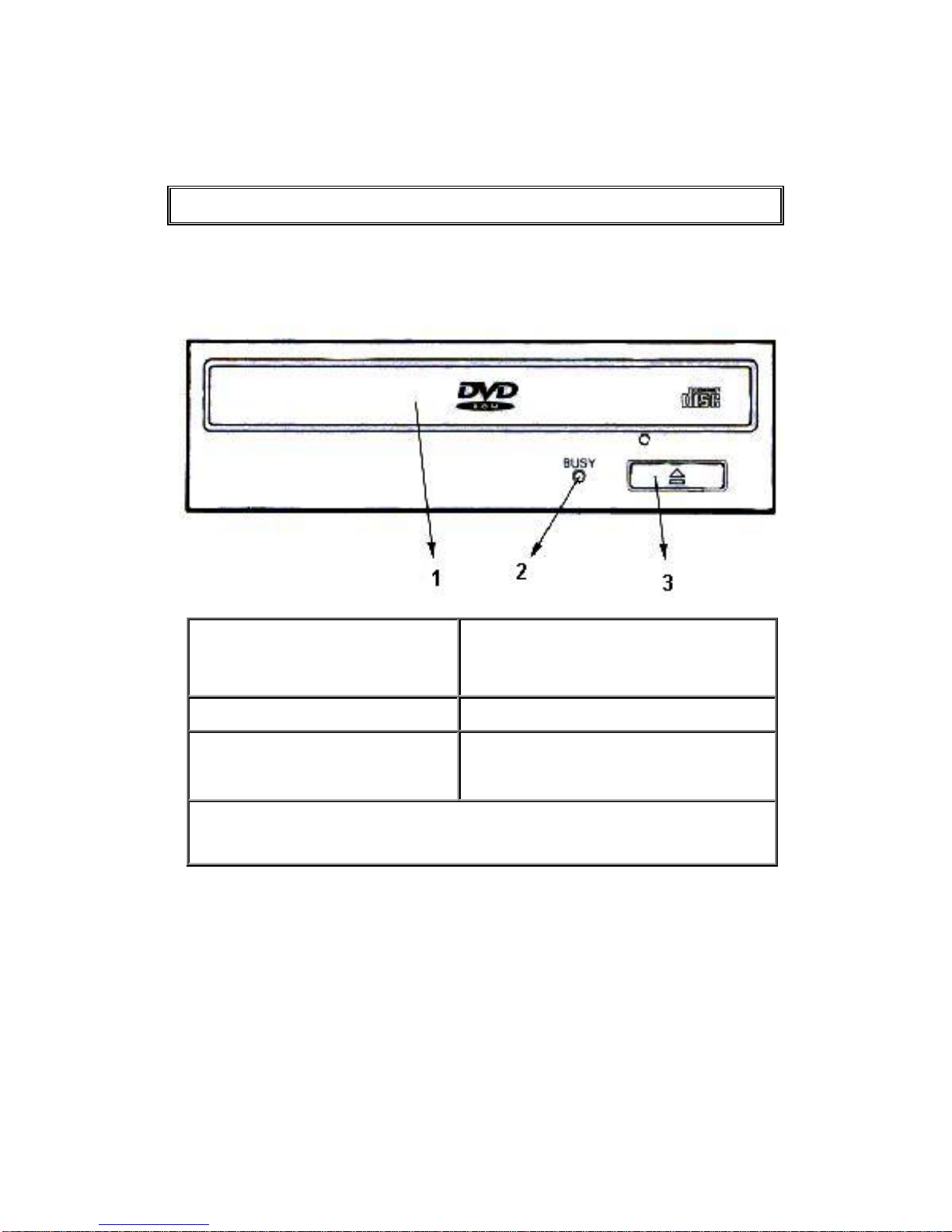
Front Panel
1. Disk tray Auto loading by means of the ejection
button. Place the CD-ROM / DVD-ROM
with the label facing up onto the tray.
2. Busy indicator Flashes during data access.
3. Eject button This button is used to open and close the
tray.
Forced ejection hole (above eject button): When the eject button has lost its
function, insert a stiff rod into this hole and push to eject the disk tray.

4
Rear Panel
4. Audio output
This is a connector for output of analog
audio. Pin 1 = Left channel
Pin 2 = Ground
Pin 3 = Ground
Pin 4 = Right channel
5. Device configuration
jumper
This is the jumper switch for selection of
the drive use mode and supporting PC. The
jumper goes on both pins vertically.
MA = Master
SL = Slave
CS = CSEL of
IDE interface.
Reserved = Do
not use.
6. Host IDE interface This is a 40-pin I/O connector according to
the ATA specifications.
7. DC input This is the power supply input.
Questo manuale è adatto per i seguenti modelli
1
Indice
Altri manuali I/O Magic Unità DVD


