
IBM WAVV 2004 Manuale utente

IBM IT Education Services
© 2004 IBM
Corporation
WAVV 2004
Setup of VSAM Redirector
VSE Connectors
Workshop

Wilhelm Mild, Ingo Franzki
WAVV 2004
Connectors
Setup of
VSAM Redirector
VSE Connectors
Workshop
© Copyright IBM Corporation 2004
VSE/ESA 2.6/2.7
VSAM Redirector
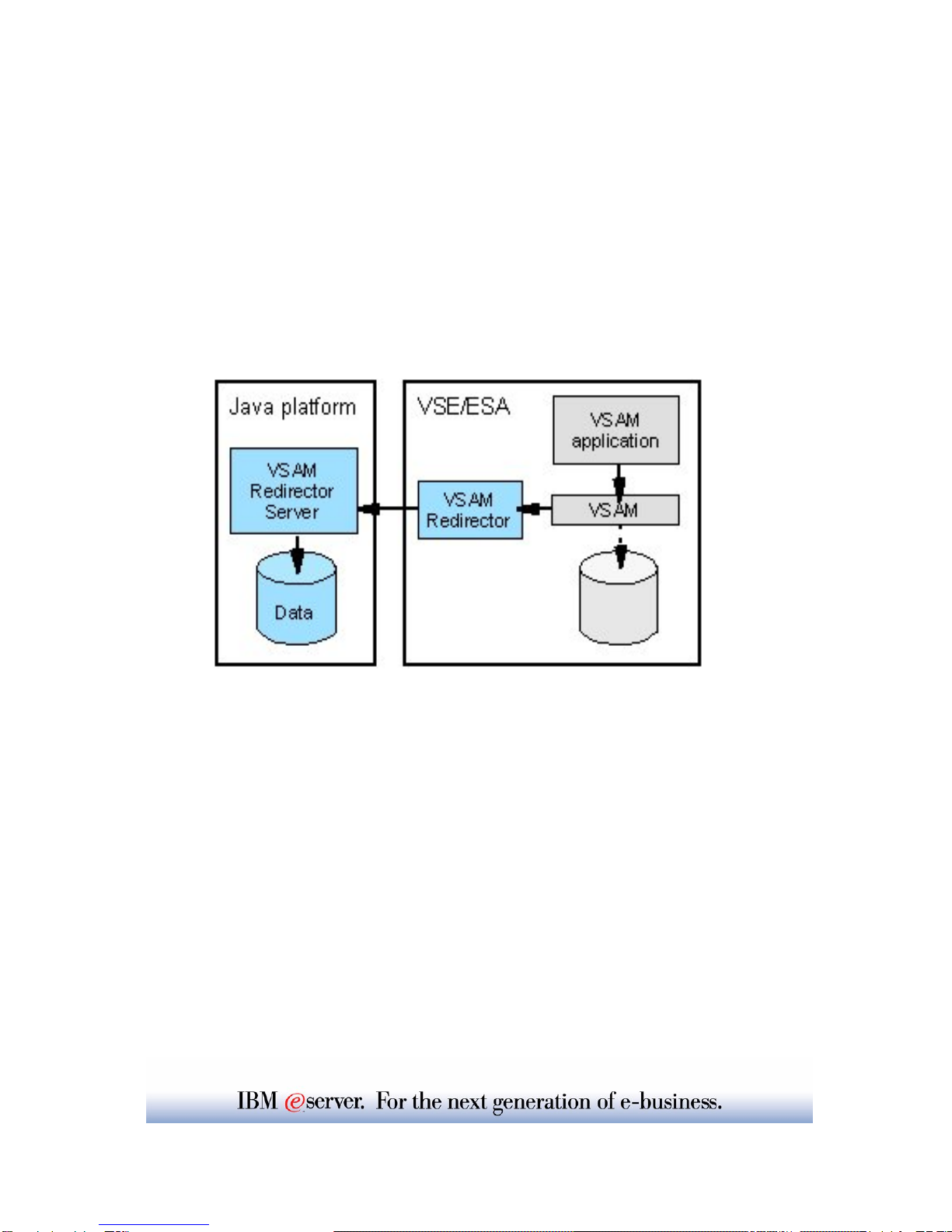
The VSAM Redirector is a new VSE/ESA connector, introduced with VSE/ESA
2.6. The VSAM Redirector allows you to redirect all requests to a certain VSAM
file into any other file system or database on any other (Java-enabled) platform.
VSE/ESA is the client, while the server part runs on any other Java-enabled
platform like Windows.
For example you could use the VSAM Redirector to synchronize a VSAM file with
a DB2 database running on a Windows. By using the VSAM Redirector your
existing VSAM programs doesn't require any revisions.
The VSAM Redirector makes use of a so called VSAM Data Access Exit (VDA).
This exit intercepts all VSAM requests. The exit gets control at OPEN, CLOSE,
and for all data requests (GET, PUT, INSERT,...).
A configuration table is used to define which VSAM files are being "redirected".
The VSAM Redirector Client on VSE forwards all requests against a redirected file
to the VSAM Redirector Server which then handles the request.
The VSAM Redirector Server is a Java application. It can run on any Java
enabled platform.
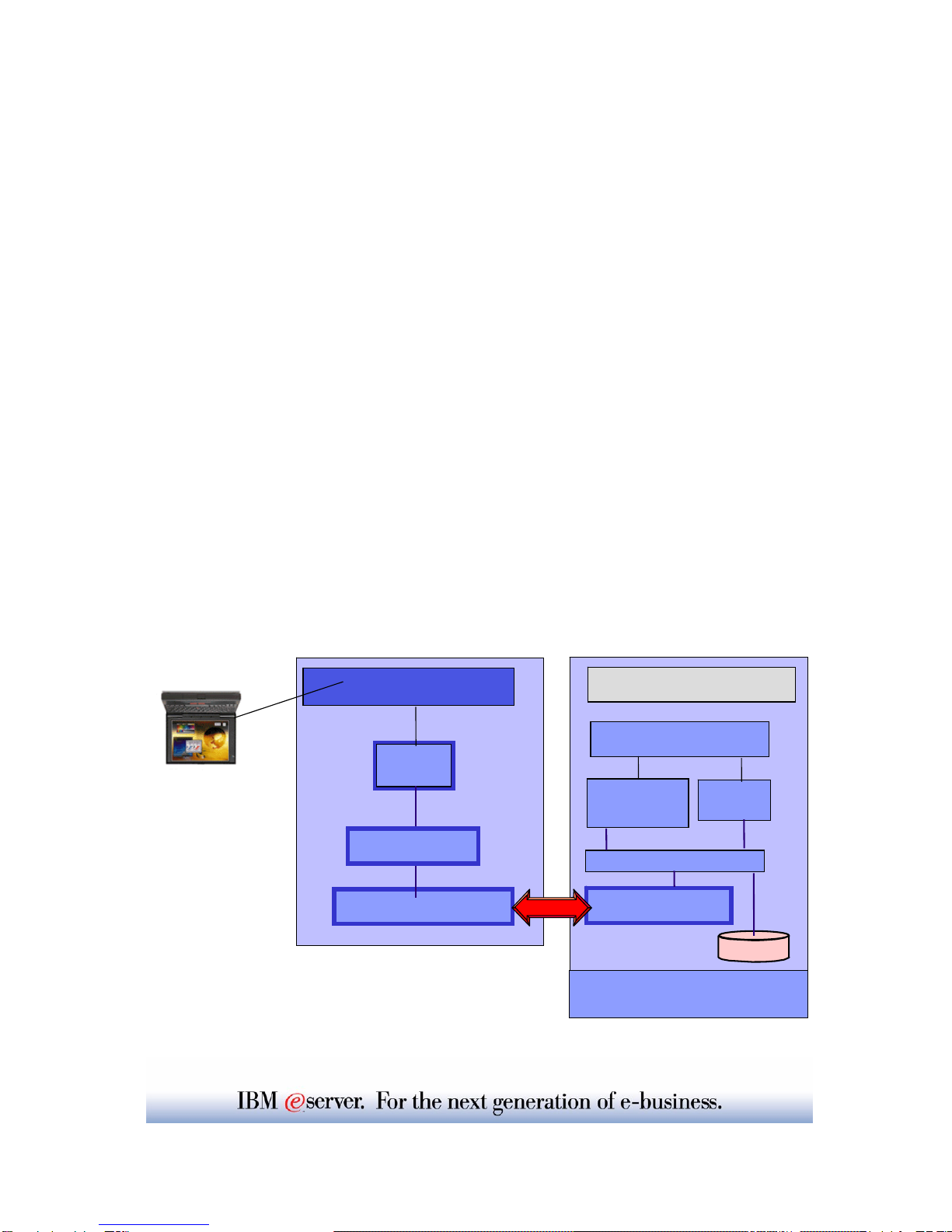
Initial state:
ÎYou have a VSAM file that contains data
(FLIGHT.ORDERING.ORDERS)
ÎYou have applications that work with that VSAM file
(i.e. batch applications, CICS Application, tools like Ditto )
Goal:
ÎRedirect all VSAM INSERT requests to a HTML page on
Windows
ÎThis operation can be done with existing applications (without
changing/touching them)
NOTE: The VSAM Redirector Server does NOT require the
VSE Connector Client on Windows
Redirect VSAM requests to a HTML
page on Windows - Overview
VSE/ESA 2.6
Apache TCP/IP
CICS
Transaction batch
Redirector server Redirector client
VSAM Request
VSAM
Program
HTML
page
Handler

Chapter1: Steps for installation
of VSAM Redirector server on
Windows
STEP1.1: Navigate to VSE Redirector Server home page
Open the VSE Homepage with a web browser:
http://www-1.ibm.com/servers/eserver/zseries/os/vse/
Click on "Service and Support" on the left side
and then on "e-business connectors and utilities".
The page you see contains the VSAM Redirector Server and some tools
that can be downloaded for free.
Navigate to the VSAM Redirector Server which
represents the remote component of the VSAM Redirector.
Click on:
Details and Download
The page explains the most important functions of the
VSAM Redirector Server, which is the Java part of the
VSAM Redirector function.

Steps for installation on a
workstation
STEP1.2: Verification if Java environment installed
To install the VSAM Redirector a Java Virtual Machine must
be installed on Windows.
yTo just run Java programs, the JRE 1.3.x or later is needed
(Java Runtime Environment),
yto develop/compile Java programs, JDK 1.3.x or later is needed
(Java Developer Kit, which includes the JRE).
To verify if a Java Virtual Machine is installed, open a command prompt and
hit command:
java -version
You should see something like:
Java version "1.3.1"
Java(TM) 2 Runtime Environment, Standard Edition
If the messages above are shown go to STEP1.4.
STEP1.3: Install JDK if not on the system
If following message is shown:
'Java' is not recognized as an internal or external command,
operable program or batch file.
- > your system has no Java virtual machine (Runtime Environment) installed.
To install a Java Virtual machine on the PC do:
On the same HTML page (Service and Support -> VSE e-business
Connectors):
VSAM Redirector Server -> Details and Download
in section: Installation you will find a link were you can download the Java
Developer Kit from IBM.
http://www.ibm.com/developerworks/java/
or you can download a SUN Version from http://www.sun.com
Install the downloaded JDK 1.3.x. or later and reboot the workstation.

Steps for installation on a
workstation
STEP1.4: Download VSE Redirector server Code
With Java installed, navigate on VSAM Redirector Server -> Details and
Download to:
Download latest Code via HTML
and click on: redir270-pq74694.zip (VSE 2.6 and 2.7). The file name may
vary since it contains an APAR number. Please make sure you have
applied the corresponding APAR on your VSE system.
The download process will be started. You will be prompted to specify
where to save the code. Save it in a place you remember later on.
Download via FTP:
An alternative to the HTML download can be an FTP download if the
code is on a FTP server.
For that issue commands:
ftp <ppp.xxx.yyy.zzz>
cd <pub>
bin
mget *.zip
After the code is downloaded it must be unzipped.
The ZIP file contains the following files:
install.class, install.bat, install.cmd, install.sh
Note: The VSAM Redirector server is also shipped and installed with the
VSE base product in Library PRD1.BASE as member iesvsmrd.w
You can download it from there in binary format and rename it to
redir27.zip. But the newest level will always be on the Internet.

Steps for installation on a
workstation
STEP1.5: Install VSE Redirector Server
To install the VSAM Redirector server, open a Windows command line and
change current directory to the one where install.class resides.
Type:
java install
or start the install program install.bat
This will guide you trough the installation process of the VSAM Redirector
Server.
The VSAM Redirector Server consists of:
ythe VSAM Redirector Server code
ya detailed HTML documentation about the functions and
possibilities
ytwo sample handlers, one for relational databases (i.e.DB2) and
one for HTML
yThe HTML handler allows, to collect data inserted into a
VSAM cluster, on a HTML page on Windows
yThe DB2 handler allows the synchronization of a VSAM
cluster with a remote DB2 database
ydocumentation how to develop own handlers.
NOTE: The VSE Redirector Server does NOT require the
VSE Connector Client

STEP1.6: Verify Redirector server Documentation
To verify that the VSAM Redirector Server is installed properly,
open the HTML Documentation
(For Windows: START -> Programs -> VSAM Redirector -> Online Help
The Help HTML page will be opened.
STEP1.7: Start VSE Redirector server
To start the VSAM Redirector Server, execute:
run.bat in the <redirector> directory or
use START -> Programs -> VSAM Redirector -> Start Server)
• Commands for Redirector server:
status - shows the status of the server
stop x | all - stop client with number 'x' (show in status) or stop all clients
quit - stop all clients and exit server
Verify installation of
VSAM Redirector Server

STEP1.8: Redirector Server -> Handler
To be able to work with VSAM data on another platform (ASCII), the most
important component is the Handler.
The handler is responsible for data manipulation and conversion. Therefore it
must know the structure (mapping) of the VSAM record.
The handler used in the workshop is the HtmlHandler.class
stored in directory: <redir>\com\ibm\vse\htmlhandler
The handler needs a map to split the record into fields. This map does not need
to be defined on the VSE system, but you can reuse a already defined map.
A map for a VSAM cluster can be defined with the Maptool, VSE Navigator or
IDCAMS RECMAP utility.
We work with the VSAM Cluster FLIGHT.ORDERING.ORDERS
The ORDERS_MAP is already defined.
In the used HTML handler <redir>com\ibm\vse\htmlhandler\HtmlHandler.java
the mapping is hard coded.
The Record Layout of the ORDERS Cluster is defined as follows:
Offset Length Type Key Field Name Description
----------------------------------------------------------
0 20 STRING no FIRST_NAME First Name
20 20 STRING no LAST_NAME Last Name
40 4 UNSIGNED no FLIGHT_NUMBER Flight Number
44 4 UNSIGNED no SEATS Seats
48 1 BINARY no NON_SMOKE Smoker 0=no
The Record length is 49 Bytes
The Record Layout is reflected in the Map ORDERS_MAP
Redirect a VSAM requests to a
HTML page
Questo manuale è adatto per i seguenti modelli
1
Indice
Altri manuali IBM Accessori per computer

IBM
IBM 77 Manuale utente

IBM
IBM THINKPAD 92P1836 Manuale utente

IBM
IBM 29 CARD PUNCH - Manuale utente

IBM
IBM ThinkPad Dock I Manuale utente

IBM
IBM Multimedia Kit for RS/6000 Manuale

IBM
IBM THINKPAD A30 Manuale di installazione e funzionamento

IBM
IBM Wireless Keyboard and Mouse Manuale utente

IBM
IBM IBM ThinkPad Multi-Burner PlusUltrabay Enhanced... Manuale utente

IBM
IBM 29 CARD PUNCH - Manuale utente


