ICP Electronics DM-121 Manuale utente

DM-121/SRM-121
User Manual
Ver
3.0

1
Copyright Notice
This document and product are copyrighted, September 2001, by ICP Electronics Inc.
All rights are reserved. No part of this manual may be reproduced, copied, or
translated without prior notice to ICP Electronics Inc.
The information provided in this document is for reference only. We do not assume
any responsibility arising out of the application of the products. This manual is subject
to change without any notice.
DM-121, SRM-121 and ICP are trademark of ICP Electronics Inc.

2
Table of Contents
Chapter 1 Product Information
1.1 Product Information and Specifications… .…………………….P3
1.2 Product Dimensions …………………………………………...P7
Chapter 2 System Setup
2.1 Front Panel Operations………………………………………….P8
2.2 LCD Installation………………………………………………...P9
2.3Panel Mounting………………………………………………..P11
2.4 Arm Mounting…………………………………………………P12
2.5Wall Mounting…………………………………………………P13
2.6Rack Mounting………………………………………………...P14
Chapter 3 User Mode OSD Information
3.1 User Mode Structure………………...………………………..P15
3.2 User Mode OSD Item description…………………………….p16
Appendix Check list………………………………………………P19

3
Chapter 1 Product Information
1.1 Product Specifications and Information
ICP Electronics Inc. is an expert in Industrial Computer solutions, manufacturer
and system integrator. We specialize in single board computers, chassis, workstations,
panel PC, flash disk, PC/104 products, power supply, and backplane. ICP operates a
worldwide network of distributors and sales representatives to offer customer the best
service.
IEI LCD monitor brings information everywhere. Even under the most severe
environments like steel plant or warehouse, DM/SRM series offer multiple mounting
options and brightness that meet your needs. The DM-121/ SRM-121 is a 12.1" flat
panel display specially designed to meet the applications for industrial environment.
lSuitable for panel mounting and 75/100mm interface pads for arm mounting
(conform to the proposed VESA standard)
lPanel Interface: Analog VGA signal ( by AV-9261 Analog VGA to Digital LCD
Interface Board)
lFront OSD control keys to adjust the best display quality.
lSide cabling design to less the LCD monitor’s total thickness
lFront plastic panel or aluminum material (DM-121-AL/ SRM-121-AL)
lShip with power adapter for 100-240 VAC input
lDisplay Model(DM-121):
IMES 12.1” TFT M121-53DH high brightness TFT LCD
Resolution: 800X600
MAX. Colors: 18 bits
Brightness: 250 cd/m2
Hor. Frequency: 15-80KHz
Ver. Frequency: 50-85Hz
Operating Temperature: 0~50 oC
Storage Temperature: -20~60 oC
Viewing Angle(degree): R/L:180 U/D:30
LCD MTBF: 50,000 hrs
Backlight MTBF: 30,000 hrs

4
lDisplay Model(SRM-121):
LiteMAX 12.1” TFT SP1201 high brightness TFT LCD
Resolution: 800X600
MAX. Colors: 18 bits
Brightness: 1308 cd/m2
Hor. Frequency: 15-80KHz
Ver. Frequency: 50-85Hz
Operating Temperature: 0~40oC
Storage Temperature: -20~60 oC
Viewing Angle (degree): R/L:180 U/D:30
LCD MTBF: 50,000 hrs
Backlight MTBF: 20,000 hrs
lOption Touch Screen :Dynapro 12.1”
Type: Analog Resistive
Resolution: Continuous
Light transmission: Typical value 75%
Surface Hardness: 4H (Test condition: ASTM D3363-92A)
8-wire touch screen
Touch screen interface: RS-232
Support driver: Linux,MS-DOS,Windows 3.1/95/
98/CE,ME/2000/NT,OS/2,MAC,etc.
lEnvironmental specifications
Operating Temperature : 0 ~ 50℃
Relative Humidity: 10-95% @0~50 ℃, non-condensing
Vibration: 5 to 17 Hz 0.1" double-amplitude displacements,
17 to 640 Hz 1.5 G Peak to peak

5
lPower supply: (DM-121)
Model no: UP06031120A
Input requirements:
Input Voltage range: 90 to 264 VAC.
Line frequency: 47 to 63 HZ.
In-Rush current: 80 A max.
Input current: 1.4 A max.
Output:
Output Voltage range: +11.4V ~+12.6V (tolerance: ±5%) 3.8A 45 Watt
Ripple and Noise at +12V Voltage
Maximum peak to peak ripple and noise: 120mV
Operating environmental conditions:
Ambient Temperature: 0°C~50°C.
Relative Humidity: 10%~95%.
Altitude: Sea level to 12,000 feet.
Vibration: 1.0mm, 10-25Hz, 15 minutes per cycle for each Axis (X, Y, Z).
EMI emissions:
The power supply meets the radiated and conducted emission requirements for
a (CISPR22 CLASS B) and a (FCC CLASS B).
MTBF:
When the power supply is operated within any of the limits of this power
supply’s specification, the MTBF shall be at least 50,000 hours at 25°C.
** System Power Consumption: 12V / 1.3A(not include touch screen)

6
lPower supply: (SRM-121)
Model no: PSA65U-120
Input requirements:
Input Voltage range: 90 to 264 VAC.
Line frequency: 47 to 63 HZ.
In-Rush current: 30A max@115VAC ,60A max@230VAC at 25℃.
Input current: 1.5 A max@115VAC, 0.8A max@230VAC.
Output:
Output Voltage range: +12V ±0.5V 5A 60 Watt
Ripple and Noise at Voltage 120 mvP
Operating environmental conditions:
Ambient Temperature: 0°C~40°C.
Relative Humidity: 5%~95%.
Altitude: Sea level to 10,000 feet.
Vibration: 10-55Hz, 15 minutes X, Y, ZAxis cycle: 20.
EMI emissions:
The power supply meets the radiated and conducted emission requirements for
a (CISPR22 CLASS B) and a (FCC CLASS B).
MTBF:
When the power supply is operated within any of the limits of this power
supply’s specification, the MTBF shall be at least 50,000 hours at 25°C.
** System Power Consumption: 12V / 2.4A(not include touch screen)

7
1.2 Product Dimensions
The following diagramsindicate the dimensions of DM-121/SRM-121.
Front Panel: 340mm x 260mm x 9mm (WxHxD)
Cabinet: 310mm x 230mm x 43.7mm (WxHxD)……DM-121
Cabinet: 310mm x 230mm x 56.6mm (WxHxD)……SRM-121
(Unit:mm)
SRM-121
DM-121
210
43.7
6.1
18.1
102 310
210
56.6
310
102
6.1
28.4
340
186
247
260
230
9
"*" Front panel of thickness. the thickness is 8 mm.By DM-121-AL / SRM-121-AL
*

8
Chapter 2 System Setup
The DM-121/ SRM-121 is very easy to be set up for operation. As you set up your
system, please refer to the following procedures.
2.1 Front panel operation
LCD on/off Button
Exit Button
Up Button
Down Button
Menu Button
POWER LED Indicate
9
2.2LCD Installation
DM-121/SRM-121 provides two features for yourchoosing: one is LCD only; the
other is LCD with touch screen. You can use VGA cable connects from LCD panel
to your system VGA interface.
2.2.1 LCD without Touch Screen
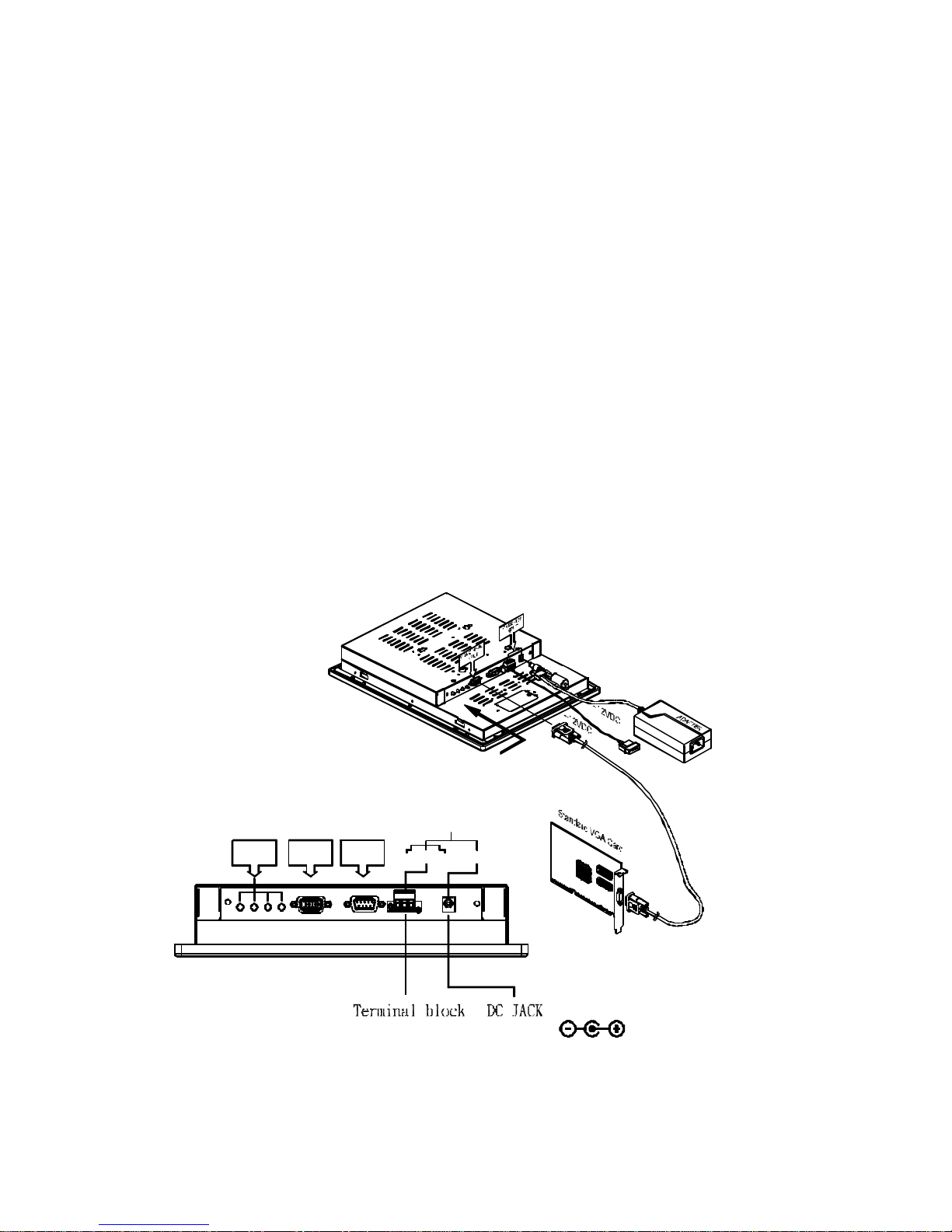
There are five LCD adjustment switches on the rear panel of DM-121/SRM-121.
Also, there are two ports for VGA and RS-232. If you want to install LCD
without Touch Screen, just connect the VGA Card to the VGA Signal Input port.
The power connection you can choose 12V DC jack or terminal block use to 12V
DC input.
(OPTION)
RS-232
INPUT
VGA SIGNAL
ExitUPDNMENU
(under diagram)
VIEW THE SIDE
VGA
INPUT
POWER INPUT
12VGnd
RS-232
(OPTION) 12V DC
DC
GndBOTTON
OSD
CAUTION: FOR INDOOR USE ONLY
POWER INPUT:
Black color: to Gnd
Yellow color: to +12VDC
Questo manuale è adatto per i seguenti modelli
1
Indice
Altri manuali ICP Electronics Monitor