
ICP TSTAT0710 Manuale utente
DIGITAL THERMOSTAT
P/N TSTAT0710
Installation
Instructions
MULTI-STAGE PROGRAMMABLE
HEAT
PUMP
HEAT
COOL
&
International Comfort Products 2003
70
COOL
o
Am
6:03
70
Su
ModeCooler Warmer

Table Of Contents
PREPARATION
REMOVE OLD THERMOSTAT
WIRE CONNECTIONS
WIRING DIAGRAMS
CALIBRATION
TEST OPERATION
TROUBLESHOOTING
Page 1
P/N TSTAT0710
CAUTION Follow Installation Instructions carefully.
DISCONNECT POWER TO THE HEATER -
AIR CONDITIONER BEFORE REMOVING
THE OLD THERMOSTAT AND INSTALLING
THE NEW THERMOSTAT. WARNING
2
3
4
5
8
10
9
This device complies with Part 15 of the FCC rules.
Operation is subject to the following 2 conditions:
(1) This device may not cause harmful interference,
and (2) This device must accept any interference
received, including interference that may cause
undesired operation.
International Comfort Products 2003

Proper installation of the thermostat will be
accomplished by following these step
by step instructions. If you are unsure
about any of these steps, call a qualified
technician for assistance.
Assemble tools
Make sure your Heater/Air Conditioner
is working properly before beginning
installation of the thermostat.
Carefully unpack the thermostat.
Save the screws, bracket, and
instructions.
STEP #1
PREPARATION
Page 2
Turn off the power to the Heating/Air
Conditioning system at the main fuse
panel. Most residential systems have
a separate breaker for disconnecting
power to the furnace.
Flat Blade
Screwdriver
Wire cutter
& Stripper
70
COOL
o
Am
6:03
70
Su
ModeCooler Warmer
70
COOL
o
Am
6:03
70
Su
ModeCooler Warmer
70
COOL
o
Am
6:03
70
Su
ModeCooler Warmer
70
COOL
o
Am
6:03
70
Su
ModeCooler Warmer
70
COOL
o
Am
6:03
70
Su
ModeCooler Warmer

Remove the cover of the old thermostat.
If it does not come off easily check for
screws.
Loosen the screws holding the thermostat
base or subbase to the wall, and lift away.
Disconnect the wires from the old
thermostat. Tape the ends of the wires
as you disconnect them, and mark them
with the letter of the terminal for easy
reconnection to the new thermostat.
STEP #2
REMOVE & REPLACE OLD THERMOSTAT
Page 3
Keep the old thermostat for reference
purposes, until your new thermostat is
functioning properly.
70
COOL
o
Am
6:03
70
Su
ModeCooler Warmer
70
COOL
o
Am
6:03
70
Su
ModeCooler Warmer
70
COOL
o
Am
6:03
70
Su
ModeCooler Warmer
70
COOL
o
Am
6:03
70
Su
ModeCooler Warmer

STEP #3
WIRE CONNECTIONS
Page 4
If the terminal designations on your old
thermostat do not match those on the
new thermostat, refer to the chart below,
or the wiring diagrams that follow.
* C may not be used on all systems.
** O/B is used if your system is a Heat Pump.
Wire from the
old thermostat
terminal marked Function
Install on the
new thermostat
connector marked
G or F Fan G
Y1, Y or C Cooling Y1
W1, W or H Heating W1,O,B
W1,O,B**
PowerRh, R, M, Vr, A R
C
O/B
C *
Common
Rev. Valve
Y2 Y2
W2 W2
2nd Stage Cool
2nd Stage Heat
RS+5 RS+5
Remote Sensor +5vdc
RS RS
Remote Sensor Signal
RS G GND
Remote Sensor Ground
CK1
CK2
Dry Contact Switch 1
Dry Contact Switch 2
70
COOL
o
Am
6:03
70
Su
ModeCooler Warmer

Sample Wiring Diagrams
Thermostat
Thermostat
Page 5
R
C
G
Y1
Y2
W1
W2
O
E
L
RC
G
Y1
Y2 W1
W2
O
24 vac common
24 vac return
fan relay
compressor relay
1st stage heat circuit
R
C
G
Y1
Y2
W1
W2
O
E
L
RC
G
Y1
Y2 W1
W2
O
24 vac return
fan relay
compressor relay
1st stage heat circuit
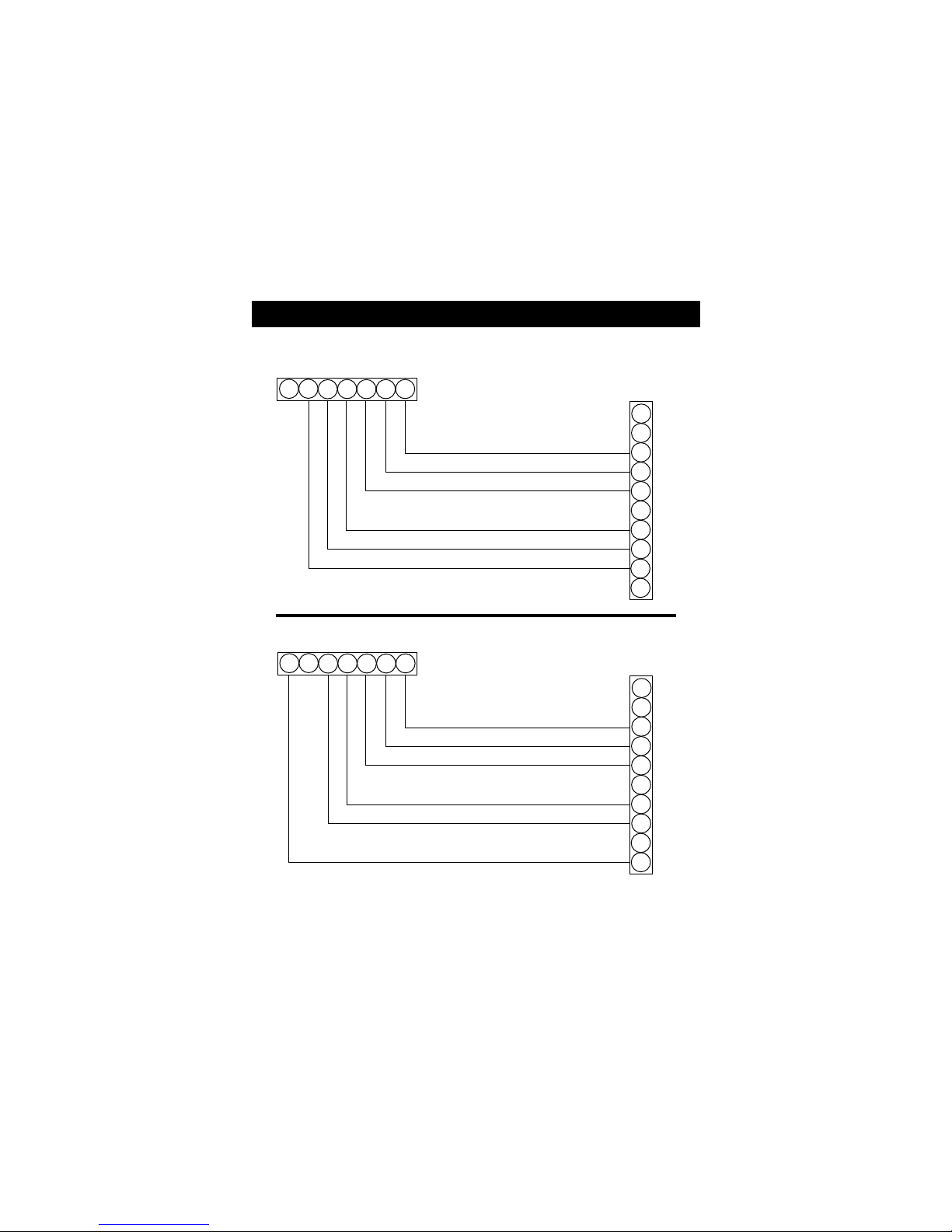
5 Wire, 1 Stage Cooling, 1 Stage Gas Heat
4 Wire, 1 Stage Cooling, 1 Stage Gas Heat
Residential Gas or Electric Heat *,
Electric Cool, split systems & package
units
Residential Gas or Electric Heat *,
Electric Cool, split systems & package
units
*If using electric heat this option must be
selected on during advanced setup.
*If using electric heat this option must be
selected on during advanced setup.
Sample Wiring Diagrams
Page 6
R
C
G
Y1
Y2
W1
W2
O
E
L
RC
G
Y1
Y2 W1
W2
O
24 vac common
24 vac return
fan relay
compressor relay
2nd stage compressor relay
1st stage heat circuit
R
C
G
Y1
Y2
W1
W2
O
E
L
RC
G
Y1
Y2 W1
W2
O
24 vac common
24 vac return
fan relay
compressor relay
1st stage heat circuit
2nd stage heat circuit
Residential 2 Stage Cooling, with
Gas or Electric Heat*
Residential & commercial 1 Stage Cooling,
with 2 Stage Gas or Electric Heat*
6 Wire, 2 Stage Cooling, 1 Stage Heat
6 Wire, 1 Stage Cooling, 2 Stage Heat
Thermostat
Thermostat
* If using electric heat, this option must
be selected during advanced setup.

Sample Wiring Diagrams
Page 7
R
C
G
Y1
Y2
W1
W2
O
E
L
RC
G
Y1
Y2 W1
W2
O
24 vac common
24 vac return
fan relay
compressor relay
2nd stage compressor relay
1st stage heat circuit
2nd stage heat circuit
R
C
G
Y1
Y2
W1
W2
O
E
L
RC
G
Y1
Y2 W1
W2
O
24 vac common
24 vac return
fan relay
compressor relay
reversing valve
Commercial Gas or Electric Heat ***,
Electric Cool, split systems & package units
including Commercial Heat Pumps **
No auxiliary heat, residential Heat Pumps ,
split systems & package units
7 Wire, 2 Stage Cooling, 2 Stage Heat
5 Wire, 1 Stage Cooling, 1 Stage Heat - Heat Pump*
Thermostat
Thermostat
* If using residential heat pump, this option
must be selected on during advanced setup.
** Commercial heat pumps do not have
the heat pump turned on in advanced setup.
*** If using electric heat, this option must
be selected on during advanced setup.

Sample Wiring Diagram
Calibration
Page 8
R
C
G
Y1
Y2
W1
W2
O
E
L
RC
G
Y1
Y2 W1
W2
O
24 vac common
24 vac return
fan relay
compressor relay
1st stage heat circuit
2nd stage heat circuit
6 Wire, 1 Stage Cooling, 2 Stage Heat, Heat Pump *
Most residential split and package heat pumps
with auxiliary heat
Thermostat
* The heat pump option must be selected
on during advanced setup.
Every thermostat is calibrated before it leaves the factory.
Under normal circumstances there will never be a need to
recalibrate the thermostat again.
To accommodate special needs, the thermostat may be recalibrated
following these steps:
1. While holding the mode button in, press the fan button for
5 seconds. After all the icons in the display appear, release
the buttons.
2. Press the Up and Down arrow buttons simultaneously, twice.
3. Press the up or down buttons until the flashing number
equals the current room temperature.
4. Press the mode button to return to normal operation.

STEP #4
TEST OPERATION
Page 9
Press the MODE button repeatedly until
the HEAT icon appears on the display.
Press the Up or Down buttons until the set
temperature is 10 degrees above room
temperature. The furnace should turn on.
Press the MODE button repeatedly until
the COOL icon appears on the display.
Press the Up or Down buttons until the set
temperature is 10 degrees below room
temperature. The air conditioner should
turn on. NOTE: Most equipment has a
time delay of 5 minutes between cool
cycles. This feature is defeatable on the
thermostat. Consult the Owner's Manual
under Setup, cycles per hour.
Turn the power on to the Heating/Air
Conditioning system.
Press the MODE button to OFF. Press
the FAN button to Fan On. The fan
should turn on and run continuously.
70
COOL
o
Am
6:03
70
Su
ModeCooler Warmer
70
COOL
o
Am
6:03
70
Su
ModeCooler Warmer
70
COOL
o
Am
6:03
70
Su
ModeCooler Warmer
70
COOL
o
Am
6:03
70
Su
ModeCooler Warmer
Indice
Altri manuali ICP Termostato


