
ICPDAS TPD-283-H Manuale utente

TPD-283-H/283U-H Quick Start, version 1.0 Last Revised: April 2017 - 1 -
Quick Start Version 1.0
1Shipping package
Thanks for buying ICPDAS TPD 2.8 inch H series device. This shipping package contains the
following items:
TPD-283-H/283U-H Quick Start (This Document)
2Appearance
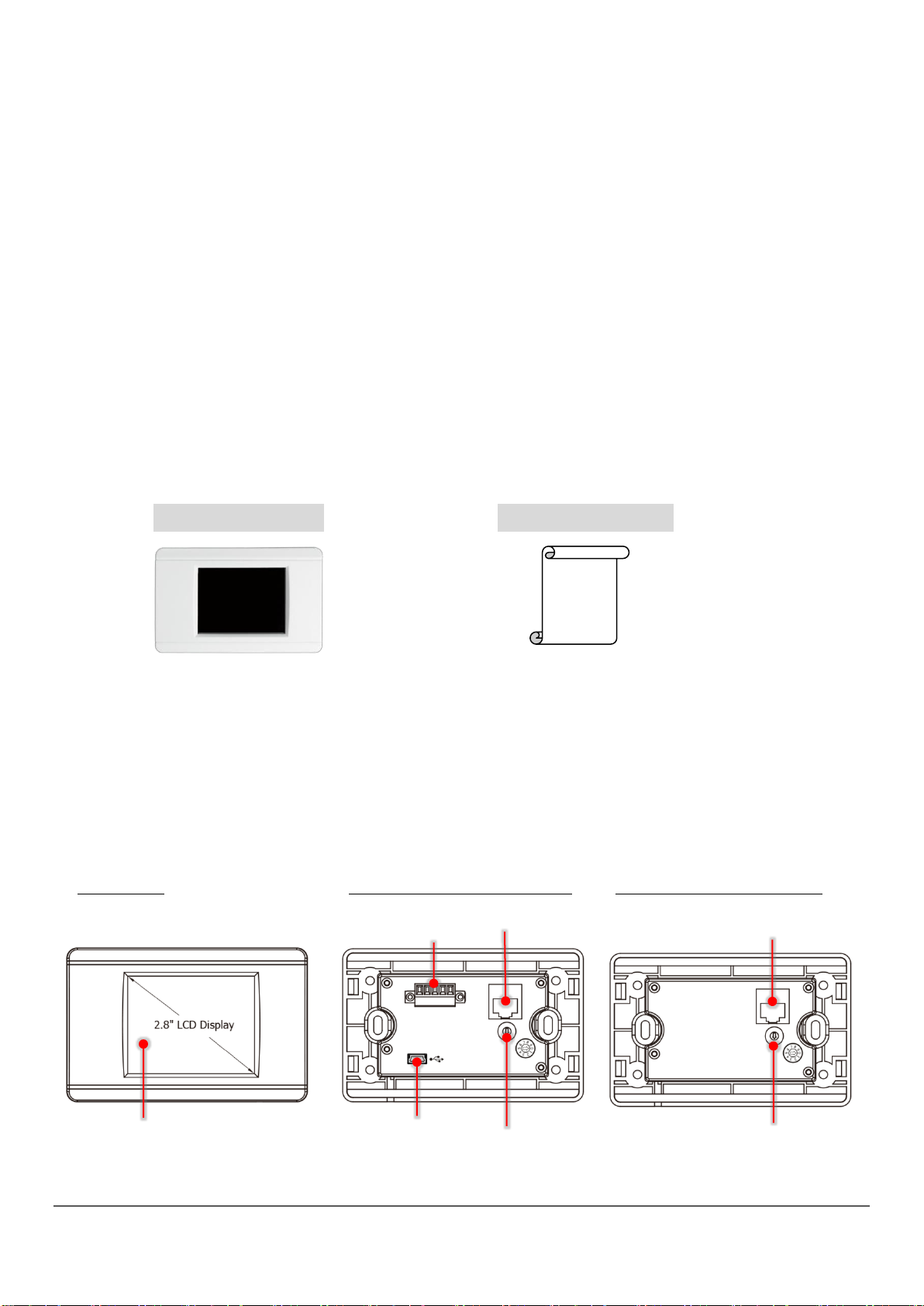
Front View TPD-283U-H Rear View TPD-283-H Rear View
2.8”TFT LCD with Touch Panel
TPD-283-H/283U-H
USB
Rotary Switch
RS-485
Ethernet
Rotary Switch
Ethernet

TPD-283-H/283U-H Quick Start, version 1.0 Last Revised: April 2017 - 2 -
3Pin Assignment
On the back of the TPD-283U-H:
The pin assignments:
No
Pin
Description
0
F.G.
Frame Ground. F.G. is connected to the inside EMI or ESD suppression
circuits. Make sure that F.G. is connected to the Earth
1
VDC
DC input Voltage (range: +12 V ~ +48 V)
2
GND
Connected to the power supply’s ground pin
3
Data+
The positive data line of the RS-485 network
4
Data-
The negative data line of the RS-485 network
The definition of the rotary switch (TPD-283-H):
No
Mode
Description
0
Run & Update
This is a special run mode which is used in the
development stage. The TouchPAD device can be
updated by a PC from the remote side through
Ethernet.
1
Force Update
While the application run on the TouchPAD device
seriously crashes, use this mode to update a new
application to the TouchPAD device through Ethernet.
2
Run Only
Run the program.

TPD-283-H/283U-H Quick Start, version 1.0 Last Revised: April 2017 - 3 -
The definition of the rotary switch (TPD-283U-H):
No
Mode
Description
0
Run & Update
(Ethernet)
This is a special run mode which is used in the
development stage. The TouchPAD device can be
updated by a PC from the remote side through
Ethernet.
1
Ethernet
Force Update
While the application run on the TouchPAD device
seriously crashes, use this mode to update a new
application to the TouchPAD device through Ethernet.
2
Run Only
Run the program.
9
USB Force
Update
Update a new application to the TouchPAD device
through USB.
4First Use of the TPD 2.8”H Series
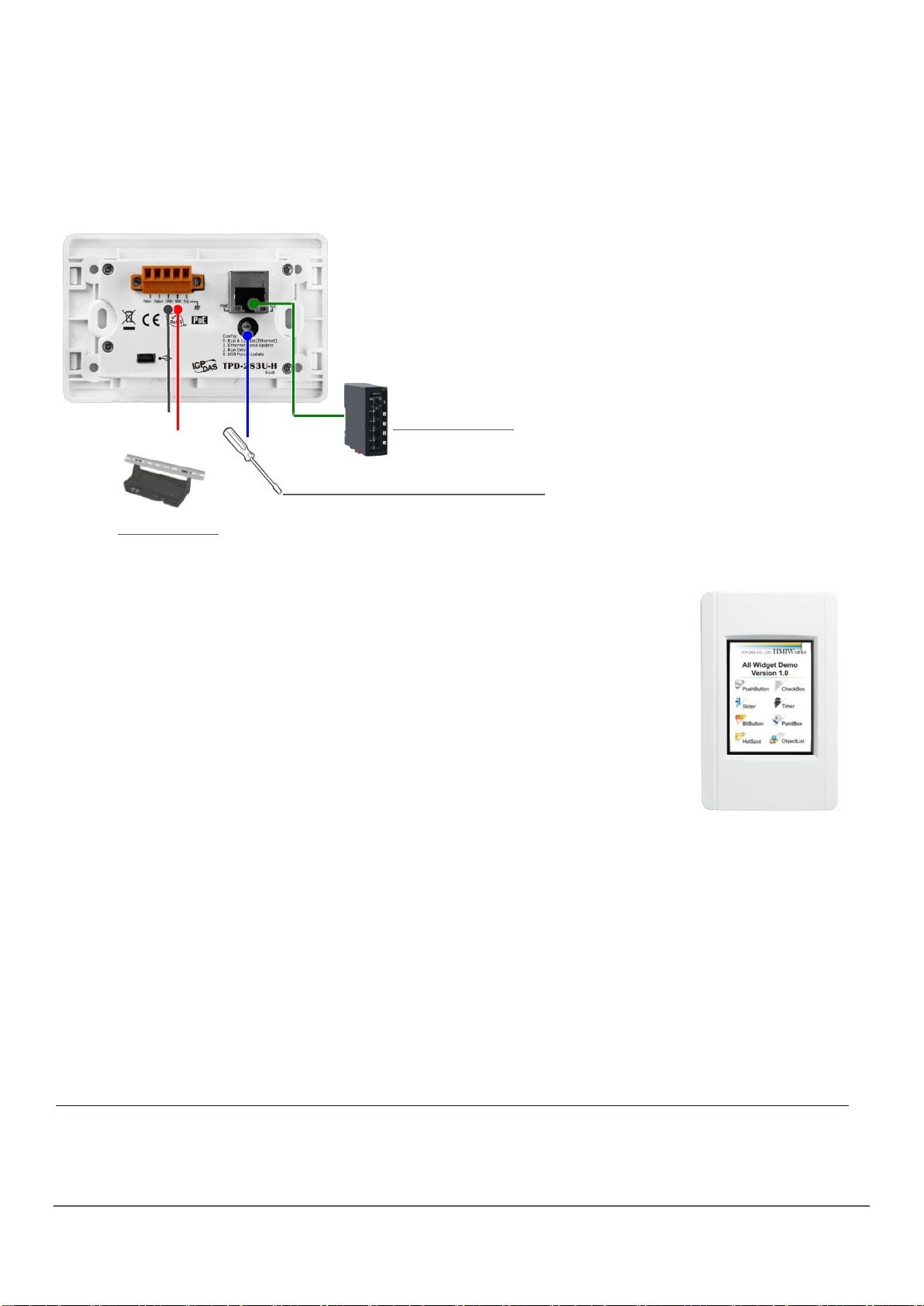
1. Connect wires as the figure or prepare an Ethernet cable
which will be used to supply power through PoE if there’s a
RJ-45 Ethernet port on it. And set the rotary switch to zero
(At this point, the power is not yet supplied).
2. Supply power to the TPD-283-H/283U-H, wait for several seconds and
then you can see the default program run on it.
3. Try to touch on the icons on the bottom-right corner of the screen of
the TPD-283-H/283U-H and you can find that TPD-283-H/283U-H
switches to the setting pages.
GND
VDC (+12~+48V)
PoE Switch
Use a flat-head screwdriver to set
rotary switch
External Power
TPD-283-H/283U-H Quick Start, version 1.0 Last Revised: April 2017 - 4 -
5Creating First Project
To create your first project of the TPD-283-H/283U-H, install the free development tool,
HMIWorks and then refer to <<TouchPAD_getting_started.pdf>>, which can be found on the
FTP: http://ftp.icpdas.com/pub/cd/touchpad/document/english/programming_guide/
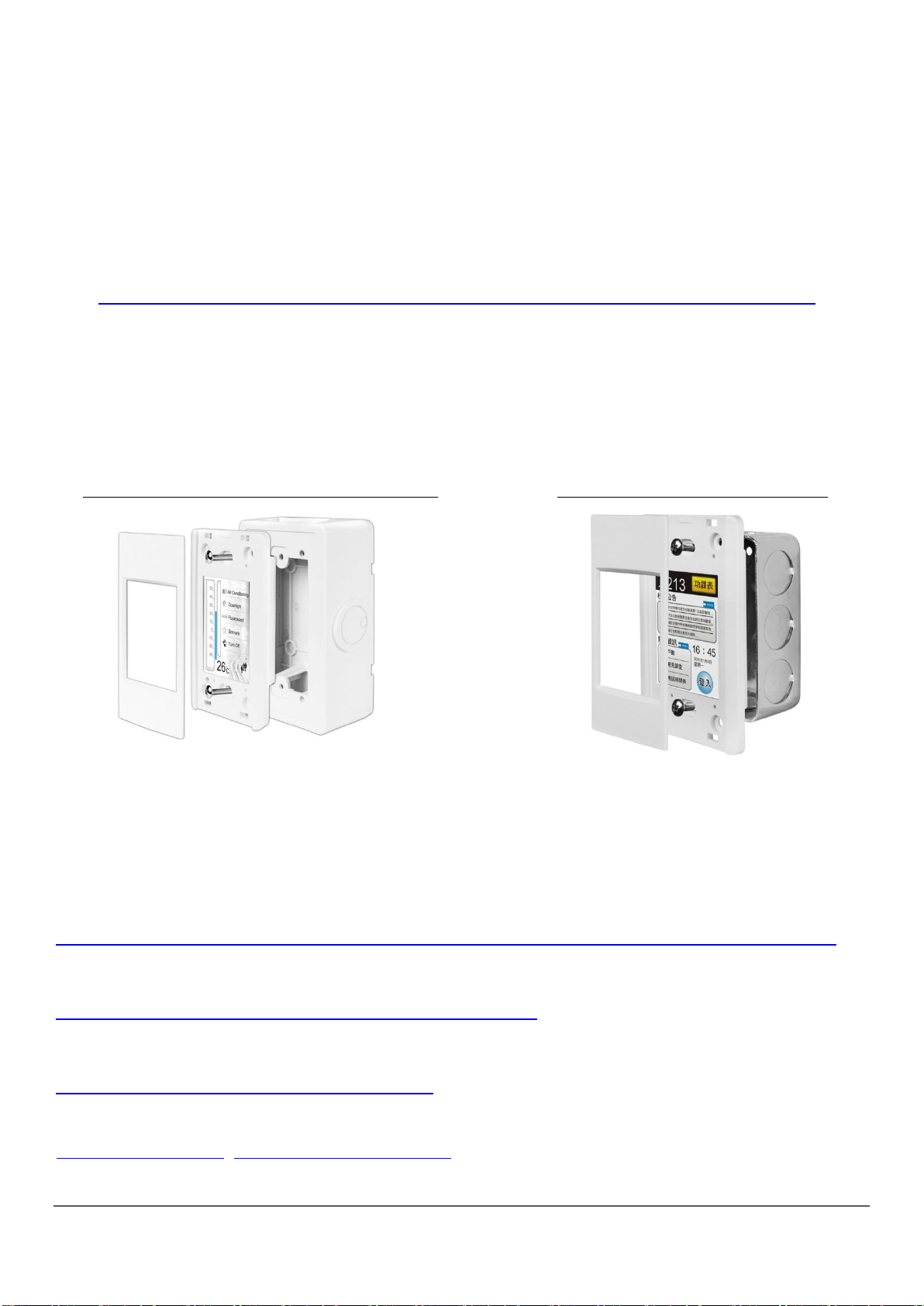
6Hardware Installation
7Related Information
TPD-283-H/283U-H Product Page:
http://www.icpdas.com/root/product/solutions/hmi_touch_monitor/touchpad/tpd-280-h.html
Documents, such as the user manuals, the API references, etc.:
ftp://ftp.icpdas.com/pub/cd/touchpad/document/english/
Free Development Software, HMIWorks v2.10.10 or above:
ftp://ftp.icpdas.com/pub/cd/touchpad/setup/
If you have any questions, please feel free to contact us via email at:
service@icpdas.com, service.icpda[email protected]
External Wall Box, EWB-T28 (optional)
Outlet Box, OB120 (optional)
TPD-283-H/283U-H Quick Start, version 1.0 Last Revised: April 2017 - 5 -
快速入門指南 版本 1.0
1檢查配件
感謝您購買泓格的 TPD 2.8 吋H系列產品。產品包裝內應包含下列配件:
TPD-283-H/283U-H 產品須知 (本文件)
2外觀
前配置圖 TPD-283U-H 後配置圖 TPD-283-H 後配置圖
2.8 吋觸控液晶螢幕
TPD-283-H/283U-H
USB
RS-485
Ethernet
旋轉開關
Ethernet
旋轉開關

TPD-283-H/283U-H Quick Start, version 1.0 Last Revised: April 2017 - 6 -
3腳位定義
在TPD-283U-H 的背面可見到如下圖樣:
腳位定義:
No
Pin
說明
0
F.G.
機架接地,F.G. (連接到內部的 EMI 或ESD 保護電路),請接到大地。
1
VDC
直流電壓輸入 (範圍:+12 V ~ +48 V)
2
GND
連到電源的接地端
3
Data+
RS-485 網路的正訊號線
4
Data-
RS-485 網路的負訊號線
旋轉開關 (Rotary Switch) 的配置模式定義 (TPD-283-H):
項次
模式
說明
0
Run & Update
執行/更新程式,用於程式開發階段 (能執行
程式,也能進行更新)。
1
Force Update
強制更新,當 TouchPAD 上的程式嚴重毀損時
可用此模式透過 Ethernet 更新。
2
Run Only
執行程式。
旋轉開關 (Rotary Switch) 的配置模式定義 (TPD-283U-H):
項次
模式
說明
0
Run & Update
(Ethernet)
執行/更新程式,用於程式開發階段 (能執行
程式,也能進行更新)。
1
Ethernet Force
Update
強制更新,當 TouchPAD 上的程式嚴重毀損時
可用此模式透過 Ethernet 更新。
2
Run Only
執行程式。
9
USB Force
Update
透過 USB 更新程式。
TPD-283-H/283U-H Quick Start, version 1.0 Last Revised: April 2017 - 7 -
4第一次使用 TPD-283(U)-H
1. 如左圖所示,將電源和接地線連接完成。或是若有
RJ-45 的乙太網路接孔,可以準備一條網路線,透過乙太
網路供電(PoE)。然後將旋轉開關(Rotary Switch)轉到
0(此時尚未供電)。
2. 開始供電給 TPD-283-H/283U-H,等待約數秒的開機時間,接著
可以看到 TPD-283-H/283U-H 執行出貨預附的程式如圖所示。
3. 試著按一下 TPD-283-H/283U-H 螢幕上面的圖示,
TPD-283-H/283U-H 會切到其他的頁面。
5建立第一個軟體專案
在建立 TPD-283-H/283U-H 的第一個專案之前,請先安裝免費的開發軟體 HMIWorks。然
後參考<< TouchPAD_getting_started.pdf>>這份文件,一步一步地完成。該份文件可
以在 FTP 上找到:
http://ftp.icpdas.com/pub/cd/touchpad/document/chinese/programming_guide/
使用一字起子來配置旋轉開關
乙太網路供電
GND
VDC (+12~+48V)
外部供電器

TPD-283-H/283U-H Quick Start, version 1.0 Last Revised: April 2017 - 8 -
6硬體安裝
7參考資訊
TPD-283-H/283U-H 產品網頁:
http://www.icpdas.com/root/product/solutions/hmi_touch_monitor/touchpad/tpd-280-h_tc.html
相關文件,如使用手冊、API 函數手冊…等:
http://ftp.icpdas.com/pub/cd/touchpad/document/chinese/
免費開發軟體,HMIWorks 版本 2.10.10 或以上版本:
ftp://ftp.icpdas.com/pub/cd/touchpad/setup/
如有任何問題歡迎聯繫我們,我們將會為您提供完善的咨詢服務:
E-mail: service@icpdas.com, service.icpda[email protected]
安裝於專用明盒 EWB-T28(選購)
安裝於專用暗盒 OB120 (選購)
Altri manuali per TPD-283-H
2
Questo manuale è adatto per i seguenti modelli
2
Indice


