
Icy Box IB-SPL1029AC Manuale utente
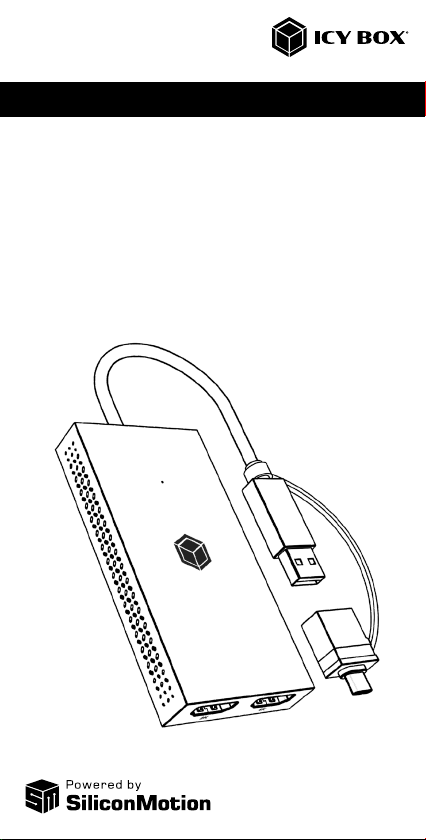
Manual IB-SPL1029AC
Mobile USB to Dual HDMI®Splitter
Handbuch IB-SPL1029AC
Mobiler USB zu Dual HDMI®Splitter
Manual IB-SPL1029AC
Please read carefully the following information to prevent injuries, da-
mage to material and device as well as data loss:
Warning levels
Signal words and safety codes indicate the warning level and provide immediate
information in terms of the probability of occurrence as well as the type and severity
of the consequences if the measures to prevent hazards are not complied with.
Warns of a directly hazardous situation causing
death or serious injury.
Warns of a potentially hazardous situation that may
cause death or serious injury.
Warns of a potentially hazardous situation that may
cause minor injury.
Warns of a potential situation that may cause ma-
terial or environmental damage and disrupt operative
processes.
1. Risk of electrical shock
Contact with parts conducting electricity
Risk of death by electrical shock
• Read the operating instructions prior to use
• Make sure the device has been de-energised prior to working on it
• Do not remove contact protection panels
• Avoid contact with conducting parts
• Do not bring plug contacts in contact with pointed and metal objects
• Use in intended environments only
• Operate the device using a power unit meeting the specifications of the type plate
only!
• Keep the device/power unit away from humidity, liquid, vapour and dust
• Do not modify the device
• Do not connect the device during thunderstorms
• Approach specialist retailers if you require repairs
2. Hazards during assembly (if intended)
Sharp components
Potential injuries to fingers or hands during assembly (if
intended)
• Read the operating instructions prior to assembly
• Avoid coming into contact with sharp edges or pointed components
• Do not force components together
• Use suitable tools
• Use potentially enclosed accessories and tools only
3. Hazards caused by a development of heat
Insufficient device/power unit ventilation
Overheating and failure of the device/power unit
• Prevent externally heating up components and ensure an exchange of air
• Do not cover the fan outlet and passive cooling elements
DANGER
WARNING
CAUTION
IMPORTANT
WARNING
CAUTION
IMPORTANT
Manual IB-SPL1029AC
• Avoid direct sunlight on the device/power unit
• Guarantee sufficient ambient air for the device/power unit
• Do not place objects on the device/power unit
4. Hazards caused by very small parts and packaging
Risk of suffocation
Risk of death by suffocation or swallowing
• Keep small parts and accessories away from children
• Store/dispose of plastic bags and packaging in an area that is inaccessible to
children
• Do not hand over small parts and packaging to children
5. Potential data loss
Data lost during commissioning
Potentially irreversible data loss
• Always comply with the information in the operating instructions/quick installation
guide
• Exclusively use the product once the specifications have been met
• Back up data prior to commissioning
• Back up data prior to connecting new hardware
• Use accessories enclosed with the product
6. Cleaning the device
Harmful cleaning agents
Scratches, discolouration, damage caused by moisture
or short circuit in the device
• Disconnect the device prior to cleaning
• Aggressive or intense cleaning agents and solvents are unsuitable
• Make sure there is no residual moisture after cleaning
• We recommend cleaning devices using a dry, anti-static cloth
7. Disposing of the device
Environmental pollution, unsuitable for recycling
Potential environmental pollution caused by
components, recycling circle interrupted
This icon on product and packaging indicates that this product must
not be disposed of as part of domestic waste. In compliance with the
Waste Electrical and Electronic Equipment Directive (WEEE) this elec-
trical device and potentially included batteries must not be disposed
of in conventional, domestic waste or recycling waste. If you would
like to dispose of this product and potentially included batteries, please
return it to the retailer or your local waste disposal and recycling point.
If you have any questions, please do not hesitate to contact our support at
WARNING
IMPORTANT
IMPORTANT
IMPORTANT
Handbuch IB-SPL1029AC
Zur Vermeidung körperlicher Schäden, sowie von Sach-, Geräteschäden
und Datenverlust beachten Sie bitte folgende Hinweise:
Warnstufen
Signalwort und Sicherheitszeichen kennzeichnen die Warnstufe und geben einen
sofortigen Hinweis auf Wahrscheinlichkeit, Art und Schwere der Folgen, wenn die
Maßnahmen zur Vermeidung der Gefahr nicht befolgt werden.
warnt vor einer unmittelbar gefährlichen Situation, die
zum Tod oder zu schweren Verletzungen führen wird.
warnt vor einer möglicherweise gefährlichen
Situation, die zum Tod oder zu schweren Verletzungen
führen kann.
warnt vor einer möglicherweise gefährlichen Situati-
on, die zu leichten Verletzungen führen kann.
warnt vor einer möglichen Situation, die zu Sach- und
Umweltschäden führen und den Betriebsablauf stören
kann.
1. Gefahren durch elektrische Spannung
Kontakt mit elektrisch leitenden Teilen
Lebensgefahr durch Stromschlag
• vor Benutzung Betriebsanleitung lesen
• vor Arbeiten am Gerät, Spannungsfreiheit sicherstellen
• Kontaktschutzblenden nicht entfernen
• Kontakt mit Spannungsführenden Komponenten vermeiden.
• Steckkontakte nicht mit spitzen und metallischen Gegenständen berühren
• Verwendung nur in dafür vorgesehenen Umgebungen
• Gerät ausschließlich mit Typenschildkonformen Netzteil betreiben!
• Gerät/Netzteil fern von Feuchtigkeit, Flüssigkeit, Dampf und Staub halten
• Eigenständige Modifikationen sind unzulässig
• Gerät nicht während eines Gewitters anschließen
• Geben Sie Ihr Gerät im Reparaturfall in den Fachhandel
2. Gefahren während Montage (wenn vorgesehen)
Scharfkantige Bauteile
Finger- oder Handverletzungen bei Zusammenbau
(wenn vorgesehen) möglich
• vor Montage, Betriebsanleitung lesen
• Kontakt mit scharfen Kanten oder spitzen Bauteilen vermeiden
• Bauteile nicht mit Gewalt zusammensetzen
• geeignetes Werkzeug verwenden
• nur gegebenenfalls mitgeliefertes Zubehör und Werkzeug verwenden
3. Gefahren durch Wärmeentwicklung
Mangelhafte Belüftung des Geräts/Netzteils
Überhitzung und Ausfall des Geräts/Netzteils
• externe Erwärmung vermeiden und Luftaustausch zulassen
• Lüfter-Auslass und passive Kühlkörper freihalten
GEFAHR
WARNUNG
VORSICHT
ACHTUNG
WARNUNG
VORSICHT
ACHTUNG
Handbuch IB-SPL1029AC
• direkte Sonneneinstrahlung auf Gerät/Netzteil vermeiden
• ausreichend Umgebungsluft für Gerät/Netzteil sicherstellen
• keine Gegenstände auf dem Gerät/Netzteil abstellen
4. Gefahren durch Kleinstteile und Verpackung
Erstickungsgefahr
Lebensgefahr durch Ersticken oder Verschlucken
• Kleinteile, Zubehör für Kinder unzugänglich verwahren
• Plastiktüten und Verpackung für Kinder unzugänglich verwahren/entsorgen
• Kleinteile und Verpackungen nicht in Kinderhände geben
5. Möglicher Datenverlust
Datenverlust bei Inbetriebnahme
Unwiederbringlicher Datenverlust möglich
• Unbedingt Hinweise in der Bedienungsanleitung/Schnellinstallationsanleitung
beachten
• Produkt nur verwenden, wenn Spezifikationen erfüllt sind
• Datensicherung vor Inbetriebnahme durchführen
• Datensicherung vor Anschluss neuer Hardware durchführen
• dem Produkt beiliegendes Zubehör verwenden
6. Reinigung des Gerätes
Schädigende Reinigungsmittel
Kratzer, Farbveränderungen, Feuchteschäden oder
Kurzschluss am Gerät
• vor Reinigung, das Gerät außer Betrieb nehmen
• aggressive bzw. scharfe Reinigungs- und Lösungsmittel sind ungeeignet
• nach der Reinigung sicherstellen, dass keine Restfeuchtigkeit vorhanden ist
• Reinigung der Geräte am besten mit trockenem Antistatiktuch durchführen
7. Entsorgung des Gerätes
Umweltverschmutzung, Wiederverwertung nicht möglich
Mögliche Umweltbelastung durch Bestandteile,
Recyclingkreislauf unterbrochen
Dieses auf dem Produkt und der Verpackung angebrachte Symbol
zeigt an, dass dieses Produkt nicht mit dem Hausmüll entsorgt werden
darf. In Übereinstimmung mit der Richtlinie über Elektro- und Elekt-
ronik-Altgeräte (WEEE) darf dieses Elektrogerät und ggf. enthaltene
Batterien nicht im normalen Hausmüll oder dem Gelben Sack ent-
sorgt werden. Wenn Sie dieses Produkt und ggf. enthaltene Batterien
entsorgen möchten, bringen Sie diese bitte zur Verkaufsstelle zurück
oder zum Recycling-Sammelpunkt Ihrer Gemeinde.
oder besuchen Sie unsere Internetseite www.icybox.de.
WARNUNG
ACHTUNG
ACHTUNG
ACHTUNG
Manual IB-SPL1029AC
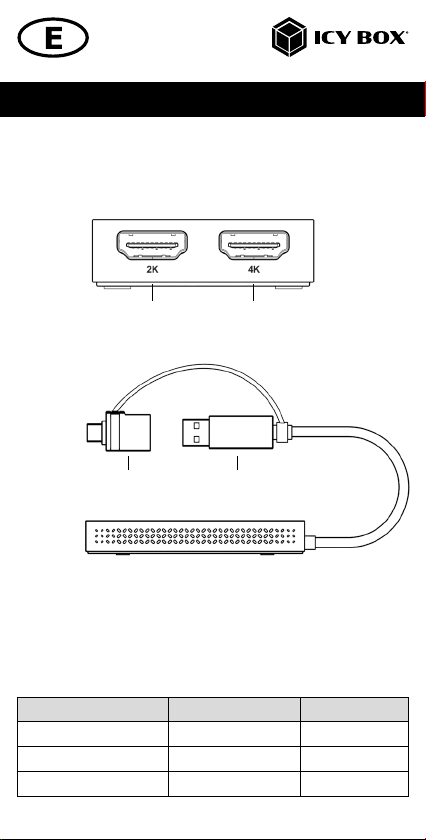
Package content
IB-SPL1029AC, 1x manual
View
1. HDMI®interface with up to 2K@60 Hz
2. HDMI®interface with up to 4K@30 Hz
3. USB Type-A to Type-C®adapter
4. USB 3.2 Gen 1 Type-A host computer connector
3 4
1 2
Legacy USB standards Current USB standards Data tansfer rate
USB 3.0 = USB 3.1 (Gen 1) = USB 3.2 Gen 1 = 5 Gbit/s
USB 3.1 = USB 3.1 (Gen 2) = USB 3.2 Gen 2 = 10 Gbit/s
USB 3.2 (Gen 2x2) = USB 3.2 Gen 2x2 = 20 Gbit/s

Manual IB-SPL1029AC
Requirements
• Windows®, macOS®, Android™
• Installed SiliconMotion driver
• USB 3.2 Gen 1 Type-A host interface
• The device is compatible with Thunderbolt™3/4 Type-C®equipped
computers
Starting up
Installation of the driver!
Caution: Do not connect the splitter to your computer before installing the driver
from the download area of:
https://www.siliconmotion.com/downloads/index.html
1. Select your operating system and download the correct driver from the
webpage mentioned above
2. Click on the executable file of the related version
3. Follow the instructions and finish the driver installation
4. Connect the splitter to a supported USB Type-C®or USB Type-A port on
your computer
5. Restart the computer
6. The IB-SPL1029AC is ready for use.
Manual IB-SPL1029AC
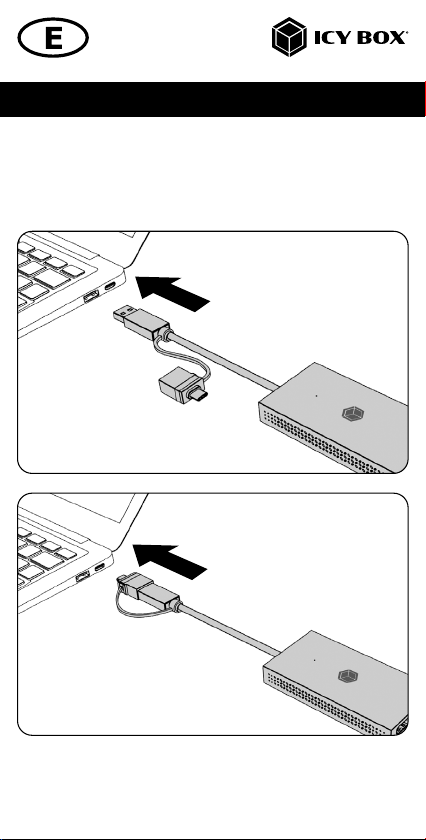
Starting up
1. Connect the splitter via the integrated USB Type-A cable or via the attached
Type-A/Type- C®adapter to a supported computer (at least USB 3.2 Gen
1).
Manual IB-SPL1029AC
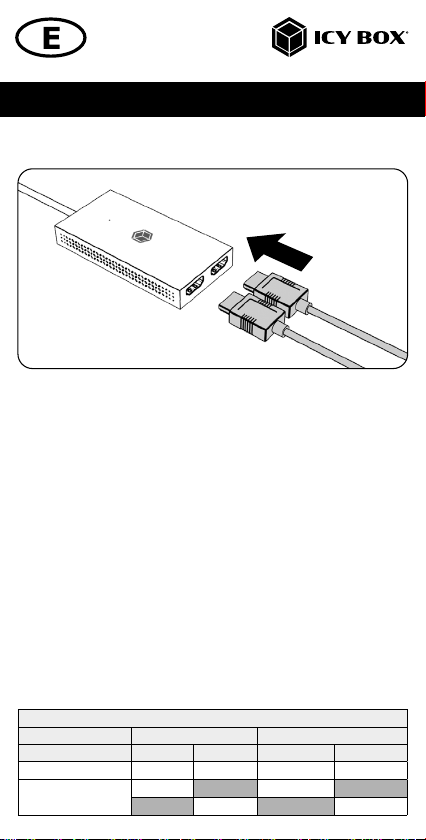
2. Connect your HDMI®displays to the corresponding interfaces of the splitter.
To use this splitter to its full potential, ensure that the host USB port of your computer
supports USB 3.2 Gen 1.
Please consult your host PC documentation or contact the PC manufacturer to
confirm compatibility with this technology.
Displays
Please set up your display settings according to your operating system
and requirements.
For detailed information refer to the corresponding operation manual and descripti-
on of your operating system.
Monitor connections
Connection of one computer to two HDMI®monitors
You can set up dual displays by using the video output ports of the IB-SPL1029AC.
Connect your monitors to the HDMI®interfaces by using certified HDMI®cables
(not included).
It is recommended to use monitors of the same size, type and resolution for a dual
connection. Same monitor type means that the monitors have the same native
resolution and display refresh rate.
Video matrix (Host PC = USB 3.2 Gen 1 SiliconMoon), maximum resoluons
Number of displays HDMI®1 HDMI®2 Display 1 Display 2
Dual video output ü ü 1920x1080@60 Hz 3840x2160@30 Hz
Single video output
ü1920x1080@60 Hz
ü3840x2160@30 Hz
Supported video resolutions
Manual IB-SPL1029AC
Windows®display configuration
Note: The screenshots might vary slightly with the operating system.
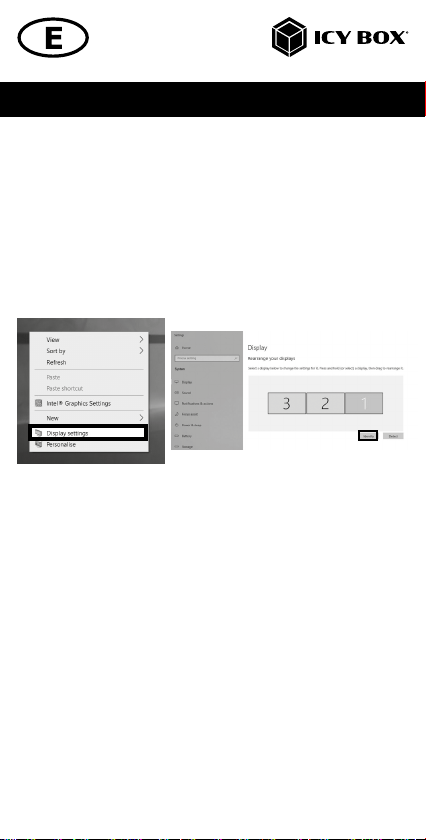
Arrange your displays
Once the extra monitors are connected, they can be configured to either mirror
mode, extended mode or to the setting of the primary display.
e.g: extending your monitors
- Position the mouse anywhere on the Windows®desktop
- Right-click and select Display settings to bring up the configuration window.
- Refer to the Display configuration section
- Identify your monitors by clicking the Identify button.
- Select the relevant monitor for the following settings by clicking the identified
monitor symbol
Indice
Lingue:
Altri manuali Icy Box Convertitore multimediale

Icy Box
Icy Box IB-2536 Manuale utente

Icy Box
Icy Box IB-SPL1041 Manuale utente

Icy Box
Icy Box IB-CVB513 Manuale utente

Icy Box
Icy Box Thunderbolt IB-SPL1026-TB3 Manuale utente

Icy Box
Icy Box IB-2537StS Manuale utente

Icy Box
Icy Box IB-RD2121StS Manuale utente

Icy Box
Icy Box IB-SPL1028-C Manuale utente

Icy Box
Icy Box IB-SPL1027-C Manuale utente

Icy Box
Icy Box IB-SPL1025-TB3 Manuale utente


