
iFootage SL1320DN Manuale utente

3DK1482001


Thank you for purchasing this iFootage product. This manual provides
important user information for the Anglerfish SL1 320DN LED Light.
Please read the manual carefully before operating the equipment and
keep the manual safe for future reference.
The Anglerfish SL1 320DN is a convenient and versatile LED light
suitable for both video and photography production and features
brightness adjustment, 5600K colour temperature, 8 different special
effects and mobile device APP connectivity providing multiple settings
including key frames. This flexible and compact light is perfect for both
studio and location recording.
Features 1
Component Description 2
Operating Description 4
Mode Selection 5
Power Management
6
Menu Bar
7
Bluetooth Connectivity 8
App Introduction 9
Accessory Installation 10
How to Use 11
Technical Information
List of Items
13
Notes
14
Maintenance
14
15

1
●The 320DN light has fully adjustable angles, provides simple
onboard controls as well as App control and can be used hand held
or on a stand or with any other suitable support equipment.
●The 320DN provides a solar spectrum light source, RA 98, high
colour fidelity, realistic and saturated colour IES TM30-18 index, Rf
97 and Rg100.
●The 320DN offers 8 different special lighting effects designed to
suite various scenarios.
●There are 4 types of dimming curves to choose from.
●Connecting to the App via Bluetooth will provide further
functions such as key frames, multi-lamp control and music mode.
●Key frame and sequence dimming are fully adjustable and can be
preset to suit user requirements.
●Equipped with silent fans the 320DN will automatically adjust fan
speed to accommodate the temperature of the light.
●The product has a 'High Temperature' warning function.
Precautions:
1. Keep dry. Do not expose the product to water, liquids, rain or
moisture either whilst in use or when in storage. lt is recommended
that the product should not be handled using wet hands.
2. Do not disassemble or modify the product. Mishandling, includ-
ing dropping the product, may result in permanent damage.
3. Please keep this product out of the reach of children and animals.
4. Do not use or store the light in the vicinity of harmful chemicals
or combustible materials. Always read the warning labels prior to
using the product.
5. Please use appropriate adapters for power supply and tempera-
ture specifications and range.
6. The effectiveness of the lamp will be impaired if the heat sink is
blocked or covered.
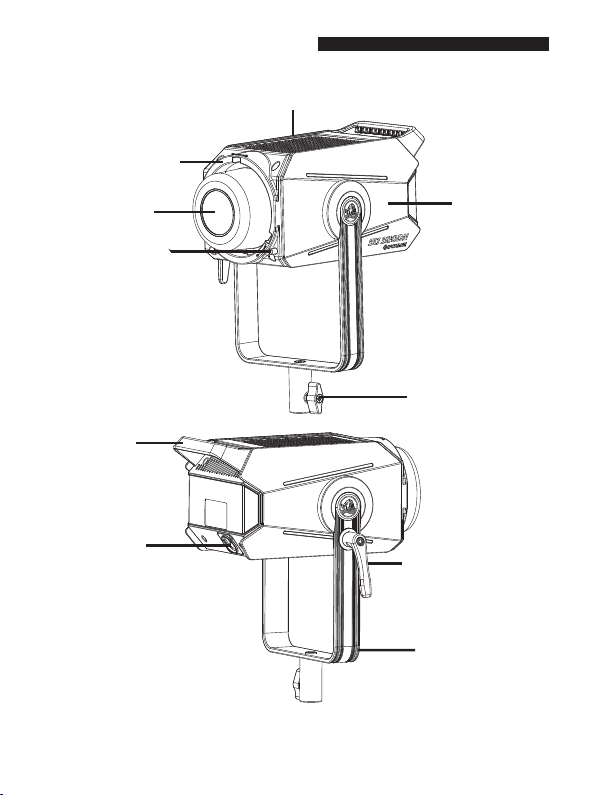
2
Heat sink
Handle
Side panel
Bowens adapter port button
Bowens adapter port
COB lamp beads
XLR connection Angle adjustment
locking control
U-shaped bracket
Light stand locking control

3
Clip
Screen
SET Button
Operation Dial
INT Button
FX Button
BT Button
MENU Button
Top Cover
Base
Lanyard
XLR
connection
DMX Interface
Power Button
AC Power
Connection
Air Vent
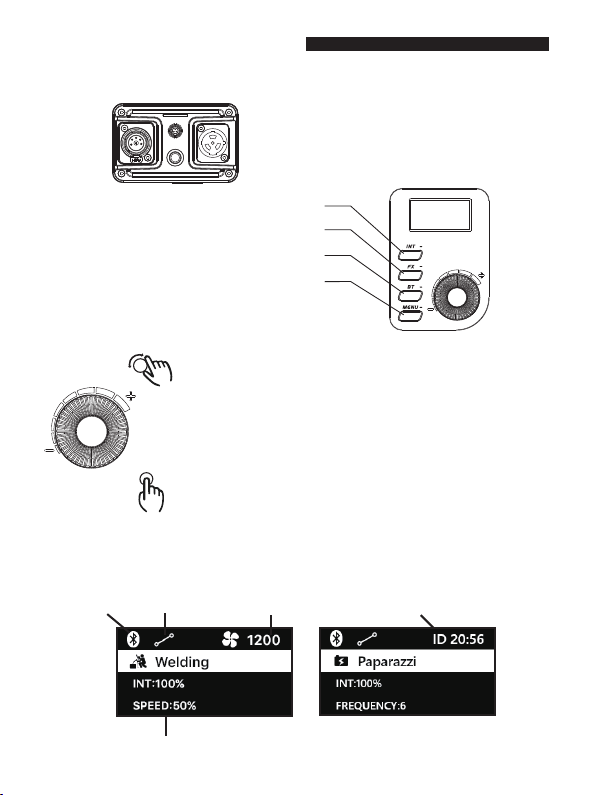
44
■Screen Description
Bluetooth Dimming Curve Fan Speed/Device ID Code Switch
Main Menu Bar
■Controls Description
INT Button: Short press for brightness mode
FX Button: Short press for special effect mode
BT Button: Short press for Bluetooth settings
Menu Button: Short press for menu settings
SET
Rotate:
Long press: On / Off
Short press: Temporarily turns light off / on
On/Off Button
Operation Dial
INT mode: Rotate clockwise to increase brightness.
Rotate ant-clockwise to reduce brightness.
FX mode: Rotate dial to select special effects.
BT mode: Rotate dial to select Bluetooth reset.
Menu mode: Rotate dial to select menu.
Press: FX mode: Move the cursor to confirm the current option,
Switch between special effect type, brightness, speed /
frequency / attenuation respectively.
BT mode: Determine whether to select Yes or no.
Menu mode: Fan setting, dimming curve, language, DMX.
DMX Settings: Short press to change DMX address; Channel
settings.

5
■Light brightness mode
Press the INT Button to access the brightness adjustment mode. Instantly
adjust brightness using the control dial.
Adjust brightness parameters-fixed at colour temperature 5600K±200.
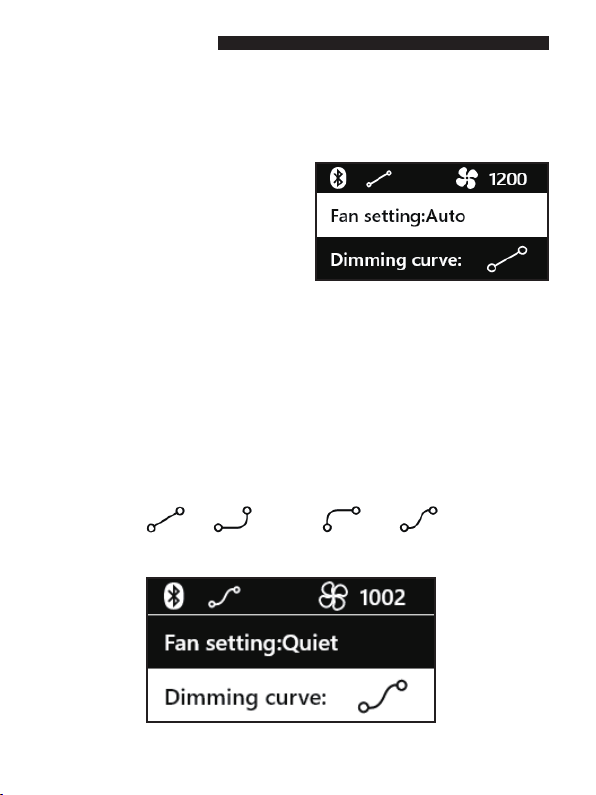
■Special effects mode
FX Mode
Brightness parameters
Lighting effect adjustable
parameters
There are 8 special effects including: paparazzi, fireworks, lightening, strobe light,
welding light, faulty bulb, pulsing and explosion. The corresponding parameters can
be adjusted according to the effect being used.
Bluetooth Dimming curve Fan speed
Press the FX Button to access the special effects mode; Place the cursor on
special effects mode and select FX, brightness, speed/frequency and attenua-
tion using the SET button. Rotate dial to select special effect and chosen
parameter changes.
6
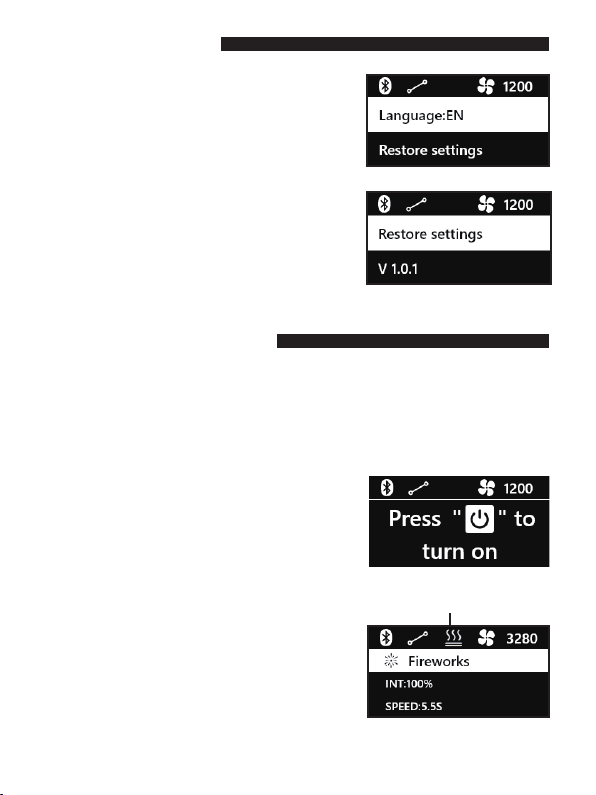
■Fan speed adjustment
■Dimming Curve
20
Linear Exponential
Logarithmic
S-curve
Fan speed can be adjusted to suit usage.There are 3 fan settings: 'Quiet' ,
'Auto' and 'Ultra Quiet'.
Press MENU control to access menu
directory: adjust parameters using the
SET button. Rotate dial to select.
This is a means of pre-setting the dimming light function using one of four
dimming curves: linear, exponential, logarithmic and S-curve. Each one
provides an alternative type of dimming.
Press MENU control to access menu directory: rotate dial to view curve setting
required. Use Set button to select.
7
AC Power port
Input voltage:AC 100V~240V 50/60HZ
Input power: 350W
■Power Supply
■Language settings
Press Menu→ Rotate the Dial to select
language→ Press SET Button→switch
between Chinese and English.
High Temperature Alert
■High Temperature Alert
■Temporary Lamp Shutoff
Press the power button to turn the light off, and
press the power button again to turn the light
on. Temporary light shutoff is a low-power
mode. When the product is not in use, please
check to make sure the product is fully shut
down.
When the display shows the 'Overheating
Protection’warning, the brightness will be
reduced. It is recommended to turn the lamp
off, and then continue to use after the overall
temperature of the light has reduced.
Long-term use of this product in high
temperature conditions will affect the life of
the device.
■Restore Factory Settings
To restore factory settings please press the
'OK/Select' key, then using the dial, select 'Yes'
followed by 'OK/Select'. If you do not want to
Restore Factory Settings select 'No' followed by
'OK/Select' to exit.
Indice
Altri manuali iFootage Attrezzatura di illuminazione


