
ILS ILS14 Manuale utente

The ILS14 Lectern - User Set up guide.
ILS Presentation Systems
Better for presenters, better for the audience
Intelligent Lectern Systems BV Amsterdam / Westerbork / Mumbai / San Diego
Product specications are subject to change. 081001EN

Table of contents
Product Overview ...................................................................................... 1
Parts Overview ......................................................................................... 1
Components ............................................................................................ 2
Specications ........................................................................................... 3
Controller main, Notebook interface, Control panel ......................................... 6
Controller back panel ................................................................................. 7
Controller connection ................................................................................... 8
Controller connection layout ......................................................................... 9
Electric Light control, Relay default positions ...................................................... 10
Motorized screen and Operating relays .......................................................... 11
Operation instructions .................................................................................. 12
Trouble shooting .......................................................................................... 15

1
Congratulations with your ILS14 product.
1. Product overview
To hold a computer & internet based lecture in a classroom, devices such as a PC, amplier, microphone, and a
speaker system are required. You also need to be able to adjust fairly complex device settings to suit your needs,
and the equipment needs a safe storage place where it can be kept in good order when it’s not in use.
These needs resulted in developing the all-in-one multimedia podium. It is easy to move and has a built-in controller to
control each device with one touch, while a multimedia desktop PC can be put inside the compact design cabinet.
The highly sensitive LCD Touch screen monitor enables you to deliver impressive lectures, navigating through your
presentation can be done with a single touch. It is also possible to save the lecture contents in a moving picture le
which can be used for distance learning.
With all these advantages, the Intelligent Power Lectern becomes a state-of-the-art multimedia E-Learning Solution.
2. Parts overview

2
3. Components
Lectern
2ch 700Mhz Wireless Microphone 1
5 Input (3ch mic. 2ch AUX) 1 Output Stereo AMP 1
Notebook interface module 1
LCD Monitor 1
Gooseneck Microphone 1
Controller - 7” LCD Type 1
Speaker (4 Ohm 20 W) 2
Combo (option) 1
Cable & Others
RGB Cable 1.5m 3
USB Cable 1.5m 4
Mini-stereo Cable 1.5m 4
RCA AV Cable (3:3) 1.5m 1
RCA Audio Cable ( 2:2) 1.5m 1
LAN Cable 1.5m 2
Power Code 1.5m 5
RS –232 Cable 1.5m 1
Power Code 1.5m 5
Adepter 5V 1A 1
Adepter 19V 3.4A 2
Tablet Pen 1
User Manual 1
Driver & Software CD 1

3
4. Specications
Controller Specications AMC - 6000L
VGA
VGA Input VGA x 3
VGA Output VGA x2
Signal Type VGA, SVGA, XGA, QXGA
Max. Resolution 2048 x1536
Pixel Frequency 440 Mhz
Sound
Audio Input Audio x 5
Audio Output Audio x 1
Frequency Response 20 Hz ~ 20 KHz + 1 / -3 dB
Video
Video Input Video x 2
Video Output Video x 2
Bandwidth 100 MHz
Return loss -30 dB; 5MHz
Control
Projector Power Control Port x 1
Screen Control Port x 1
Serial RS-232 Port x 1
Other
Power 220 ± 10% 50/60 Hz 5A
Weight 1 kg
Size 420 x 84 x 250 mm

4
Amplier Specication AMX - 3020W
Maximum power ( 1KHz : THD < 1%) 4ohm 200W+200W
Total Harmonic distortion <0.05%
Intermodulation distortion <0.08%
Cross talk (at 1KHz) < -80dB
Microphone Input Sensitivity 1-6CH 0.8mV at 600 Ohm
Singnal to Noise ratio Mic 1-6 Better than 60dB
Auxiliary Input Sensitivity 1-2 100mV at 47k Ohm 700mV
Tone control range Bass +or -10dB at 100Hz Treble +or -10dB at 10kHz
Main power supply 220 ~ 240V AC at 50~60Hz
Power consumption 280W at rated power
Dimensions (WHD) 420 X 84 X 350 mm
Weight 15.7kg

5

6
5. Controller Main, Notebook interface, Control panel
Controller panel
Notebook Interface
7” LCD Control Panel

7
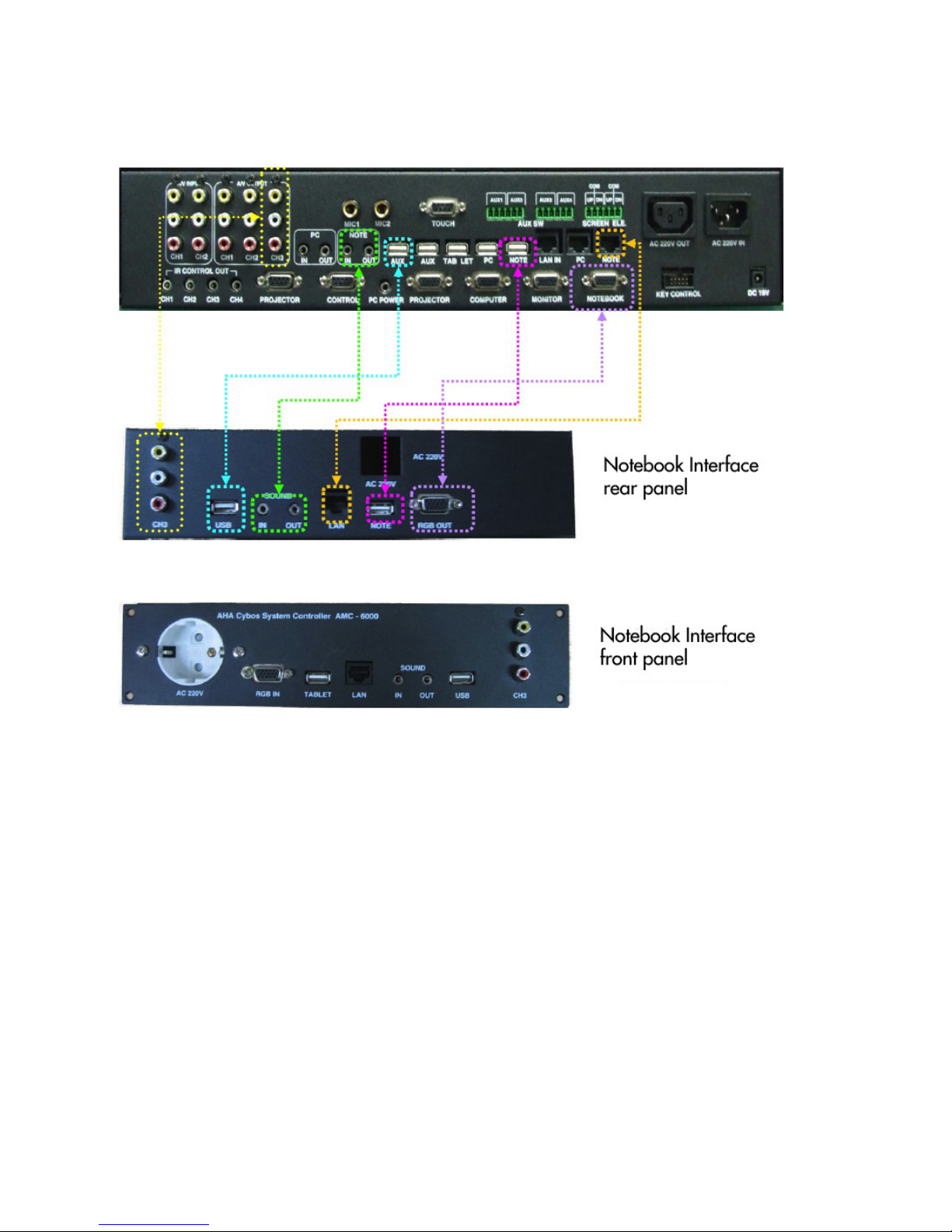
6. Controller Back panel
a A/V OUT: Video Sound Output port. Connect to Projector & Amplier.
b A/V INPUT : Connect DVD, VCR , Visualizer, etc.
c Mic. Input: Connect MIC 1, MIC 2. (MIC1 supports 12V phantom power)
d TOUCH : Connect LCD touch screen.
e POWER CONTROL: To control external devices power & screen elevation.
f AC Out: Security function port. If USB KEY is pulled out, all connected devices go off.
g AC In : Supplies power to control AC Out and 220V Devices (screen, elevation).
h PC Sound: PC’s speaker port is connected to IN port, mic port is connected to OUT.
i Notebook Sound : Notebook speaker port is connected to IN, MIC port is connected to OUT.
j USB : USB from monitor is to Tablet, AUX port is used to expand at PC. (see conguration)
Others are selector ports of PC and Notebook. Each one connects to PC and Notebook.
k LAN : Selector port of Notebook and PC. Main LAN cable is connected to LAN IN, others are connected to
PC and Notebook’s internet port.
l IR Control : for IR signal output.
m PROJECTOR : RS-232 port to control projector. (connected to projector)
n CONTROL : Connected to PC by RS -232
o PC POWER : PC power control port (Connected to PC’s power port)
p RGB distributor : Distribute RGB signal and output images to monitor and projector (selector function included)
q KEY Control : Port connected to keys
r Power: 19V 3.16A
8
7. Controller connection
AMC - 6000 (Rear panel)
Indice
Altri manuali ILS Sistema di leggio


